


Integration Workplan Post Merger And Acquisition Operations M And A Playbook




Try Before you Buy Download Free Sample Product
 Impress Your
 Audience
 100%
100% Editable
 Save Hours
 of Time


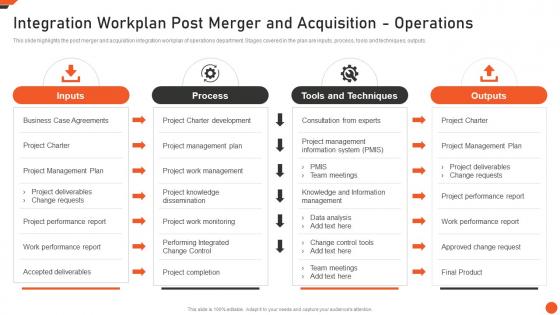
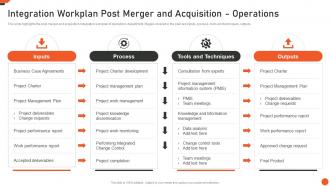
This slide highlights the post merger and acquisition integration workplan of operations department. Stages covered in the plan are inputs, process, tools and techniques, outputs.
People who downloaded this PowerPoint presentation also viewed the following :
Integration Workplan Post Merger And Acquisition Operations M And A Playbook with all 6 slides:
Use our Integration Workplan Post Merger And Acquisition Operations M And A Playbook to effectively help you save your valuable time. They are readymade to fit into any presentation structure.





FAQs for Integration Workplan Post Merger And Acquisition Operations M
For your integration plan, you'll need five main things. Start with clear goals and how you'll measure success. Set realistic timelines with milestones - seriously, double whatever time you think it'll take. Define who's doing what upfront (saves so much drama later). Map out your data sources and tech requirements. Oh, and have backup plans for when things go sideways. The whole point is making it detailed enough that someone else could run with it. I learned this the hard way on my last project - vague plans just create chaos.
First thing - figure out what compliance stuff and data formats your industry actually needs. Generic templates are pretty much worthless, honestly. Map out your specific workflows and who needs to approve what. Don't forget about any weird industry systems you'll need to connect. Build your timeline around when you're actually busy vs slow periods. Buffer time is crucial for all the testing requirements. Oh, and definitely steal templates from similar companies instead of starting fresh - way easier than reinventing the wheel.
Dude, buffer time is everything - you'll need way more than you think. Never try integrating everything at once, that's just chaos waiting to happen. Map out who's responsible for what upfront because "I thought you were handling that" kills projects faster than anything else. Test your rollback plan early! Tackle the scariest integrations first while you still have energy to fix whatever breaks. Oh and break stuff into smaller pieces - honestly makes such a difference. The critical path should be your main focus. Celebrate the small wins too, keeps morale up when things get messy.
Look at your data flows first - is everything actually talking to each other? Then check if people are using it without constantly bugging IT (that's honestly the best sign). Track your timeline and budget too, obviously. User adoption numbers matter, but I'd focus more on whether you're fixing the original problem you set out to solve. Those pretty dashboards look great in meetings, but are people ditching their old manual workarounds? Set up check-ins with stakeholders so you can pivot if things go sideways early on.
Communication is honestly the make-or-break thing for integrations. Without it, teams work in silos and everything goes sideways super quick. I always tell people to set up regular check-ins from the start - could be weekly calls, Slack updates, whatever works. You'll catch problems way earlier this way. Don't just send status reports though, actually make space for questions and pushback. Oh and track your dependencies religiously because that's where most surprises come from. Trust me, I've watched too many projects crash just because people stopped talking to each other halfway through.
Dude, you need to automate the boring stuff or you'll lose your mind. Project management tools like Asana help track everything without spreadsheet hell. Slack keeps the team talking instead of endless email chains - honestly, game changer for my sanity. Data integration platforms handle all the technical connecting so you can focus on the big picture stuff. Oh, and time tracking features? Total lifesaver when you're wondering where three weeks disappeared to. Pick whatever fixes your biggest headache first. Don't try to do everything at once or you'll just create more chaos.
Honestly, just assume everything's gonna take way longer than you think - integrations are basically designed to mess with your timeline. Map out which tasks depend on each other first because one broken API will screw up your whole chain. Breaking things into tiny milestones helps you spot problems early instead of having a panic attack three weeks in. Weekly check-ins with everyone involved are clutch for catching issues before they explode. I learned this the hard way, but being realistic about deadlines upfront saves you so much stress later. Just communicate immediately when stuff shifts.
Handle the foundational stuff first - whatever other tasks depend on. Then hit your critical path items and compliance things because those will absolutely wreck your timeline if they slip (trust me on this one). After that, check what resources you actually have available and which deliverables your stakeholders are breathing down your neck about. Those high-visibility ones? Bump them up. Oh, and grab some quick wins early - honestly makes everything feel less overwhelming when you get momentum going. Just map out what's blocking what first, then layer your business priorities over it.
Honestly, start with joint planning sessions where everyone maps out who needs what from who. That's the foundation. Set up shared goals that tie departments together - suddenly they're not competing anymore, they're actually helping each other win. Don't just do status updates in your cross-functional meetings, make them actual problem-solving sessions. Oh, and pick "champions" from each team who can translate between departments and flag issues fast. The trick is tackling your biggest interdepartmental headaches first. Once you solve those, people start trusting the process and everything else gets way easier.
Don't treat risk assessment like some separate thing you do once. Weave it right into each phase of your workplan from the start. During planning, figure out what could go wrong - data migration disasters, system crashes, users who refuse to adapt (ugh, always the worst part). Map out who's handling what risks and when, tied to your actual milestones. Set up regular check-ins too, maybe weekly if things are complicated. The whole point is making it ongoing throughout the project. Otherwise you're just scrambling when stuff inevitably hits the fan.
Look, feedback loops are what make your integration plan actually work instead of just sitting there looking pretty. Catch problems early before they blow up. Your team stays way more invested when they know you'll actually listen to them - trust me on this one. Reality always hits different than your original timeline anyway, so build in those regular check-ins where people can speak up without seeming like complainers. Weekly pulse checks work great. You'll spot those sneaky dependencies you totally missed at first. Short version: make feedback expected, not just something you tolerate when things go sideways.
Honestly, if you don't tie your integration work to what the business actually cares about, you'll end up building cool stuff that sits there collecting digital dust. Been down that road - not fun explaining why you spent months on something nobody uses. When leadership sees your project directly helping with revenue or making processes faster, suddenly your budget requests get approved way easier. You'll know which features to tackle first instead of just guessing. My advice? Map each piece of your workplan to an actual business goal. Makes the whole thing way more defensible when people start asking questions.
Don't treat change management like some side project - build it right into your timeline from the start. Figure out who's gonna be affected and what they'll probably hate about it. Honestly, I've watched so many integrations crash because people ignored the human drama. Set up regular check-ins and training throughout each phase. Actually budget for this stuff too, not just token amounts. The real trick is finding change champions in each department who can sell it internally and flag problems before they blow up. Oh, and feedback loops are clutch for catching resistance early.
So there's a bunch of ways you could tackle this. Gantt charts are pretty popular since they show timelines really well. Basic spreadsheets work too - just columns for tasks, who's doing what, deadlines. Tools like Asana or Monday have decent templates built in. Kanban boards look cool but honestly? They get chaotic fast with complex stuff. If your company's all formal, there's project charter templates too. My take - just start simple with a spreadsheet first. Get your tasks mapped out, then you can always move to fancier project management tools later once you've figured out what you actually need.
Look, data analytics will totally change how you approach your integration workplan. Instead of just winging it, you'll actually see where the bottlenecks are happening. Track your progress against milestones and figure out the usual failure points - trust me, every project has them. Use that info to adjust timelines and move resources around smarter. You can even compare against similar projects you've done before to set realistic expectations (something I wish I'd done earlier in my career). Start simple though - pick the metrics that actually matter for your specific situation, then set up weekly dashboards to track everything.
-
I have just started downloading templates for my presentations and I must say this is a great design. It helped accelerate my presentation design process and made it more visually appealing.
-
I am a big fan of their newsletters because that is how I found my perfect requirement at the time of urgency. Thank God, I kept opening those.