


IT For Communication In Business Powerpoint Presentation Slides





Try Before you Buy Download Free Sample Product
 Impress Your
 Audience
 100%
100% Editable
 Save Hours
 of Time


Communication in business is vital to convey clear, strong messages about strategy, customer service, and branding. Grab our IT for Communication in Business IT template. It briefly explains the business communication types and problems companies face in their communication strategies, training programs, and budget. Our Social Media in Customer Service deck covers the overview of two types of business communication such as external and internal. It also includes the problems businesses face with their communication strategy and its impact on business. In addition, our internal Business Communication PPT contains the external communication implementation plan for customer service and social media technologies. It also caters to the different implementation challenges and their impact. Also, our Video Conferencing in the Internal Communication presentation exhibits the internal communication implementation plan and its effects. Furthermore, it caters to an employee training program for communication technologies and a budget plan to implement new communication channels into business. Moreover, our Instant Messenger in Internal Communication module comprises a timeline and a roadmap to implement IT communication technologies in business. Lastly, it contains a dashboard for tracking progress. Get instant access.
People who downloaded this PowerPoint presentation also viewed the following :
Content of this Powerpoint Presentation
Slide 1: This slide introduces IT for Communication in Business. Commence by stating Your Company Name.
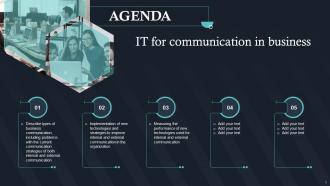
Slide 2: This slide depicts the Agenda of the presentation.
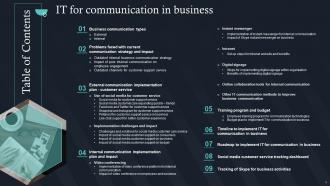
Slide 3: This slide incorporates the Table of Contents.
Slide 4: This slide highlights the Title for the Topics to be discussed further.
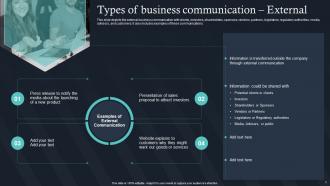
Slide 5: This slide states the external business communication with clients, investors, shareholders, sponsors, etc.
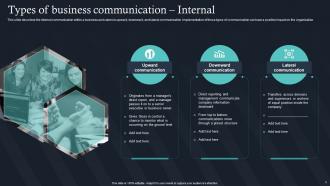
Slide 6: This slide describes the internal communication within a business and caters to upward, downward, and lateral communication.
Slide 7: This slide elucidates the Heading for the Components to be further discussed.
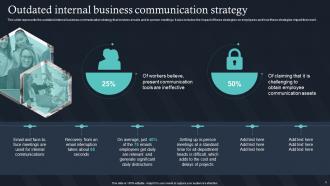
Slide 8: This slide talks about the Outdated internal business communication strategy.
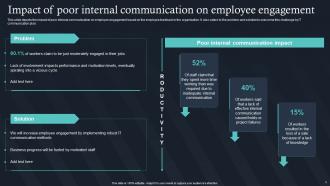
Slide 9: This slide depicts the impact of poor internal communication on employee engagement.
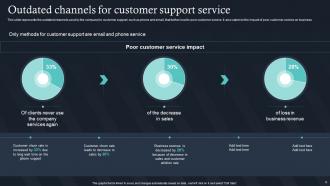
Slide 10: This slide represents the outdated channels used by the company for customer support.
Slide 11: This slide displays the Title for the Ideas to be covered in the following template.
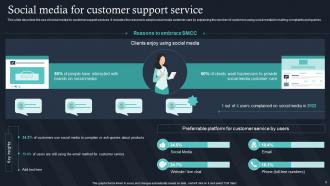
Slide 12: This slide describes the use of social media for customer support services.
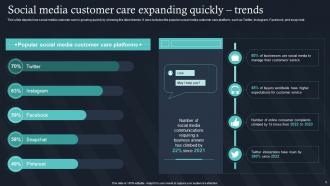
Slide 13: This slide presents how social media customer care is growing quickly by showing the latest trends.
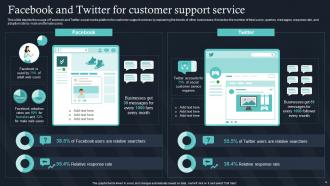
Slide 14: This slide elucidates Facebook and Twitter for customer support service.
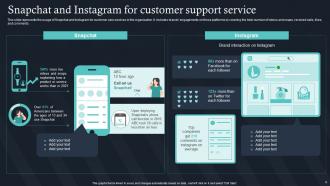
Slide 15: This slide represents the usage of Snapchat and Instagram for customer care services in the organization.
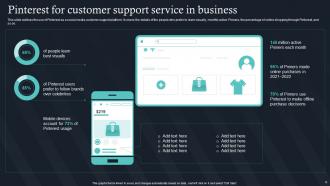
Slide 16: This slide outlines the use of Pinterest as a social media customer support platform.
Slide 17: This slide talks about live chat support for a better customer experience.
Slide 18: This slide showcases the Heading for the Ideas to be discussed in the upcoming template.
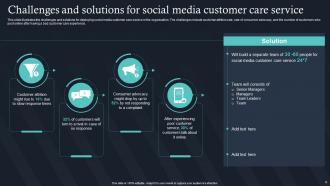
Slide 19: This slide illustrates the challenges and solutions for deploying social media customer care service in the organization.
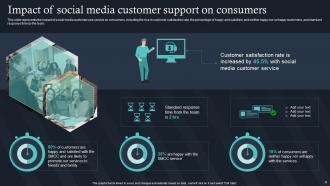
Slide 20: This slide exhibits the Impact of social media customer support on consumers.
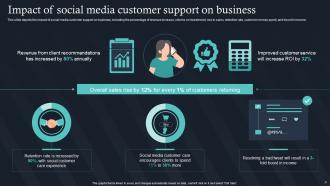
Slide 21: This slide depicts the impact of social media customer support on business.
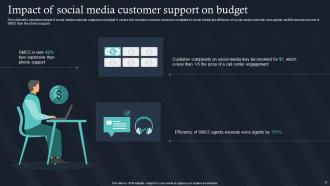
Slide 22: This slide talks about the impact of social media customer support on a budget.
Slide 23: This slide mentions the Title for the Contents to be covered in the following template.
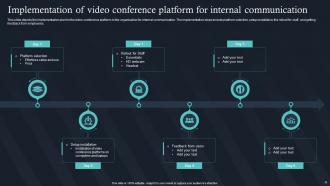
Slide 24: This slide displays the implementation plan for the video conference platform in the organization for internal communication.
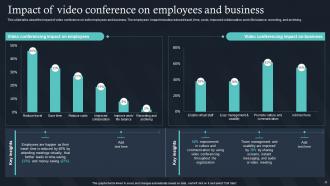
Slide 25: This slide elucidates the Impact of video conference on employees and business.
Slide 26: This slide highlights the Heading for the Topics to be discussed next.
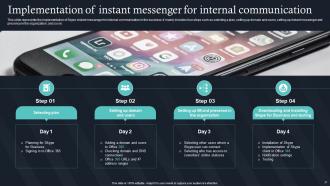
Slide 27: This slide represents the implementation of Skype instant messenger for internal communication in the business.
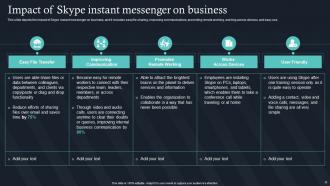
Slide 28: This slide depicts the impact of Skype instant messenger on business.
Slide 29: This slide portrays the Title for the Topics to be covered in the following template.
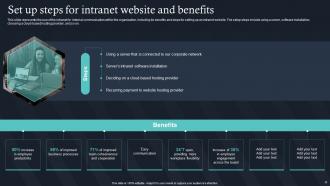
Slide 30: This slide presents the use of the intranet for internal communication within the organization.
Slide 31: This slide elucidates the Heading for the Components to be further discussed.
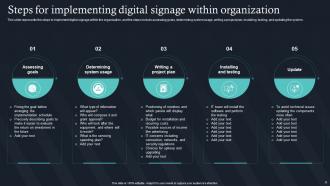
Slide 32: This slide states the steps to implement digital signage within the organization.
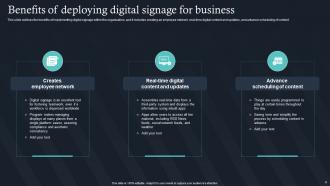
Slide 33: This slide exhibits the Benefits of deploying digital signage for business.
Slide 34: This slide outlines the Heading for the Components to be covered in the following template.
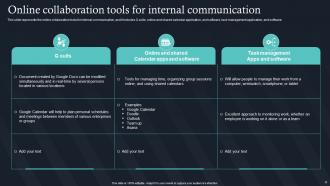
Slide 35: This slide displays the Online collaboration tools for internal communication.
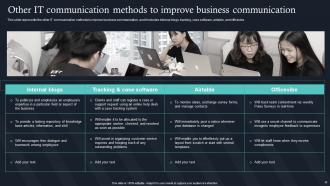
Slide 36: This slide represents the other IT communication methods to improve business communication.
Slide 37: This slide indicates the Title for the Ideas to be discussed next.
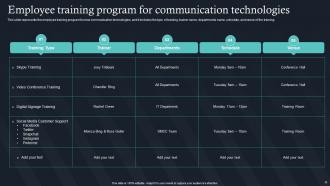
Slide 38: This slide showcases the Employee training program for communication technologies.
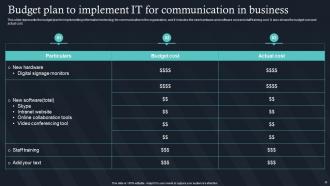
Slide 39: This slide highlights the Budget plan to implement IT for communication in business.
Slide 40: This slide incorporates the Heading for the Ideas to be covered further.
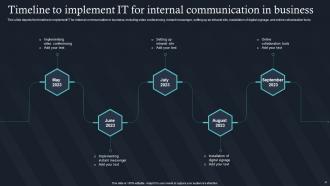
Slide 41: This slide depicts the timeline to implement IT for internal communication in business.
Slide 42: This slide portrays the Title for the Components to be discussed in the following template.
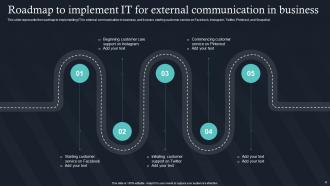
Slide 43: This slide represents the roadmap to implementing IT for external communication in business.
Slide 44: This slide shows the Heading for the Topics to be covered in the forth-coming template.
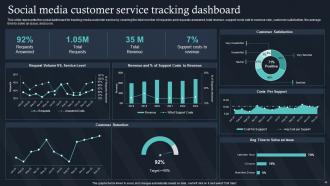
Slide 45: This slide represents the social dashboard for tracking media customer service.
Slide 46: This slide includes the Title for the Components to be discussed next.
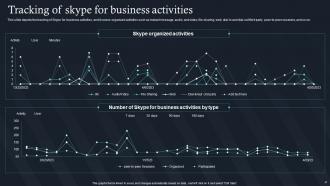
Slide 47: This slide depicts the tracking of Skype for business activities, and it covers organized activities.
Slide 48: This is the Icons slide containing all the Icons used in the plan.
Slide 49: This slide is used for showcasing Additional information.
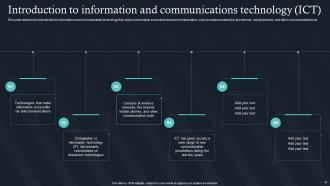
Slide 50: This slide outlines the introduction to information and communication technology.
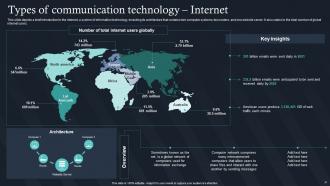
Slide 51: This slide displays a brief introduction to the internet, a system of information technology.
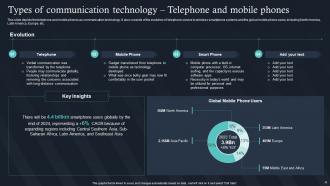
Slide 52: This slide states the telephone and mobile phones as communication technology.
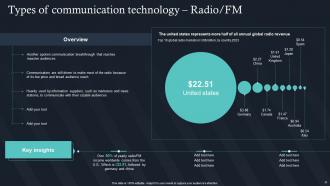
Slide 53: This slide mentions the Types of communication technology for Radio/FM.
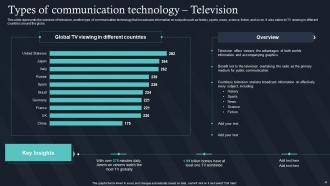
Slide 54: This slide represents the overview of television.
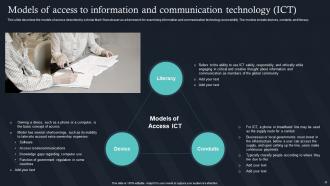
Slide 55: This slide describes the models of access described by scholar Mark Warschauer as a framework for examining information and communication technology accessibility.
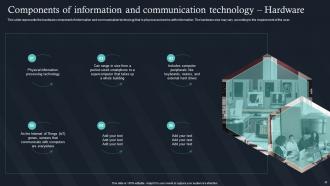
Slide 56: This slide showcases the hardware component of information and communication technology.
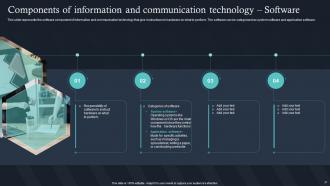
Slide 57: This slide represents the software component of information and communication technology.
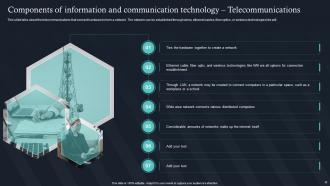
Slide 58: This slide talks about the telecommunications that connect hardware to form a network.
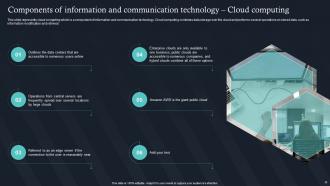
Slide 59: This slide reveals the cloud computing which is a component of information and communication technology.
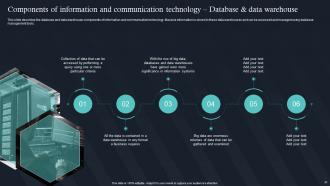
Slide 60: This slide describes the database and data warehouse components of information and communication technology.
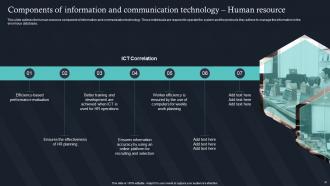
Slide 61: This slide outlines the human resource component of information and communication technology.
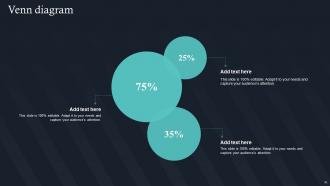
Slide 62: This is the Venn diagram slide.
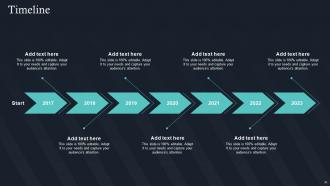
Slide 63: This slide presents the Company Timeline.
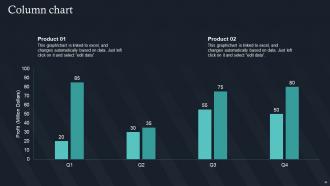
Slide 64: This slide illustrates the Column chart.
Slide 65: This is the Puzzle slide with related imagery.
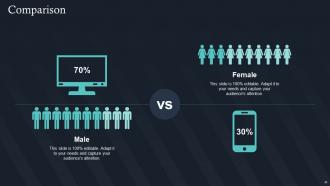
Slide 66: This slide is used for the purpose of Comparison.
Slide 67: This slide contains the Post it notes for reminders and deadlines.
Slide 68: This is the 30 60 90 days plan slide for effective planning.
Slide 69: This is Our goal slide. Mention your organizational goals here.
Slide 70: This is the Thank You slide for acknowledgement.
IT For Communication In Business Powerpoint Presentation Slides with all 75 slides:
Use our IT For Communication In Business Powerpoint Presentation Slides to effectively help you save your valuable time. They are readymade to fit into any presentation structure.









FAQs for IT For Communication In Business
Honestly, it all comes down to speaking their language - ditch the tech jargon and talk business impact first. Document the important stuff and set up regular check-ins, like weekly updates or whatever works. Quick responses are huge too, especially when things break (people freak out if you go silent). Oh, and make sure everyone knows who to bug for different problems - clear escalation paths save your sanity. The trick that really works? Always start with "here's how this affects revenue/users" then dive into technical details after. Trust me, this approach changes everything. Even something as simple as switching your communication order makes stakeholders way happier.
Honestly, templates are a game changer for tech presentations. You won't be wandering around explaining random database configs when you should be talking about the actual problem. They make you structure everything - what's broken, how you'll fix it, what could go wrong. Your team will know exactly where to look for specific info too. I always start with something basic: problem, solution, next steps. Works way better than winging it (which I definitely used to do). Once you try it, meetings get so much clearer.
Dude, you HAVE to use visuals for IT presentations. Non-tech people just zone out when you start talking about architecture stuff. I've literally watched amazing projects get rejected because someone used boring bullet points everywhere. Start with diagrams and flowcharts that actually tell your story - the problem, your fix, what happens after. Charts work great for showing timelines or cost savings since executives love that stuff. They need to get it without you explaining every detail. Oh, and sketch your main ideas first, then build slides around those. Way easier than starting with a blank PowerPoint template.
Read your audience first, then adjust everything from there. Executives? Hit them with business impact and timelines - skip the technical stuff entirely. Fellow devs want the nitty-gritty architecture details. End users just need to know how it affects their day-to-day work. I used to overthink this so much, honestly. But it really comes down to matching their knowledge level and what actually matters to them. Oh, and here's the thing that changed everything for me - just ask upfront what they need to know instead of word-vomiting everything you think is important.
Set up weekly or bi-weekly check-ins depending on how complex your project is. I always do three sections: stuff that's done, what's up next, and any roadblocks. Trust me on this - stakeholders would rather hear bad news early than get blindsided later. Charts and dashboards are your friend because execs love that visual stuff they can quickly scan. Oh, and don't send the same update to everyone. Your dev team wants technical details while leadership just needs the big picture summary. It's honestly made such a difference in how smooth my projects run.
Track response times for IT tickets and user satisfaction scores - those are your bread and butter. Employee surveys will show you if people actually get what you're saying or if you're just confusing everyone more. Help desk volume is another good one to watch. When that drops after you roll out changes, you know your communication worked. Pick maybe 2-3 metrics that actually matter to your situation and stick with them. I'd personally focus on the survey feedback first since that tells the real story. Short-term stuff like adoption rates for new tech can be misleading sometimes.
Honestly, the worst part is trying to explain tech stuff to executives who just glaze over when you mention APIs or whatever. They only want to hear how it affects the bottom line. Crisis mode makes everything 10x harder because everyone's already freaking out and you're scrambling to translate complex problems on the spot. Different audiences need totally different approaches too - your boss might want some details, but the C-suite? Forget it. Start with business impact every single time. Only get into the technical weeds if they specifically ask. Trust me on this one.
Dude, just tell stories instead of drowning people in specs! Open with something like "So our system crashed at 2 AM last month and everyone lost their minds..." - way better than boring agenda slides. Our brains literally process stories better than bullet points anyway. Walk them through the problem, your fix, then the happy ending. Real examples work way better than hypothetical stuff. I started doing this and honestly? My presentations don't suck anymore. People actually stay awake. Try opening your next one with "Let me tell you about..." and watch how different the room feels.
Honestly, Slack or Teams are pretty much essential for quick messages and file sharing. Zoom's obviously solid for video calls when you need to actually see faces or share screens. Project stuff gets tricky though - Jira's great if you're doing proper development work, but Trello's way simpler for basic task tracking. For documentation, Confluence is decent but Notion's been growing on me lately. The real trick is not going overboard - pick maybe 3 tools and stick with them. I've seen teams burn through like 5 different project managers in a year and it's just chaos.
Honestly, infographics are a game-changer for explaining techy stuff that usually makes people's eyes glaze over. You know how painful it is trying to describe cloud architecture in an email? Just draw some boxes and arrows instead. Way better than drowning someone in paragraphs they won't read anyway. Visual stuff sticks - people remember like 65% more when they can actually see what you're talking about. Flowcharts work great for showing how systems connect, and diagrams make data flows super obvious. I always start with whatever concept confuses people most and just sketch it out first. You'll be shocked how much sense it makes once it's visual.
Set up quick check-ins after you send out big announcements or project updates. Like doing a post-mortem, but for your actual communication. Simple surveys work - just ask "Was this clear?" or "What'd we miss?" after technical updates. Slack polls are honestly genius for this because people will click an emoji reaction way faster than filling out some form. The trick is making feedback super easy to give. Then you've gotta actually do something with what people tell you - otherwise it's pointless. Circle back and show how you're changing things based on their input.
Honestly, AI chatbots are getting scary good at customer service stuff. 5G is finally delivering on those promises - mobile communication actually works now. Video calls are turning into these crazy immersive workspaces too. But the real game-changer? Platforms that smash everything together - chat, calls, video, project stuff - all in one place. No more juggling fifteen different apps (thank god). Edge computing is making remote work way less laggy, which... took long enough. Start looking at what could replace your current mess of tools. Your sanity will thank you later.
Oh man, cultural stuff can totally wreck IT projects if you're not careful. Time zones are obvious, but it's also about communication styles - Germans want every technical detail upfront, while other cultures need to chat and build trust first. Language barriers are tricky even when everyone speaks English because tech terms mean different things everywhere. Honestly, I've seen projects fail just from misunderstood requirements. Set clear protocols from day one. Visual aids help tons. Don't assume people get it - always double-check understanding and document everything so you can reference it later when confusion inevitably happens.
Okay so documentation is basically your lifeline on IT projects. Keeps everyone on the same page with requirements and decisions - you won't have those "wait what did we decide?" panic moments. When people quit or you get new team members, decent docs get them caught up without you explaining everything from scratch. I've watched projects completely fall apart because someone kept all the important stuff in their head and then left. Honestly, even basic templates for requirements and meeting notes make a huge difference. Your PM will love you when crunch time hits.
Honestly, try setting up Slack channels or Teams for IT stuff - way better than those emails nobody reads. Create separate spaces for updates, troubleshooting, and project announcements. Your team will actually engage with it. For external stuff, LinkedIn and Twitter work great for showing off tech wins and handling customer issues fast. The trick is making it conversational, not just dumping info on people. Let them ask questions and give feedback - makes a huge difference. Oh, and start with just one internal channel first to test the waters before going all out.
-
Best Representation of topics, really appreciable.
-
Great experience, I would definitely use your services further.