

IT Operations Automation An AIOps Guide Powerpoint Presentation Slides AI CD V




Try Before you Buy Download Free Sample Product
 Impress Your
 Audience
 100%
100% Editable
 Save Hours
 of Time


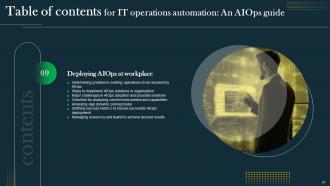
AIOps is abbreviation for Artificial intelligence for IT operations management. It is the implementation of advanced analytics such as machine learning ML and artificial intelligence AI to automate and improve IT operations. The deck IT operations automation An AIOps guide covers brief introduction, types and key benefits of leveraging AIops to simplify IT operations. It focusses on various reasons to adopt AIOps such as increasing volume of alerts, enhancing customer experience, managing analytics, etc. It also highlights transformation of IT operations management from manual to automation. The presentation will assist organizations to understand AIOps market, trends, and assess how does AIOps work. It illustrates key steps involved in deploying AIOps at workplace. It mainly focuses on AIOps use cases including anomaly detection, application performance monitoring, event correlation, IT service management, etc. It also defines how AIOps assist several industries namely, entertainment, banking, logistics, healthcare, finance, manufacturing, telecom and many more. It highlights top five AIOps platforms simplifying incident management comprising Dynatrace, App dynamics, Spunk, Moogsoft and Big Panda. The deck also depicts the impact of implementing AIops in enhancing business performance. Furthermore, it also provides dashboards and KPIs such as MTTD, MTTR, downtime, mean time between failures, service availability, ticket to incident ratio, etc. Get access now.
People who downloaded this PowerPoint presentation also viewed the following :
Content of this Powerpoint Presentation
Slide 1: This slide displays the title IT operations automation: An AIOps guide.
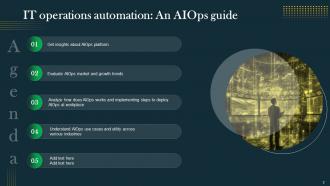
Slide 2: This slide displays the title Agenda.
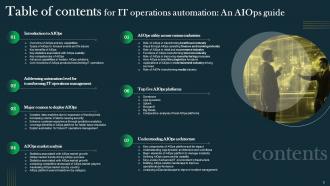
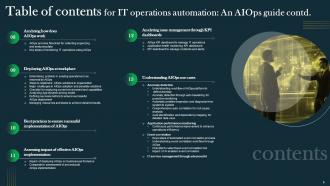
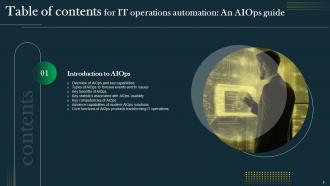
Slide 3: This slide exhibit table of content.
Slide 4: This slide exhibit table of content.
Slide 5: This slide exhibit table of content that is to be discuss further.
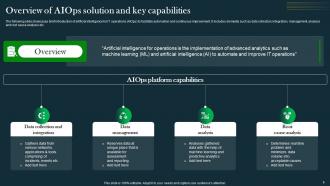
Slide 6: The following slide showcases brief introduction of artificial intelligence for IT operations (AIOps) to facilitate automation and continuous improvement.
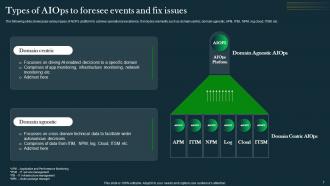
Slide 7: The following slide showcases various types of AIOPs platform to achieve operational excellence.
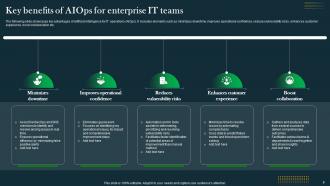
Slide 8: The following slide showcases key advantages of artificial intelligence for IT operations (AIOps).
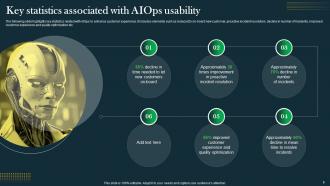
Slide 9: The following slide highlights key statistics related with AIOps to enhance customer experience.
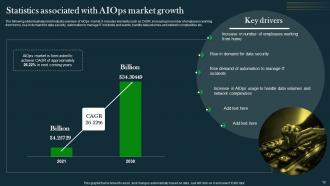
Slide 10: The following slide illustrates brief industry overview of AIOps market.
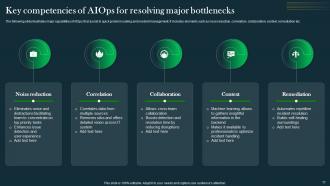
Slide 11: The following slide illustrates major capabilities of AIOps that assist in quick problem solving and incident management.
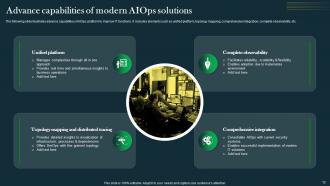
Slide 12: The following slide illustrates advance capabilities of AIOps platform to improve IT functions.
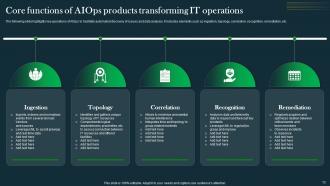
Slide 13: The following slide highlights key operations of AIOps to facilitate automated discovery of issues and data analysis.
Slide 14: This slide exhibit table of content that is to be discuss further.
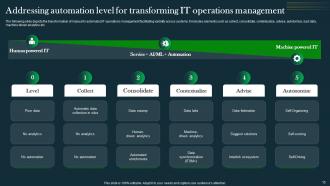
Slide 15: The following slide depicts the transformation of manual to automated IT operations management facilitating visibility across systems.
Slide 16: This slide exhibit table of content that is to be discuss further.
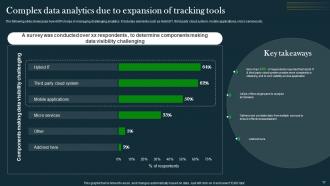
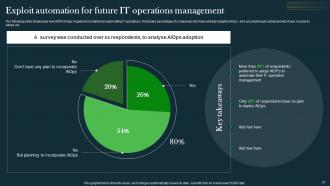
Slide 17: The following slide showcases how AIOPs helps in managing challenging analytics.
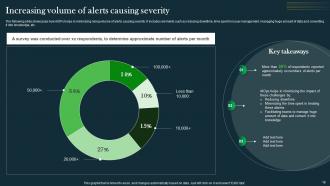
Slide 18: The following slide showcases how AIOPs helps in minimizing rising volume of alerts causing severity.
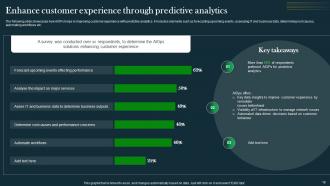
Slide 19: The following slide showcases how AIOPs helps in improving customer experience with predictive analytics.
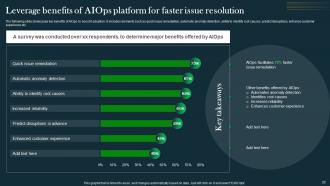
Slide 20: The following slide showcases key benefits of AIOps to boost it adoption.
Slide 21: The following slide showcases how AIOPs helps in gained momentum in automating IT operations.
Slide 22: This slide exhibit table of content that is to be discuss further.
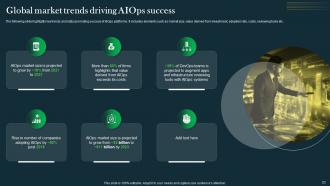
Slide 23: The following slide highlights key trends and stats promoting success of AIOps platforms.
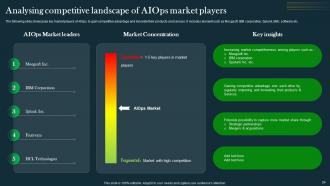
Slide 24: The following slide showcases key market players of AIOps to gain competitive advantage and innovate their products and servces.
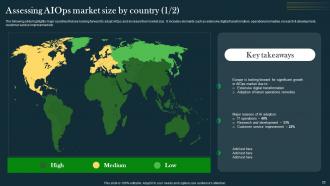
Slide 25: The following slide highlights major countries that are looking forward to adopt AIOps and increase their market size.
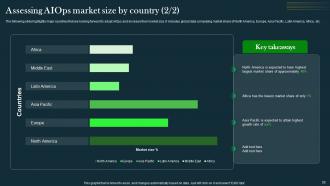
Slide 26: The following slide highlights major countries that are looking forward to adopt AIOps and increase their market size.
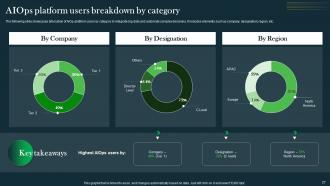
Slide 27: The following slide showcases bifurcation of AIOp platform users by category to integrate big data and automate complex decisions.
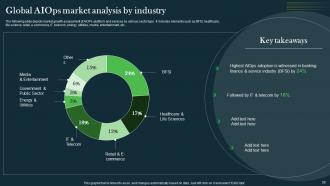
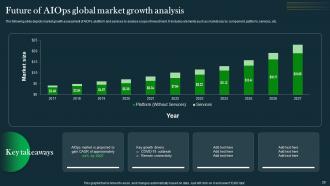
Slide 28: The following slide depicts market growth assessment of AIOPs platform and services by various sector type.
Slide 29: The following slide depicts market growth assessment of AIOPs platform and services to analyse scope of investment.
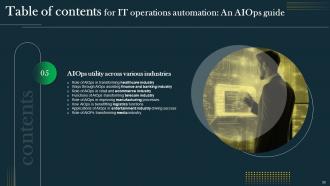
Slide 30: This slide exhibit table of content that is to be discuss further.
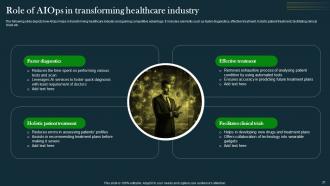
Slide 31: The following slide depicts how AIOps helps in transforming healthcare industry and gaining competitive advantage.
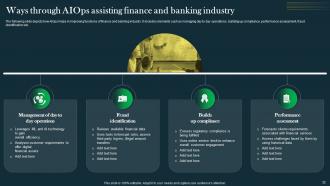
Slide 32: The following slide depicts how AIOps helps in improving functions of finance and banking industry.
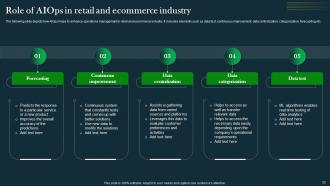
Slide 33: The following slide depicts how AIOps helps to enhance operations management in retail and ecommerce industry.
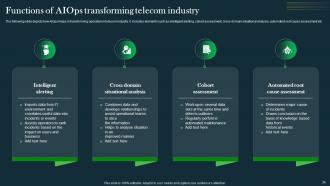
Slide 34: The following slide depicts how AIOps helps in transforming operation in telecom industry.
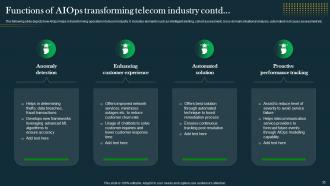
Slide 35: The following slide depicts how AIOps helps in transforming operation in telecom industry.
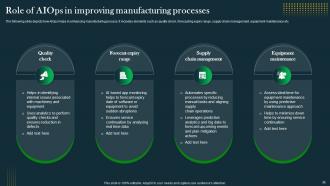
Slide 36: The following slide depicts how AIOps helps in enhancing manufacturing process.
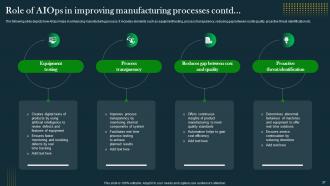
Slide 37: The following slide depicts how AIOps helps in enhancing manufacturing process.
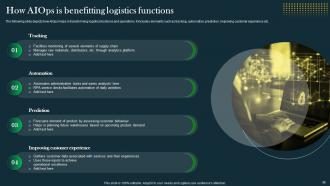
Slide 38: The following slide depicts how AIOps helps in transforming logistics functions and operations.
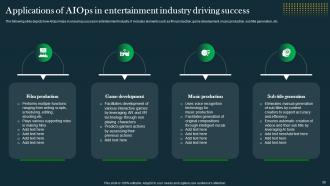
Slide 39: The following slide depicts how AIOps helps in ensuring success in entertainment industry.
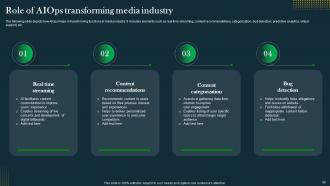
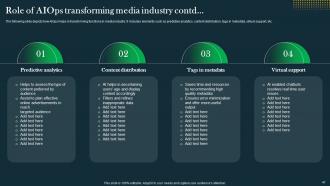
Slide 40: The following slide depicts how AIOps helps in transforming functions in media industry.
Slide 41: The following slide depicts how AIOps helps in transforming functions in media industry.
Slide 42: This slide exhibit table of content that is to be discuss further.
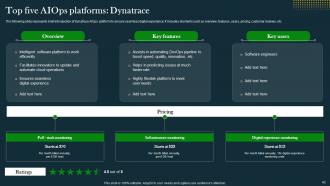
Slide 43: The following slide represents brief introduction of Dynatrace AIOps platform to ensure seamless digital experience.
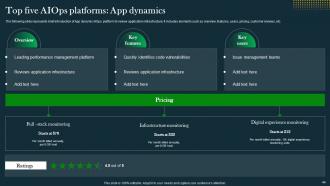
Slide 44: The following slide represents brief introduction of App dynamic AIOps platform to review application infrastructure.
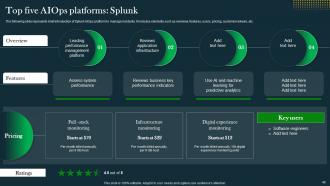
Slide 45: The following slide represents brief introduction of Splunk AIOps platform to manage incidents.
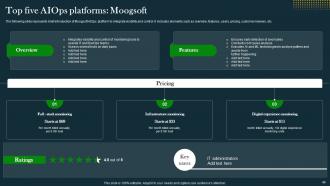
Slide 46: The following slide represents brief introduction of Moogsoft AIOps platform to integrate visibility and control.
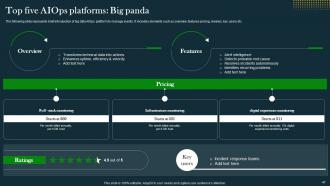
Slide 47: The following slide represents brief introduction of big data AIOps platform to manage events.
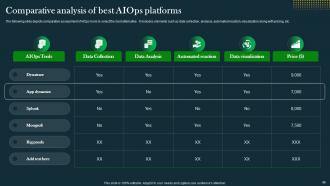
Slide 48: The following slide depicts comparative assessment of AIOps tools to select the best alternative.
Slide 49: This slide exhibit table of content that is to be discuss further.
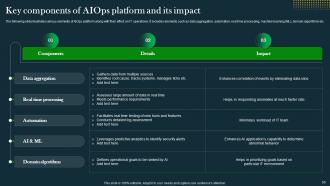
Slide 50: The following slide illustrates various elements of AIOps platform along with their effect on IT operations.
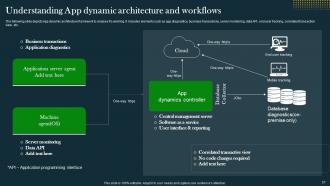
Slide 51: The following slide depicts App dynamic architecture framework to analyse it's working.
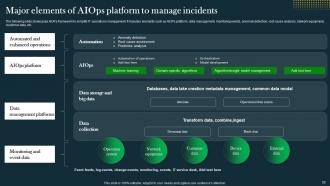
Slide 52: The following slide showcases AIOPs framework to simplify IT operations management.
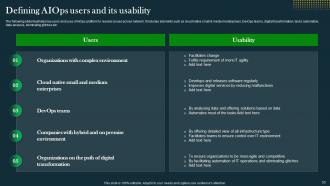
Slide 53: The following slide illustrates key users and uses of AIOps platform to resolve issues across network.
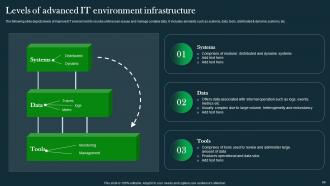
Slide 54: The following slide depicts levels of improved IT environment to resolve unforeseen issues and manage complex data.
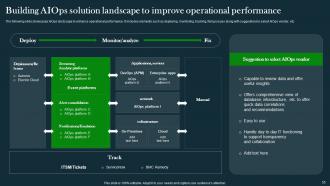
Slide 55: The following slide showcases AIOps landscape to enhance operational performance.
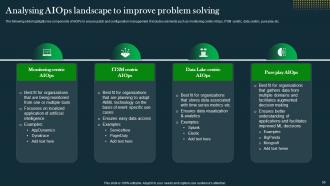
Slide 56: The following slide highlights key components of AIOPs to ensure patch and configuration management.
Slide 57: This slide exhibit table of content that is to be discuss further.
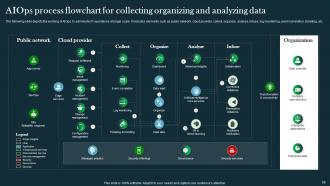
Slide 58: The following slide depicts the working of AIOps to administer IT operations at larger scale.
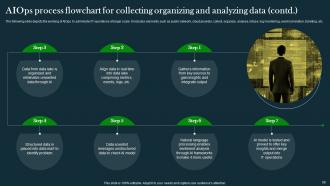
Slide 59: The following slide depicts the working of AIOps to administer IT operations at larger scale.
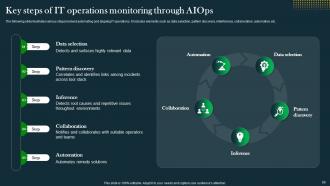
Slide 60: The following slide illustrates various steps involved automating and aligning IT operations.
Slide 61: This slide exhibit table of content that is to be discuss further.
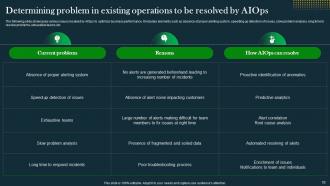
Slide 62: The following slide showcases various issues resolved by AIOps to optimize business performance.
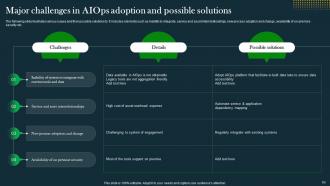
Slide 63: The following slide illustrates various issues and their possible solutions to.
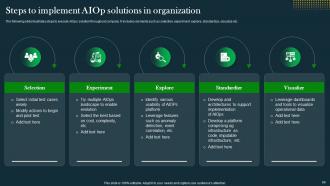
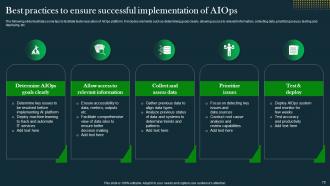
Slide 64: The following slide illustrates steps to execute AIOps solution throughout company.
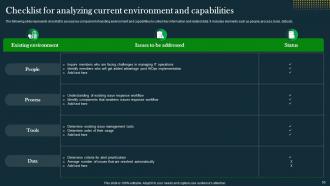
Slide 65: The following slide represents checklist to assess key component of existing environment and capabilities to collect key information and related data.
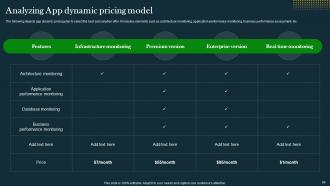
Slide 66: The following depicts app dynamic pricing plan to select the best subscription offer.
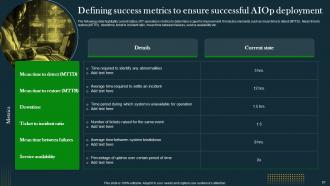
Slide 67: The following slide highlights current status of IT operations metrics to determine scope for improvement.
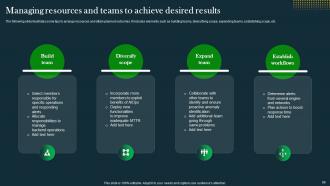
Slide 68: The following slide illustrates some tips to arrange resources and attain planned outcomes.
Slide 69: This slide exhibit table of content that is to be discuss further.
Slide 70: The following slide illustrates some tips to facilitate faster execution of AIOps platform.
Slide 71: This slide exhibit table of content that is to be discuss further.
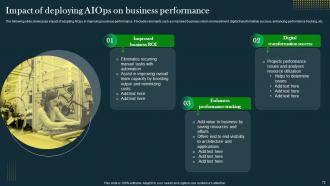
Slide 72: The following slide showcases impact of adopting AIOps in improving business performance.
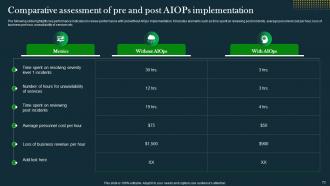
Slide 73: The following slide highlights key performance indicators to review performance with and without AIOps implementation.
Slide 74: This slide exhibit table of content that is to be discuss further.
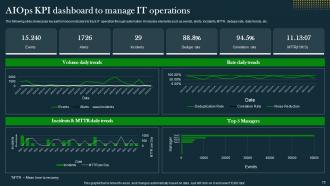
Slide 75: The following slide showcases key performance indicators to track IT operation through automation.
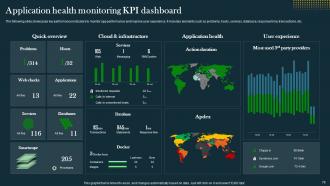
Slide 76: The following slide showcases key performance indicators to monitor app performance and improve user experience.
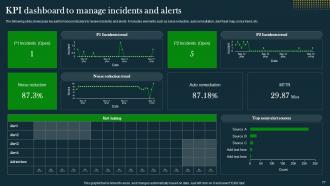
Slide 77: The following slide showcases key performance indicators to review incidents and alerts.
Slide 78: This slide exhibit table of content that is to be discuss further.
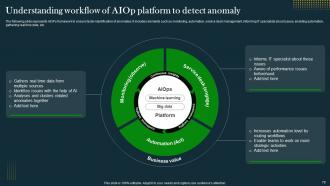
Slide 79: The following slide represents AIOPs framework to ensure faster identification of anomalies.
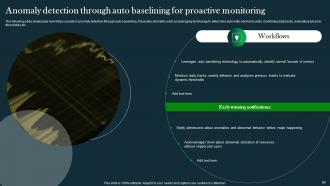
Slide 80: The following slide showcases how AIOps assists in anomaly detection through auto baselining.
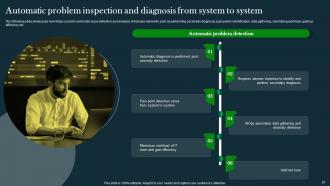
Slide 81: The following slide showcases how AIOps assist in automatic issue detection and analysis.
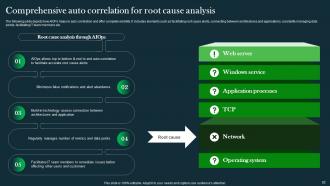
Slide 82: The following slide depicts how AIOPs helps in auto correlation and offer complete visibility.
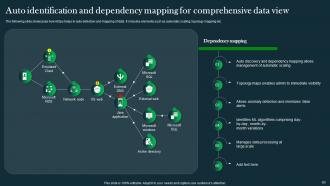
Slide 83: The following slide showcases how AIOps helps in auto detection and mapping of data.
Slide 84: This slide exhibit table of content that is to be discuss further.
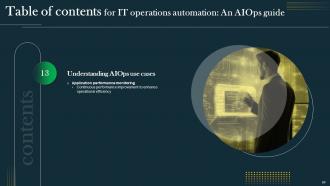
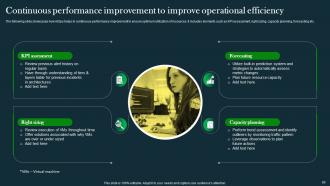
Slide 85: The following slide showcases how AIOps helps in continuous performance improvement to ensure optimum utilization of resources.
Slide 86: This slide exhibit table of content that is to be discuss further.
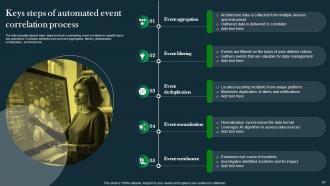
Slide 87: The following slide depicts major steps involved in automating event correlation to simplify day to day operations.
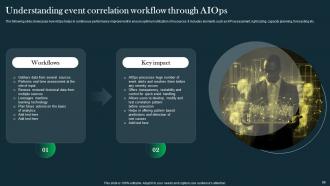
Slide 88: The following slide illustrates workflow process of event correlation through AIOps to manage day to day operations.
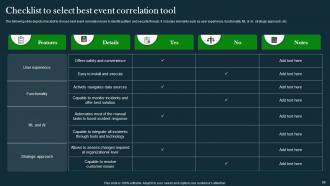
Slide 89: The following slide depicts checklist to choose best event correlation tools to identify pattern and security threats.
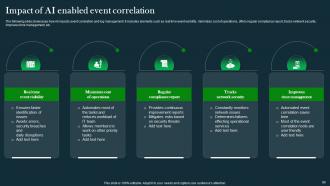
Slide 90: The following slide showcases how AI impacts event correlation and log management.
Slide 91: This slide exhibit table of content that is to be discuss further.
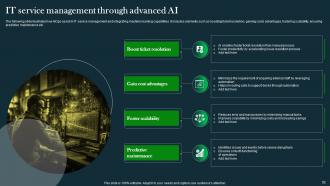
Slide 92: The following slide illustrates how AIOps assist in IT service management and integrating machine learning capabilities.
Slide 93: This is the icons slide.
Slide 94: This slide presents title for additional slides.
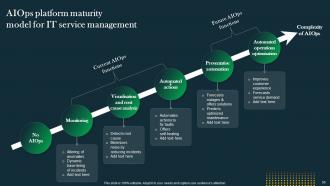
Slide 95: This slide display the title AIOps platform maturity model for IT service management.
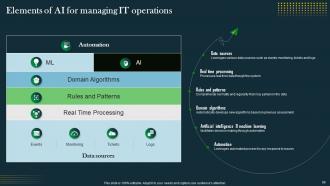
Slide 96: This slide showcase Elements of AI for managing IT operations.
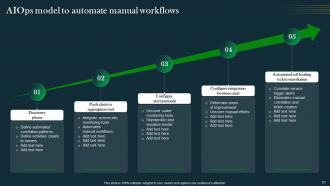
Slide 97: This slide showcase AIOps model to automate manual workflows.
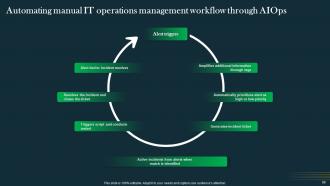
Slide 98: This slide showcase Automating manual IT operations management workflow through AIOps.
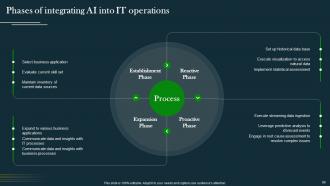
Slide 99: This slide display Phases of integrating AI into IT operations.
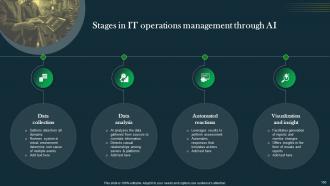
Slide 100: This slide showcase Stages in IT operations management through AI.
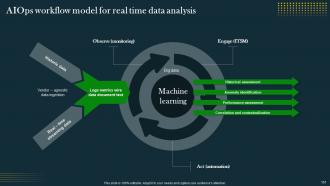
Slide 101: This slide showcase AIOps workflow model for real time data analysis.
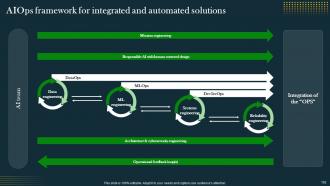
Slide 102: This slide display the title AIOps framework for integrated and automated solutions.
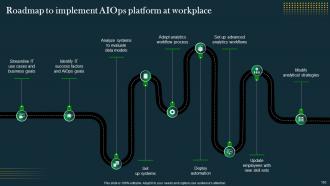
Slide 103: This slide display Roadmap to implement AIOps platform at workplace.
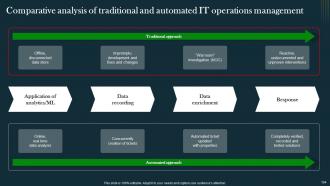
Slide 104: This slide display Comparative analysis of traditional and automated IT operations management.
Slide 105: This slide shows details of team members like name, designation, etc.
Slide 106: This slide showcase About us.
Slide 107: This slide depicts posts for past experiences of clients.
Slide 108: This slide display Swot analysis.
Slide 109: This slide exhibits ideas generated.
Slide 110: This slide presents your company's vision, mission and goals.
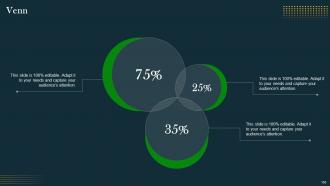
Slide 111: This slide display Venn diagram.
Slide 112: This slide display Clustered column for different products.
Slide 113: This slide showcase Mind map.
Slide 114: This slide display Location.
Slide 115: This slide display Quotes.
Slide 116: This is thank you slide & contains contact details of company like office address, phone no., etc.
IT Operations Automation An AIOps Guide Powerpoint Presentation Slides AI CD V with all 117 slides:
Use our IT Operations Automation An AIOps Guide Powerpoint Presentation Slides AI CD V to effectively help you save your valuable time. They are readymade to fit into any presentation structure.











FAQs for IT Operations Automation An AIOps Guide Powerpoint Presentation Slides
Honestly, the biggest thing you'll notice is way fewer stupid manual mistakes. Response times get so much faster when stuff can fix itself or scale up automatically. Your team stops wasting time on boring repetitive crap and can actually work on interesting projects. Plus you won't deal with that annoying "works fine on my laptop" problem anymore since automation does the exact same steps every time. Mean time to resolution drops like crazy. Cost savings are legit too - you don't need as many people babysitting systems. I'd start with something simple like automated patching to show it works, then build from there.
Dude, automation is a game changer for incident response. You can set it up to handle all the boring stuff - routing tickets, running basic diagnostics, pinging the right people when things break. No more waking up at 2am to manually sort through alerts (been there, it sucks). Pick something simple to start with, like one type of incident that happens all the time. Build a workflow that automatically classifies it, assigns severity, maybe even runs some standard fix scripts. Your team gets to actually solve real problems instead of playing ticket shuffle. Honestly, once you get the hang of it, you'll wonder why you waited so long.
Honestly, the team pushback is brutal - everyone thinks you're trying to replace them. Legacy systems are a total pain too, they never work with new automation tools. Your staff probably doesn't know Python yet, which creates this huge skills gap. Oh and executives get super nervous about upfront costs, obviously. The workflow design part is trickier than it looks - getting stuff to actually run reliably takes forever. My advice? Pick something boring and repetitive first. Show some wins, prove it saves money, then go after the complicated processes.
Dude, automation is a game changer for response times. Your team stops doing boring stuff like server restarts manually - workflows just handle it instantly when problems pop up. Honestly, I've seen incident times go from hours down to minutes for the usual suspects. It's like having someone who actually pays attention 24/7, which is more than I can say for half my coworkers lol. Start with whatever eats up the most time first. That way you'll see results fast and your people can work on the interesting problems instead.
Dude, ML is pretty sick for automating IT stuff. Predictive maintenance is probably the biggest win - it catches patterns in your system data and warns you before shit breaks. Way better than scrambling during an outage at 3am, trust me. Anomaly detection is solid too since it finds weird behavior your regular rules would totally miss. Oh, and it's great at resource allocation - learns how people actually use your systems and scales automatically. Honestly though? Don't go crazy trying to do everything at once. Pick something simple like analyzing logs first, then build from there once you see how well it works.
So you'll want to watch four main things. MTTR should drop once you automate incident stuff - that's mean time to resolution if you haven't seen that acronym before. Also track your operational costs per service. Error rates and uptime usually get way more consistent with automation, which is nice. But honestly? The best metric is measuring how much time your team wastes on manual crap versus actual strategic work. That one really shows the human side of it. Just make sure you get baseline numbers first, then check monthly. Makes it way easier to justify buying more automation tools later.
So automation basically becomes this safety net for compliance stuff. It runs consistent processes and tracks everything automatically. You can set up checks that watch for policy violations 24/7, plus it spits out compliance reports without you lifting a finger. Honestly, audit season used to be pure chaos before we automated most of our checks. No more digging around for evidence or fixing mistakes people made. The cool part? You can make it auto-fix common violations before they blow up into real problems. I'd start with your biggest compliance headaches first.
So DevOps is what actually makes IT automation work in real life. Think of it as tearing down those annoying walls between dev and ops teams - suddenly everyone's responsible for automation instead of ops just frantically trying to catch up. You'll get continuous integration, infrastructure as code, automated testing, all working together smoothly. Honestly, the cultural piece is way harder than the tech part. My advice? Get your teams actually talking first. Once they're on the same page, implementing the tools becomes so much easier. The whole pipeline from commits to production just flows better.
First thing - figure out what's actually broken in your current setup before you go tool shopping. You'll want something that plays nice with whatever software you're already using. Nobody has time for apps that don't talk to each other, it's honestly a nightmare. Also think about whether your team can actually use the thing - I've seen companies blow money on fancy platforms that just sit there unused. Do a test run with real work scenarios first. Oh, and don't try to automate your entire life at once. Pick one annoying process and nail that first.
So automation gives you real-time visibility into what you're actually using vs. what you're paying for. Pretty neat stuff. You can scale up and down based on actual demand instead of just guessing or over-buying "just in case." Think of it like a smart thermostat but for your whole IT setup. You'll spot those servers sitting around doing nothing, automatically move workloads when things get busy, and finally figure out what all those random resources are for (seriously, why do we always have mystery VMs?). I'd start with automating your monitoring first, then move into scaling policies once you get the hang of it.
Yeah, automation totally changes how teams work. People stop putting out fires all day and start doing bigger picture stuff - system design, spotting trends, that kind of thing. Some folks get really into it, but others freak out thinking they'll lose their jobs. What actually happens is roles just shift around. Junior admins end up becoming automation engineers, senior people dive into architecture work. Oh and definitely be upfront about what's changing - nobody likes surprises with their career. Find the team members who are pumped about learning new tech first. They'll help sell everyone else on it.
Honestly, build security in from the start - don't try adding it later like most people do. Set up role-based access so random people can't mess with your scripts. Encrypt your data everywhere it goes. Audit logging is clutch because you actually need to see what's happening behind the scenes. Oh, and never hardcode passwords - use proper secrets management tools instead. Scan your automation code for vulnerabilities regularly too. I know a guy who skipped all this stuff and got totally burned when something went sideways. Basically treat it like any other critical system you'd secure.
So AIOps and ML automation are pretty solid right now - they can actually predict problems before stuff breaks. Self-healing infrastructure is everywhere too, systems just fix themselves without you doing anything. GitOps and infrastructure as code make everything way cleaner than the old manual setup days, honestly such a game changer. Oh and observability platforms are huge for seeing what's happening across your whole stack. I'd probably start with automated incident response first though - trying to automate everything at once is just gonna stress you out. Build from there once you've got one thing working smoothly.
Honestly, automation is a game-changer for cutting IT costs. Your team stops wasting time on repetitive stuff and can actually work on interesting projects instead. The best part? It catches problems before they blow up into those 3am emergency calls that cost a fortune. I mean, one major outage probably costs more than your entire automation setup. Most companies see their investment pay off in like 6-12 months just from needing fewer people to babysit systems. Labor costs drop fast. Oh, and way fewer human mistakes means less downtime. Start with whatever eats up most of your day - you'll see results pretty quick.
Dude, so many good options out there. Pluralsight and Udemy have solid hands-on labs for Ansible, Puppet, all that stuff. Red Hat does official certs if your company's into that. YouTube's actually not terrible - some random channels have better tutorials than the paid ones, which is weird. But for team training you'll probably want something more structured. Honestly though? Set up a sandbox where they can totally wreck things. That's when people actually learn. Oh, and don't try to learn everything at once - pick one tool first or everyone gets overwhelmed.
-
“Slides are formally built and the color theme is also very exciting. This went perfectly with my needs and saved a good amount of time.”
-
I've been looking for a good template source for some time. I'm happy that I discovered SlideTeam. Excellent presentations must try!