


Artificial intelligence for it operations aiops architecture devops data use cases it




Try Before you Buy Download Free Sample Product
 Impress Your
 Audience
 100%
100% Editable
 Save Hours
 of Time


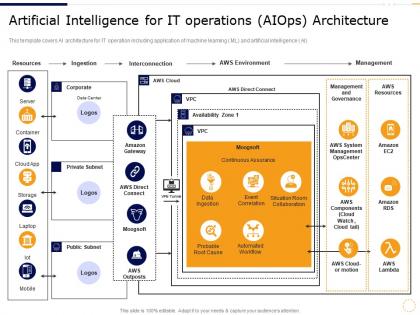
This template covers AI architecture for IT operation including application of machine learning ML and artificial intelligence AI
People who downloaded this PowerPoint presentation also viewed the following :
Artificial intelligence for it operations aiops architecture devops data use cases it with all 2 slides:
Use our Artificial Intelligence For It Operations Aiops Architecture DevOps Data Use Cases IT to effectively help you save your valuable time. They are readymade to fit into any presentation structure.
FAQs for Artificial intelligence for it operations aiops architecture devops data
Alright so the main parts are data ingestion, ML analytics, automation engines, and dashboards. Basically pulls info from whatever monitoring tools you're already running - Nagios, Splunk, all that stuff. Machine learning finds patterns you'd miss (honestly pretty impressive how much it catches). But here's the best part - automation can fix problems before they explode on you. Integration works through APIs so you don't have to trash your current setup, which is huge. I'd say start with something simple like alert correlation. You'll see results fast and won't mess up everything else you've got going.
So AIOps basically cuts your MTTR by catching incidents before they blow up and connecting all the related alerts across your stack. No more drowning in hundreds of random notifications - it groups everything intelligently so you can actually see what's causing the problem. The ML learns how your environment behaves, then predicts failures and suggests fixes based on what worked before. Honestly, it's pretty slick. Critical stuff gets routed to the right teams instantly, so you're not constantly putting out fires. I'd start with your messiest services first - you'll see results fast.
So ML is what makes AIOps actually smart instead of just another noisy tool. It chews through tons of operational data and spots patterns you'd miss completely. Honestly, the predictive stuff is where it gets really useful - catching problems before they blow up in prod. Over time it learns what's normal for your setup, so you stop getting buried in false alarms. The correlation across different systems is pretty neat too. I'd start with whatever's generating the most alert spam right now. That's where you'll see the biggest difference first, and it'll probably save your sanity.
So AIOps is pretty cool - it uses machine learning to catch problems before they actually break stuff. Your system learns what normal traffic and performance looks like, then alerts you when weird patterns start showing up. Way better than the old days of scrambling after users are already pissed off. It churns through tons of log data and metrics that you'd never spot manually. Honestly feels like cheating sometimes. My advice? Pick your most important services first and start there. Don't try to monitor everything at once or you'll get overwhelmed with alerts.
Honestly, the three biggest pain points are data chaos, finding the right people, and managing expectations. Most companies have their data spread across like 15 different tools - good luck getting AI to make sense of that mess. Finding someone who actually knows both IT ops AND machine learning? Yeah, those people don't grow on trees. Everyone thinks AIOps will fix everything in two weeks when really it takes months to get models working right. My advice? Pick one small problem to start with, clean up your data situation first (seriously, this part sucks but you gotta do it), and tell your boss it's gonna take time.
So AIOps takes all that tedious stuff your team's doing manually - incident detection, figuring out root causes, optimizing resources - and automates it. Pretty sweet deal honestly. It'll spot problems before they turn into those 3am "everything's on fire" calls and predict when you need to scale up or down. The money you save from preventing downtime alone makes it worth it, plus your engineers won't be stuck doing mindless monitoring work. I'd honestly just look at whatever's eating up most of your team's time right now and start there.
Yeah, AIOps basically flips everything around - you stop putting out fires all day and actually get to think strategically. The monitoring and basic troubleshooting stuff runs itself now. Honestly, it's weird at first but then you realize you can focus on the fun parts like optimization and planning ahead. Your team transforms from "emergency response" to actually making systems better. All that boring manual work disappears (thank god). I'd say look at what repetitive tasks are eating up your time right now - those are your first automation targets. Makes such a difference.
So AIOps basically looks at your usage history and predicts what you'll need down the road. Pretty cool stuff - it catches things like memory slowly eating up resources or those random traffic surges during holidays that you'd totally miss otherwise. The machine learning gets really good at connecting dots across your whole system, which beats scrambling to fix things after they break. Most tools will actually tell you what to do too, like resizing instances or moving workloads around. Honestly, I'd start with predictive alerts on your most important services first and build from there.
So you're gonna need a bunch of different data sources - monitoring stuff from your infrastructure and apps is huge. Log data too, from servers and security tools. Config management data is actually super important because changes always seem to break things (learned that the hard way). Your ticketing system events help a ton, plus any business metrics you can grab. Oh, and network performance data - can't forget that. More data sources = better pattern recognition. The platform gets way smarter when it can see connections between different systems instead of just looking at one thing.
AIOps catches problems before your customers even know something's wrong - honestly pretty cool when it actually works. It spots slowdowns, predicts when stuff might break, and fixes routine issues automatically. So your customers deal with way fewer outages and faster load times overall. When things do go sideways (because they will), your team can find the root cause super quickly instead of scrambling for hours. I'd start by looking at whatever breaks most often for your users and see if predictive monitoring could help there first.
Track both tech stuff and business impact to see if your AIOps actually works. MTTD, MTTR, and fewer false alarms show you're catching problems faster. Business metrics? Cost savings from less downtime and manual grunt work. Here's the thing though - you absolutely need solid baselines before rolling anything out, or you're just making up improvements. Honestly, most people skip this step and regret it later. Pick maybe 3-4 metrics your stakeholders actually care about and stick with those. Don't go overboard trying to measure everything.
Honestly, the biggest thing you'll deal with is expanding your attack surface - you're basically giving AI keys to your whole infrastructure. If someone compromises those systems, they could wreak havoc everywhere. AI can also get tricked by attacks it hasn't seen before or develop weird blind spots. That said, the upside is pretty solid - AI spots anomalies way faster than we ever could. Just don't go all-in without proper access controls and make sure you're auditing those models regularly. Oh, and keep humans in the loop for the big decisions, obviously.
Oh man, AIOps is literally made for this stuff. You know how annoying it is switching between different dashboards for AWS, Azure, your on-prem servers? AIOps pulls everything into one view so you're not going crazy. The AI part is clutch - it'll catch weird patterns when something breaks in one cloud and messes up another environment. Honestly saved my ass a few times when cascading failures happened. Those cross-cloud dependencies are brutal to track manually. I'd say map out where your monitoring is spotty between environments first, then go from there.
Start with something small - like anomaly detection or predicting incidents. Don't try to fix everything at once because that's where most companies crash and burn (learned that one the hard way). Your data needs to be clean first, otherwise you're just feeding garbage into the system. Get both your IT team and the business folks on board early. Honestly, the political buy-in is almost harder than the technical stuff sometimes. Don't expect miracles right away either. Pick one thing, nail it, show some wins, then build from there. Quick victories are your best friend here.
AIOps gets crazy good when you throw more data at it - business metrics, user behavior, even external stuff like traffic patterns. Not just the usual logs and metrics everyone focuses on. The magic happens when it understands *why* things break, not just when they're about to. Those ML models are honestly getting scary good at catching patterns we'd never spot. Think about your worst "oh shit" moments - the outages nobody saw coming. That's exactly where better prediction pays off big time. Start there and work backwards to figure out what data you're missing.
-
Excellent Designs.
-
Unique design & color.
-
Thanks for all your great templates they have saved me lots of time and accelerate my presentations. Great product, keep them up!
-
Awesomely designed templates, Easy to understand.