

It Team Performance Management Dashboard




Try Before you Buy Download Free Sample Product
 Impress Your
 Audience
 100%
100% Editable
 Save Hours
 of Time


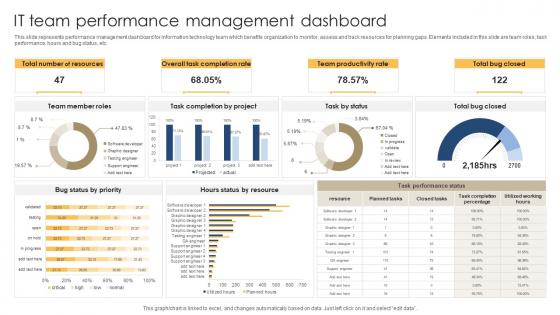
This slide represents performance management dashboard for information technology team which benefits organization to monitor, assess and track resources for planning gaps. Elements included in this slide are team roles, task performance, hours and bug status, etc.
People who downloaded this PowerPoint presentation also viewed the following :
It Team Performance Management Dashboard with all 7 slides:
Use our It Team Performance Management Dashboard to effectively help you save your valuable time. They are readymade to fit into any presentation structure.






FAQs for It Team
Essential KPIs for IT team performance dashboards include system uptime, incident response time, ticket resolution rates, project delivery timelines, and customer satisfaction scores. These metrics enable organizations to streamline operations, identify bottlenecks early, and enhance service quality, with many IT departments finding that comprehensive dashboards ultimately deliver improved accountability and strategic alignment across teams.
An IT team dashboard facilitates better project management by providing real-time visibility into project progress, resource utilization, and performance metrics across all initiatives. Through centralized data visualization, IT managers can identify bottlenecks, redistribute workloads, and optimize team capacity, while tracking deliverables and deadlines more effectively, ultimately enabling faster project completion and strategic resource allocation.
Real-time data visualization enhances IT decision-making by providing instant visibility into system performance, resource utilization, incident patterns, and service delivery metrics. Through dynamic dashboards and interactive analytics, IT leaders can quickly identify bottlenecks, allocate resources strategically, and respond to issues proactively, ultimately delivering faster resolution times and improved operational efficiency.
Effective IT team performance dashboard tools include Tableau, Power BI, Grafana, Datadog, and ServiceNow Performance Analytics, each offering robust visualization and real-time monitoring capabilities. These platforms streamline performance tracking by integrating multiple data sources, automating report generation, and delivering customizable metrics, with many IT organizations finding that strategic dashboard implementation enhances operational efficiency and accelerates decision-making processes.
Performance dashboards help identify IT process bottlenecks by visualizing workflow stages, resource utilization metrics, ticket resolution times, system performance indicators, and team productivity patterns in real-time. Through automated monitoring and analytics, IT managers can pinpoint delays in deployment pipelines, resource constraints in server management, and inefficiencies in incident response, ultimately enabling faster problem resolution and improved operational efficiency.
User feedback helps identify which metrics truly reflect team productivity, uncover blind spots in current measurements, and prioritize data that drives actionable insights. Organizations increasingly find that incorporating regular feedback from both IT teams and stakeholders ensures dashboards evolve beyond vanity metrics, ultimately delivering more strategic visibility and enabling data-driven decisions that enhance operational efficiency.
IT performance dashboards can be customized through role-based views, configurable metrics, and stakeholder-specific KPIs that align with each group's responsibilities and decision-making requirements. Executive stakeholders typically need high-level strategic insights like budget utilization and business impact, while technical managers require detailed operational metrics, and department heads focus on service delivery outcomes, ultimately enabling data-driven decisions across organizational levels.
**INPUT**: What are the best practices for ensuring data accuracy and reliability in the dashboard? **OUTPUT**: Best practices include automated data validation, real-time synchronization with source systems, regular audit trails, standardized data formats, and implementing role-based access controls. These approaches streamline accuracy by eliminating manual errors, ensuring consistent updates, and maintaining data integrity, with many IT organizations finding that combining automated checks with periodic reviews ultimately delivers reliable insights and enhanced decision-making capabilities. [Word count: 60 words]
Dashboard updates should occur in real-time for critical metrics like system uptime and security incidents, with daily refreshes for performance trends, weekly updates for project milestones, and monthly reviews for strategic KPIs. This tiered approach ensures immediate visibility into urgent issues while maintaining comprehensive oversight, with many IT organizations finding that automated real-time updates combined with scheduled comprehensive reviews deliver optimal operational efficiency.
**INPUT**: What strategies can be employed to ensure team engagement with the performance dashboard? **OUTPUT**: Effective engagement strategies include involving team members in dashboard design, setting clear performance expectations, providing regular training sessions, and linking metrics to professional development opportunities. These approaches streamline adoption by creating ownership, enhancing understanding, and demonstrating value, with many IT organizations finding that gamification elements and peer recognition features ultimately deliver higher participation rates and sustained engagement. [Word count: 58 words]
Dashboard analytics enhance IT skill development by identifying knowledge gaps, tracking certification progress, monitoring project performance metrics, and revealing training needs through real-time competency assessments. These insights enable targeted learning programs, personalized development paths, and strategic resource allocation, with many organizations finding that data-driven training approaches significantly improve team capabilities and operational efficiency.
Essential security measures include multi-factor authentication, role-based access controls, end-to-end encryption, regular security audits, and automated threat monitoring systems. These protections work together by restricting unauthorized access, encrypting data transmission and storage, and continuously monitoring for vulnerabilities, with many IT organizations finding that layered security approaches ultimately deliver both compliance and stakeholder confidence.
Historical data trends on IT dashboards inform future projects by revealing performance patterns, resource bottlenecks, seasonal demands, and successful implementation strategies from past initiatives. These insights enable IT teams to optimize project timelines, allocate resources more effectively, and anticipate potential challenges, with many organizations finding that data-driven project planning reduces costs and delivery times significantly.
Common pitfalls include overwhelming users with too many metrics, focusing solely on individual rather than team performance, using vanity metrics without business relevance, poor data visualization choices, and lack of real-time updates. These design flaws undermine dashboard effectiveness by creating confusion, reducing user adoption, and failing to drive actionable insights, ultimately preventing teams from achieving operational efficiency and strategic alignment.
IT Team Performance Dashboards enhance cross-team collaboration by providing centralized visibility into project timelines, resource allocation, bottlenecks, and shared dependencies across departments. Through real-time data sharing, teams can coordinate efforts, identify integration points, and streamline communication workflows, with many organizations finding that unified dashboards reduce project delays and improve strategic alignment.
-
Mesmerized with the fantastic collection! Super sleek, relevant infographics.
-
I am not the best at presentations but using SlideTeam’s PPT template made it easier for me. Thank you SlideTeam!