Key timelines and deadline powerpoint slide ideas

Rating:
80%
Key timelines and deadline powerpoint slide ideas
Slide 1 of 7
Favourites Favourites

Try Before you Buy Download Free Sample Product

Audience Impress Your
Audience
Editable 100%
Editable
Time Save Hours
of Time
The Biggest Sale is ending soon in
0
0
:
0
0
:
0
0
Rating:
80%
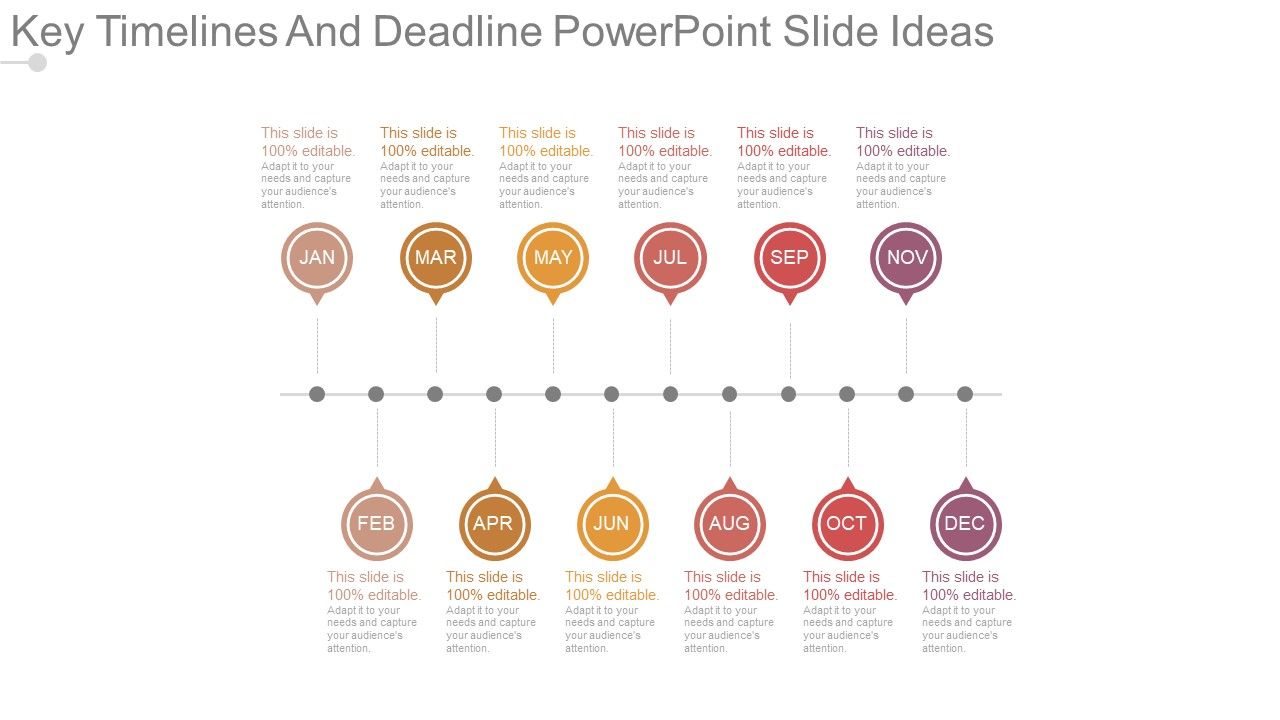
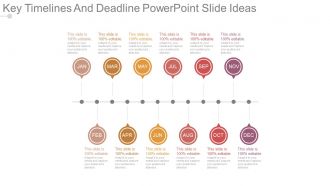
Presenting key timelines and deadline powerpoint slide ideas. This is a key timelines and deadline powerpoint slide ideas. This is a twelve stage process. The stages in this process are jan, feb, mar, apr, may, jun, jul, aug, sep, oct, nov, dec.

People who downloaded this PowerPoint presentation also viewed the following :

FAQs for Key timelines and deadline

Definitely focus on your kickoff date, big deliverable deadlines, and when stakeholders need to review stuff. Oh, and don't forget your final delivery date - that's the big one everyone cares about. External dependencies are huge too because vendors love to mess up your timeline when you least expect it. I'd throw in resource milestones like when people are joining or leaving the team. Make it visual with some kind of timeline instead of boring bullet points (trust me on this). Also be clear about which dates are set in stone versus which ones you can move around if needed.

Honestly, visual timelines are a game changer compared to those awful bullet point lists everyone hates reading. People can actually see how everything connects and spot where things might go sideways. I swear, half the projects I've worked on crashed because someone missed a deadline and nobody realized it would screw over three other teams. Color-coding helps too - like blue for dev work, red for reviews, whatever works. Gantt charts are solid, but even a quick sketch on a whiteboard does wonders. Your team will actually remember the dates instead of nodding politely and forgetting everything five minutes later.

Gantt charts are your best friend here - way better than those awful bullet point lists. Color-code everything by team or priority so people can actually find their stuff quickly. I'm big on calling out the real "drop dead" dates because let's be honest, some deadlines are fake and others will literally kill your project. Always build in buffer time but don't tell anyone that's what you're doing. Start broad, then get specific with phases. Oh and definitely explain what happens if things go sideways - people work harder when they understand the consequences. Trust me on this one.

So each industry has its own weird timeline quirks, honestly. Tech loves those agile sprints where deadlines can shift around. Construction though? They work backwards from rock-solid deadlines with crazy detailed planning. Healthcare is all about hitting regulatory checkpoints - the FDA doesn't care about your schedule lol. Finance builds in massive buffer time for compliance stuff. You gotta match your approach to whatever usually tanks projects in your space. Figure out the biggest failure points and plan around those instead of just picking random dates.

Oh man, dependencies are such a pain but super important. Basically you can't start task B until A is finished, and when one thing gets delayed, everything else dominoes. I've watched whole launch dates get pushed back because someone forgot about one tiny dependency - it's honestly maddening. The worst part? Half the time you're waiting on other teams or outside vendors you can't even control. What I'd do is map everything out first, add extra time for the really critical stuff (trust me on this), and then bug the dependency owners regularly. Short bursts work better than long check-ins.

Dude, Gantt charts are seriously your best friend for project presentations. They show tasks as bars on a timeline, so people instantly get what's happening when. Way better than boring bullet points - honestly, I don't know why anyone uses those anymore. You can highlight big milestones, show which tasks depend on others, and use colors for different teams or phases. Makes the whole project super clear at a glance. Just don't go overboard with details or you'll lose people. Stick to the major stuff and it'll look clean and professional.

Put your deadlines right up front - slide 2, not buried somewhere in the middle. Visual timelines work great because people actually look at those instead of just text blocks. Color-code everything so it's obvious what's on track vs. what's a mess. The critical path stuff and dependencies need to be super clear too. Oh, and build in buffer time but don't tell anyone about it (learned that one the hard way). End with who owns what and when. Honestly, stakeholders just want to know if they should panic or not.

Go with that red-yellow-green thing everyone knows from stoplights. Red for "oh crap" deadlines, yellow when stuff's getting close, green for done or safe zones. Bold borders and bigger fonts help urgent things jump out at you. Progress bars are pretty cool too - they fill up as deadlines get closer. I'm probably obsessed with countdown timers but they actually work lol. Just pick your colors and stick with them so people aren't constantly wondering what everything means. Your team will thank you for not making them decode some weird system.

Dude, never sugarcoat timelines just to keep people happy - that always bites you later. Also skip the super detailed breakdowns that'll just confuse everyone. Build in buffer time because something *always* goes wrong (learned this the hard way). Present dates as estimates, not guarantees. Be upfront about your confidence level and what you're assuming. Keep things high-level and realistic. Oh, and call out the risks early - way better than scrambling to explain delays later when everyone's already stressed.

Ugh, regulatory deadlines are such a pain but they're literally set in stone - everything else has to bend around them. Start with those dates and work backwards. Your timelines will get squeezed way tighter than you want, which sucks. Map out every regulatory checkpoint right away and pad time for revisions because their feedback can totally wreck your schedule. I learned this the hard way on my last project! Flag these dates super clearly for your team. There's zero flexibility if things go sideways, so you really can't afford surprises.

Timeline JS is probably your best bet - it's free and works great for web stuff. Prezi's got that cool zooming thing going on if you're into that. PowerPoint actually has decent timeline templates now (I was surprised too). Canva's super easy if you don't want to get technical about it. Aeon Timeline and Lucidchart are more heavy-duty options. Really depends what you need though - like are you embedding this somewhere or just presenting it? I'd start with Timeline JS since it doesn't cost anything and you can always switch later if it's not working.

Dude, stop listing boring dates! Turn your deadlines into an actual story people want to follow. Start with where you're at right now, then show the journey with milestones as your main plot points. Paint that picture of what winning looks like at the end - people need to see it. Honestly, nobody gives a crap about timeline slides anyway. Make it about characters and real consequences. Who's doing what? What happens if we miss something big? Frame the whole thing as "here's our mission, let's crush it together." Oh, and visual timelines that look like actual journeys? Those work surprisingly well.

Track your scope completion, budget burn rate, and schedule variance first. Resource utilization is critical - I've seen projects crash when someone realizes their lead dev is spread across three different things. Quality stuff matters too like defect rates since fixing bugs early beats scrambling later. Don't forget risk indicators and how happy your stakeholders actually are. Honestly, a simple weekly dashboard works better than anything fancy. Pick metrics that'll warn you before things go sideways, not just tell you what already happened.

Dude, make those deadlines super visual during your presentation. Walk through a timeline slide and ask "does this work?" at each milestone - don't just let people nod along. I made this mistake once and half my team thought launch was two weeks later than it actually was, which was... not great. Get verbal confirmation from everyone on their specific pieces. Also, send a written summary within like an hour afterward while everything's still fresh in people's minds. Trust me, this saves you from those annoying "wait, I thought you meant..." conversations down the road.

Honestly, just rip the band-aid off and tell them right away - don't wait around hoping things magically fix themselves. Explain what went sideways and give them your best guess on the new timeline. People get way more pissed about surprises than actual delays, trust me on this. Make sure you mention how it affects their stuff too, and throw in some solutions if you've got any. Even if you already called them, shoot over an email afterward. The whole point is getting ahead of it instead of scrambling to explain later.

Ratings and Reviews

80% of 100
Review Form
Write a review
Most Relevant Reviews
  1. 80%

    by Chet Cox

    Easy to edit slides with easy to understand instructions.
  2. 80%

    by Del Holmes

    The content is very helpful from business point of view.

2 Item(s)

per page: