

Learning and development model powerpoint slide graphics




Try Before you Buy Download Free Sample Product
 Impress Your
 Audience
 100%
100% Editable
 Save Hours
 of Time


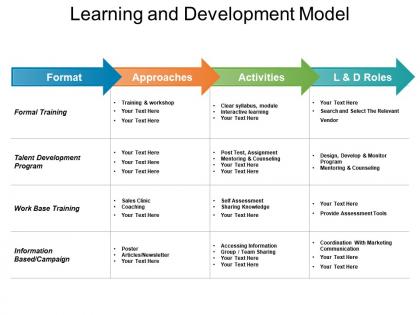
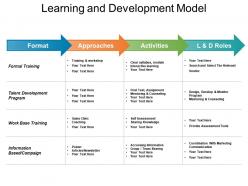
Introducing Learning And Development Model PowerPoint Slide Graphics depicting the facts and features in order to improve the performance level. With the help of this slide, you can collect all the information which is helpful in maintaining your career graph and taking it to the next level. Learning and development presentation slide explains the need of time and strategy which helps an individual to be committed to their respective workforce. This template concentrates on the functions like creativity, adapting, learning, cost effectiveness, flexibility, etc. which helps in measuring the progress of a person. This learning and development slides showcase the amount of capability which is required by an employee or organization in order to fulfil their wishes. With the help of this template you can learn and grow in your respective field. The slide contains numerous high-grade icons with which you can understand the process in a clear way. Therefore, download this ready to use PPT and develop your skills effectively.
People who downloaded this PowerPoint presentation also viewed the following :
Learning and development model powerpoint slide graphics with all 5 slides:
Cater for jolts with our Learning And Development Model Powerpoint Slide Graphics. Instruct folks on handling emergencies.
FAQs for Learning and development model
So basically you need four things: assessment, design, delivery, and evaluation. First figure out what skills your team's missing vs what they actually have. Then build programs that target those specific gaps. For delivery, honestly don't just do boring PowerPoints - mix it up with workshops, mentoring, online stuff, whatever clicks with your people. The evaluation part is crucial though - did anything actually change performance-wise? Oh and make it ongoing, not just a one-time thing. I learned that the hard way when our "training day" got forgotten by the next week.
Honestly, most companies get this backwards. First thing - figure out what skills you're actually missing to hit your goals. Like if you want 20% more revenue, maybe your sales team needs better product training, not another generic leadership workshop. Those cookie-cutter programs are usually a waste anyway. Focus on stuff that directly moves the needle. And here's the thing - track actual results, not just who showed up. Your training budget should generate real ROI just like marketing or any other department. Sounds obvious but you'd be surprised how many places skip this step.
Honestly, tech just makes everything you're already doing way more effective. Mobile apps, VR training, AI that actually adapts to how fast people learn - it's pretty wild what's possible now. The analytics alone are worth it because you finally know if training actually worked instead of crossing your fingers after some marathon workshop. But here's the thing - don't chase whatever's trendy. Pick something that fixes your actual biggest headache first. I learned this the hard way when we bought this fancy platform nobody used. Start with one tool that solves a real problem, then expand from there.
Honestly, start simple with completion rates and how long it takes people to actually get good at stuff. Most LMS platforms will give you knowledge retention scores too. But here's where it gets interesting - you've gotta connect that learning data to real business results. Sales numbers, customer satisfaction, retention rates before vs after training. Yeah, it's a bit of data detective work, but way easier than it used to be. Pick maybe 3 metrics that actually align with what your company cares about and build from there. Don't overthink it at first.
Start with a skills gap analysis - basically compare where your team is now vs where they need to be. Survey employees directly about what they want to learn (they're usually pretty honest about their weak spots). Get manager input too since they see daily performance. Also think about your business goals - expanding into new markets means you'll need different skills. Oh, and definitely check performance reviews and exit interviews for patterns. I learned this the hard way, but don't rely on just one survey. Multiple data sources give you the real picture.
Honestly, blended learning works because people actually get to choose how they absorb info. Some folks thrive in group settings, while others are those weird 6am learners with their coffee (no judgment). Different formats keep everyone awake - way better than sitting through another brutal PowerPoint marathon. Completion rates go up since people can move at their own speed and circle back when stuff doesn't click the first time. Oh, and it actually hits different learning styles instead of just hoping everyone gets it. I'd start by just asking your team what they prefer - might surprise you what comes back.
Honestly, the hardest part is just keeping people engaged through a screen. You miss all those random "oh wait, that reminds me" moments that happen naturally in person. Can't really peek over someone's shoulder to see if they're actually getting it, you know? Tech issues are annoying too - some people are stuck with terrible wifi or working from their kitchen table. I'd say build in way more check-ins than feels necessary. Keep everything super short and interactive, otherwise people just zone out. Oh, and make it actually fun if you can swing it - remote learning can feel pretty isolating.
Look, the trick is making it feel normal, not like homework on top of everything else. Have your leaders actually DO learning stuff themselves - when the CEO mentions their latest course, people pay attention. Give folks real time during work hours for it, because let's be honest, nobody's doing professional development at 9pm after a long day. Create space where admitting "I don't know this" won't get you side-eyed. Connect it directly to promotions and growth opportunities. And here's what really matters - celebrate when someone uses new skills, not just when they finish some boring module. Oh, and definitely recognize people who share knowledge around the office.
Look, most training programs totally bomb because nobody thinks about measuring success upfront. Before you even start, figure out what business metrics actually matter - revenue, productivity, whatever moves the needle for you guys. Then design everything around real scenarios people will actually face at work. The theory-heavy stuff is honestly useless. Track what people do differently after training through manager check-ins and performance data over like 3-6 months. Oh, and make them apply skills right away and report back on results. Creates way better accountability than hoping they'll just magically change their behavior.
Oh dude, there are basically three spots to grab feedback. Do a quick pre-check to see what people already know going in. During the actual training? Polls and mini check-ins work great - you can pivot if everyone looks confused (which happens more than you'd think). Most people totally forget about the during part though. After everything wraps up, hit them with surveys at 30 and 90 days to see what actually worked. Here's the thing - you've gotta actually USE that feedback to improve your next session. Don't just collect responses and let them sit there.
Honestly, leadership development is the most underrated part of any L&D strategy. Good leaders create this ripple effect - they spot skill gaps early, coach their people, and actually make learning feel safe instead of scary. Nobody sticks around for managers who can't develop talent anyway. Your best leaders become walking advertisements for growth initiatives. They reinforce what you're teaching and get people excited about improving. I'd start by figuring out what leadership skills actually matter for your business goals. Then build some clear development paths around those competencies. Trust me, it pays off.
Mix up your content delivery - videos, written stuff, workshops, hands-on practice. People learn differently, right? Some need to see it, others have to hear it, and some won't get it unless they're actually doing something. I'm one of those weirdos who has to write notes by hand or nothing sticks. Give people both solo options and group work. Oh, and actually ask your team what's working - surveys are clutch for this. Start by looking at what you're doing now and spot where you're only covering one learning style.
Don't just cross your fingers and hope people share what they learned. Monthly lunch-and-learns work great - have recent training folks present their key takeaways. Also set up peer mentoring between people who went and those who didn't. Internal wikis help too, though honestly gamification is surprisingly effective because people genuinely love showing off new expertise! Make it feel rewarding instead of like homework. Oh, and discussion channels for new skills are clutch. Start small with one session monthly and grow from there.
So basically you want to chop up your training into tiny 3-5 minute chunks. Mobile apps work great for this - people can knock them out between meetings or whatever. Quick videos, little quizzes, simple how-to stuff. Honestly, it's genius because nobody has time for hour-long training sessions anymore. You can push these through Slack or email too. Works really well for boring compliance stuff or when you're rolling out new software. Oh, and here's what I'd do - take one big training module you already have and just split it into like 5-6 smaller pieces instead. Way less overwhelming.
So external training gets you the latest industry stuff and good networking opportunities. Super pricey though, and it won't be tailored to how you guys actually work. In-house is way cheaper if you're training lots of people - plus you can make it fit your culture perfectly. Problem is you're stuck with whatever knowledge your team already has. Building decent content takes forever too. Honestly? Most companies I know do both. External for the specialized technical stuff, in-house for your day-to-day processes. Works pretty well.
-
Editable templates with innovative design and color combination.
-
Awesomely designed templates, Easy to understand.