


Training guidelines powerpoint templates microsoft





Try Before you Buy Download Free Sample Product
 Impress Your
 Audience
 100%
100% Editable
 Save Hours
 of Time


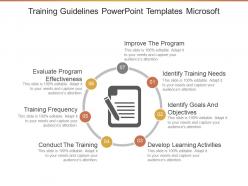
Develop a professional development program for your employees with our technically designed training guidelines PowerPoint template. This employee training plan PowerPoint image design will analyze the prospects where your employee needs to enhance their skills. You can define the training process with this training program guidelines PowerPoint layout diagram. It starts from the point of improving your existing training program. Then as per the latest change in technology or business culture, the management will identify the need of training for their employees. Thus, describe some influential factors which may affect your training program with this training plan Presentation layout. Such as the employees behavior, plan without a goal, insufficient resources and more. Use this training guidelines for employees PPT slide template to develop some competent learning activities which helps in improving your business environment. It also achieves your business goals too. Hence, simply snap on the download tab to start customizing this PPT plan. Really compelling presentations need really compelling design. Thousands of Training Guidelines Powerpoint Templates Microsoft designs are here to get your message across.
People who downloaded this PowerPoint presentation also viewed the following :
Training guidelines powerpoint templates microsoft with all 5 slides:
When you need to tell a story it needs to be simple concrete and credible. So why not use our Training Guidelines Powerpoint Templates Microsoft that will help ease the task?
FAQs for Training guidelines
Key features include professional layouts with clear hierarchies, customizable slide designs for different content types, consistent branding elements, interactive components like flowcharts and checklists, and mobile-responsive formatting. These templates streamline training development by providing structured frameworks, ensuring visual consistency across materials, and enabling quick customization, with many organizations finding that well-designed templates significantly reduce preparation time while enhancing learner engagement.
A well-designed template improves training effectiveness by ensuring consistent visual hierarchy, reducing cognitive load, maintaining learner focus, and streamlining content delivery across sessions. Through standardized layouts and clear information architecture, trainers can deliver more engaging presentations while participants retain information better, ultimately enhancing knowledge transfer and reducing preparation time for training teams.
Training guidelines presentations should include clear learning objectives, step-by-step procedures, visual aids and examples, assessment criteria, compliance requirements, and contact information for support. These elements work together by establishing expectations, demonstrating processes through real scenarios, and providing accountability measures, with many organizations finding that comprehensive templates streamline onboarding while ensuring consistent knowledge transfer across departments.
Color schemes in PowerPoint templates significantly influence audience engagement by enhancing readability, creating emotional responses, and reinforcing brand consistency throughout training sessions. Strategic color combinations improve information retention, reduce cognitive load, and maintain visual interest, with many training organizations finding that well-designed templates with complementary palettes deliver more effective learning outcomes and higher participant satisfaction rates.
Best practices for incorporating visuals in training guideline presentations include using consistent branding elements, clear infographics, relevant screenshots, step-by-step process diagrams, and interactive elements like clickable buttons. These visual components enhance comprehension by simplifying complex procedures, reducing cognitive load, and improving retention rates, with many organizations finding that well-designed visual presentations increase training effectiveness and employee engagement significantly.
Interactive elements enhance training PowerPoint slides by encouraging active participation, improving information retention, and accommodating different learning styles through clickable navigation, embedded quizzes, and multimedia content. These features transform passive presentations into engaging experiences, with many organizations finding that interactive training materials increase learner engagement by up to 70%, ultimately delivering better knowledge transfer and more effective skill development across teams.
Bar charts, line graphs, pie charts, progress indicators, and heat maps are most effective for displaying training data in PowerPoint presentations. These visual formats enable organizations to track completion rates, performance improvements, and competency development across departments, with many training managers finding that interactive dashboards and comparison charts enhance stakeholder engagement and demonstrate measurable learning outcomes.
Presenters can customize PowerPoint templates by modifying color schemes, fonts, layouts, adding company branding, incorporating interactive elements, and adjusting content structures to match their training objectives. Through slide master editing, custom animations, and personalized graphics, trainers create engaging, brand-consistent presentations that enhance learner retention, streamline content delivery, and ultimately deliver more effective training experiences across diverse organizational contexts.
Consistency and branding ensure training presentations maintain professional credibility, reinforce organizational identity, and enhance learner retention through cohesive visual elements, standardized formatting, and unified messaging. These elements streamline content development by providing clear design parameters, while strengthening brand recognition and creating memorable learning experiences that ultimately deliver more effective knowledge transfer and stronger employee engagement across training programs.
Templates facilitate adherence to compliance and regulatory training requirements by standardizing content delivery, ensuring consistent messaging across departments, incorporating mandatory regulatory elements, and providing audit-ready documentation structures. Through pre-built compliance frameworks, organizations streamline training deployment, reduce legal risks, and maintain regulatory alignment, with many financial services and healthcare institutions finding that standardized templates significantly enhance compliance tracking and reporting efficiency.
Common pitfalls include overloading slides with excessive text, using generic content without customization, neglecting interactive elements, poor visual hierarchy, and inconsistent branding across materials. These issues can significantly reduce engagement and learning effectiveness, with many training professionals finding that strategic template customization, balanced content distribution, and audience-specific adaptations ultimately deliver more impactful sessions and better knowledge retention.
Narratives and case studies can be integrated into PowerPoint training templates through dedicated story slides, scenario-based exercises, before-and-after comparisons, testimonial sections, and interactive case study breakdowns. These storytelling elements enhance learning retention by providing real-world context, with many training professionals finding that narrative-driven templates increase engagement and help learners connect theoretical concepts to practical applications.
Presenters can access high-quality training guideline templates through professional platforms like SlideTeam, Microsoft's template gallery, design marketplaces such as Envato, and corporate learning management systems. These resources offer industry-specific templates for healthcare training, corporate onboarding, and compliance programs, with many organizations finding that professionally designed templates enhance learner engagement and streamline content delivery processes.
Animations and transitions can enhance training presentation clarity by highlighting key points, guiding audience attention, and creating visual flow between concepts. However, excessive or complex animations often distract learners and reduce comprehension, with many training professionals finding that subtle, purposeful transitions streamline information delivery while maintaining engagement, ultimately supporting better knowledge retention and more effective learning outcomes.
PowerPoint templates offer significant time savings, cost efficiency, professional design consistency, built-in brand alignment, and reduced creative barriers compared to custom presentations. These pre-designed frameworks enable organizations to streamline content creation, maintain visual standards across teams, and accelerate presentation development, with many businesses finding that templates deliver faster turnaround times while ensuring polished, cohesive messaging.
-
Content of slide is easy to understand and edit.
-
Qualitative and comprehensive slides.