

Levels Of Data Center Commissioning And Testing Procedures




Try Before you Buy Download Free Sample Product
 Impress Your
 Audience
 100%
100% Editable
 Save Hours
 of Time


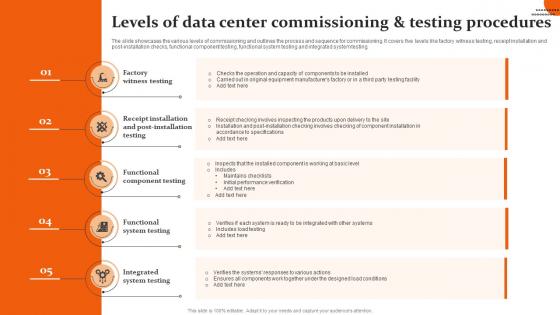
The slide showcases the various levels of commissioning and outlines the process and sequence for commissioning. It covers five levels like factory witness testing, receipt installation and post installation checks, functional component testing, functional system testing and integrated system testing.
People who downloaded this PowerPoint presentation also viewed the following :
Levels Of Data Center Commissioning And Testing Procedures with all 6 slides:
Use our Levels Of Data Center Commissioning And Testing Procedures to effectively help you save your valuable time. They are readymade to fit into any presentation structure.





FAQs for Levels Of Data Center Commissioning
So there's basically four phases you'll go through. Pre-commissioning comes first - just checking that all your gear is installed right and doing basic stuff. Functional testing is next and honestly, this part's a nightmare because you're running everything through different scenarios to see what breaks. After that you do integrated testing where all the systems have to play nice together. Performance verification wraps it up - making sure everything hits your design specs and efficiency numbers. Oh and document literally everything obsessively during each step. Trust me, you'll want those notes when weird issues pop up six months later and you can't remember what the hell you did.
Dude, commissioning is huge for energy savings - we're talking 10-30% improvement, which is honestly insane. You're basically tuning everything so your cooling, airflow, and power systems actually work together instead of fighting each other. It's like... remember when you got your car tuned and suddenly everything felt smoother? Same concept. You'll find all sorts of waste - zones that are way too cold, fans running at stupid speeds, terrible airflow patterns. The cool part is your systems stay efficient long-term instead of slowly getting worse. Oh, and start with cooling first since that's where you burn the most energy anyway.
Check your power and cooling setup first - that's everything. Manufacturer specs aren't suggestions, follow them exactly for rack placement and cables. I've watched too many people rush this part and regret it big time. Document while you work, not after. Test every connection before flipping anything on. Run full load tests on everything - seriously, don't half-ass this step. Simulate some failures to see if your backups actually work (spoiler: sometimes they don't). Make a list of any problems and get everyone to sign off before you're done.
So predictive maintenance really kicks off during commissioning - that's when you're laying the groundwork. You'll want to grab baseline data from all your critical stuff (HVAC, power, cooling) while everything's running perfectly. Install those sensors now too, since they'll feed your algorithms later. Think of it like training your data center to give you a heads up before things break. Honestly, documentation is huge here - I've seen too many teams skip this step and regret it. Those baselines become your reference points when the predictive models start doing their thing. Your maintenance crew will definitely appreciate having solid data to work with.
Start with your PUE and temperature/humidity readings - those are your bread and butter. Power quality stuff like voltage stability matters way more than people think, trust me on that one. Check airflow patterns and cooling performance obviously. UPS runtime testing under load is crucial, same with generator transfer times. Fire suppression response times too. Network latency and server benchmarks during stress tests will save you headaches later. The whole point is getting solid baseline numbers during commissioning so you can actually tell when something's going wrong once you're live.
Dude, environmental stuff will totally screw up your commissioning schedule and results. Heat messes with cooling system tests, humidity throws off electrical validation, dust skews air filtration readings. Phoenix taught me this lesson the hard way - that crazy heat made our HVAC load calcs useless. Try timing your commissioning around better seasonal conditions, especially for outdoor gear. Can't always control timing though. When you're stuck with bad conditions, just build those environmental variations into your test parameters and what you'll accept as passing. Weather's gonna do what it wants anyway.
So basically they're your independent quality control person for the whole data center project. They write up the commissioning plan and watch over all the testing - kind of like having a referee who keeps contractors honest since they don't work for anyone with skin in the game. Pretty smart setup if you ask me. They'll coordinate between your teams, document everything that happens, and sign off when systems are actually ready to go live. Just make sure you bring them in during design phase, not after. Way easier than trying to fix stuff later when everything's already built.
So basically, IoT sensors are a game changer for commissioning - they track temperature, humidity, power usage, all that stuff in real-time across your whole facility. No more running around manually checking everything. They catch problems before they blow up, which honestly saves your sanity. You can actually validate that your HVAC and cooling systems work like they're supposed to. The data's super helpful during testing too. I'd start small though - put sensors in your most critical spots first, then add more once you see how much easier it makes everything.
Honestly? Integration problems between systems will drive you crazy. Documentation's always half-finished too. Power and cooling are the worst offenders - something always breaks during testing, I swear it's Murphy's Law. Build extra time into your testing phases, that's non-negotiable. Get complete as-built drawings upfront before you even think about starting. Oh, and loop your commissioning agent into design meetings early - waiting until the end is a nightmare. Keep vendor support numbers handy because you'll definitely need them when things go sideways.
So pre-commissioning is when you test each system individually - like making sure your cooling units actually cool before connecting everything. Pretty straightforward stuff. Commissioning comes after and that's where you run everything together under real conditions, basically proving your data center won't crash when it goes live. I learned this the hard way on my first project - we skipped some pre-comm tests thinking we'd save time. Big mistake. You'll catch the obvious failures early in pre-comm, then commissioning shows if everything plays nice together. Honestly, start your pre-comm checklist way earlier than you think you need to.
Dude, bad commissioning will absolutely destroy your uptime. You'll get hit with random outages, equipment failures, those nightmare 3am calls. Cooling systems fail, power gets wonky, stuff just doesn't work right under actual load. Honestly? It's probably the worst place to try saving money. Your reliability goes to hell because all the issues that should've been found during testing pop up when you're running critical stuff. I've seen it happen too many times. Just budget properly for real commissioning upfront - way cheaper than dealing with downtime later.
Honestly, most data centers need retro-commissioning every 3-5 years, but it really comes down to your setup. Major equipment changes or weird efficiency drops? Do it sooner. Newer places with solid maintenance can probably wait the full 5 years. Older facilities or ones that've been heavily modified should stick closer to 3 years - trust me on this one. Oh, and definitely after any major incidents. I'd just set a reminder for year 3 and see how everything's running then. Way easier than trying to remember later.
So you've got a bunch of compliance stuff to deal with. Building codes and fire safety are the big ones - all that NFPA fire suppression stuff plus electrical codes. Energy efficiency requirements fall under environmental compliance, and don't forget ADA accessibility rules. HIPAA or PCI DSS might come into play if you're dealing with sensitive data - those can add extra physical security headaches during commissioning, honestly. Here's the thing though: map this all out during design phase. Trust me, it's a nightmare trying to fix compliance issues after inspectors show up. Way cheaper to get it right upfront.
Dude, you definitely want to run simulations before firing up that data center. Model your airflow, thermal spots, and power distribution first - catches design problems early when they're cheap to fix. Critical cooling paths and power redundancy should be your starting point, then branch out from there. It's basically like having a crystal ball for how your systems will perform under different loads. Way less painful than discovering issues during actual commissioning. Honestly wish more people did this step - saves so much troubleshooting later.
Dude, the whole data center commissioning game has totally changed. You can literally simulate your entire facility before it's even built using AI predictive analytics and digital twins - pretty wild stuff. Instead of that old-school one-time testing, everyone's doing continuous commissioning now with IoT sensors that catch problems in real-time. Cloud platforms let your team work together remotely too, which honestly saved my butt on the last project I worked on. The time savings are legit - we're talking 30-40% faster commissioning. Remote collaboration tools have standardized workflows across sites too. Definitely worth checking out for your next build.
-
Qualitative and comprehensive slides.
-
Great quality slides in rapid time.