


Levels Of Service Offering And Slas Ppt Sample Download




Try Before you Buy Download Free Sample Product
 Impress Your
 Audience
 100%
100% Editable
 Save Hours
 of Time


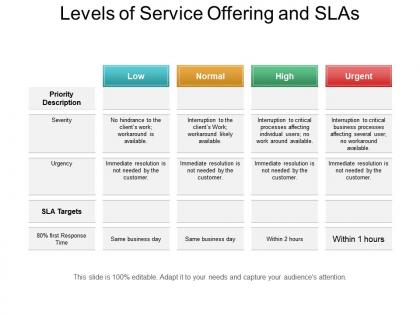
Elucidate the extent of service of your company with this Levels Of Service Offering And Slas PPT Sample Download template. Showcase the SLA targets of your service priority for various products/services with this service-level PPT. Employ this service-level objective PowerPoint slideshow to manage customer expectations and present terms and conditions in which SLA will work with customers. Take advantage of this service-level requirement PPT slide to plan for your service and design a service model that will eventually help your business to prosper. Further, you can take the assistance of this turn-around time presentation to identify which product/service is critical to your business and when an immediate resolution is required. Moreover, this product offering diagram will help you to focus on critical areas such as response time and resolution time. Thus, download this business offering PPT sample to create a visually impressive presentation and make your product a successful one.
People who downloaded this PowerPoint presentation also viewed the following :
Levels Of Service Offering And Slas Ppt Sample Download with all 5 slides:
Increase the confidence to advance boldly with our Levels Of Service Offering And Slas Ppt Sample Download. It helps change their gingerly approach.
FAQs for Levels Of Service Offering And Slas
So you'll need uptime targets (like 99.9%), response times for different priority stuff, and clear escalation steps when shit hits the fan. Define what counts as a real incident vs just minor annoyances - this honestly prevents so many stupid fights down the road. Also spell out how you'll measure everything and how often you'll report back. Oh, and don't forget maintenance windows and any exclusions. The whole point is getting your team and stakeholders on the same page about what "good service" actually means in real numbers.
Look, SLAs are honestly game-changers because they kill those awkward "um, where's my stuff?" convos before they start. I usually do something super basic - 3 days for initial concepts, 2 revision rounds max. Clients actually love having clear expectations written down (who knew, right?). No more scope creep disasters or timeline drama. When everything's spelled out - turnaround times, what you're delivering, how many changes they get - there's zero confusion. Makes you look way more professional too. I was skeptical at first, but now I can't imagine working without them.
So you'll want to watch response time and uptime first - like, are pages loading fast and is the thing actually working? Throughput matters too (requests per second). Error rates are super critical though - imagine slides breaking mid-presentation, yikes. Resource monitoring is key since these apps are total memory hogs with all the graphics and video. Some teams get fancy tracking user experience stuff like time-to-first-render. Honestly though? Start simple with response time and availability. You can always add the other metrics once you've got those dialed in.
Honestly, the tech support you get can make or break your whole presentation. Professional AV crew and decent equipment? Your stuff flows perfectly. But when you're stuck with crappy mics and no backup plan, you'll be that person fumbling around looking totally unprepared. Trust me, audiences can tell the difference immediately. I've seen speakers lose their entire momentum just because the sound kept cutting out - it's brutal to watch. Short version: find out what kind of support you're getting ahead of time so you can actually prepare for it.
So basically, minimum service is just the bare bones stuff - basic layouts and standard fonts. Nothing fancy. Targeted is where things start looking actually professional with consistent branding and maybe some custom graphics thrown in. Optimal though? That's the whole nine yards - animations, interactive stuff, the works. Honestly most people don't need all that unless you're constantly presenting to executives or whatever. I'd probably go with targeted first and see how it goes. You can always upgrade later if people are like "wow this looks kinda basic" but that rarely happens tbh.
Honestly, you've gotta get ahead of this stuff before you even start. Have those awkward detailed convos upfront - timelines, how many revisions, what "professional" actually means to them (trust me, everyone thinks they know but definitions vary wildly). Document what you agree on so there's no "but I thought you meant..." later. Check in regularly while you're working on it. Set up those milestone reviews too - way better to catch problems early than realize you're totally off-base when you deliver the final thing.
Look, feedback is your best friend for figuring out what's actually going wrong with your presentations. Don't just rely on one source though - grab input from your audience, stakeholders, maybe even the tech crew if they're wrestling with equipment issues. Most teams think everything's peachy until someone loses it and complains! Make collecting feedback a regular thing instead of crossing your fingers that people will volunteer their thoughts. Post-presentation surveys work great, plus debrief sessions with your main stakeholders. Then - and this part's crucial - actually use what you learn to tweak your targets and processes. Pick one metric to start tracking this month.
So basically, service levels are like a priority system for your presentation. Standard gets you 5-7 business days, which is fine if you're not stressed about timing. Premium bumps you up to 2-3 days. Rush service can sometimes be same-day, but honestly that depends on how crazy busy they are. The cool thing about higher tiers is you get more revision rounds and someone actually managing your project. Way less confusion that way. I'd say pick whatever matches your deadline - no point paying extra if you've got time.
Missing your service deadlines? Yeah, that's gonna hurt. Clients get pissed when their stuff isn't ready on time, and honestly, who can blame them? Trust goes out the window fast. Your team ends up looking incompetent, other departments can't plan around your mess, and everything snowballs from there. Rushed fixes just create more problems - quality drops, everyone's stressed, more delays pile up. I'd set up some kind of tracking system and build in extra time as cushion. Better to over-deliver than scramble explaining why you're behind again.
Dude, automation tools are a game changer for presentations. Templates keep everything looking consistent - no more scrambling to match fonts and colors. Auto-updating charts are clutch too since they pull fresh data automatically. I used to waste hours on version control headaches, but workflows handle that now. The approval process runs itself while you focus on the actual storytelling part. Turnaround times get way faster since you're not doing busy work anymore. Oh, and start with template automation first - honestly the easiest thing to set up and you'll see results right away.
Put this stuff in your contract from day one - response times, how many revisions, what's covered. Make a simple one-pager that breaks it all down visually. Maybe throw in some examples too. Honestly, clients eat this up when you show you're organized. Do regular check-ins on bigger projects because that's when things go sideways fast. The trick is setting boundaries when everyone's happy and optimistic, not after you're already dealing with scope creep hell. I always send the service doc with my proposal now - saves so many awkward conversations down the road.
Quarterly reviews work best for this stuff. Design moves crazy fast - what's premium today becomes expected tomorrow, you know? I do quick monthly pulse checks on feedback and basic metrics, but every three months I really dive in. Check what competitors are doing, look at client happiness scores, see if my service levels still make sense for where I want the business to go. Honestly, the creative industry changes so much that standing still feels like going backwards. Just set a calendar reminder now or you'll totally forget - trust me on this one.
So your team definitely needs the basics down first - design tools, UX principles, accessibility stuff. Then train them on your specific service requirements like response times and escalation processes. Project management certs are honestly a game changer when things get crazy. They need to understand how you're measuring their work too. Oh, and regular skill assessments help - I'd map out a training plan that ties directly to your performance standards. Sounds boring but it actually works really well.
Oh man, this is so real. Different cultures have totally different service expectations and it'll mess with your head if you're not ready for it. Germans want everything super planned out - your usual timeline? Too fast for them. Americans are the opposite and think you're dragging your feet. I got burned once with a Japanese client because I didn't budget enough time for all the relationship stuff upfront (learned that lesson fast). Payment terms are all over the place too. Meeting styles, how they give feedback - it's wildly different everywhere. Just ask each new international client straight up how they like to communicate and what their timeline expectations are. Saves so much drama later.
So most agencies aim for 24-48 hours on regular decks, same-day for rush jobs. Client emails? Four hours max or they'll blow up your phone. You want 99% accuracy on charts and graphs, zero typos on final versions - sounds obvious but you'd be surprised how often that gets missed. Most places track satisfaction scores above 4.5/5 and hit 95%+ on-time delivery. Oh, and build in 2-3 feedback rounds upfront so clients don't keep adding more later. I'd track where you're at now against these numbers first, then figure out what needs the most work.
-
The content is very helpful from business point of view.
-
Use of different colors is good. It's simple and attractive.