

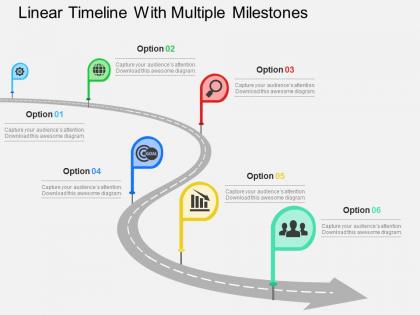
Linear timeline with multiple milestones flat powerpoint design




Try Before you Buy Download Free Sample Product
 Impress Your
 Audience
 100%
100% Editable
 Save Hours
 of Time


See where your business stands which can trigger the right response with our linear timeline with multiple milestones flat PowerPoint design. This PowerPoint slide will help you make profitable business model, realistic measurable marketing strategy gain significant control of your business. With the help of this PPT diagram you can review long term and short term business goal which may be focused on profits, sales, brand promotion or reductions in operations cost. This PPT icon with timeline has been crafted by team of professionals. This presentation icon will allow you to pitch to your prospective customers what are key achievements in the previous years? What goals are to be accomplished? Consider how your business will grow and revise goals which are not feasible to achieve .This Presentation will allow you to organize your business objectives, goals and milestones in an order to ensure that you are on track towards meeting your goals. Our Linear Timeline With Multiple Milestones Flat Powerpoint Design are conceived by a dedicated team. Use them and give form to your wondrous ideas.
People who downloaded this PowerPoint presentation also viewed the following :
Linear timeline with multiple milestones flat powerpoint design with all 4 slides:
Our Linear Timeline With Multiple Milestones Flat Powerpoint Design are full of encouragement. Fuel the drive to achieve.
FAQs for Linear timeline with multiple milestones
Linear timeline with milestones enhances presentations by providing clear chronological structure, visual progress tracking, stakeholder alignment, and simplified complex project communication. This format enables organizations to streamline project reviews, accelerate decision-making processes, and improve team coordination, with many businesses finding that milestone visualization ultimately delivers enhanced transparency and stronger stakeholder engagement across departments.
A linear timeline enhances storytelling by creating a clear narrative arc that guides audiences through project phases, key achievements, decision points, and outcomes in chronological order. This structured approach enables presenters to build compelling stories around project evolution, highlight critical milestones and challenges overcome, while demonstrating progress momentum, ultimately delivering greater audience engagement and stakeholder confidence in project success.
Effective linear timeline elements include milestone markers, dates, task descriptions, progress indicators, and responsibility assignments. These components work together by providing visual clarity, establishing accountability, and enabling stakeholders to track deliverables, with many project managers finding that well-structured timelines enhance team coordination and client communication while reducing project delays.
Visual linear timelines significantly enhance audience engagement by creating clear chronological flow, reducing cognitive load, and enabling instant comprehension of project progression or historical sequences. Through strategic use of colors, icons, and milestone markers, presenters can guide audience attention, maintain focus throughout complex narratives, and facilitate better retention, with many organizations finding that visual timelines increase meeting productivity and stakeholder buy-in.
**INPUT**: What types of projects are most suited for a linear timeline presentation format? **OUTPUT**: Linear timeline presentations work best for projects with sequential phases, clear dependencies, and milestone-driven deliverables, including software development cycles, construction projects, product launches, and regulatory compliance initiatives. These formats enable project managers to streamline communication by visualizing critical paths, resource allocation, and deadline interdependencies, while stakeholders gain enhanced transparency into progress tracking, ultimately delivering improved coordination and accountability across complex organizational initiatives.
Different color schemes in linear timeline templates significantly influence milestone perception through psychological associations, visual hierarchy, and audience engagement patterns. Strategic color choices enhance comprehension by creating emotional connections, establishing priority levels, and improving information retention, with many organizations finding that warm colors emphasize achievements while cool tones convey professionalism and reliability.
Common pitfalls include overcrowding slides with excessive text, using inconsistent formatting across milestones, neglecting proper spacing between timeline elements, choosing poor color contrast that reduces readability, and failing to maintain chronological accuracy. Many organizations find that these issues undermine presentation effectiveness, while strategic use of white space, consistent visual hierarchy, and clear milestone differentiation ultimately delivers more engaging timelines and enhanced audience comprehension.
Interactive elements in linear timeline presentations include clickable milestones, hover effects for detailed information, embedded multimedia content, animated progression sequences, and navigation controls allowing audience exploration. These features transform static timelines into engaging experiences by enabling viewers to access deeper insights, control pacing, and explore relevant data points, ultimately delivering more memorable presentations and enhanced audience engagement across corporate and educational settings.
The linear timeline template offers extensive customization through color schemes, icons, fonts, milestone descriptions, and visual elements to align with specific industry requirements or brand guidelines. Organizations across sectors like healthcare, finance, manufacturing, and technology can modify backgrounds, incorporate industry-specific graphics, adjust formatting styles, and tailor content descriptions, ultimately delivering presentations that resonate with their target audience while maintaining professional consistency.
**INPUT**: What software tools, besides PowerPoint, can be used to create an effective linear timeline? **OUTPUT**: Effective linear timeline creation tools include Canva, Lucidchart, Visio, Google Slides, and Adobe Illustrator, each offering specialized features for project visualization. These platforms streamline timeline development through drag-and-drop interfaces, collaborative editing, and professional templates, with many organizations finding that tools like Lucidchart enhance team coordination while Canva delivers cost-effective design solutions.
Animations in linear timelines can highlight milestone progression through fade-ins, slide transitions, sequential reveals, and color changes that draw attention to critical achievements. These visual enhancements enable presenters to control narrative pacing, emphasize breakthrough moments, and maintain audience engagement, with many organizations finding that animated milestones significantly improve comprehension and retention during strategic presentations.
Best practices for milestone labeling include using concise, action-oriented descriptions, consistent formatting, chronological sequencing, clear visual hierarchy, and strategic color coding for different project phases. These approaches streamline project communication by enhancing readability, minimizing confusion, and enabling stakeholders to quickly identify critical deadlines, with many organizations finding that well-labeled timelines ultimately deliver improved accountability and faster decision-making across teams.
Chronological milestone presentation enhances audience comprehension by creating logical narrative flow, establishing clear cause-and-effect relationships, and demonstrating systematic project progression from initiation to completion. This sequential approach enables stakeholders to grasp dependencies, identify critical path elements, and anticipate upcoming deliverables more effectively, ultimately improving project transparency and stakeholder alignment.
Linear timelines excel in retrospective presentations by chronologically mapping completed projects, strategic initiatives, organizational changes, and key achievements with clear milestone markers. They enable presenters to showcase progress trajectories, highlight critical decision points, and demonstrate cause-and-effect relationships between events, with many executives finding that this visual approach enhances stakeholder understanding while building compelling narratives around business growth and lessons learned.
Linear timeline templates adapt seamlessly for digital presentations through interactive elements, zoom capabilities, clickable milestones, animated transitions, and embedded multimedia content. These digital enhancements enable presenters to navigate complex project phases dynamically during virtual meetings, with many organizations finding that interactive timelines improve stakeholder engagement and facilitate real-time discussions about milestone dependencies and strategic adjustments.
-
Wonderful templates design to use in business meetings.
-
Qualitative and comprehensive slides.
-
good