

Managed it services pricing powerpoint presentation slides




Try Before you Buy Download Free Sample Product
 Impress Your
 Audience
 100%
100% Editable
 Save Hours
 of Time


Managed It Services Pricing Powerpoint Presentation Slides are specially created for information technology professionals. Use this PPT slideshow to represent the IT outsourcing and pricing model. Showcase organizational aptitude by consolidating a crisp company overview through this IT managed services PowerPoint theme. Educate your audience about your client's IT needs like high-level cybersecurity and sound IT infrastructure. Demonstrate managed information technology services like network administration, technical support, technical consulting, and proactive technology management. Use our comprehensive PPT presentation to showcase other managed IT services that you can provide. Employ our patterned PowerPoint layout to represent the pricing structure for IT systems management services. An organized tabular format helps you in dividing the price framework into categories. This creates a flexible IT managed services pricing model. You can depict plans based on duration, packages, individual service, or all of them. Make your presentation compelling by elucidating how you are better than your competitors through competitor analysis. There is a lot more information that you can add. All you have to do is hit the download button and begin personalization. Our Managed It Services Pricing Powerpoint Presentation Slides are topically designed to provide an attractive backdrop to any subject. Use them to look like a presentation pro.
People who downloaded this PowerPoint presentation also viewed the following :
Content of this Powerpoint Presentation
Slide 1: This slide introduces Managed IT Services Pricing. State Your Company name and begin.
Slide 2: This slide displays Agenda for Pricing IT Services.
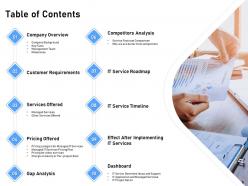
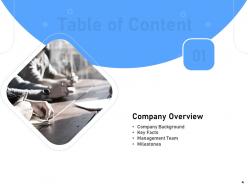
Slide 3: This slide displays Table of Contents.
Slide 4: This slide displays Table of Content.
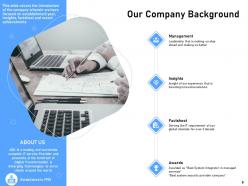
Slide 5: This slide covers the introduction of the company wherein we have focused on establishment year, insights, factsheet and recent achievements
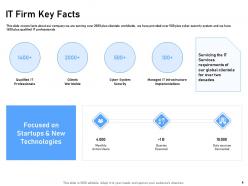
Slide 6: This slide covers facts about our company we are serving over 2000 plus clientele worldwide, we have provided over 500 plus cyber security system and we have 1400 plus qualified IT professionals
Slide 7: This slide covers the key team members of the company such as chairman, managing directors and whole-time directors
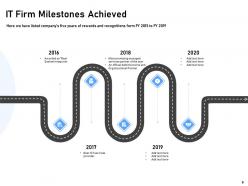
Slide 8: In this slide, we have listed company’s five years of rewards and recognitions form FY 2016 to FY 2020
Slide 9: This slide displays Table of Content.
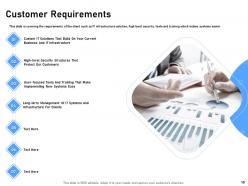
Slide 10: This slide is covering the requirements of the client such as IT infrastructure solution, high level security, tools and training which makes systems easier
Slide 11: This slide displays Table of Content.
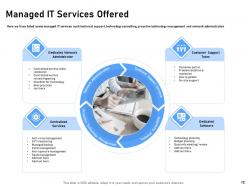
Slide 12: In this slide, we have listed some managed IT services such technical support, technology consulting, proactive technology management and network administration
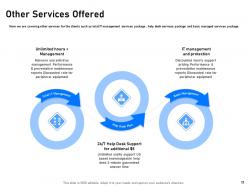
Slide 13: In this slide, we are covering other services for the clients such as total IT management services package , help desk services package and basic managed services package
Slide 14: This slide displays Table of Content.
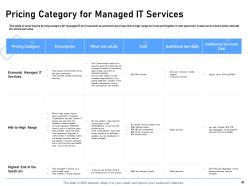
Slide 15: This slide is covering the pricing category for managed IT services such as economic services, mid to high range services and highest in cost spectrum. It also covers description and cost for all the services.
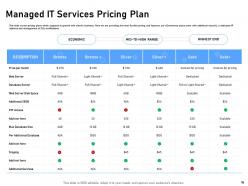
Slide 16: This slide covers pricing plans which supports to growth with client's business. Here we are providing the most flexible pricing and features, our eCommerce plans come with additional security, a dedicated IP address and management of SSL certifications.
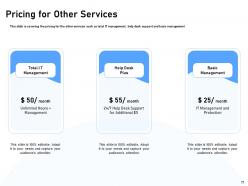
Slide 17: This slide is covering the pricing for the other services such as total IT management, help desk support and basic management
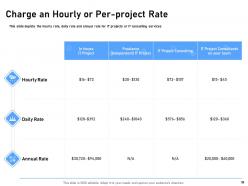
Slide 18: This slide depicts the hourly rate, daily rate and annual rate for IT projects or IT consulting services
Slide 19: This slide shows Table of Content.
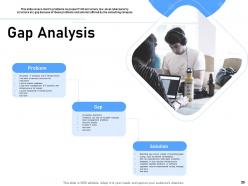
Slide 20: This slide covers client's problems no proper IT infrastructure, low-level cybersecurity structure etc. gap because of these problems and solution offered by the consulting company
Slide 21: This slide displays Table of Content.
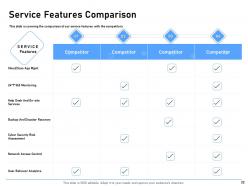
Slide 22: This slide is covering the comparison of our service features with the competitors
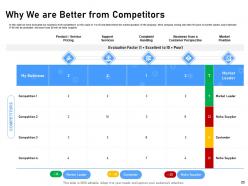
Slide 23: In this slide we have evaluated our business from competitors on the scale of 1 to 10 and determined the market position of the company. Here company having less then 10 score is market leader, score between 11-20 will be contender and more than 20 will be niche supplier
Slide 24: This slide displays Table of Content.
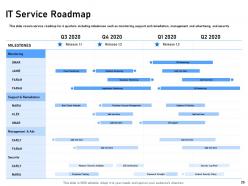
Slide 25: This slide covers service roadmap for 4 quarters including milestones such as monitoring, support and remediation, management and advertising, and security
Slide 26: This slide displays Table of Content.
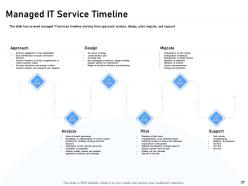
Slide 27: This slide has covered managed IT services timeline starting from approach, analyze, design, pilot, migrate, and support
Slide 28: This slide displays Table of Content.
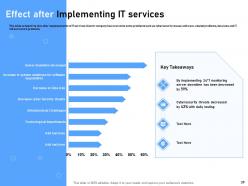
Slide 29: This slide is depicting that after implementation of IT services clients' company has overcome some problems such as cybersecurity issues, software-related problems, data loss and IT infrastructure problems
Slide 30: This slide displays Table of Content.
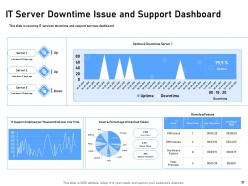
Slide 31: This slide is covering IT services downtime and support services dashboard
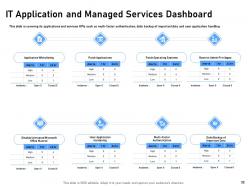
Slide 32: This slide is covering its applications and services KPIs such as multi-factor authentication, daily backup of important data and user application handling
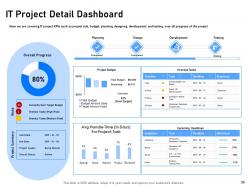
Slide 33: In this slide, we are covering IT project KPIs such as project risk, budget, planning, designing, development and testing, over all progress of the project
Slide 34: This is Managed IT Services Icons Slide.
Slide 35: This slide is titled as Additional Slides for moving forward.
Slide 36: This is About Us slide to showcase Company specifications.
Slide 37: This slide displays Our Mission, Vision and Goal.
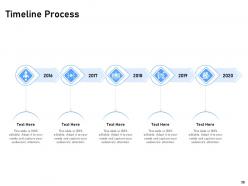
Slide 38: This slide depicts Timeline Process.
Slide 39: This is Idea Generation slide.
Slide 40: This slide is titled as Post It Notes. Post your important notes.
Slide 41: This slide shows Roadmap process.
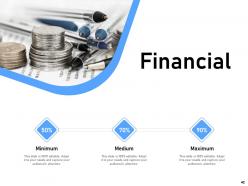
Slide 42: This is Financial slide to showcase Finance related stuff.
Slide 43: This is Thank You slide with Contact details.
Managed it services pricing powerpoint presentation slides with all 43 slides:
Use our Managed It Services Pricing Powerpoint Presentation Slides to effectively help you save your valuable time. They are readymade to fit into any presentation structure.





FAQs for Managed it services pricing
So pricing depends on a bunch of stuff - how many users you have, how complex your setup is, what kind of support you want. More devices = more expensive since they're monitoring everything. If you're in healthcare or finance, expect to pay more because of all the compliance BS. 24/7 support obviously costs more than just business hours. Location can bump up prices too depending where you are. Oh and some industries are just pickier than others. I'd get quotes from like 3 or 4 companies and actually compare what they include - don't just look at the bottom line price.
Honestly? Go with fixed pricing if you can. When providers charge a flat rate, they're way more motivated to fix stuff quickly and prevent problems - dragging things out just hurts their bottom line. You'll get way more consistent support too. Hourly billing is sketchy because - and I hate to say this - some techs might milk the clock a bit. Why rush when they're getting paid by the hour, right? Tiered pricing keeps costs predictable but you might hit those limits at the worst possible time. Just make sure whatever fixed deal you get has the scope spelled out clearly upfront, or they'll hit you with "that's extra" later.
So most contracts cover the basics - help desk, monitoring, security patches, routine maintenance stuff. Hardware swaps and software licenses? Usually separate charges. Same with big projects. Some providers are cool about on-site visits, others charge you every time (which honestly gets annoying fast). They'll exclude third-party apps they don't manage and any custom coding work. Here's the thing that trips people up - make sure you understand what counts as "emergency" support versus regular tickets. That's where the surprise bills come from, trust me.
Yeah, location is huge for IT costs - we're talking 30-50% swings depending where you are. NYC and SF will destroy your budget because of crazy labor costs and rent. Rural spots are way cheaper but you might get stuck with slower response times or less experienced techs. Offshore providers can save you serious money, though dealing with time zones gets annoying fast. I'd honestly just get quotes from a mix - local guys, regional companies, maybe some remote options. Don't just look at the cheapest price though, sometimes you get what you pay for with this stuff.
SLAs are basically what you're paying for - they spell out response times, uptime guarantees, all that stuff. Better service costs more, obviously. Like if you want 99.9% uptime with 15-minute responses vs basic 99% uptime with 4-hour waits? Yeah, you'll pay way more for the premium option. Providers have to dedicate more people and resources when they promise tighter commitments. I'd honestly look at what you actually need first though - no point shelling out for enterprise-level SLAs if you don't really need them.
Honestly, just track your IT spending for like 3 months first - salaries, licenses, hardware fixes, all that stuff. Then compare it to what you'd pay for managed services. The hard part is putting a dollar amount on things like better productivity and not having your team stressed about servers crashing at 2am (which totally happens more than you'd think). Most companies break even within 6-12 months once you factor in fewer security headaches and your people actually working on useful projects instead of putting out fires. Plus there's compliance benefits if that matters for your industry.
So you're looking at anywhere from $500-$5,000 for onboarding, depending on how big and messy your setup is. They'll charge for the initial network checkup, security stuff, moving your software over - basically getting everything configured. Honestly? Shop around because some companies will waive those fees if you sign a longer contract. Worth considering if you actually like them. The more custom weird integrations you have, the more expensive it gets obviously. Oh and definitely ask what's included upfront - I've seen people get hit with random "configuration fees" that weren't mentioned initially. Super annoying.
Yeah, cybersecurity stuff will jack up your managed IT costs by like 20-40%. Basic antivirus and firewalls usually come with the package, but then they hit you with the upsells. Advanced threat detection, 24/7 monitoring, compliance reports - it adds up quick. Most providers do this tiered thing where you're basically paying by protection level. Healthcare and finance companies get hit hardest since they need all the fancy enterprise security. Oh, and half the sales demos are just shiny features you probably don't even need. I'd figure out what actually matters for your business first.
Honestly, cloud stuff has made managed IT way cheaper and more predictable. Most companies do subscription pricing now instead of those crazy upfront costs. The best part? You can scale up or down whenever - no more guessing what you'll actually need. I'm still amazed how much easier this makes budgeting. Cloud integration lets providers work more efficiently too, so they pass savings onto you. Just make sure whoever you pick does hybrid setups. Don't get stuck with one approach only.
Most places say they review pricing once a year, but honestly? Feels like it's way more often lately. Inflation's hitting everything, plus good IT people cost a fortune right now. Your pricing will shift if your company grows, you add new tech, or they need better security tools - which seems to be constantly these days. Market competition plays into it too. Here's what I'd do: ask them upfront about their review schedule and what actually triggers price changes. That way you won't get blindsided. Also make sure they give you at least 30-60 days heads up before any increases. Trust me on that one.
Setup fees are the worst - they spring those on you along with migration costs. Then there's the whole "additional users" thing that's never explained properly upfront. Most providers will nail you with overage charges when you go past your support request limits, which is honestly such BS when you're already paying monthly. After-hours support costs extra too, plus hardware replacements and software licensing that you thought was included but... nope. Oh, and always ask what's NOT covered in your base price. Get them to spell out exactly when extra fees kick in.
Look, managed IT is totally doable on a shoestring budget if you're smart about it. Don't go crazy with the full packages right away. Just grab the basics - monitoring, security, maybe backup stuff. Way better than crossing your fingers and hoping your server doesn't die on a Friday afternoon (been there). Hunt for providers with tiered pricing or those pay-as-you-grow deals instead of locked-in enterprise contracts. You can beef things up later when you're making more money. Honestly? Start by getting quotes for whatever's driving you nuts right now.
Yeah, MSPs are totally shifting away from that old per-seat pricing - it's way more flexible now. Most do tiered packages (basic/standard/premium) which is honestly so much better for budgeting. Security stuff gets bundled into everything these days because, well, ransomware paranoia is real. They're mixing fixed monthly rates with usage add-ons too. Definitely shop around though - get 3-4 quotes since everyone's competing hard right now. Oh and don't take their first offer! There's always wiggle room on what they'll actually include. Competition's keeping things reasonable if you're willing to negotiate a bit.
Definitely shop around first - get at least 3-4 quotes before you even think about negotiating. Try bundling everything together since MSPs hate dealing with small scattered contracts. The margins in this space are honestly insane, so there's almost always wiggle room on price. Maybe look into 2-3 year deals if you can swing it - they'll usually cut you a better rate for the guaranteed business. Oh, and don't just haggle on the total amount. Pick apart individual line items too. Ask what support tier you're actually getting - you might be overpaying for white-glove service when basic support does the job fine. Get it all documented though.
Honestly, start tracking your total IT costs now vs later - including all the annoying hidden stuff like downtime and how much time your people waste fixing random tech problems. Measure things like system uptime, how fast issues get resolved, and hours your team gets back for actual work. Security incidents matter too, plus user satisfaction scores. The trick is getting baseline numbers before switching providers. Then check the same stuff in 6-12 months to see if you're actually saving money or just moving problems around. Oh, and track compliance gaps - those can bite you later.
-
Nice and innovative design.
-
Excellent Designs.
-
Graphics are very appealing to eyes.
-
Unique design & color.
-
Amazing product with appealing content and design.