

Member profile management ppt powerpoint presentation file slides





Try Before you Buy Download Free Sample Product
 Impress Your
 Audience
 100%
100% Editable
 Save Hours
 of Time


Folks feel driven to join due to our Member Profile Management Ppt Powerpoint Presentation File Slides. They get convinced your intentions are good.
People who downloaded this PowerPoint presentation also viewed the following :
Content of this Powerpoint Presentation
Description:
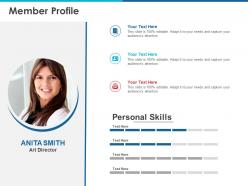
The image is a PowerPoint slide titled "Member Profile," designed for presenting an individual's professional profile. The slide features a photograph of a woman named Anita Smith, designated as an Art Director. Below the name and title, there are sections for text input, which are placeholders for additional details about Anita's profile. These sections are presumably for contact information or professional background details.
There is also a section labeled "Personal Skills," with a bar graph representation indicating the level of proficiency in various skills. This visual element is typically used to quickly convey a person's strengths in different areas. The text "Your Text Here" repeats across the slide, suggesting that the information is to be customized.
Use Cases:
This type of professional profile slide can be used across various industries for different purposes:
1. Advertising:
Use: Introducing team members in a pitch presentation.
Presenter: Team Leader
Audience: Potential clients
2. Consulting:
Use: Showcasing consultant expertise in a proposal.
Presenter: Consulting Manager
Audience: Business clients
3. Education:
Use: Highlighting the credentials of faculty or staff.
Presenter: Academic Dean
Audience: Students, academic peers
4. Healthcare:
Use: Presenting the qualifications of medical professionals.
Presenter: Hospital Administrator
Audience: Hospital staff, patients
5. Technology:
Use: Displaying the tech team's expertise in internal meetings.
Presenter: Chief Technology Officer
Audience: Internal stakeholders, investors
6. Real Estate:
Use: Profiling agents for real estate brochures or websites.
Presenter: Real Estate Broker
Audience: Home buyers, sellers
7. Legal:
Use: Detailing attorney profiles for client information packets.
Presenter: Law Firm Partner
Audience: Clients, legal interns
Member profile management ppt powerpoint presentation file slides with all 2 slides:
Folks get convinced your intentions are good due to our Member Profile Management Ppt Powerpoint Presentation File Slides. They feel driven to join.
FAQs for Member profile management ppt powerpoint
Honestly, start with what data you actually need vs. what sounds cool to collect. Four main things to nail down: accuracy, user control, security, and how it plays with your other systems. Let people update their own stuff - calling support to change a phone number is brutal in 2024. Strong authentication keeps everyone happy about sharing personal info. Oh, and make sure it syncs with billing, email platforms, event management, whatever else you're running. Clean interface is huge too. I'd audit your current setup first though - most orgs collect way more than they use.
Honestly, people just want to feel seen. Let them customize their dashboard however they want. Recommend stuff based on what they're actually doing on the platform. You know how your coffee shop remembers your usual order? Same energy here. Profile data helps you connect members with similar interests too - that's where the magic happens. Oh, and don't be sketchy about their data. Nobody likes feeling stalked. Just be upfront about what you're doing with their info and they'll trust you way more.
Okay so three main things to nail down: data minimization, access controls, and encryption. Don't collect more member info than you actually need - I know it's super tempting to grab everything but it'll bite you later. Role-based permissions are clutch so your staff can't see stuff they shouldn't. Encrypt the sensitive data when it's stored and moving around. Oh and seriously, set up a data retention policy that actually deletes old member profiles automatically. Most places just hoard everything forever which is honestly pretty stupid from a security standpoint. Regular audits help too.
So basically, you can set up AI to automatically tag member profiles by looking at how they behave and what they're into. It'll catch patterns you'd totally miss - like spotting who's about to cancel or upgrade. The ML stuff also figures out what content each person wants to see, which honestly saves you from doing all that manual segmentation work. Oh, and it handles the boring stuff too like merging duplicate accounts and filling gaps in member data. I'd probably start with just the automated tagging though. Get that working smoothly first, then add more features once you're confident it's not screwing anything up.
Honestly, user feedback is like having a crystal ball for your member profiles. People will straight up tell you what info they actually care about and what's just clutter. Super helpful. Pay attention when they complain about confusing signup fields or weird categories that don't make sense. That stuff matters more than you'd think. The feedback shows you which profile sections help people connect and which ones everyone ignores. Just throw a simple feedback box on profile pages. Actually read the responses though - don't just collect them and forget about it. Members basically give you a roadmap for fixing what's broken.
Honestly, start with defaults that work for like 80% of people - don't make everyone configure everything upfront. Netflix does this well with profiles. Basic setup first, then if someone wants to tweak stuff they can click "advanced" or whatever. I'd probably do role-based templates too since different users need different things. Show the simple options right away, but tuck the nerdy settings behind another click. That way casual users aren't overwhelmed but power users can still go crazy customizing. It's all about not forcing choices on people who just want it to work.
Honestly, the worst thing you can do is dump a million fields on someone right away. I've watched people literally close tabs when they can't find basic stuff like turning off those annoying email notifications - it's buried three menus deep and they just bail. Don't make every field required upfront either. Let people fill things out over time. Group similar settings together so it actually makes sense. Oh, and figure out what your users do most often (like 3-5 main things) and make those super obvious. Everything else can wait.
So member profile analytics are pretty clutch for figuring out who your audience actually is. You can spot patterns in how different groups behave and what they're into. Say you notice your 25-35 crowd is always on mobile - boom, make mobile-first campaigns just for them. The cool part is seeing which content hits different for each segment, plus when to reach out and what channels actually convert. Honestly once you get the hang of it, you'll wonder how you managed without it. My advice? Pick one segment first and test it against your usual spray-and-pray approach.
Definitely go with multi-layered security first. Strong encryption for stored data and anything moving around, plus role-based access so only the right people see member info. Two-factor auth is absolutely essential for admin accounts - I can't tell you how many horror stories I've heard that could've been avoided with just that. Set up audit logs too so you'll know who looked at what and when. Oh, and don't forget regular security checks to catch problems early. PCI compliance might apply depending on your setup. Bottom line? Treat their data like your own personal stuff because that's exactly what they're trusting you to do.
Profile data is honestly a game-changer for making real connections happen. Like if you know Sarah's big into data science and Mike wants to switch careers, you can introduce them instead of everyone just awkwardly mingling. Plus you'll spot weird gaps - I've seen communities where tons of members work remotely but nobody talks about productivity tips or anything. You can send better targeted messages too. Oh, and find your super active members who'd probably love being community champions. Just don't be one of those people who collects all this info then never actually does anything with it.
Honestly, mobile accessibility can make or break your member profiles. Most people live on their phones now, so if your forms are a pain to use, they'll just skip updating anything. Think about it - when someone gets a new job or moves, they're probably checking that stuff on mobile anyway. Clunky interfaces mean your database gets stale fast. People get frustrated and stop engaging altogether. Focus on thumb-friendly buttons and keep those forms simple. Otherwise you'll end up with outdated info and members who don't bother participating. It's really that straightforward.
Honestly, just add social login first - nobody wants another password to remember. LinkedIn and Facebook can auto-fill names, photos, job titles so people don't have to type everything. Then let members share their wins, certifications, events on social media (free publicity for you). But make it optional! Some people hate mixing work and personal stuff online, which I totally get. Short sentences work better than long ones here. Focus on features that actually help members instead of just hoarding their data. The goal is removing friction, not creating a surveillance system lol.
Honestly, AI personalization is the biggest thing happening right now. These systems just automatically update member profiles based on what people actually do and like. GDPR and privacy stuff is making everyone way better about consent and being transparent with data - which is good! Most people are on their phones anyway, so mobile-first design isn't optional anymore. Real-time syncing across platforms should've been a thing ages ago but whatever, it's finally standard now. Members want to manage their own profiles without having to call anyone. You should probably check out your current system and see where you can automate more stuff and give people more control.
Yeah, age makes a huge difference here. Younger people want tons of privacy controls and ways to customize everything, but older users? They just want it simple and clean. Higher income folks expect premium features too - makes sense. Geography's actually pretty important. Different cultures have totally different comfort levels about sharing personal stuff online. I learned this the hard way when we launched in Europe first. Bottom line: you gotta let people set things up however they want. One-size-fits-all profiles are basically useless since everyone's needs are so different.
Honestly, just set up reminders every 6 months for people to update their stuff. But don't make them fill out everything again - that's brutal. Quick 2-minute form asking what's changed. Works best when you tie it into things they're already doing, like renewing memberships or signing up for events. Oh, and definitely ping them after big life changes like new jobs or moving. The trick is making it feel worth their time instead of just busy work for your database. People hate feeling like they're doing admin tasks for free, you know?
No Reviews