

Modernizing Production Through Robotic Process Automation Powerpoint Presentation Slides




Try Before you Buy Download Free Sample Product
 Impress Your
 Audience
 100%
100% Editable
 Save Hours
 of Time


Manufacturing automation is the development process of mechanized production in which manual control and monitoring of tasks are transferred to instruments and automated technologies. Its purpose is to optimize labor efficiency and manufacture product quality by optimally utilizing automated resources. Therefore, our team has crafted this Modernizing Production through Robotic Process Automation PPT to provide detailed insight into the manufacturing automation industry. The PPT slides provide a comparative assessment of production costs within the industry along with its major trends, statistics, and gap analysis. Also, the PPT deck highlights numerous automated technologies, benefits, and framework deployment for manufacturing automation. Additionally, this PowerPoint provides access to an automatic manufacturing process implementation timeline. Moreover, it includes multiple strategies for improving and mechanizing manufacturing processes such as workflow automation, enterprise resource planner ERP, industrial IoT, Robotic process automation, computer-aided engineering CAD, artificial intelligence AI, visual inspection system, and procurement automation. Furthermore, this deck includes members, the training program, and the RACI matrix of the automated manufacturing process team. The complete deck also contains the overall budget, ERP software selection, and automated systems costs calculation implementing and managing production automation. Lastly, it provides KPI dashboards, monthly performance reports, and impact analysis to measure the effectiveness of automation on the manufacturing process. Get access now.
People who downloaded this PowerPoint presentation also viewed the following :
Content of this Powerpoint Presentation
Slide 1: This slide displays the title Modernizing Production through Robotic Process Automation.
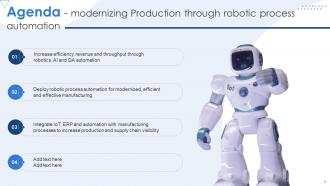
Slide 2: This slide displays the title Agenda - modernizing Production through robotic process automation.
Slide 3: This slide exhibit table of content.
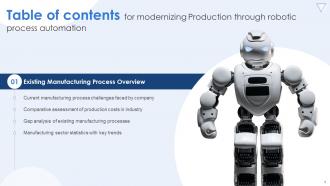
Slide 4: This slide exhibit table of content- Existing Manufacturing Process Overview.
Slide 5: The following slide showcases existing manufacturing procedure challenges incurred on company.
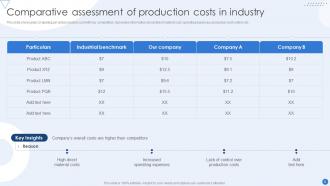
Slide 6: This slide showcases comparing per unit production cost with key competitors.
Slide 7: The following slide showcases gap analysis of existing manufacturing processes.
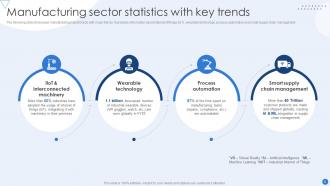
Slide 8: The following slide showcases manufacturing industry facts with major trends.
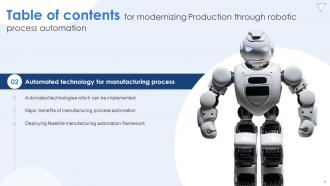
Slide 9: This slide exhibit table of content- Automated technology for manufacturing process
Slide 10: This slide illustrates automatic technologies which can be deployed in project management.
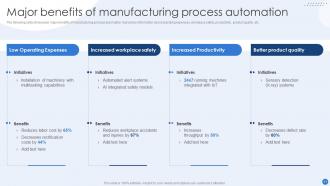
Slide 11: The following slide showcases major benefits of manufacturing process automation.
Slide 12: This slide illustrates deploying feasible manufacturing automation framework.
Slide 13: This slide exhibit table of content: Timeline – Implementing automation in current manufacturing process
Slide 14: This slide showcases automation implementation timeline for automating existing production process.
Slide 15: This slide exhibit table of content- Ways to improve manufacturing processes through automation.
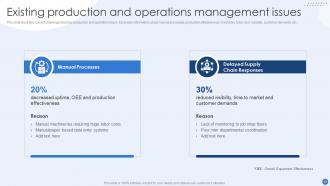
Slide 16: This slide illustrates current challenges faced by production and operations team.
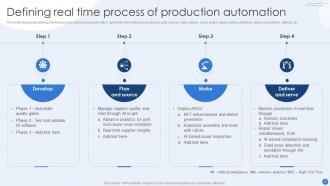
Slide 17: This slide showcases defining real time process of production automation.
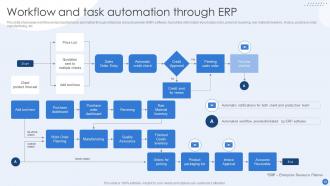
Slide 18: This slide showcases workflow and production tasks automation through enterprise resource planner (ERP) software.
Slide 19: This slide showcases impact of automation on production and operations.
Slide 20: This slide exhibit table of content- Improving manufacturing processes through automated IoT.
Slide 21: This slide showcases challenges faced before implementing internet of things (IoT).
Slide 22: The following slide depicts automated industrial internet of things (IIOT) for enhanced efficiency.
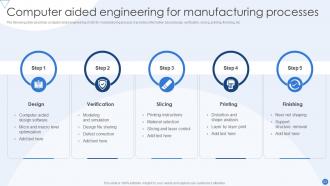
Slide 23: The following slide describes computer aided engineering (CAE) for manufacturing process.
Slide 24: This slide demonstrates usage of artificial intelligence for predictive maintenance of production processes.
Slide 25: This slide showcases impact of executing internet of things (IoT) in manufacturing process.
Slide 26: This slide exhibit table of content- Quality management
Slide 27: This slide illustrates present scenario of quality assurance in manufacturing.
Slide 28: This slide represents data integrated system for manufacturing quality control.
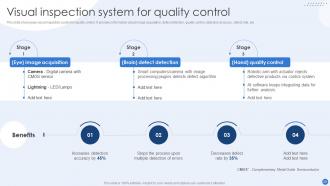
Slide 29: This slide showcases visual inspection system for quality control.
Slide 30: This slide shows a diagrammatical representation of visual quality control inspection system.
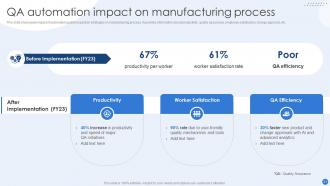
Slide 31: This slide showcases impact of automated quality inspection strategies on manufacturing process.
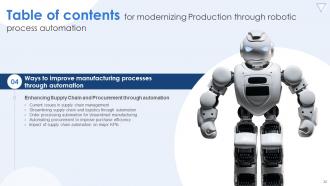
Slide 32: This slide exhibit table of content- Enhancing Supply Chain and Procurement through automation.
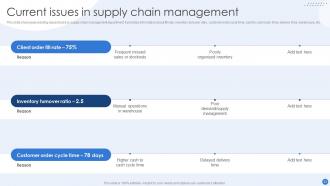
Slide 33: This slide showcases existing issues faced by supply chain management department.
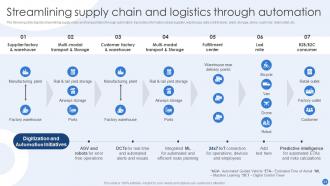
Slide 34: The following slide depicts streamlining supply chain and transportation through automation.
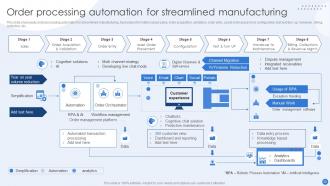
Slide 35: This slide showcases order processing automation for streamlined manufacturing.
Slide 36: The following slide describes automating procurement to enhance purchase efficiency.
Slide 37: This slide showcases impact of supply chain automation on key performance indicators (KPIs).
Slide 38: This slide exhibit table of content- Automated manufacturing process team.
Slide 39: This slide highlights manufacturing department team members.
Slide 40: This slide illustrates RACI matrix with major responsibilities.
Slide 41: This slide illustrates manufacturing workers training for adopting automation.
Slide 42: This slide exhibit table of content- Overall costs involved in automating manufacturing process.
Slide 43: This slide showcases budget for bringing automation in manufacturing process.
Slide 44: This slide illustrates choosing feasible enterprise resource planner (ERP) software for production procedures.
Slide 45: This slide showcases measuring expenses of automatic systems for production process.
Slide 46: This slide exhibit table of content- Analyzing overall impact of automation on manufacturing process.
Slide 47: This slide shows positive impact after deployment of automation in manufacturing process.
Slide 48: This slide showcases Annual budget analysis of manufacturing department .
Slide 49: This slide exhibit table of content- Dashboard.
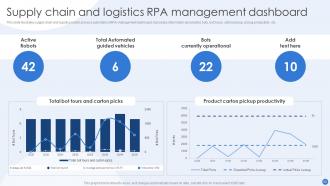
Slide 50: This slide illustrates supply chain and logistics robotic process automation (RPA) management dashboard.
Slide 51: This slide showcases production process performance management dashboard.
Slide 52: This is the icons slide.
Slide 53: This slide presents title for additional slides.
Slide 54: This slide shows details of team members like name, designation, etc.
Slide 55: This slide depicts 30-60-90 days plan for projects.
Slide 56: This slide display title About us
Slide 57: This slide depicts posts for past experiences of clients.
Slide 58: This is thank you slide & contains contact details of company like office address, phone no., etc.
Modernizing Production Through Robotic Process Automation Powerpoint Presentation Slides with all 63 slides:
Use our Modernizing Production Through Robotic Process Automation Powerpoint Presentation Slides to effectively help you save your valuable time. They are readymade to fit into any presentation structure.
























FAQs for Modernizing Production Through Robotic Process Automation
Honestly, RPA is pretty solid - you'll cut costs and speed things up big time. Bots don't make typos like we do, and they work around the clock without complaining about overtime. Your team gets to ditch the boring stuff like data entry and actually do interesting work for once. During busy seasons? Just spin up more bots instead of scrambling to hire temps. Most companies I've seen get their money back in like 6-12 months, which isn't bad at all. Oh, and start with your most repetitive processes first - the ones where people are basically human copy-paste machines.
So basically RPA just copies whatever you'd normally click and type - no fancy coding needed. Traditional automation? That's a whole different beast where developers have to build APIs and mess with databases for months. I swear RPA feels like magic sometimes - you can set it up in a few weeks without breaking anything. It literally watches your screen movements and repeats them (which honestly sounds dystopian but whatever). Look at your most boring daily tasks first. Those repetitive things you do on autopilot? Perfect candidates. Way easier than I thought it'd be.
Start with the stuff your team hates doing - repetitive tasks like data entry, invoice processing, or onboarding paperwork. High volume is key. Does it follow the same steps every single time? Perfect RPA material right there. Skip anything creative or messy though - unstructured data will just frustrate you. I'd honestly just walk around and listen for complaints about boring, manual work first. Then map out your biggest time-wasters and rank them by how often they happen vs. how complex they are. The sweet spot? Tasks that make people want to bang their heads against their desks.
Banks and healthcare are crushing it with RPA right now. Loan processing, compliance stuff, patient data - they're automating tons of it. Insurance is huge too since they're drowning in paperwork anyway. Manufacturing's doing inventory bots, retail's got order processing covered. Honestly, I went down a rabbit hole reading about this last week - the numbers are wild. Healthcare claims processing alone is saving companies like millions. If you're thinking about jumping in, I'd scope out what competitors in these industries are actually doing. Don't sleep on it though - everyone's moving fast here.
Honestly, RPA is pretty slick with integration - it just sits on top of whatever systems you already have. Works through the same interfaces your team uses every day. Clicks buttons, fills out forms, reads screens, moves data around. You won't need to tear out existing software or do some massive IT project (thank god). Most tools can tap into APIs when you need that deeper connection too. I'd start by looking at your most repetitive tasks that jump between different systems - those usually work best for this kind of automation.
Honestly, most people mess up by picking terrible processes to automate first. Don't touch anything messy or full of exceptions - I've watched teams burn months on that stuff. Go for high-volume, rule-based tasks that are already documented well. The tech side? Pretty straightforward actually. What kills projects is employees freaking out about being replaced, plus IT getting all paranoid about security. Oh, and executives who bail halfway through. Start with something small, talk to people constantly about how this frees them up for better work, and get your boss's boss on board before you even begin.
Yeah, RPA can definitely scale up well if you're smart about it. Start with a center of excellence - sounds fancy but basically just means having one team standardize how everyone builds and manages bots. Focus on high-volume, repetitive stuff first since that's where you'll see the biggest wins. Cloud platforms are honestly a game-changer here because you can spin up tons of bots without worrying about servers and all that headache. Just don't go crazy right away - managing 5 bots is way different than managing 200. The monitoring gets intense. Prove it works on a small scale first, then gradually expand from there.
So RPA bots are great but they're pretty dumb - they just follow scripts. Add AI though? Game changer. Now your bot can actually read messy documents and make real decisions. Like with emails - instead of blindly shuffling them around, it reads the content and knows where stuff should go. Pretty cool combo honestly, you get RPA's rock-solid reliability but with AI's smarts to handle curveballs. I'd say start small though. Find one process that's stuck because of messy data and try adding AI there first.
Track the obvious stuff first - time saved, costs cut, fewer errors. ROI calculation is straightforward: implementation costs vs annual savings. Most companies hit 20-40% ROI in year one, which honestly isn't bad. Don't skip the softer wins though - like how much happier your team is not doing mindless data entry anymore. Process accuracy and compliance improvements matter too. I'd set up monthly dashboards to show leadership the real impact. Oh, and track scalability - you'll want to know which bots are actually worth expanding. Makes it way easier to justify the next automation project.
Honestly, RPA's more about understanding business processes than hardcore coding. Sure, knowing Python or Java helps, but most tools like UiPath are pretty visual - lots of drag-and-drop stuff. The real skill is figuring out which workflows actually make sense to automate. You can't just throw robots at everything, right? Communication's probably the biggest thing since you'll be dealing with people who think automation means they're getting fired. Business sense matters too - you're solving actual problems, not just playing with code. I'd start with getting certified in one platform and go from there.
Honestly, most companies see jobs change rather than disappear completely when they bring in RPA. The bots take over the boring, repetitive stuff - which is actually pretty nice for employees. People end up doing more interesting work like analyzing data, building client relationships, or figuring out how to improve processes. Sure, some roles might get cut, but that's where upskilling comes in. Smart companies retrain their people to manage the automation or move into bigger responsibilities. My advice? Don't wait. Talk to your team now about what they want to learn. Makes everything way less stressful when changes actually happen.
First thing - never hardcode passwords, always use secure vaults for your bot credentials. RPA bots basically have the same access as regular users, which honestly scares me a bit. Do an audit of your current bot permissions - I bet half of them have way more access than they actually need. Log everything your bots do for compliance stuff. Encrypt sensitive data they touch, and keep your platform updated with security patches. Also, set up proper access controls from the start. Way easier than fixing it later when you've got dozens of bots running around.
So basically, RPA platforms track everything your bots do - like audit trails, user permissions, detailed logs of each action. Map out your compliance stuff first though, before you deploy anything. Your bots need to follow the same rules as people would - data privacy, SOX, whatever applies to your industry. UiPath and Automation Anywhere have modules that document processes automatically. But here's the thing - you can't just launch and walk away. Regular reviews are crucial, plus monitoring how your bots behave. Honestly, the documentation side is pretty solid once it's set up properly.
So RPA is huge for small businesses right now. Invoice processing alone cuts manual work by like 70% - pretty insane numbers. Customer onboarding gets way smoother when bots handle all that data entry stuff. HR teams are obsessed with it for payroll and getting new hires set up. Inventory management might be the sweet spot though. Bots just sync stock levels across everything without you babysitting them. Manufacturing companies use it for orders and scheduling too, even the smaller ones. My advice? Pick whatever process makes your team want to pull their hair out. Run a quick 30-day test, then scale up if it works.
From day one, build monitoring right into your RPA setup. Performance dashboards are actually pretty cool once you see the data coming in - track processing time, error rates, throughput, all that stuff. Monthly reviews with business users will save you headaches later. Process changes love to break bots when you're not looking, so keep an eye out. Oh, and don't treat this like a one-and-done project. Pick your top 2-3 processes first. Review them monthly and you'll catch issues before they blow up.
-
Definitely a time saver! Predesigned and easy-to-use templates just helped me put together an amazing presentation.
-
The templates you provide are great! They have saved me tons of time and made my presentations come alive. Thank you for this awesome product. Keep up the good work!