

Natural Language AI Powerpoint Presentation Slides





Try Before you Buy Download Free Sample Product
 Impress Your
 Audience
 100%
100% Editable
 Save Hours
 of Time


Natural language processing NLP is a field of computer science notably, a branch of AI concerning the capacity of computers to interpret text and spoken words in the same manner that humans can. Check out our competently designed Natural Language AI template that gives a brief idea about the current business problems such as spam emails, and unstructured data, and the benefits of NLP in eliminating these issues. In this PowerPoint Presentation, we have covered the overview of natural language processing, including various approaches, techniques, tools, and works. In addition, this template contains components, phases, architecture, and its challenges and difficulty with computers. Furthermore, this template includes natural language processing with other technologies such as log mining, text mining, and a difference between classical and deep learning-based NLP. Moreover, this PPT caters to the implementation of NLP in its application in various sectors such as business, healthcare, web mining, etc. Lastly, this deck comprises the impacts of NLP implementation on business, a 30-60-90 days plan for NLP implementation, and a roadmap. Download this 100 percent editable template and customize it based on your needs now.
People who downloaded this PowerPoint presentation also viewed the following :
Content of this Powerpoint Presentation
Slide 1: This slide displays the title Natural Language AI.
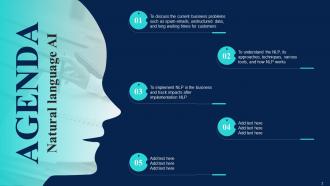
Slide 2: This slide displays the title AGENDA.
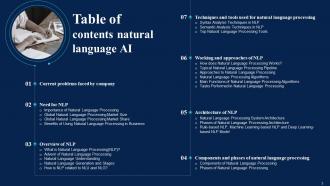
Slide 3: This slide exhibit table of content.
Slide 4: This slide exhibit table of content.
Slide 5: This slide exhibit table of content- Current Problems Faced by Company.
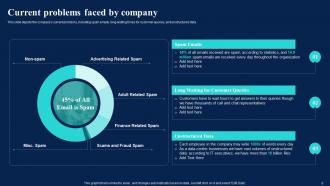
Slide 6: This slide depicts the company's current problems, including spam emails, long waiting times for customer queries, and unstructured data.
Slide 7: This slide exhibit table of content- Need for NLP.
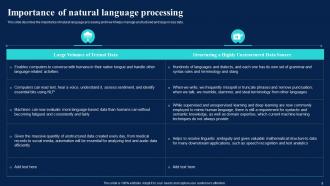
Slide 8: This slide describes the importance of natural language processing and how it helps manage unstructured and large in size data.
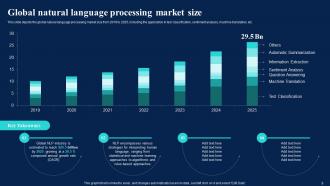
Slide 9: This slide depicts the global natural language processing market size from 2019 to 2025.
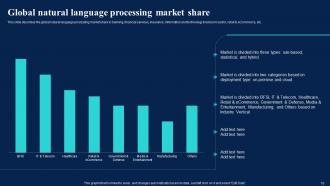
Slide 10: This slide describes the global natural language processing market share.
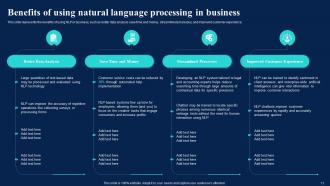
Slide 11: This slide represents the benefits of using NLP in business.
Slide 12: This slide exhibit table of content- Overview of NLP.
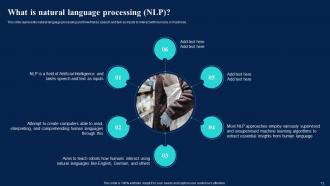
Slide 13: This slide represents natural language processing and how it takes speech and text as inputs to interact with humans or machines.
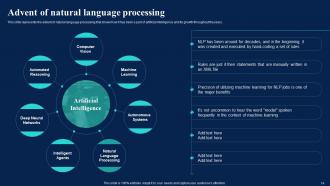
Slide 14: This slide represents the advent of natural language processing that shows how it has been a part of artificial intelligence and its growth throughout the years.
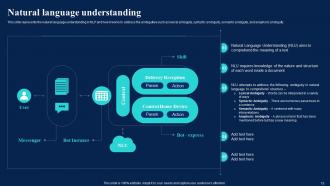
Slide 15: This slide represents the natural language understanding in NLP and how it works to address the ambiguities.
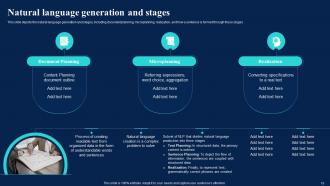
Slide 16: This slide depicts the natural language generation and stages.
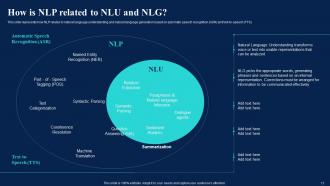
Slide 17: This slide represents how NLP relates to natural language understanding and natural language generation.
Slide 18: This slide exhibit table of content- Components and Phases of Natural Language Processing.
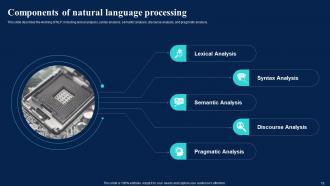
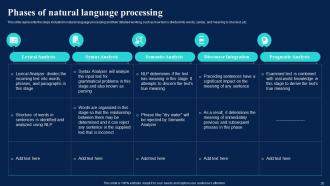
Slide 19: This slide describes the working of NLP, including lexical analysis, syntax analysis, semantic analysis, discourse analysis, and pragmatic analysis.
Slide 20: This slide represents the steps included in natural language processing and their detailed working.
Slide 21: This slide exhibit table of content- Architecture of NLP
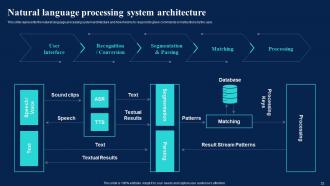
Slide 22: This slide represents the natural language processing system architecture and how it works to respond to given commands or instructions by the user.
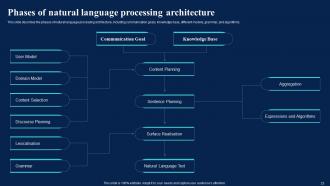
Slide 23: This slide describes the phases of natural language processing architecture.
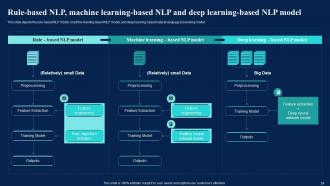
Slide 24: This slide depicts the rule-based NLP model, machine learning-based NLP model, and deep learning-based natural language processing model.
Slide 25: This slide exhibit table of content- Working and Approaches of NLP.
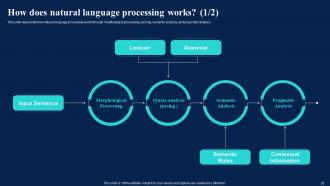
Slide 26: This slide represents how natural language processing works through morphological processing, parsing, semantic analysis, and pragmatic analysis.
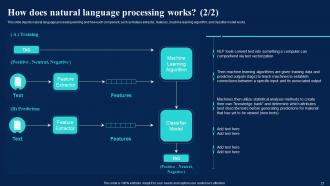
Slide 27: This slide depicts natural language processing working and how each component.
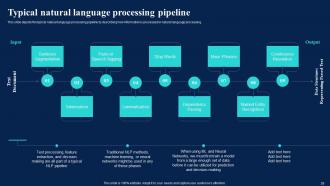
Slide 28: This slide depicts the typical natural language processing pipeline by describing how information is processed in natural language processing.
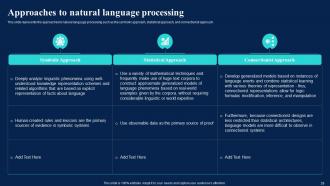
Slide 29: This slide represents the approaches to natural language processing such as the symbolic approach, statistical approach, and connectionist approach.
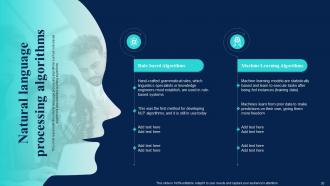
Slide 30: This slide represents the natural language processing algorithms such as rule-based algorithms and machine learning algorithms.
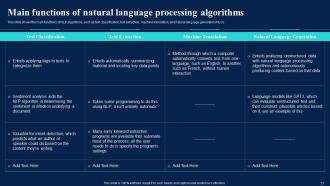
Slide 31: This slide shows the main functions of NLP algorithms, such as text classification, text extraction, machine translation, and natural language generation (NLG).
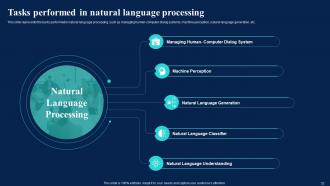
Slide 32: This slide represents the tasks performed in natural language processing.
Slide 33: This slide exhibit table of content- Techniques and Tools used for Natural Language Processing
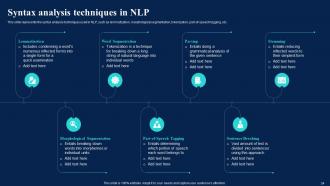
Slide 34: This slide represents the syntax analysis techniques used in NLP, such as lemmatization, morphological segmentation, tokenization, part-of-speech tagging, etc.
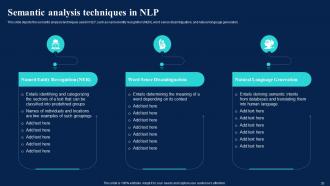
Slide 35: This slide depicts the semantic analysis techniques used in NLP.
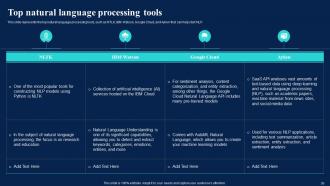
Slide 36: This slide represents the top natural language processing tools.
Slide 37: This slide exhibit table of content- Challenges and Computer Difficulty of NLP.
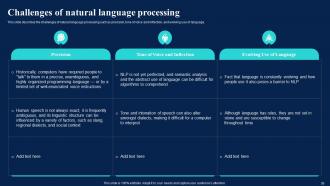
Slide 38: This slide describes the challenges of natural language processing such as precision, tone of voice and inflection, and evolving use of language.
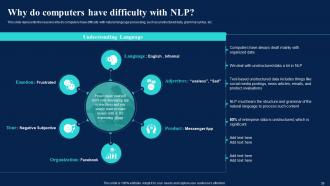
Slide 39: This slide represents the reasons why do computers have difficulty with natural language processing, such as unstructured data, grammar syntax, etc.
Slide 40: This slide exhibit table of content- NLP with Other Technologies
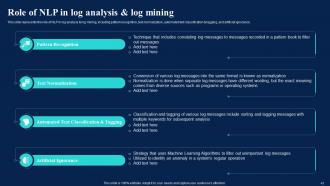
Slide 41: This slide represents the role of NLP in log analysis & log mining.
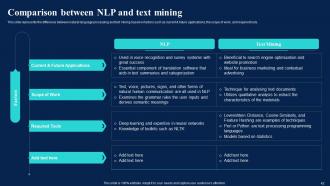
Slide 42: This slide represents the difference between natural language processing and text mining based on factors.
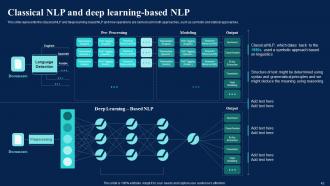
Slide 43: This slide represents the classical NLP and deep learning-based NLP and how operations are carried out in both approaches.
Slide 44: This slide exhibit table of content- Implementation and Use Cases of NLP
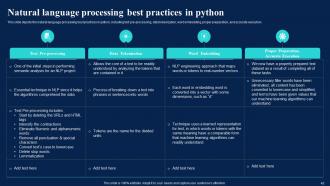
Slide 45: This slide depicts the natural language processing best practices in python.
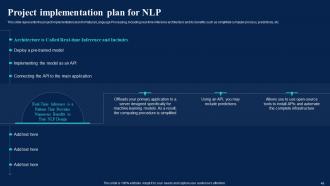
Slide 46: This slide represents the project implementation plan for Natural Language Processing.
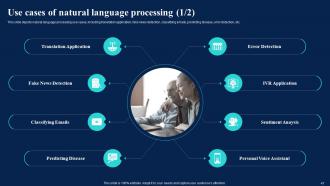
Slide 47: This slide depicts natural language processing use cases.
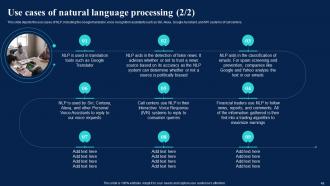
Slide 48: This slide depicts the use cases of NLP.
Slide 49: This slide depicts the training program for employees, including departments, employee names, schedule of training, and modules to be covered during the training.
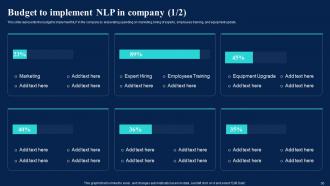
Slide 50: This slide represents the budget to implement NLP in the company.
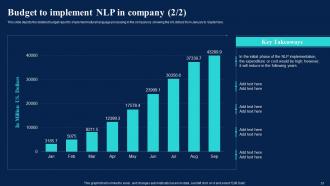
Slide 51: This slide depicts the detailed budget report to implement natural language processing in the company by showing the US dollars from January to September.
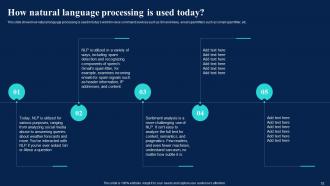
Slide 52: This slide shows how natural language processing is used in today’s world in voice command services.
Slide 53: This slide exhibit table of content- Applications of NLP.
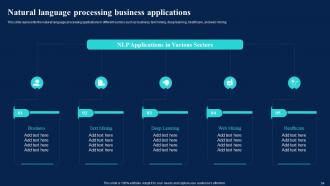
Slide 54: This slide represents the natural language processing applications in different sectors such as business, text mining, deep learning, healthcare, and web mining.
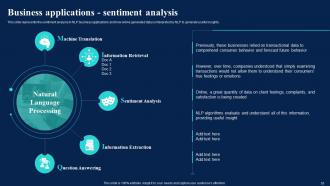
Slide 55: This slide represents the sentiment analysis in NLP business applications and how online generated data is interpreted by NLP to generate useful insights.
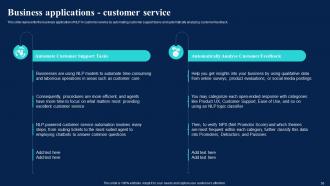
Slide 56: This slide represents the business application of NLP in customer service by automating customer support tasks and automatically analyzing customer feedback.
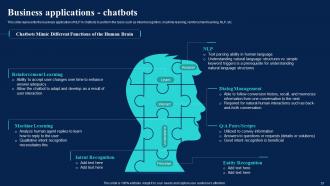
Slide 57: This slide represents the business application of NLP in chatbots to perform the tasks.
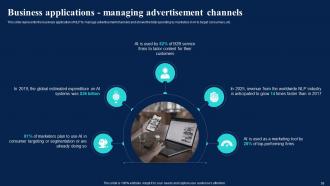
Slide 58: This slide represents the business application of NLP to manage advertisement channels and shows the total spending by marketers in AI to target consumers, etc.
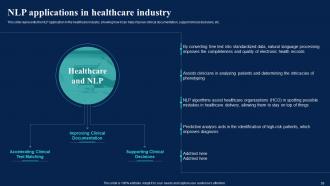
Slide 59: This slide represents the NLP application in the healthcare industry, showing how it can help improve clinical documentation, support clinical decisions, etc.
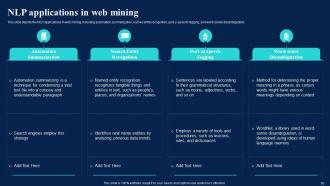
Slide 60: This slide depicts the NLP applications in web mining.
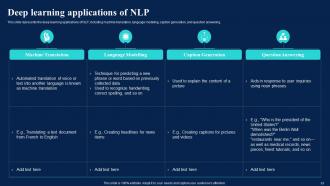
Slide 61: This slide represents the deep learning applications of NLP, including machine translation, language modeling, caption generation, and question answering.
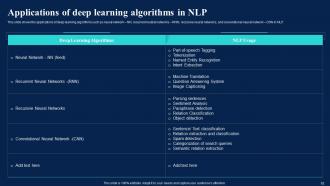
Slide 62: This slide shows the applications of deep learning algorithms.
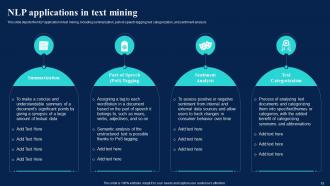
Slide 63: This slide depicts the NLP application in text mining, including summarization, part-of-speech tagging, text categorization, and sentiment analysis
Slide 64: This slide exhibit table of content- Impact of Natural Language Processing Implementation.
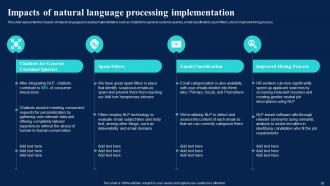
Slide 65: This slide represents the impacts of natural language processing implementation.
Slide 66: This slide exhibit table of content- 30-60-90 Days Plan for Implementing NLP in Company.
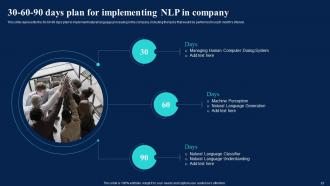
Slide 67: This slide represents the 30-60-90 days plan to implement natural language processing in the company.
Slide 68: This slide exhibit table of content- Roadmap to Implement NLP in Company.
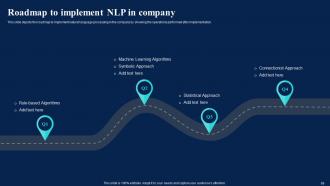
Slide 69: This slide depicts the roadmap to implement natural language processing in the company by showing the operations performed after implementation.
Slide 70: This is the icons slide.
Slide 71: This slide presents title for additional slides.
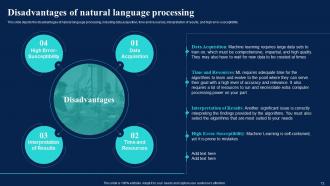
Slide 72: This slide depicts the disadvantages of natural language processing.
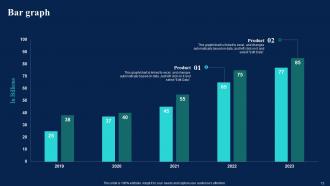
Slide 73: This slide displays yearly bar graph for different products.
Slide 74: This slide display Our goal.
Slide 75: This slide shows puzzle for displaying elements of company.
Slide 76: This slide exhibit Timeline.
Slide 77: This slide display Venn diagram.
Slide 78: This slide depicts posts for past experiences of clients.
Slide 79: This slide exhibits ideas generated.
Slide 80: This is thank you slide & contains contact details of company like office address, phone no., etc.
Natural Language AI Powerpoint Presentation Slides with all 85 slides:
Use our Natural Language AI Powerpoint Presentation Slides to effectively help you save your valuable time. They are readymade to fit into any presentation structure.









FAQs for Natural Language AI
So there's tokenization - basically chopping text into words/phrases. Then you've got part-of-speech tagging, named entity recognition, and syntactic parsing. Sentiment analysis figures out emotions, semantic analysis handles meaning. Sounds scary but it's really not once you mess around with it. Oh, and modern NLP has ML models doing translation, summarization, all that stuff. I always forget how much is packed in there. Start with spaCy or NLTK if you want to actually see this stuff work - way better than just reading about it.
So basically, regular programming is all about clear rules - if this happens, do that. But human language? Total chaos. People say the same thing a million different ways, which makes coding for it a nightmare honestly. You can't just write "if user says X, do Y" because language doesn't work like that. NLP flips the whole approach - instead of hard rules, it uses stats and machine learning to spot patterns in tons of text data. The key shift is thinking in probabilities rather than exact outcomes. Way messier but that's how you handle something as unpredictable as how people actually talk.
Honestly, sarcasm will be your biggest pain point - like when someone says "Oh great, another meeting" but actually means they're annoyed. Context matters so much too. Then you've got negations flipping everything around, plus cultural stuff that varies by region. Finance language is totally different from social media posts, which makes it even trickier. And here's the thing - sentiment is super subjective anyway. What I think is positive might just seem meh to you. I'd start small with one specific domain and really focus on getting your training data right for those patterns first.
So NLP is actually crazy good now for customer service stuff. Basic chatbots can handle your FAQs without just doing dumb keyword matching - they actually get what people are asking. Sentiment analysis is clutch too, automatically flagging pissed off customers so you can jump on those first. Oh, and it pulls info straight from emails into your CRM, which honestly saves tons of manual work. I'd start with a simple FAQ bot since that's low-hanging fruit, then add the sentiment stuff once you see how much time it saves. The ROI is pretty solid if you do it right.
Honestly, ML is pretty much running the whole NLP show these days. You know how Google Translate doesn't suck anymore? That's deep learning doing its thing with huge text datasets. Way better than the old days when people had to manually code every grammar rule - what a pain that must've been. These algorithms just learn from examples and figure out context, sentiment, all that stuff. They can even write text that sounds weirdly human. Oh, and if you're building something with NLP, definitely check out pre-trained models like BERT or GPT first. Saves you tons of time.
Ugh, consent is the big one - people don't realize their texts can reveal health stuff or political leanings they never meant to share. Plus these systems are total black boxes, so users have no clue what's happening to their data. Honestly, the whole field moves so fast that privacy protections feel like an afterthought sometimes. You'll want clear opt-ins and regular audits. Give people actual control over what gets stored and analyzed. Oh, and transparency about how the algorithms work - though good luck making that user-friendly.
So NLP basically uses different models for each language since they all have weird quirks. Like Chinese doesn't use spaces between words, which is honestly kind of a nightmare for tokenization. Then you've got languages with crazy grammar rules that need special preprocessing. Dialects though? That's where things get messy - most systems just can't handle regional stuff or slang well. I'd start with something like mBERT or XLM-R since they're already trained on tons of languages. If you need dialect-specific stuff, you'll have to fine-tune with local data, assuming you can actually find good datasets.
Honestly, just go with a pre-trained transformer like BERT or GPT - they'll handle most stuff you throw at them. RNNs and LSTMs are solid too, though transformers kinda stole their thunder. For quick and dirty classification, Naive Bayes still rocks. CNNs work surprisingly well on text (weird, right?). TF-IDF and Word2Vec are your go-to for traditional preprocessing. SVMs are great when you don't want to overcomplicate things - sometimes simple wins. Really comes down to your data size and what you're trying to do though.
So NLP can actually do some pretty cool stuff for content creation. Start by analyzing your social media comments and reviews - you'll spot trending topics and see what language hits with your audience. The data insights are honestly crazy good once you dig in. You can also generate different versions of posts, tweak headlines for better SEO, and personalize messages for different customer groups. Oh, and it scales way better than doing everything manually. My advice? Don't overthink it at first. Just pick one of your best-performing posts and run it through an NLP tool to see what patterns pop up.
So rule-based NLP is when you manually code in grammar rules and patterns - like old-school grammar checkers. Statistical methods just learn from tons of data instead. Rule-based stuff is super predictable since you wrote the rules, so debugging's easier. But statistical approaches (transformers and all that) handle real messy language way better. They're basically black boxes though - good luck figuring out why they made some weird decision. Honestly, most people go statistical now unless you're in finance or healthcare where you need to explain every choice. Performance usually beats explainability these days.
So basically, search engines got way smarter about understanding what you actually mean instead of just looking for exact keywords. Like if you search "best pizza nearby," it'll find places even if their website says "top Italian food in your area" or whatever. Pretty cool how it handles typos too - saves me constantly since I type like I'm wearing mittens. They call it semantic search now, which sounds fancy but just means it gets context and relationships between ideas. Oh, and this is why you don't need to stuff keywords anymore. Just write normally and search engines will figure it out.
Honestly, NLP is a game changer for transcription stuff. You can use automatic speech recognition to convert your audio straight to text - and the accuracy is actually pretty solid now, not like the garbage we had before. It'll fix grammar, add punctuation, even figure out who's talking. Short transcripts are one thing, but for longer ones you can get automatic summaries which saves tons of time. There's also sentiment analysis if you need to catch emotional moments. Oh, and real-time translation too if you're working with different languages. I'd start by testing Google's or AWS's APIs - see which one handles your audio quality better.
NLP is such a game-changer for accessibility, seriously. Speech-to-text lets people with motor issues control computers way easier. Text-to-speech is huge for visually impaired users too. Real-time captioning helps the deaf community, and predictive text makes things smoother for folks with cognitive disabilities. Voice assistants are pretty cool - you can control your whole smart home hands-free. Oh, and translation features break down language barriers, which honestly didn't even occur to me until recently. If you're building anything user-facing, definitely think about adding NLP features early on to make it more inclusive.
NLP works great for both healthcare and finance since they're basically drowning in text. Healthcare can use it for analyzing clinical notes, tracking patient sentiment, or automating medical coding - honestly, doctors spend way too much time on paperwork. Finance teams love it for fraud detection (checking transaction descriptions), processing compliance docs, and analyzing market sentiment. The trick is making your models domain-specific though. Medical data needs totally different training than financial stuff. I'd start by figuring out what repetitive text work is killing your team's productivity, then build something targeted around that specific workflow.
Honestly, multimodal AI is where things get interesting - stuff that handles text, images, and audio together. Small language models are getting way more efficient too, so you can actually run them locally now. The "bigger is always better" thing? That's changing fast. AI agents are finally doing real tasks like booking flights or writing actual working code, not just chatting back and forth. Oh, and reasoning capabilities are getting much better beyond basic pattern matching. My take? Start playing around with those smaller, focused models for whatever you're working on instead of always going for the huge general ones. Way more practical.
-
Great designs, really helpful.
-
I want to thank SlideTeam for the work that they do, especially their customer service.