


Natural language processing it powerpoint presentation slides





Try Before you Buy Download Free Sample Product
 Impress Your
 Audience
 100%
100% Editable
 Save Hours
 of Time


Natural language processing NLP is a field of computer science notably, a branch of AI concerning the capacity of computers to interpret text and spoken words in the same manner that humans can. Check out our competently designed NLP IT template that gives a brief idea about the current business problems such as spam emails, unstructured data and the benefits of NLP in eliminating the issues. In this PowerPoint Presentation, we have covered the overview of natural language processing, including various approaches, techniques, tools, and it works. In addition, this template contains components, phases, architecture, and its challenges and difficulty with computers. Furthermore, this template includes natural language processing with other technologies such as log mining, text mining, and a difference between classical and deep learning-based NLP. Moreover, this PPT caters to the implementation of NLP in its application in various sectors such as business, healthcare, web mining, etc. Lastly, this deck comprises the impacts of NLP implementation on business, a 30-60-90 days plan of NLP implementation, and a roadmap. Download this 100 percent editable template and customize it based on needs now.
People who downloaded this PowerPoint presentation also viewed the following :
Content of this Powerpoint Presentation
Slide 1: This slide introduces Natural Language Processing (IT). State Your Company Name and begin.
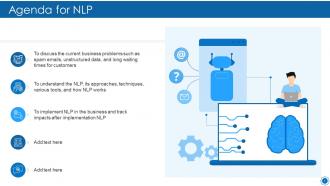
Slide 2: This is an Agenda slide. State your agendas here.
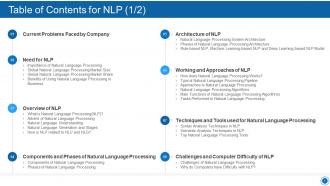
Slide 3: This slide presents Table of Content for the presentation.
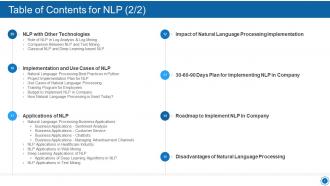
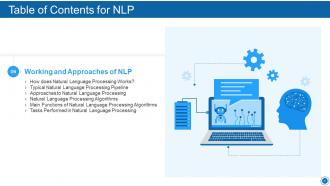
Slide 4: This slide shows Table of Content for the presentation.
Slide 5: This slide displays Table of Content highlighting Current Problems Faced by Company.
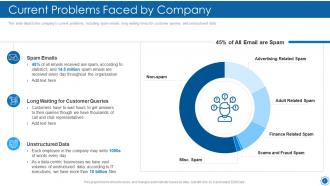
Slide 6: This slide depicts the company's current problems, including spam emails, long waiting times for customer queries, etc.
Slide 7: This slide shows Table of Content for the presentation.
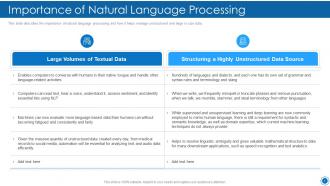
Slide 8: This slide presents importance of natural language processing and how it helps manage unstructured and large in size data.
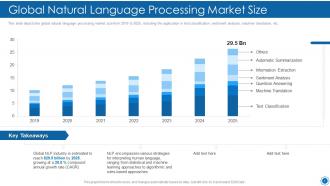
Slide 9: This slide shows Global Natural Language Processing Market Size.
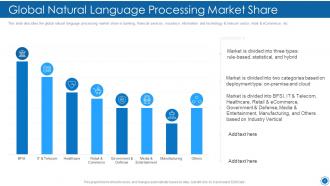
Slide 10: This slide displays Global Natural Language Processing Market Share.
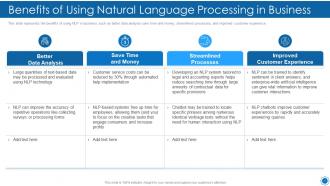
Slide 11: This slide shows Benefits of Using Natural Language Processing in Business.
Slide 12: This slide shows Table of Content for the presentation.
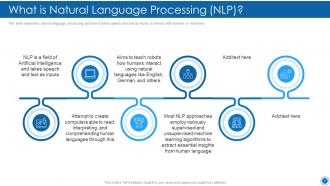
Slide 13: This slide represents natural language processing and how it takes speech and text as inputs.
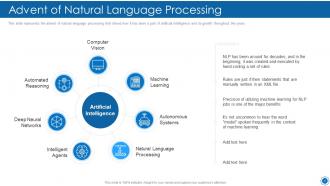
Slide 14: This slide shows Advent of Natural Language Processing.
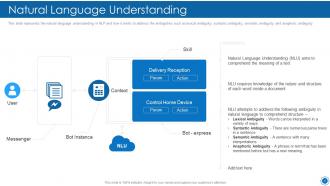
Slide 15: This slide displays the natural language understanding in NLP and how it works to address the ambiguities.
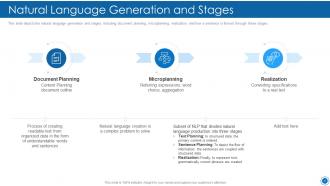
Slide 16: This slide depicts the natural language generation and stages, including document planning, microplanning, etc.
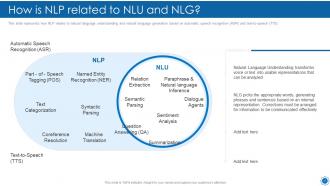
Slide 17: This slide represents how NLP relates to natural language understanding and natural language generation.
Slide 18: This slide presents Table of Content for the presentation.
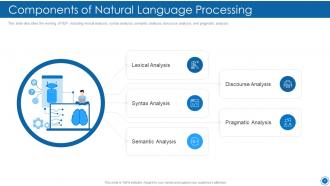
Slide 19: This slide shows Components of Natural Language Processing.
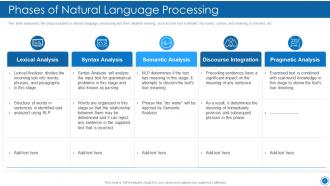
Slide 20: This slide displays the steps included in natural language processing and their detailed working.
Slide 21: This slide shows Table of Content for the presentation.
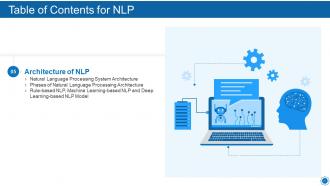
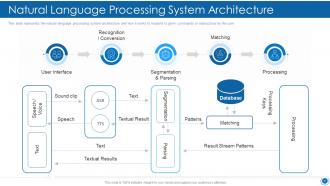
Slide 22: This slide shows Natural Language Processing System Architecture.
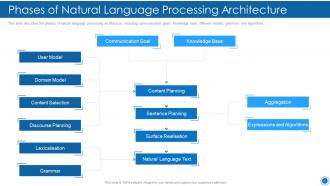
Slide 23: This slide presents Phases of Natural Language Processing Architecture.
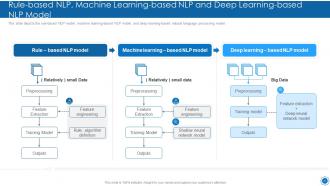
Slide 24: This slide shows Rule-based NLP, Machine Learning-based NLP and Deep Learning-based NLP Model.
Slide 25: This slide displays Table of Content for the presentation.
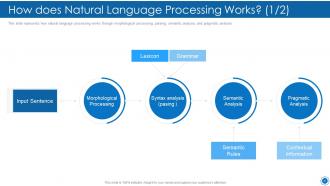
Slide 26: This slide represents how natural language processing works through morphological processing, parsing, semantic analysis, etc.
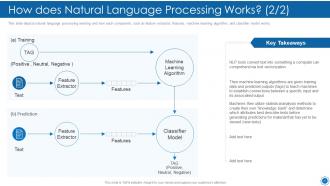
Slide 27: This slide shows How does Natural Language Processing Works.
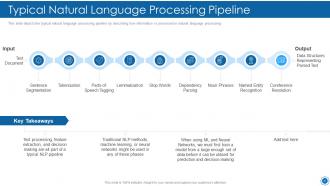
Slide 28: This slide depicts the typical natural language processing pipeline by describing how information is processed in natural language processing.
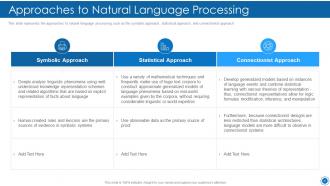
Slide 29: This slide shows Approaches to Natural Language Processing.
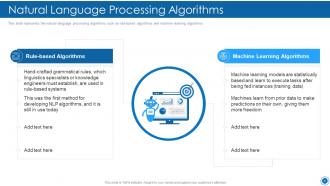
Slide 30: This slide displays the natural language processing algorithms such as rule-based algorithms and machine learning algorithms.
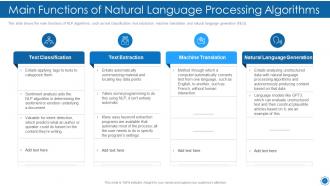
Slide 31: This slide shows the main functions of NLP algorithms, such as text classification, text extraction, etc.
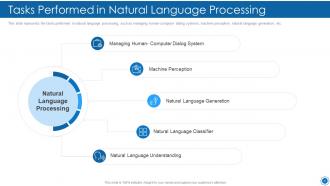
Slide 32: This slide shows Tasks Performed in Natural Language Processing.
Slide 33: This slide presents Table of Content for the presentation.
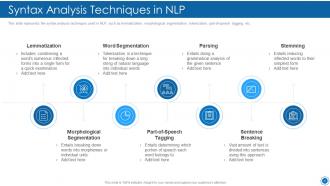
Slide 34: This slide displays the syntax analysis techniques used in NLP, such as lemmatization, morphological segmentation, etc.
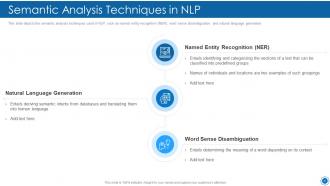
Slide 35: This slide depicts the semantic analysis techniques used in NLP, such as named entity recognition (NER), word sense disambiguation, etc.
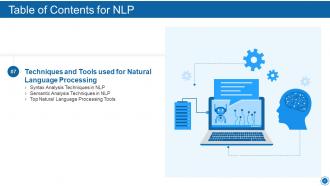
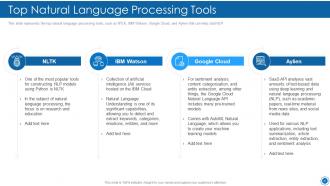
Slide 36: This slide represents the top natural language processing tools, such as NTLK, IBM Watson, etc.
Slide 37: This slide shows Table of Content for the presentation.
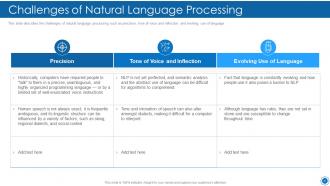
Slide 38: This slide describes the challenges of natural language processing such as precision, tone of voice and inflection, etc.
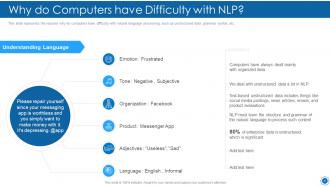
Slide 39: This slide represents the reasons why do computers have difficulty with natural language processing.
Slide 40: This slide displays Table of Content for the presentation.
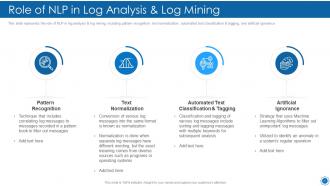
Slide 41: This slide represents the role of NLP in log analysis & log mining, including pattern recognition, text normalization, etc.
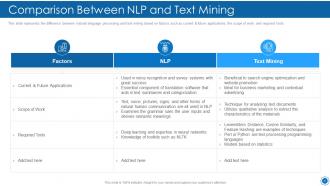
Slide 42: This slide shows Comparison Between NLP and Text Mining.
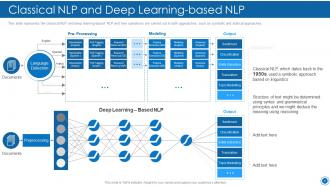
Slide 43: This slide represents the classical NLP and deep learning-based NLP and how operations are carried out in both approaches.
Slide 44: This slide shows Table of Content for the presentation.
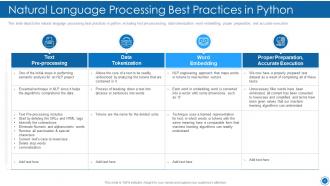
Slide 45: This slide displays Natural Language Processing Best Practices in Python.
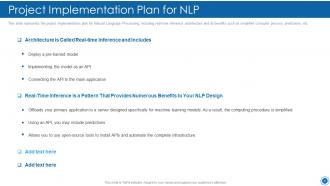
Slide 46: This slide represents the project implementation plan for Natural Language Processing.
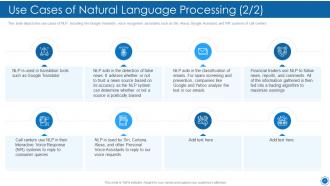
Slide 47: This slide depicts the use cases of NLP, including the Google translator, voice recognition assistants, etc.
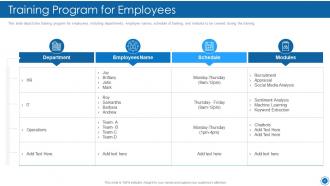
Slide 48: This slide presents the training program for employees, including departments, employee names, schedule of training, etc.
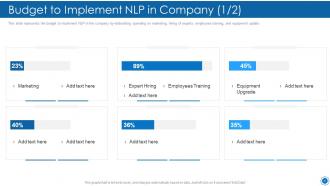
Slide 49: This slide represents the budget to implement NLP in the company by elaborating spending on marketing.
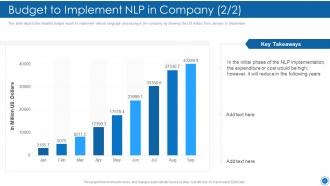
Slide 50: This slide depicts the detailed budget report to implement natural language processing in the company.
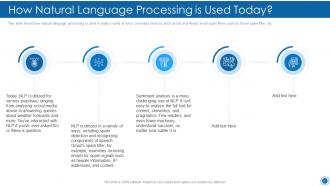
Slide 51: This slide shows How Natural Language Processing is Used Today.
Slide 52: This slide shows Table of Content for the presentation.
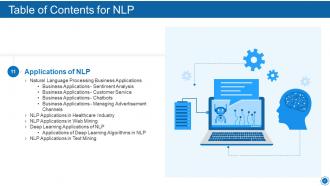
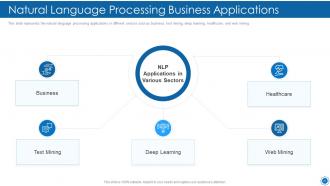
Slide 53: This slide presents Natural Language Processing Business Applications.
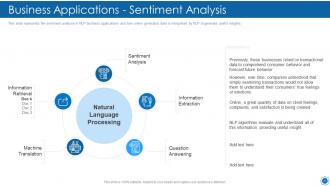
Slide 54: This slide represents the sentiment analysis in NLP business applications and how online generated data.
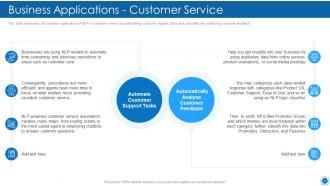
Slide 55: This slide displays the business application of NLP in customer service by automating customer support.
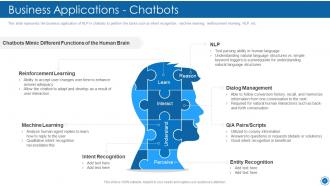
Slide 56: This slide represents the business application of NLP in chatbots to perform the tasks such as intent recognition, machine learning, etc.
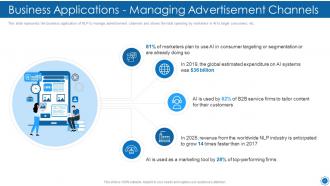
Slide 57: This slide shows Business Applications - Managing Advertisement Channels.
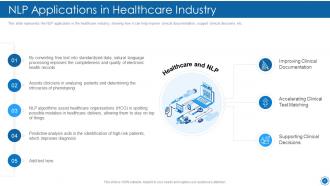
Slide 58: This slide presents the NLP application in the healthcare industry.
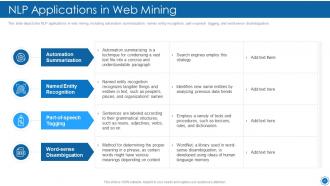
Slide 59: This slide depicts the NLP applications in web mining, including automation summarization.
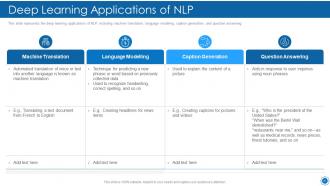
Slide 60: This slide represents the deep learning applications of NLP, including machine translation, language modeling, etc.
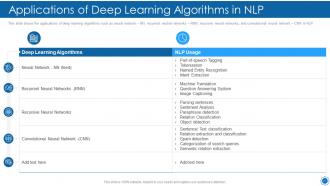
Slide 61: This slide displays the applications of deep learning algorithms.
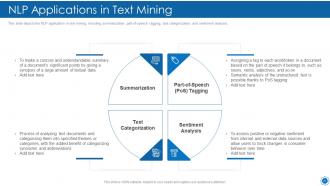
Slide 62: This slide depicts the NLP application in text mining, including summarization, part-of-speech tagging, etc.
Slide 63: This slide presents Table of Content for the presentation.
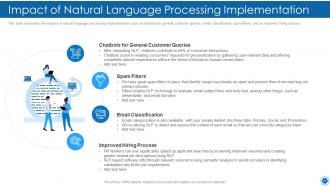
Slide 64: This slide shows Impact of Natural Language Processing Implementation.
Slide 65: This slide displays Table of Content for the presentation.
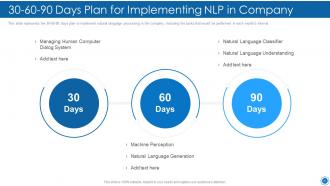
Slide 66: This slide shows 30-60-90 Days Plan for Implementing NLP in Company.
Slide 67: This slide shows Table of Content for the presentation.
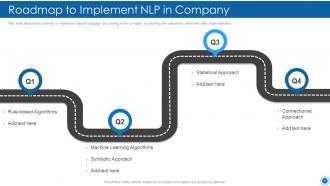
Slide 68: This slide depicts the roadmap to implement natural language processing in the company.
Slide 69: This slide is titled as Additional Slides for moving forward.
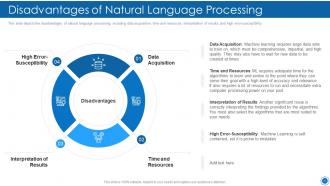
Slide 70: This slide displays Disadvantages of Natural Language Processing.
Slide 71: This slide shows Icons for Natural language Processing (IT).
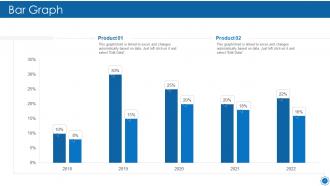
Slide 72: This slide displays Bar chart with two products comparison.
Slide 73: This is Our Goal slide. State your firm's goals here.
Slide 74: This slide shows Puzzle with related icons and text.
Slide 75: This is a Timeline slide. Show data related to time intervals here.
Slide 76: This slide shows Venn diagram with text boxes.
Slide 77: This slide shows Post It Notes. Post your important notes here.
Slide 78: This is an Idea Generation slide to state a new idea or highlight information, specifications etc.
Slide 79: This is a Thank You slide with address, contact numbers and email address.
Natural language processing it powerpoint presentation slides with all 79 slides:
Use our Natural Language Processing IT Powerpoint Presentation Slides to effectively help you save your valuable time. They are readymade to fit into any presentation structure.
FAQs for Natural language processing it
So you'll definitely want to learn tokenization first - that's just splitting text into words and phrases. Named entity recognition is super useful for finding people, places, companies in text. Sentiment analysis tells you if something sounds positive or negative, which is honestly pretty cool when it works well. Part-of-speech tagging figures out nouns vs verbs and all that grammar stuff. For the fancier techniques, there's dependency parsing that maps sentence structure and word embeddings that show how words relate to each other. BERT and other transformers are the hot thing now. Start with spaCy or NLTK though - they'll get you up and running without much headache.
So tokenization is basically how your model breaks up text - like choosing what counts as the "pieces" it works with. Bad tokenization screws everything downstream because suddenly your model can't figure out what's actually a word or meaningful chunk. It's kinda like if I randomly split wo-rds in we-ird places when texting you - makes no sense, right? Word-level vs subword vs character tokenization will totally change how your model handles weird vocabulary or complex languages. Honestly, just test a few different approaches early on with your specific data to see what doesn't suck.
So ML is what actually makes NLP work these days. Before, people tried coding grammar rules manually - what a nightmare that was! Now algorithms just learn from tons of text data instead. Way smarter approach. You'll see much better results with stuff like sentiment analysis and translation because the models get context and handle weird edge cases. Rule-based systems were honestly pretty useless for real conversations. Just make sure your training data doesn't suck. That garbage in, garbage out thing is still totally true.
So sentiment analysis is basically thumbs up/thumbs down - tells you if something's positive, negative, or neutral. Pretty straightforward stuff. Emotion detection digs way deeper though and picks up specific feelings like anger, joy, fear, whatever. It's kinda like the difference between knowing someone's in a bad mood versus understanding they're frustrated about their broken laptop, you know? For quick customer feedback reviews, sentiment works fine. But if you need to figure out WHY people are pissed off (not just that they are), go with emotion detection. Really depends how deep you wanna dive.
So word embeddings turn words into numbers that actually mean something. Similar words end up clustered together in this vector space - like "king" and "queen" sit close to each other, but "king" and "banana" are way far apart. You can literally do math with them too, like king - man + woman = queen (okay, it's messier in real life but still pretty wild). Your models stop just looking for exact word matches and start getting what things actually mean. Oh, and definitely check out t-SNE visualizations of embeddings sometime - seeing those word clusters pop out is honestly satisfying.
Oh man, morphologically rich languages are such a pain for NLP! Take Finnish or Turkish - one word can literally mean what takes us a whole sentence in English. Your vocab size just explodes because each root has like hundreds of different forms. Standard tokenization is useless here, honestly. Models can't learn patterns when they barely see each inflected form in training. What you need is subword stuff like BPE, or maybe morphological analyzers that break words into chunks first. Trust me, don't try to feed raw Turkish text to a basic model - you'll just waste time.
So NLP is pretty game-changing for customer support. You can build chatbots that actually get what people mean instead of just hunting for keywords. The sentiment analysis stuff is clutch - it'll flag when customers are getting pissed off before things blow up. Plus it handles ticket routing automatically and pulls insights from reviews. Honestly, the recommendation engine based on customer feedback is where you see real ROI. I'd start with a basic bot for your FAQ stuff first though, then build out from there once you see what works.
Oh man, this stuff is tricky. First off, your training data probably has bias baked in - I've seen models that basically learned to be racist or sexist. Audit that carefully. Privacy's another nightmare since you're dealing with people's actual conversations and personal stuff. Just be super transparent about what you're collecting. The black box thing honestly bugs me the most though - users have no clue how decisions get made, which is scary for important applications. My advice? Set up bias testing and solid data policies before you launch anything. Trust me on this one.
Dude, BERT and GPT-3 totally flipped the script on NLP. You don't have to build everything from zero anymore - just grab a pre-trained model and fine-tune it. Way less data needed, way better results. BERT killed it for understanding stuff like search, while GPT-3 blew my mind with how well it could write actual articles. The magic? Transfer learning. These models already learned from huge datasets, so your project gets all that knowledge for free. Oh, and definitely check out Hugging Face's model hub - it's where I always start testing things out.
So for classification stuff, accuracy and F1-score are solid choices. BLEU and ROUGE work better for text generation - like translation or summarization tasks. But here's the thing - automated metrics don't tell you everything. You really need human evaluation for fluency and whether things actually make sense, you know? Cross-validation helps too since it tests your results on different data splits. Oh, and definitely try testing on real user scenarios when you can. I'd mix multiple approaches rather than relying on just one metric.
So basically transfer learning means you don't have to train models from scratch - you can grab something like BERT or GPT that's already learned language patterns from huge datasets. Then just fine-tune it for whatever you're doing. Honestly saves so much time and compute power. What used to take weeks now takes hours, which is pretty wild when you think about it. Plus you'll actually get better results, especially if your training data is kinda limited. I'd just pick whichever pre-trained model seems closest to your domain and go from there.
Oh man, low-resource NLP has gotten so much better lately! Transfer learning is where it's at - models like mBERT and XLM-R basically borrow from high-resource languages to help out the smaller ones. Cross-lingual embeddings are doing crazy things too, letting you move knowledge between languages way smoother than before. Data augmentation helps when you're stuck with tiny datasets. Few-shot learning too, obviously. Honestly, I'd just grab a pretrained multilingual model and fine-tune from there if I were you - saves so much headache upfront.
So NLP basically lets you throw massive amounts of text at algorithms and get clean summaries back in minutes instead of spending your whole day reading. There's two ways to do it - extractive just pulls the best sentences that already exist, while abstractive actually rewrites stuff in new words (which is honestly pretty cool but can be unreliable). The tech finds main themes and cuts out repetitive junk while keeping everything coherent. Perfect for research, tracking news, legal docs, whatever. I'd start with extractive methods first since they're way more dependable, then maybe experiment with the fancier stuff later.
Dude, context awareness is everything in NLP. Your models will totally bomb without it - missing sarcasm, screwing up pronouns, the whole mess. Like when someone says "bank" - are we talking rivers or money? Models need that background to figure it out. They've gotta track conversation history and catch those subtle meaning shifts that flip everything around. Honestly, if you're building something people will actually use, spend the money on good contextual modeling. I've seen too many projects fail because they skipped this part. It's literally what makes users love or hate your system.
So basically you'd train models to catch the telltale signs - emotional language, sketchy sources, contradictory claims, that sort of thing. The systems analyze text patterns and cross-check facts against reliable databases. Some even track how misinformation spreads on social media (which is honestly kind of wild to watch). You'll want human oversight though since context is huge. Oh, and if you're just starting out, check Google's Fact Check Tools first before building your own classifier - assuming you've got labeled data to work with.
-
Very unique, user-friendly presentation interface.
-
Appreciate the research and its presentable format.
-
Topic best represented with attractive design.
-
Easily Editable.
-
Great designs, really helpful.