

Natural Language Processing Applications IT Powerpoint Presentation Slides




Try Before you Buy Download Free Sample Product
 Impress Your
 Audience
 100%
100% Editable
 Save Hours
 of Time


Natural language processing NLP is a field of computer science notably, a branch of AI concerning the capacity of computers to interpret text and spoken words in the same manner that humans can. Check out our competently designed Natural Language Processing Applications template that gives a brief idea about the current business problems. Such as spam emails, and unstructured data, and the benefits of NLP in eliminating these issues. In this PowerPoint Presentation, we have covered the overview of natural language processing, including various approaches, techniques, tools, and works. In addition, this template contains components, phases, architecture, and its challenges and difficulty with computers. Furthermore, this template includes natural language processing with other technologies such as log mining, text mining, and a difference between classical and deep learning based NLP. Moreover, this PPT caters to the implementation of NLP in its application in various sectors such as business, healthcare, web mining, etc. Lastly, this deck comprises the impacts of NLP implementation on business, a 30 60 90 days plan for NLP implementation, and a roadmap. Download this 100 percent editable template and customize it based on your needs now.
People who downloaded this PowerPoint presentation also viewed the following :
Content of this Powerpoint Presentation
Slide 1: This slide displays the title Natural Language Processing Applications (IT).
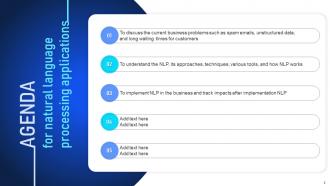
Slide 2: This slide displays the title AGENDA.
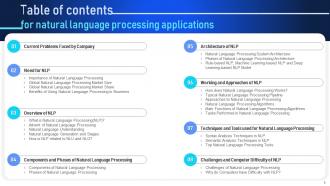
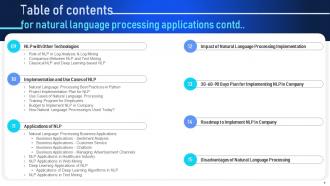
Slide 3: This slide exhibit table of content.
Slide 4: This slide exhibit table of content.
Slide 5: This slide exhibit table of content- Current Problems Faced by Company
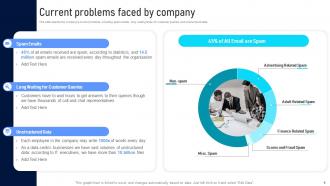
Slide 6: This slide depicts the company's current problems, including spam emails, long waiting times for customer queries, and unstructured data.
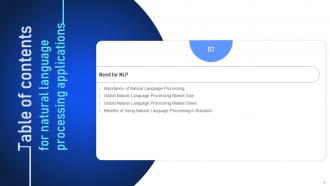
Slide 7: This slide exhibit table of content- Need for NLP.
Slide 8: This slide describes the importance of natural language processing and how it helps manage unstructured and large in size data.
Slide 9: This slide depicts the global natural language processing market size from 2019 to 2025.
Slide 10: This slide describes the global natural language processing market share.
Slide 11: This slide represents the benefits of using NLP in business.
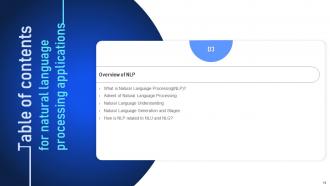
Slide 12: This slide exhibit table of content- Overview of NLP.
Slide 13: This slide represents natural language processing and how it takes speech and text as inputs to interact with humans or machines.
Slide 14: This slide represents the advent of natural language processing that shows how it has been a part of artificial intelligence and its growth throughout the years.
Slide 15: This slide represents the natural language understanding in NLP and how it works to address the ambiguities.
Slide 16: This slide depicts the natural language generation and stages.
Slide 17: This slide represents how NLP relates to natural language understanding and natural language generation.
Slide 18: This slide exhibit table of content- Components and Phases of Natural Language Processing
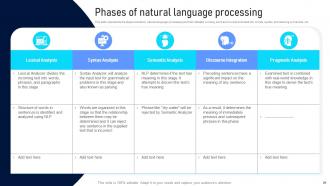
Slide 19: This slide describes the working of NLP, including lexical analysis, syntax analysis, semantic analysis, discourse analysis, and pragmatic analysis.
Slide 20: This slide represents the steps included in natural language processing and their detailed working.
Slide 21: This slide exhibit table of content- Architecture of NLP
Slide 22: This slide represents the natural language processing system architecture and how it works to respond to given commands or instructions by the user.
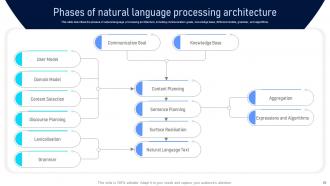
Slide 23: This slide describes the phases of natural language processing architecture, including communication goals, knowledge base, different models, grammar, and algorithms.
Slide 24: This slide depicts the rule-based NLP model, machine learning-based NLP model, and deep learning-based natural language processing model.
Slide 25: This slide exhibit table of content- Working and Approaches of NLP
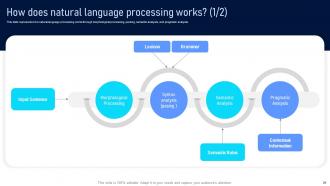
Slide 26: This slide represents how natural language processing works through morphological processing, parsing, semantic analysis, and pragmatic analysis.
Slide 27: This slide depicts natural language processing working and how each component.
Slide 28: This slide depicts the typical natural language processing pipeline by describing how information is processed in natural language processing.
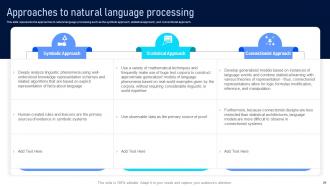
Slide 29: This slide represents the approaches to natural language processing such as the symbolic approach, statistical approach, and connectionist approach.
Slide 30: This slide represents the natural language processing algorithms such as rule-based algorithms and machine learning algorithms.
Slide 31: This slide shows the main functions of NLP algorithms.
Slide 32: This slide represents the tasks performed in natural language processing.
Slide 33: This slide exhibit table of content- Techniques and Tools used for Natural Language Processing
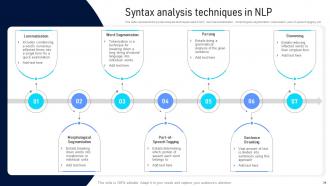
Slide 34: This slide represents the syntax analysis techniques used in NLP, such as lemmatization, morphological segmentation, tokenization, part-of-speech tagging, etc.
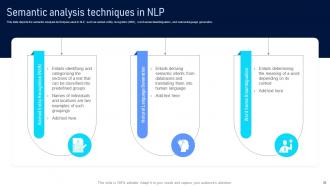
Slide 35: This slide depicts the semantic analysis techniques used in NLP, such as named entity recognition (NER), word sense disambiguation, and natural language generation.
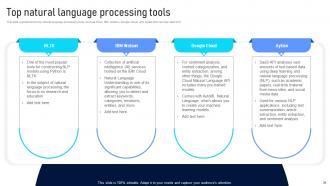
Slide 36: This slide represents the top natural language processing tools, such as NTLK, IBM Watson, Google Cloud, and Aylien that can help start NLP.
Slide 37: This slide exhibit table of content- Challenges and Computer Difficulty of NLP
Slide 38: This slide describes the challenges of natural language processing such as precision, tone of voice and inflection, and evolving use of language.
Slide 39: This slide represents the reasons why do computers have difficulty with natural language processing, such as unstructured data, grammar syntax, etc.
Slide 40: This slide exhibit table of content- NLP with Other Technologies
Slide 41: This slide represents the role of NLP in log analysis & log mining.
Slide 42: This slide represents the difference between natural language processing and text mining based on factors.
Slide 43: This slide represents the classical NLP and deep learning-based NLP and how operations are carried out in both approaches, such as symbolic and statical approaches.
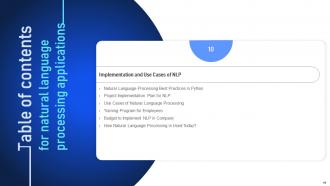
Slide 44: This slide exhibit table of content- Implementation and Use Cases of NLP
Slide 45: This slide depicts the natural language processing best practices in python.
Slide 46: This slide represents the project implementation plan for Natural Language Processing.
Slide 47: This slide depicts natural language processing use cases.
Slide 48: This slide depicts the use cases of NLP, including the Google translator, voice recognition assistants.
Slide 49: This slide depicts the training program for employees.
Slide 50: This slide represents the budget to implement NLP in the company by elaborating spending on marketing, hiring of experts, employees training, and equipment update.
Slide 51: This slide depicts the detailed budget report to implement natural language processing in the company by showing the US dollars from January to September.
Slide 52: This slide shows how natural language processing is used in today’s world in voice command services.
Slide 53: This slide exhibit table of content- Applications of NLP
Slide 54: This slide represents the natural language processing applications in different sectors such as business, text mining, deep learning, healthcare, and web mining.
Slide 55: This slide represents the sentiment analysis in NLP business applications and how online generated data is interpreted by NLP to generate useful insights.
Slide 56: This slide represents the business application of NLP in customer service by automating customer support tasks and automatically analyzing customer feedback.
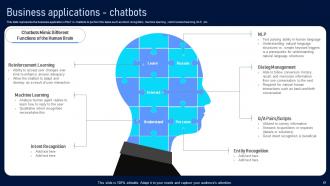
Slide 57: This slide represents the business application of NLP in chatbots to perform the tasks.
Slide 58: This slide represents the business application of NLP to manage advertisement channels and shows the total spending by marketers in AI to target consumers, etc.
Slide 59: This slide represents the NLP application in the healthcare industry, showing how it can help improve clinical documentation, support clinical decisions, etc.
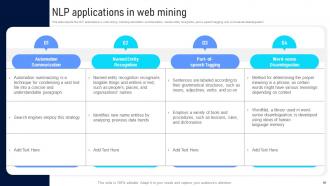
Slide 60: This slide depicts the NLP applications in web mining, including automation summarization, names entity recognition.
Slide 61: This slide represents the deep learning applications of NLP, including machine translation, language modeling, caption generation, and question answering.
Slide 62: This slide shows the applications of deep learning algorithms.
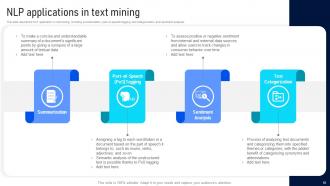
Slide 63: This slide depicts the NLP application in text mining.
Slide 64: This slide exhibit table of content- Impact of Natural Language Processing Implementation
Slide 65: This slide represents the impacts of natural language processing implementation.
Slide 66: This slide exhibit table of content- 30-60-90 Days Plan for Implementing NLP in Company.
Slide 67: This slide represents the 30-60-90 days plan to implement natural language processing in the company.
Slide 68: This slide exhibit table of content- Roadmap to Implement NLP in Company.
Slide 69: This slide depicts the roadmap to implement natural language processing in the company by showing the operations performed after implementation.
Slide 70: This is the icons slide.
Slide 71: This slide presents title for additional slides.
Slide 72: This slide depicts the disadvantages of natural language processing.
Slide 73: This slide exhibit Timeline.
Slide 74: This slide presents your company's vision, mission and goals.
Slide 75: This slide exhibits yearly profits stacked line charts for different products.
Slide 76: This slide display Our target.
Slide 77: This slide depicts posts for past experiences of clients.
Slide 78: This is thank you slide & contains contact details of company like office address, phone no., etc.
Natural Language Processing Applications IT Powerpoint Presentation Slides with all 83 slides:
Use our Natural Language Processing Applications IT Powerpoint Presentation Slides to effectively help you save your valuable time. They are readymade to fit into any presentation structure.































FAQs for Natural Language Processing Applications IT
So tokenization and embeddings are probably your best starting point - they're like the foundation for everything else. Word embeddings (Word2Vec, transformers) are honestly pretty wild when you see how they capture meaning. You'll also run into part-of-speech tagging, named entity recognition, sentiment analysis. Dependency parsing shows grammatical relationships between words. Oh, and text classification plus machine translation are everywhere now. Question-answering systems too, obviously. I'd skip the fancy stuff at first though - just nail down how tokenization works and you'll be golden.
Tokenization is basically how your model "reads" text, so it totally affects performance. If you mess up the tokenization - like splitting contractions weird or butchering punctuation - your model gets confused about what words actually mean. BPE and other subword methods are really popular right now because they handle random words the model hasn't seen before way better than just splitting on spaces. Honestly, the tricky part is picking the right approach for what you're doing. Chatbot tokenization? Completely different beast than legal docs.
So ML is what actually powers modern NLP - you dump tons of text into these algorithms and they start picking up on language patterns, grammar, how words relate to each other, all that stuff. Way better than those clunky rule-based systems from before. Deep learning changed everything though. Transformers can grasp context and subtlety in crazy impressive ways. Honestly blew my mind when I first saw what they could do. If you're diving into NLP work, definitely check out Hugging Face - makes accessing these powerful models super straightforward.
So word embeddings convert text into numbers computers can process. They map similar words close together in mathematical space - like "king" and "queen" clustering near each other, which honestly blew my mind when I first learned it. Pre-trained options like Word2Vec work great for most cases. You could train custom ones but that's probably overkill unless you're doing something super niche. The magic happens because your model realizes "happy" and "joyful" are related instead of treating them like random different words. Just grab a pre-trained one first - they'll do the job perfectly fine.
So these algorithms hunt for emotional signals in your writing - they'll scan word choices and context using patterns from their training data. There's two main approaches: lexicon-based scoring where individual words get positive/negative points, or machine learning models trained on thousands of labeled examples. ML is way better honestly since it catches sarcasm and nuance instead of just tallying "good" versus "bad" words. Most decent tools mix both methods now. Oh, and definitely test whatever you pick on your actual content type - something trained on movie reviews will probably bomb on financial stuff.
Oh man, NLP context is such a pain. Words like "bank" mean totally different things depending on the situation - money vs river, you know? Sarcasm breaks everything because algorithms can't read between the lines. Cultural stuff is even worse - try explaining "raining cats and dogs" to a computer, lol. The models also lose track when conversations span multiple sentences or need real-world knowledge to make sense. Your best bet is probably training on domain-specific data and mixing different NLP approaches together. Still gonna be messy though.
So chatbots basically tear apart your messages to figure out what you actually mean - they're looking for your intent, pulling out important info, understanding context. Way better than those ancient keyword-matching bots (ugh, remember those?). They analyze grammar and can even tell when you're pissed off or confused. The smart ones use machine learning to learn how YOU specifically talk over time. Short sentences work. Longer ones flow naturally when you let them breathe. Try throwing different phrasings at your chatbot - you'll see how good its language processing really is.
Consent's the big one - people don't realize how much NLP can figure out from their text. Like, these systems can guess your mental health state or political leanings from pretty basic stuff. Wild, right? Users rarely understand what they're actually agreeing to when they hit "accept." Also think about how long you're keeping their data - are you hoarding more than you need? Don't bury the real capabilities in your terms of service either. Be upfront about what your NLP actually does with their words.
Honestly, NLP is pretty game-changing for healthcare communication. Chatbots can handle symptom checks and appointment booking automatically. Voice-to-text is amazing too - it turns doctor conversations into proper medical notes without anyone typing. You can also set up real-time translation for patients who speak different languages. Patient feedback analysis is huge for spotting problems early. Oh, and creating personalized education materials that actually match people's reading levels instead of throwing medical jargon at everyone. I'd say figure out what's frustrating your staff most first, then tackle that problem.
Okay so here's the thing - most people don't speak English, which seems obvious but companies forget this all the time. Multilingual NLP models let you build stuff that actually works for everyone instead of just one market. Customer service bots, content filters, whatever - you can use one system across like 50+ languages rather than building separate ones for each country. It's honestly way more efficient. Plus your app suddenly works for billions more people without hiring a bunch of specialized teams. I mean, why wouldn't you want that kind of reach?
So basically, NER systems are trained on tons of annotated text examples to recognize patterns. They look at stuff like capitalization, word context, and what's around each phrase. Most modern ones use neural networks - BERT's pretty popular, or spaCy's models work well too. These have seen millions of examples so they can tell when something looks like a person's name vs a company. They give probability scores for different entity types. Oh, and if you're dealing with specialized text like medical or legal stuff, you'll definitely want to train on domain-specific data to get better accuracy.
Deep learning totally flipped NLP on its head. We ditched those old rule-based systems for stuff like BERT and GPT that actually get context and nuance. Word embeddings were huge too - suddenly models could grasp how words relate to each other semantically. These transformers handle sentiment analysis, translation, text generation, you name it. Performance is crazy good now. Oh, and if you're doing any text work? Just grab a pre-trained model instead of starting from zero. Trust me on that one - I learned it the hard way last year.
So there's two main ways to do this - extractive just pulls the best sentences straight from your text, while abstractive actually rewrites stuff in its own words. BERT and GPT models are pretty solid for this, though I'd probably start with something pre-trained from Hugging Face since building from scratch is a pain. Clean up your text first before feeding it in. If you've got specific content types, fine-tuning on similar data helps a ton. Honestly the results are way better than they used to be - just try a few different approaches and see what clicks.
Get a pre-trained model like BERT or RoBERTa first - way easier than starting from scratch. Clean your data really well though, fix duplicates and encoding stuff. You need at least a few thousand good examples per task, but honestly don't just dump everything in there at once. I learned that the hard way lol. Build up complexity slowly and watch for overfitting. Data augmentation helps if you're working with smaller datasets. Oh, and this is huge - save some data that actually represents the weird edge cases you'll see. That validation set will save you from looking stupid when things break in production.
Oh man, sentiment analysis across languages is such a pain. Most tools are trained on English data, so they completely miss how different cultures express things. Like, Japanese communication is way more indirect than what we're used to - something that reads positive to us might actually be pretty neutral there. German's the opposite - super direct. And don't even get me started on sarcasm... it just doesn't translate at all (Google Translate butchering jokes is honestly hilarious though). Your best move? Find language-specific models if you can, or at least run your results past native speakers before you make any major calls based on the data.
-
SlideTeam has helped me take my presentation to the next level. Everyone at the office is impressed! I’ll be using their designs for a long-long time.
-
Satisfied with the way SlideTeam resolved my query regarding the right business PPTs that I was having difficulty finding. I found the perfect match with their assistance.