Parallel timeline example

Rating:
80%
Slide 1 of 5
Favourites Favourites

Try Before you Buy Download Free Sample Product

Audience Impress Your
Audience
Editable 100%
Editable
Time Save Hours
of Time
The Biggest Sale is ending soon in
0
0
:
0
0
:
0
0
Rating:
80%
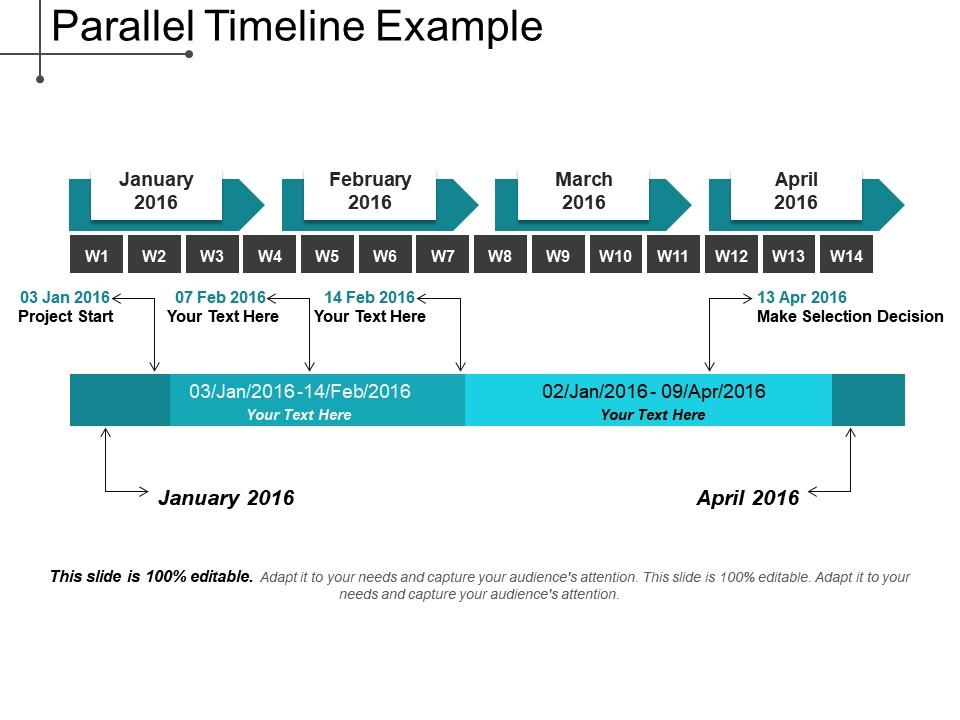
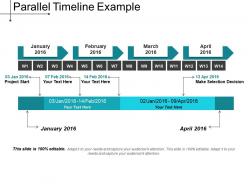
Presenting parallel timeline example. This is a parallel timeline example. This is a four stage process. The stages in this process are parallel timeline, parallel roadmap, parallel linear process.

People who downloaded this PowerPoint presentation also viewed the following :

FAQs for

Put your biggest milestones down first, then add the smaller stuff around them. Date markers are crucial - and make sure everything flows left to right or top to bottom. I learned this the hard way, but seriously don't cram too much on there! Brief descriptions work way better than paragraphs. Use arrows or lines to connect things so it actually makes sense. If you've got different phases or categories, color code them - it's honestly a game changer for complex projects. Oh, and keep your date formatting consistent throughout. Trust me, it looks way more professional when everything matches up properly.

Honestly, timelines are a game changer for projects. Instead of drowning people in emails with random dates, just throw together a visual timeline - Gantt charts work great but even a basic graphic does the trick. Map out your big milestones first, then work backwards to figure out realistic timeframes. Dependencies become super obvious this way too. I mean, stakeholders actually *get* the big picture instead of glazing over at a wall of text. Plus you'll instantly see if things are going sideways schedule-wise. Trust me, it beats explaining project status in meetings every single week.

Honestly, just nail your visual hierarchy first and you'll be halfway there. I always use a strong center line, then bounce content left and right so nothing gets cramped. Don't go nuts with colors though - I made this awful rainbow timeline once that looked like a kid's art project lol. Make your dates super easy to spot and keep text short. White space saves everything, trust me. The mobile thing is annoying but you gotta check how it looks on phones since timelines get weird fast. Start with your big moments, then fill in the smaller stuff after.

Honestly, your color choices can totally make or break how readable your timeline is. High contrast is key - don't do that light gray on white thing that makes everyone squint. I'd stick with one color family for sequential stuff, like different blues, instead of going crazy with every color imaginable. Oh and definitely consider colorblind users since red/green combos are useless for them. Two or three colors max works best. You should probably test it on your phone too - what looks good on your laptop might be terrible in bright sunlight or whatever.

So for history stuff, just go with a straight chronological timeline - you know, dates flowing left to right with the major events marked. Makes it super easy to see how one thing led to another. Project timelines are a whole different beast though. Gantt charts work great because they show what's dependent on what and who's doing what when. I swear, half the projects I've seen crash and burn could've been saved with a decent timeline. Basically your history timeline tells the story, project timeline keeps everyone on track. Just match the format to what you're actually trying to do.

Dude, interactive timelines are a game changer! People can actually click around instead of just sitting there while you drone on. Way better than boring bullet points, honestly. You can zoom into different time periods, show details when people want them, and during Q&A they can explore stuff themselves. The trick is still controlling the story flow while letting them mess around with it. TimelineJS is pretty solid for this, or you could even do clickable animations in PowerPoint if you're feeling lazy. Trust me, your audience will actually pay attention for once.

Oh man, Lucidchart and Visio are your best bet if you want something really customizable. SmartDraw's pretty good too - comes with templates already made. I probably use PowerPoint way too much for this stuff but it works fine for basic timelines. Microsoft Project gets crazy detailed if you're into that, though it might be overkill depending on what you need. Canva's surprisingly decent for quick ones too. My advice? Just start with whatever your team's already using and see how it goes first.

Your audience totally drives how fast you should pace things. Gen Z wants quick transitions and condensed info, but older folks need more time to process each point. Executives? They're scanning for bullet points they can digest fast. Technical teams actually prefer those detailed step-by-step breakdowns though. Oh and cultural stuff matters too - some people expect linear stories while others don't mind if you jump around. Honestly, I'd just test a few versions with small groups first. See what sticks, then tweak it before you launch the whole thing.

Keep it clean - nobody wants to squint at a timeline packed with tiny text everywhere. Pick one date format and stick with it (seriously, mixing MM/DD and DD/MM looks sloppy). Space your events evenly too. Make the big stuff pop with different colors or fonts so people know what matters most. Oh, and definitely check how it reads from the back of the room before you present - learned that one the hard way! Start with your major events first. You can always squeeze in smaller details later if there's room.

So instead of just putting "Q2 sales launch" on your timeline, throw in a little bar chart showing the actual revenue numbers or how many users you got. Makes it way more interesting than just text. Color coding works great for different data types - I usually do blue for revenue, green for user stuff. Mini sparklines are perfect for showing trends over time, and heat maps can highlight when things got crazy busy. Honestly beats boring bullet points every time. Start with just one type of data visualization first, then add more layers once you get the hang of it.

Linear timelines work best for straightforward stuff - project phases, historical events, anything chronological. They're just easier to follow. But when you've got complex processes where things happen at once or circle back? That's where branching or circular formats actually help. User journeys are a perfect example - people don't all take the same path, so why force it into a straight line? I usually go linear first though. It's my default because, honestly, most people's brains work that way. Only switch to something fancier if your audience is getting lost in the chronology.

Keep the formatting consistent and mark your big milestones clearly. Don't stuff every little detail in there - that's how timelines turn into absolute disasters nobody wants to read. Colors and icons help separate different types of work, which honestly makes a huge difference. Focus on deliverables and dates that stakeholders actually care about. You'll want buffer time built in because things always take longer than expected. Oh, and update it regularly! Share those updates before people have to ask - it keeps everyone on the same page about reality vs. the original plan.

Honestly, captions and annotations are what make timelines actually worth looking at. You'll have this string of dates that means nothing without context - like, okay, stuff happened, but why should I care? Good annotations explain the "so what" part. They show how events connect and why they mattered. Short punchy explanations work better than long paragraphs too. The best ones highlight those cause-and-effect moments where everything suddenly makes sense. I've seen so many pretty timelines that tell you absolutely nothing because they skipped this step. Don't do that - better to have solid explanations than fancy graphics that confuse people.

Oh man, this is actually way more complex than most people think! Western cultures read left-to-right, so timelines flow that way. But Arabic and Hebrew go right-to-left. Indigenous cultures often do cyclical timelines for seasons instead of straight lines – which honestly makes more sense for a lot of things. Colors are tricky too since red means "important" somewhere but "danger" elsewhere. Don't even get me started on date formats (MM/DD vs DD/MM drives me crazy). Best bet? Test your timeline with people from different backgrounds and maybe offer a few layout options.

Honestly, a few jump out at me right away. That New York Times COVID timeline was incredible - you could zoom from daily cases all the way out to yearly trends without missing a beat. Spotify Wrapped is genius too. They take your music data and turn it into this whole cinematic story that actually makes you want to share it. Instagram's vertical story timelines work surprisingly well for quick updates, though I never thought I'd be saying that about vertical design lol. The key is matching complexity to what people actually need. Don't overcomplicate it with fancy animations if simple horizontal flow gets the job done. Start with your key moments, then pick whatever format serves your story best.

Ratings and Reviews

80% of 100
Review Form
Write a review
Most Relevant Reviews
  1. 80%

    by Cornelius Alexander

    Designs have enough space to add content.
  2. 80%

    by Claudio Alvarez

    Topic best represented with attractive design.

2 Item(s)

per page: