


Comparison presentation powerpoint example

You must be logged in to download this presentation.




Try Before you Buy Download Free Sample Product
 Impress Your
 Audience
 100%
100% Editable
 Save Hours
 of Time


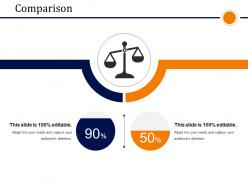
Download comparison PowerPoint Presentation slide to compare and show the differences between two things. This PPT template can be used to present the number of ratio of male and female employees in an organization, to show the comparison between two different products, to highlight the performance of the individuals, to analyze the business growth etc. The presentation layout gives you a chance to highlight any comparison in the most efficient manner. The weighing scale shown in the design can be used to measure the performance as you can edit and make changes in the slide as per your requirement. In today’s business, it is quite essential to analyze the performance on regular basis so that you can change your strategy at a right time and meet your business goals. So, let this presentation design fulfill your purpose. To see more designs that can be useful your presentation, just browse through our website. Check them and download the ones that you need for your presentation. All designs are professional and designed with creative mindset. Our Comparison Presentation Powerpoint Example characterize attention to detail. They are made for your meticulous ways.
People who downloaded this PowerPoint presentation also viewed the following :
Comparison presentation powerpoint example with all 5 slides:
Set the stage on fire with your ideas. Ignite minds with our Comparison Presentation Powerpoint Example.
FAQs for Comparison
First thing - figure out what you're actually comparing and why people should care. Start with that context. Then pick your criteria (cost, features, timing, whatever matters) and stick to them consistently across all options. Tables and charts help a ton here, trust me on this. People always want pros/cons lists too, so throw those in. Honestly, I like putting my main recommendation right up front, then backing it up with all the details after. Way more effective than making them wait until the end to hear what you actually think.
Dude, visuals are a game-changer for comparison presentations. Your audience can spot differences instantly instead of trudging through boring data lists. Bar charts and side-by-side layouts? Pure gold. I honestly think bullet points comparing features should be banned - nobody's brain works that way. Tables are solid for detailed specs, but infographics really make the important stuff jump out. Plus people actually remember visual info better since we process images way faster than text. Oh, and put your biggest comparison front and center where it can't be missed.
Don't play favorites even if you already know which option you want - let the numbers do the talking. I've been in way too many meetings where someone drowns everyone in endless feature comparisons. Nobody needs that. Pick the stuff that actually moves the needle for this decision. Make sure you're comparing things the same way across all options, otherwise it gets messy fast. Oh, and don't just dump all the info and walk away. People want your take on what they should pick.
Go for something with side-by-side columns or clean grids - basically anything that makes the differences pop right away. Skip the fancy animations, they're honestly just annoying when you're trying to compare stuff. White space is your friend here. I learned this the hard way after making slides that looked like a hot mess. Test your template with a couple slides first to make sure your data actually fits well. Once you find something that works, stick with it throughout the whole thing. Simple beats flashy every time.
Bar charts and column charts are your go-to for comparing stuff - they make differences super obvious. Line charts work well when you're tracking trends over time between different groups. Pie charts? Honestly kinda meh unless you've only got like 3-4 segments to show. Don't throw too many data series on one chart or people's eyes will just glaze over. The whole point is making your comparison jump out immediately. I always test mine on someone else first - if they squint or look confused, I know I need to simplify it.
Try turning each option into characters in a story - Company A becomes "the scrappy startup trying to shake things up" while Company B is "the big player with all the resources." Works so much better than those mind-numbing bullet point lists, trust me. Start by setting up some problem or challenge, then show how each would tackle it. Oh, and you could walk through a customer's actual experience with each option too. That usually hits different. Just make sure you end with a clear "so what now?" moment that points toward whichever one you're backing.
Start with your recommendation right up top - don't make people wait for it. Then pick 3-4 things that actually matter to your audience and compare side by side. That ping-pong thing where you go back and forth? Skip it, it's just confusing. Group everything by themes instead - cost, features, timeline, whatever makes sense. Compare both options under each one so people can follow your thinking. Honestly, this approach just works better than jumping around. Wrap up with next steps so everyone knows what decision you need and when. Nothing worse than a great presentation that ends with... crickets.
Make it interactive instead of just throwing features at them like a boring chart. Get people involved - ask which option they're leaning toward, or have them guess performance before you show the actual numbers. I always do the "raise your hand if this has happened to you" thing because honestly, people eat that stuff up when they can relate. Good visuals help tons for highlighting differences. Maybe do a quick demo if you can swing it. Oh, and here's the key part - tie everything back to what they actually care about. Their budget, timeline, whatever keeps them up at night. That's what'll stick.
Honestly, PowerPoint's probably your safest choice - the table and chart stuff is already there and works well. Canva's templates are actually really nice if you want something that looks professional without doing much work yourself. Google Slides is fine for collaboration, though I feel like everyone defaults to that now. If you're dealing with tons of data, maybe look at Tableau or even Excel (assuming you don't hate spreadsheets). I'd just go with whatever your team's already comfortable using first, then maybe try some Canva templates to see if they speed things up visually.
Dude, knowing your audience is everything when you're doing comparisons. What matters to them? Are they tech-savvy or do they just want the basics? If someone only cares about price, don't waste time diving into fancy features they'll never use. Figure out what's actually keeping them up at night first. Then match your language and focus to their priorities - like, a CEO wants different info than an IT person would. I learned this the hard way in a presentation once. Start with their main problem, then structure everything around fixing that specific issue.
Think about what your audience deals with every day - that's your goldmine right there. Don't just list features or compare abstract stuff. Show them how each option would actually work when their system crashes on a Monday morning (because we all know that's when it happens). I collect stories from customers, random news, even my own disasters that perfectly show what I'm talking about. Short version: make them go "ugh, been there" so they can picture exactly what you mean. Once they're nodding along, the differences become super obvious.
Honestly, just give both sides equal time and don't pick favorites upfront. I usually do viewpoint A first, then B - makes it way easier to follow. Skip the loaded language though, stick with stuff like "supporters say" instead of getting all dramatic about it. Your job is helping people see the differences clearly, not steering them toward whatever you think is right. Those side-by-side charts work pretty well for this kind of thing. Oh, and definitely wrap up by hitting the main trade-offs so they can actually decide for themselves. People hate feeling manipulated, you know?
Just be upfront about the weird data points - don't try to hide them. Say something like "Yeah, X metric looks different, but here's why the overall trend still backs up what I'm saying..." Honestly, people can smell BS from a mile away, so being transparent actually makes you look way more credible. Show the full picture instead of just cherry-picking the good stuff. Walk through what might be causing those outliers - proves you actually dug into this. Then circle back to your main point. It's counterintuitive but acknowledging the messy parts strengthens your whole argument.
Honestly, just pick one and tell people why. Don't do that annoying "well, it depends" thing - people asked for your opinion, so give it! I'd restate your top choice with 2-3 solid reasons that actually matter to your audience. Then give them something concrete to do next, like "let's try Option B for a month" or "I'll set up that demo for Friday." You can mention the runner-up briefly if it was close, but don't confuse everyone. The whole point is making the decision feel obvious and getting people to actually move on it.
Stop at specific moments and straight up ask for their input - "Any questions before I jump to the next part?" Works way better than hoping they'll interrupt you. Ask them direct stuff too: "Which of these actually matters to your team?" or "Sound familiar from your experience?" Most people won't speak up unless you make it super obvious you want them to. I mean, nobody wants to be that person who interrupts, right? Try building a quick pros/cons list together or have them vote on options. Make participation feel required, not like some optional thing they can skip.
-
This templates are really helpful, thanks.
-
great work
-
Qualitative and comprehensive slides.
-
Enough space for editing and adding your own content.