


Product comparison ppt ideas example





Try Before you Buy Download Free Sample Product
 Impress Your
 Audience
 100%
100% Editable
 Save Hours
 of Time


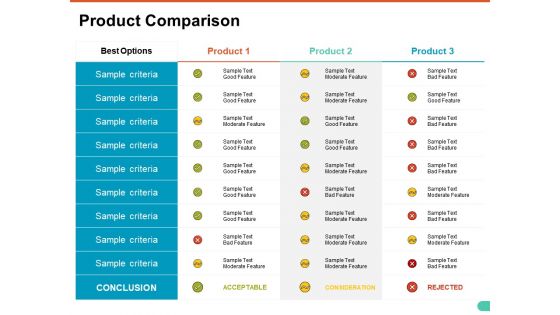
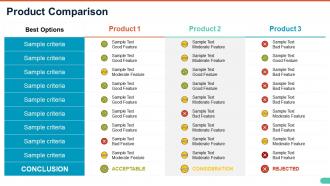
The product comparison PPT template is a simple comparison table presentation design which has been created in PowerPoint by the professionals. The comparison presentation template is a single slide template which can serve as an ultimate tool for any business comparison presentation. This tabular design is useful for the comparison of different product categories and capabilities. This slide is ideal for compare and contrast presentation concepts. The sales and marketing professionals can use this template to guide clients about different product properties and categories. On the main slide of this template, you can see a simple tabular design with clear white background. The user can add up to three products for the comparison. After adding all the product data and information into the template, the presenter can easily bring out a conclusion. The table in the design is created using independent PowerPoint shapes. The slide uses minimalistic graphics making it suitable for any business comparison presentation. Personalize the elements in the template according to your need to make a cool yet informative presentation. Download the product comparison PPT template and leave a long-lasting impact on the audience. Inject the ingredients for ideas to hatch with our Product Comparison Ppt Ideas Example. You will excel at fertilizing brains.
People who downloaded this PowerPoint presentation also viewed the following :
Product comparison ppt ideas example with all 5 slides:
Counter intimidation with our Product Comparison Ppt Ideas Example. Foil any attempts at foul play.
FAQs for Product comparison
Start with product names and logos up top, then hit the main specs and pricing. Pros/cons sections are clutch. I always throw in a comparison table too - honestly makes everything way easier to digest. Target audience stuff is good, plus customer ratings if you've got them. Oh and definitely call out winners for different use cases, like "best for beginners" or whatever. The goal is helping people decide fast, so keep everything scannable. End with a summary slide that covers your top picks for different scenarios. People love that shit.
Don't try making everything sound amazing - that's where most people mess up. Instead, figure out what each product actually does well. Maybe one's cheaper, another has killer features, or one's just way easier to set up. Then when you're writing it up, skip the boring side-by-side spec sheets (honestly, nobody reads those anyway). Call out the real winners for each option. Be upfront about the downsides too, but make sure every product gets its moment. Wrap up each section by connecting those wins to actual situations your customers face.
Honestly, go with side-by-side tables - they're perfect for this stuff. Your audience can scan features super quickly without getting confused. I'd use green for "yes" and red for "no" on features, makes it way easier to follow. Charts are fine for numbers like pricing, but tables are where it's at. Oh and definitely use icons instead of long text blocks - nobody wants to read paragraphs on slides. Keep it clean with lots of white space so it doesn't look cramped. Put your biggest selling points at the top since that's what people notice first.
Here's what I've learned works: Put your decision criteria right up top - like what actually matters when picking between these things. Side-by-side comparisons are your friend because people's brains just work that way. Don't bury your recommendation at the end (honestly, so annoying when reviews do that) - say which one you'd pick early on, then explain why. Walk through the evidence after that. Feature lists should be short and sweet, focus on how stuff actually solves their problems. Oh, and always end with pricing and next steps since that's what everyone's scrolling down to find anyway.
Don't fall into the trap of favoring whatever option you secretly want - people see right through that. Way too many folks try cramming 15+ features into one comparison, which is honestly just overwhelming. Three to five key points max, trust me. Avoid tiny fonts or messy charts that no one can actually read. Current data matters too - outdated pricing makes you look sloppy. I'd say focus on what really drives the decision and keep everything clean. Oh, and make sure people in the back can see your slides! That's how you actually get buy-in.
Dude, color psychology is sneaky powerful for product comparisons. Green screams "good choice" - perfect for eco-friendly or budget features. Red? That's your warning color, so slap it on competitor downsides like high prices. Blue builds trust (think reliability stuff), and orange pushes urgency for deals. Most people have no clue colors mess with their heads like this. I'd stick your preferred product in blues and greens while competitors get the red treatment. Sounds manipulative but honestly, everyone's doing it. Works way better than you'd think.
Definitely start with pricing and key features laid out side by side. Performance data and customer reviews are huge too. Market share info is gold if you can dig it up - makes you look way more credible. Just make sure you're comparing the same tier products, not like their basic plan vs someone else's premium. Support options matter more than people think, plus integration stuff and any sneaky fees. I learned that one the hard way lol. Stick to maybe 5-7 main criteria though. Nobody wants to wade through a massive spreadsheet of every tiny detail.
Honestly, just tell a story about someone's actual problem and how each product would handle it. Start with their pain point - like "Sarah in accounting kept missing deadlines because..." Then walk through what happens with Product A versus Product B in her real day-to-day stuff. Don't overthink it though, I've watched people get way too creative and lose their audience. Concrete scenarios beat boring feature lists every time. Maybe try a "day in the life" angle for your next comparison? Makes all that data stick way better than just rattling off specs.
Honestly, knowing your audience changes everything. Executives? They want bottom-line numbers and ROI stuff. End-users care more about whether they'll actually want to use the thing daily. I've watched so many presentations bomb because someone spent 20 minutes on technical specs when the room full of managers just wanted to know about cost savings. Figure out what keeps your specific audience awake at night first - then you can pick which features and data points will actually matter to them. Don't get caught talking workflows to the C-suite or budget breakdowns to the people who'll never see invoices.
Mix testimonials right into your comparison by matching customer quotes with specific features. Like if you're comparing software, put "This cut our processing time in half" right next to your speed stats. Skip the boring "great product!" stuff - honestly, those quotes are useless. Hunt for testimonials that mention real results or solve actual problems people have. Drop them near whatever feature they're talking about. Oh, and definitely include the customer's name and company if you can. Makes it way more believable than some anonymous quote.
Dude, just pick the stuff your audience actually cares about - price, performance, whatever matters most. Bar charts are clutch for comparing things side by side. Tables work better when you've got tons of details to show. Don't get fancy with those weird 3D charts that make everyone squint and pretend they understand. Clean visuals win every time. Same colors for each product so people aren't confused. Oh, and don't mess with the scales to make your favorite product look better - people notice that stuff. Include where you got the data from. Your audience should look at it once and immediately know what's what.
Stick to facts and data instead of opinions when you're building the comparison. Same evaluation criteria for everything - no cherry-picking metrics that make your favorite look better. I've watched way too many presentations where someone obviously picked their winner before they even started researching. Be upfront about your methodology and where you got your data. Every product needs pros AND cons listed, even the one you're leaning toward. Oh, and test each option with equal effort - can't half-ass one and deep-dive another. Tell your audience about any vendor relationships you have. Frame it like "the data shows this" rather than "you should totally buy this one."
Honestly, just go with PowerPoint, Google Slides, or Canva for comparison presentations. Canva's my pick though - their comparison templates actually look modern instead of like something from the early 2000s lol. If you're feeling fancy and want total design freedom, Figma or Adobe Creative Suite are solid. Lucidchart and Miro also work well for interactive stuff. But here's the thing - pick one and master it. You'll be so much faster once you learn all the shortcuts instead of constantly switching between tools.
You've gotta totally flip your approach depending on who you're talking to. Healthcare people only care about patient safety and compliance stuff - don't even bother with ROI numbers. Tech folks want to hear about scalability and how it'll integrate with their existing setup. Finance is all about security and risk management (makes sense, right?). Manufacturing? They're obsessed with efficiency and preventing downtime. I bombed a pitch once because I kept talking about returns when the doctors just wanted to know how patients would benefit. Do your homework first and figure out what actually keeps each industry up at night.
Stop drowning people in tech specs - talk about what it actually does for them instead. Like, call data encryption a "digital safety deposit box" or something they can picture. I've watched way too many demos crash and burn because someone started rambling about APIs in minute one. Show before/after examples. Make it visual if you can. Here's what I always do: grab someone from accounting or wherever and test your pitch on them first. If they look confused, you're still too technical. Short sentences work. Then mix in longer ones that flow naturally together.
-
Great product with effective design. Helped a lot in our corporate presentations. Easy to edit and stunning visuals.
-
Enough space for editing and adding your own content.