


Price list chart template powerpoint show






Try Before you Buy Download Free Sample Product
 Impress Your
 Audience
 100%
100% Editable
 Save Hours
 of Time


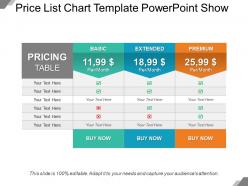
Select this price list chart template PowerPoint show slideshow to discuss and explain about the amount or the value of your product to your viewers or audience that is put to your product or service which classify your product from the other market products. Choose the catalog price figure PowerPoint shape to make a business presentation on the concept of the complex set of calculations, research, understanding and risk taking ability of the product of your business or organization. The usage of this checklist table Powerpoint diagram enables the user to adopt and implement the pricing strategy as well which further takes into various account segments, ability to pay, market conditions, competitor actions, trade margins and input costs. The attractive display of the slideshow provides the user a complete platform to assist the user to advertise the product successful for selling and promoting the sale of the product of the company. The unique features and components of this PPT slide is competent enough to draw the interests and keen attention of the viewers and audience which is the paramount factor of selling any product. So, what are you looking for when this ready made layout has been made available for you to provide you the best services as comparative to other commonly designed PPT. Eliminate aspects causing ire with our Price List Chart Template Powerpoint Show. Bring an end to any irritants.
People who downloaded this PowerPoint presentation also viewed the following :
Price list chart template powerpoint show with all 5 slides:
Increase your credibility with our Price List Chart Template Powerpoint Show. Insist on highlighting facts.
FAQs for Price list chart
Start with your company details at the top, then list everything with clear descriptions and pricing. Honestly, I'd throw in SKU numbers too if you've got them - makes reordering way easier later. Payment terms are crucial, plus any minimum orders or whether shipping's included. I learned that the hard way when a client assumed free delivery on a tiny order! Set validity dates since prices change constantly now. Oh, and make sure your contact info's obvious. Keep the whole thing scannable so people aren't hunting around for basic stuff.
Honestly, the main thing is making your pricing super easy to scan. Group similar stuff together with clear headers - nobody wants to hunt through a messy spreadsheet. Bold the important parts so customers aren't squinting at tiny text trying to figure out costs. I swear half the businesses I see lose sales just because their pricing is confusing as hell. Clean formatting makes a huge difference. When people can quickly compare options and see exactly what they're paying for, they'll actually buy instead of getting frustrated and leaving. Oh, and use pricing tiers if you have them - makes comparison shopping way easier.
Alright, so first things first - white space is your best friend here. Don't cram everything together like you're running out of paper. Pick maybe two fonts max and actually stick to them (I see too many menus that look like a ransom note). Make your prices stand out with bold or some color contrast. Group stuff logically - appetizers with appetizers, you know? The whole thing should flow so customers aren't hunting around for basic info. Oh, and test it on someone who's never seen your menu before. If they can't find what they want in like 10 seconds, you've got work to do.
Your industry basically dictates everything about pricing structure. Retail's all about SKUs and bulk tiers, but construction customers need those detailed material specs plus labor breakdowns. SaaS is totally different - subscription levels and feature comparisons work best there. Restaurants? Menu categories, obviously. Manufacturing gets tricky though - you'll need pricing matrices with volume discounts and custom options. Honestly, it comes down to figuring out how your specific customers shop and what info they actually need to decide fast.
Honestly, I'd just go with Google Sheets - it's free and you can share it right away with whoever needs it. Excel works great too if you've got it already. Both handle the math automatically which is clutch. Canva's pretty solid for making things look fancy, but their free stuff is kinda meh. InDesign is overkill unless you're doing something super elaborate (like, why make your life harder?). Word could work in a pinch. Really though, just use whatever you're already comfortable with - no point learning something new if Sheets does the job.
Oh totally, depends what you're selling though. Physical products? Yeah, definitely use images - people want to see what they're actually buying, especially if you're charging premium prices. Services are trickier... maybe just simple icons to break up text blocks? I learned this the hard way when I had a pricing page that looked like a boring spreadsheet lol. Keep them small though - you don't want the visuals competing with your actual prices. Try it both ways honestly. See what clicks with your customers.
Quarterly is usually a good baseline, but honestly it really depends on your industry. Tech or fashion? You'll probably need monthly updates since everything moves so fast. More stable stuff like manufacturing can get away with twice a year. I learned this the hard way when a supplier jacked up prices and I didn't notice for like 3 months - not fun. Just set a calendar reminder and stick to it. You don't want to get blindsided by cost changes or realize you've been leaving money on the table because your prices are outdated.
Dude, color psychology is no joke when it comes to pricing. Blue builds trust - there's a reason every bank uses it. Green screams "good deal" and affordability. Red's tricky though... creates urgency but can also feel like a warning sign. Black and gold? Pure luxury vibes, but only if you're actually premium. Honestly, I've seen so many people throw every color at their price lists and wonder why they look sketchy. Stick to 2-3 colors that match your vibe and price point. Your customers will subconsciously trust you more.
Just duplicate your main template and tweak the pricing columns - super easy. I add a "Sale Price" column right next to regular prices. Works like a charm every quarter, honestly saves me so much hassle. Throw in some promotional notes or highlight seasonal stuff in different colors so it stands out. Smart move is keeping your original template untouched so you can flip back when the promo's over. Oh, and use a naming system like "PriceList_Summer2024" or you'll lose track fast. Trust me on that one.
Okay so definitely do side-by-side columns or tables - makes it super easy to scan between options quickly. Focus on highlighting the stuff that actually matters, like features or quantities, not just price differences. I'm obsessed with putting the "recommended" option in the middle since that's where people look first. Color coding works great too... green for savings, blue for premium, whatever. But honestly don't make it too cluttered - nobody wants to decipher a massive table. Oh and test it with someone else first! I learned that the hard way when I thought my layout was obvious but my coworker was totally confused.
Honestly, having a template is a lifesaver for price changes. You'll never forget to include the actual effective date again (I've seen that mistake way too many times). It keeps everything consistent - old prices, new ones, why you're changing them, how it affects different customers. Your customers can actually scan through it quickly instead of trying to decode some confusing email. I mean, nobody wants to read a novel just to figure out their new rates. Just swap out the details each time you need it and you're done. Way less stressful than starting from scratch every single time.
Look, just give them both options - you'll cover way more ground that way. Digital works great for people who want to tweak prices or fire off quick emails to clients. But honestly? Some folks still love having physical copies for meetings or trade shows. I get it, seems like extra work, but you're basically removing any excuse not to buy from you. Quick digital delivery gets them started right away, then they can print whatever they need later. Plus some people are just... old school about having paper in their hands during presentations. More options = more sales, simple as that.
Make sure your font is at least 12pt - anything smaller is just cruel. Black text on white background works best for contrast. Break everything up with clear headings and keep your formatting consistent throughout. Tables and bullet points are great because screen readers can actually navigate them properly. Oh, and don't just stick to one format! Some people want PDFs they can print, others need HTML they can zoom in on their phones. Honestly though, the best thing you can do is test it with real people who actually use accessibility tools before you call it done.
Honestly, the worst thing you can do is make it cluttered as hell. Clean formatting is everything - white space, clear headers, proper alignment. Don't squeeze everything together with microscopic fonts because nobody's got time for that. Keep product descriptions super brief in the pricing section itself. Save the detailed specs for somewhere else, trust me. Your currency symbols and decimals better be consistent throughout (learned this the hard way). Oh, and definitely include effective dates. Test it with a couple customers first - if they can't find stuff quickly, you'll know right away what needs fixing.
Your customers are basically giving you free consulting when they complain about your price list - listen to them! Ask what info they actually need upfront and how they like seeing prices laid out. I learned this the hard way when clients kept asking for bulk discounts that weren't even on our template. Turns out we were missing tons of stuff like product specs and clearer terms. Their shopping habits probably don't match your categories either. Just bring it up on your next call or send a quick survey. Way easier than guessing what works.
-
Best Representation of topics, really appreciable.
-
Out of the box and creative design.