

Performance Improvement Plan For Efficient Customer Service Powerpoint Presentation Slides




Try Before you Buy Download Free Sample Product
 Impress Your
 Audience
 100%
100% Editable
 Save Hours
 of Time


Heres our insightfully designed template for Performance Improvement Plan for Efficient Customer Service to accomplish your business goals. The customer support teams struggles, like rising average response times, growing ticket backlogs, declining customer retention rates, etc. are detailed in the PPT. It also discusses the requirement for an improvement strategy to give the customers a better experience. Our Client support deck further discusses ways to improve customer service. It includes identifying target audience demands, tracking performance metrics, implementing software for a smooth experience, and much more. Lastly, our customer satisfaction module considers the benefits of implementing improvement tactics and the cost incurred to adopt and apply these techniques. Download this 100 percent editable presentation and get access to our highly researched and skillfully designed product.
People who downloaded this PowerPoint presentation also viewed the following :
Content of this Powerpoint Presentation
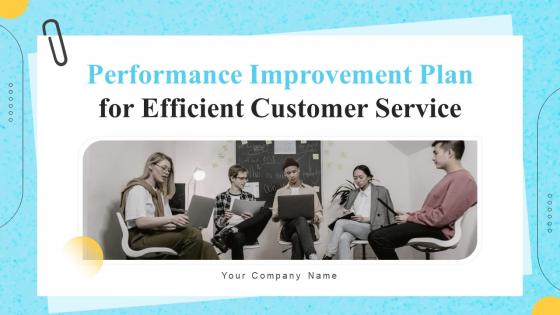
Slide 1: This slide introduces Performance Improvement Plan for Efficient Customer Service. Commence by stating Your Company Name.
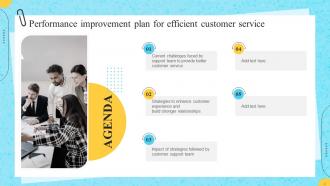
Slide 2: This slide depicts the Agenda of the presentation.
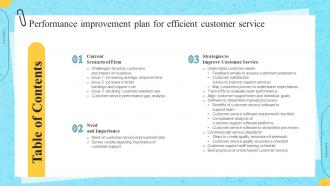
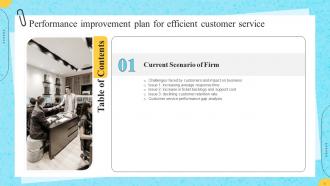
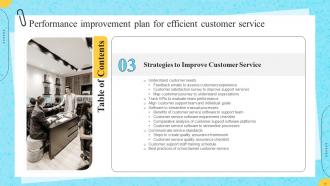
Slide 3: This slide incorporates the Table of Contents.
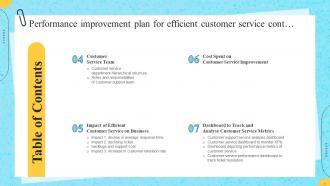
Slide 4: This is yet another slide continuing the Table of Contents.
Slide 5: This slide elucidates the Title for the Topics to be covered in the next template.
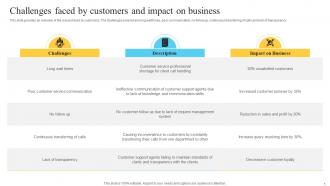
Slide 6: This slide provides an overview of the issues faced by customers and their impact on the business.
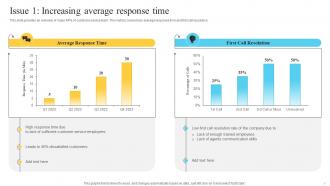
Slide 7: This deals with the overview of major KPIs of customer service team, by covering the metrics like average response time and first call resolution.
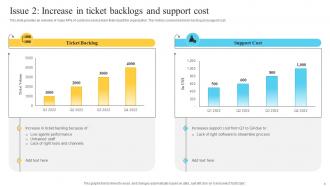
Slide 8: This slide gives a glimpse of major KPIs of customer service team that impact the organization, covering the metrics such as ticket backlog and support cost.
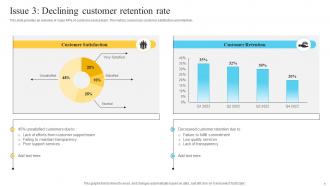
Slide 9: This slide provides an insight of major KPIs of customer service team, by incorporating metrics like customer satisfaction and retention.
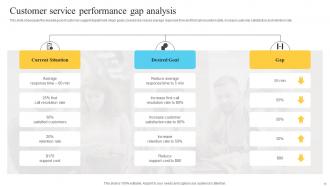
Slide 10: This slide showcases the desired goal of customer support department.
Slide 11: This slide highlights the Heading for the Contents to be discussed further.
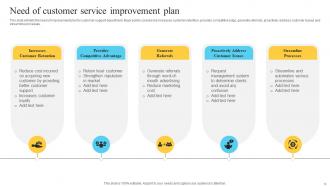
Slide 12: This slide exhibits the need of improvement plan for customer support department.
Slide 13: This slide presents the survey results that exhibit the importance of support service.
Slide 14: This slide mentions the Title for the Ideas to be discussed next.
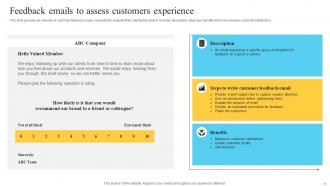
Slide 15: This slide provides an overview of customer feedback survey conducted to evaluate their satisfaction level.
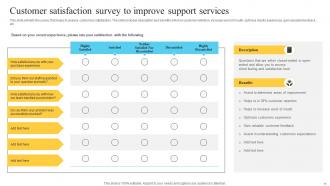
Slide 16: This slide exhibits the survey that helps to analyze customers satisfaction.
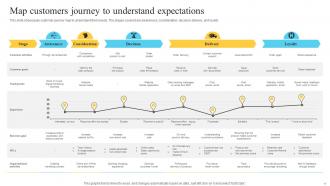
Slide 17: This slide showcases customer journey map to understand their needs.
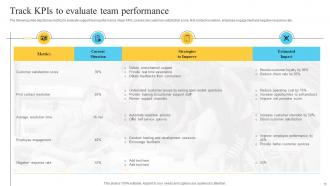
Slide 18: The following slide depicts key metrics to evaluate support team performance.
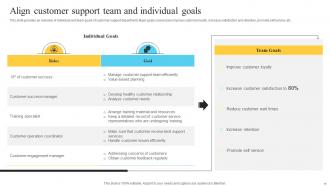
Slide 19: This slide provides information about individual and team goals of customer support department.
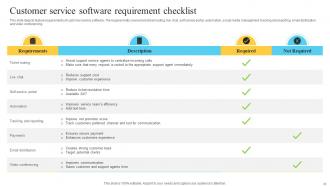
Slide 20: This slide depicts feature requirements of customer service software.
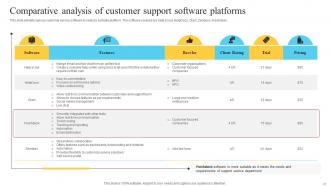
Slide 21: This slide exhibits various customer service software to select a suitable platform.
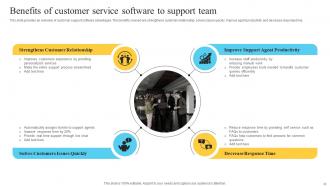
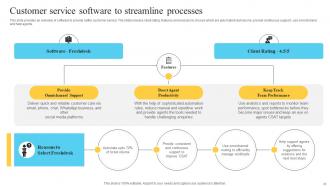
Slide 22: This slide elucidates the Benefits of customer service software to support team.
Slide 23: This slide focuses on the Customer service software to streamline processes.
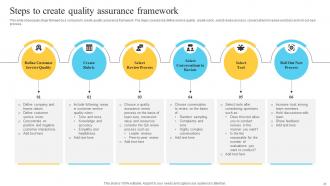
Slide 24: This slide showcases steps followed by a company to create quality assurance framework.
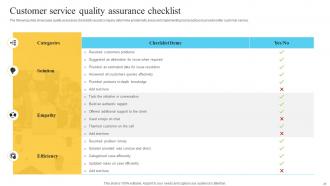
Slide 25: This slide represents the Customer service quality assurance checklist.
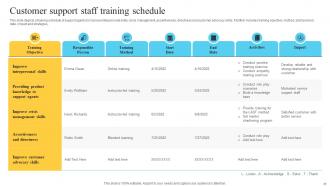
Slide 26: This slide depicts a training schedule of support agents to improve interpersonal skills, crisis management, assertiveness, directness and customer advocacy skills.
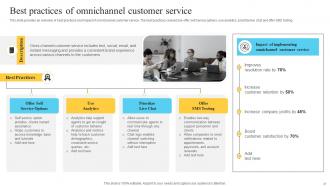
Slide 27: This slide states the best practices and impact of omnichannel customer service.
Slide 28: This slide mentions the Heading for the Components to be covered in the upcoming template.
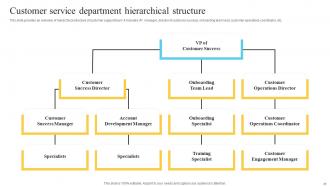
Slide 29: This slide provides an overview of hierarchical structure of customer support team.
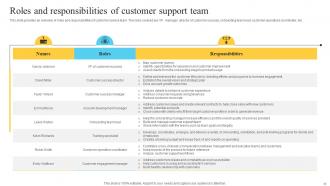
Slide 30: This slide highlights the roles and responsibilities of customer service team.
Slide 31: This slide displays the Title for the Contents to be discussed further.
Slide 32: This slide showcases the impact of good support service on the company.
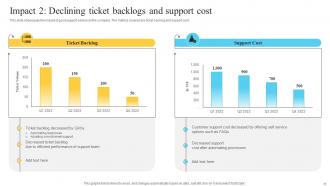
Slide 33: This slide elucidates the impact of good support service on the company, in terms of the metrics covering ticket backlog and support cost.
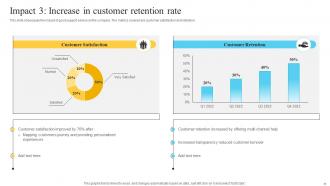
Slide 34: This slide highlights the impact of good support service on the company. The metrics covered are customer satisfaction and retention.
Slide 35: This slide depicts the Heading for the Ideas to be discussed next.
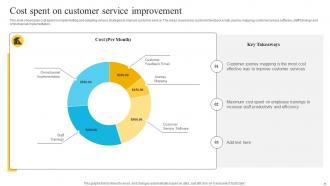
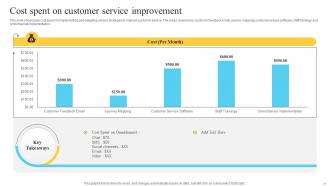
Slide 36: This slide presents the cost spent on implementing and adopting various strategies to improve customer service.
Slide 37: This slide showcases cost spent on implementing and adopting various strategies to improve customer service.
Slide 38: This slide mentions the Title for the Topics to be covered in the following template.
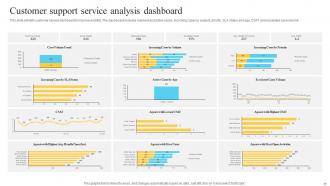
Slide 39: This slide exhibits customer service dashboard to improve visibility.
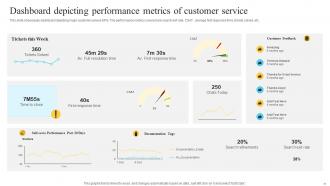
Slide 40: This slide represents support service dashboard to track relevant performance metrics.
Slide 41: This slide showcases dashboard depicting major customer service KPIs.
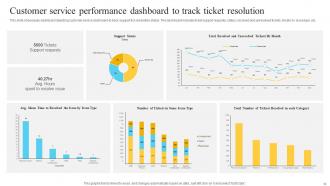
Slide 42: This slide highlights dashboard depicting customer service dashboard to track support tick resolution status.
Slide 43: This is the Icons slide containing all the Icons used in the plan.
Slide 44: This slide is used for depicting Additional information.
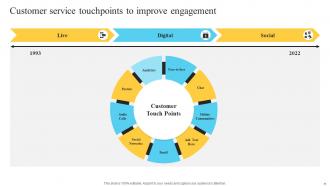
Slide 45: This slide deals with the Customer service touchpoints to improve engagement.
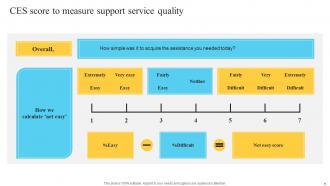
Slide 46: This slide focuses on CES score to measure support service quality.
Slide 47: This slide incorporates the 7 steps to improve and enhance customer services.
Slide 48: This slide lists the Steps to develop customer service training strategy.
Slide 49: This is the About us slide. State your company related information here.
Slide 50: This slide presents the Company's Roadmap.
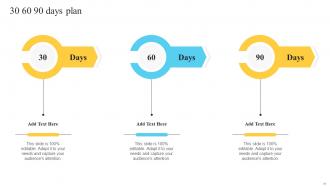
Slide 51: This slide depicts the 30 60 90 days plan for efficient planning.
Slide 52: This is the Goal slide representing the Company goals.
Slide 53: This is Our team slide. State the information related to your team members here.
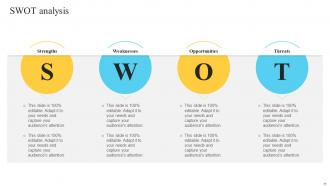
Slide 54: This slide displays the SWOT analysis.
Slide 55: This is the Idea generation slide for encouraging fresh ideas.
Slide 56: This is the Thank You slide for acknowledgement.
Performance Improvement Plan For Efficient Customer Service Powerpoint Presentation Slides with all 61 slides:
Use our Performance Improvement Plan For Efficient Customer Service Powerpoint Presentation Slides to effectively help you save your valuable time. They are readymade to fit into any presentation structure.

















FAQs for Performance Improvement Plan For Efficient Customer Service
Okay so first thing - you've gotta be super clear about what exactly needs to change. Like, don't just say "improve communication." Set measurable goals with actual deadlines (30-90 days usually). Schedule regular check-ins too so nobody's surprised later. Oh, and give them the tools they need - training, mentoring, whatever makes sense. I learned this the hard way, but document literally everything you discuss. It sounds paranoid but it'll save your butt if things go sideways. Be honest upfront about what happens if they don't hit the targets. It's not fun, but better than dragging it out forever.
You've gotta document real, specific stuff - not just feelings. Missed deadlines, crappy work quality, goals they didn't hit, behavior that's screwing with the team. I know your gut's probably spot-on, but that won't hold up if things get messy later. Pull their job description and recent reviews. Get feedback from teammates or clients too. The whole "attitude problem" thing is way too vague - you need concrete examples you can actually point to. Start collecting this evidence now so when you sit down with them, you've got specifics about what needs to change.
SMART goals are your best bet here - specific, measurable, achievable, relevant, time-bound. So instead of "improve communication," go with something like "respond to all client emails within 24 hours, tracked weekly." Break everything into smaller chunks so it doesn't feel overwhelming. I've honestly watched so many PIPs crash and burn because people set these impossible-to-track goals. Stick to 2-3 key areas max. You don't want a novel-length action plan. Pick metrics you can actually measure - "complete 4 training modules by month-end" beats "become more skilled" any day. Document your progress and set up regular check-ins.
Honestly, the biggest thing is framing it right from the start - this isn't punishment, it's literally a game plan to help them get back on track. Walk them through the specific issues you're seeing and set clear, measurable goals with deadlines that actually make sense. These conversations are super uncomfortable (trust me), but being upfront about everything is way better than dancing around it. Let them know you're genuinely rooting for them to succeed. Give them room to ask questions or push back if they need to. Oh, and definitely plan regular check-ins - they'll need to see you're actually invested in helping them improve, not just waiting for them to fail.
Honestly, you HAVE to get the employee's input when writing a PIP. They're doing the job every day - they know what's actually blocking them way better than you do from your desk. Talk to them about what obstacles they're hitting and what kind of support would actually help. Listen to their take on the performance issues too. I've seen so many PIPs fail because managers just made assumptions and threw together some generic plan. Without their feedback, you're basically shooting in the dark. Try to work their suggestions into the plan when you can. Makes a huge difference.
Honestly, the biggest thing is making your metrics super concrete - like actual numbers instead of fuzzy stuff like "team player vibes." Sales figures, project deadlines met, customer ratings... that kind of thing you can't really argue with. Don't let one person make all the calls either, that's just asking for someone's personal feelings to mess things up. Keep the same standards for everyone (sounds obvious but you'd be surprised how often this gets weird). Oh, and be upfront about what you're measuring - nobody likes getting blindsided during reviews. Document everything too, even if it feels excessive.
Oh man, the worst thing you can do is be vague about what you actually want from them. Set clear, measurable goals with real deadlines. Also don't just throw them into it without support - like, what's the point if they're set up to fail? Make sure it's about helping them grow, not punishment. I learned this the hard way but you can't rush the timeline either. Regular check-ins are huge instead of waiting till the end to see how they're doing. And honestly? Document absolutely everything because you'll need it later.
Don't wait until the end to check progress - that's a disaster waiting to happen. Weekly or bi-weekly works best, though most companies do the formal thing every 2 weeks. Honestly? Weekly informal chats are way more effective. Your employee can't improve without consistent feedback, plus you'll need to document everything anyway. If they're really struggling, maybe do quick daily check-ins for the first week or two. Just be predictable about it - set a schedule and actually stick to it. Nobody likes surprises during a PIP.
Honestly, I'd just use whatever system your team already knows - don't add new software stress to an already messy situation. BambooHR and Workday have decent PIP templates if you're fancy like that. But Google Docs works fine too? Just make a shared folder for goals, meeting notes, all that documentation stuff. Some people go overboard with Asana or whatever project management thing, but that's probably too much. The main thing is keeping everything in one spot where you can actually find it later. Oh, and make sure you can easily update progress and attach files - you'll be doing a lot of that.
Check in with them constantly - like weekly one-on-ones to talk through what's working and what isn't. Don't just set the PIP and disappear (I've seen managers do this and it's honestly terrible). Ask them straight up what help they need to actually succeed. Connect them with training or maybe pair them with someone who can mentor them. Oh, and celebrate the small stuff when they improve - it matters more than you'd think. Your whole goal should be helping them get better, not just building a paper trail to fire them later.
Give them 30-60 days minimum, maybe 90 if it's complicated stuff they need to learn. Honestly, don't start the clock when you're slammed at work - they need actual support to improve. Holidays and vacations will mess with their focus too. I'd avoid starting right before busy season hits. Document everything with real dates and check-ins. Here's the thing though - some managers either give up too fast or drag it out forever. You want to be fair but not waste months if they're clearly not getting it. Just make sure they have a genuine chance first.
Be super upfront about expectations from day one, but actually invest in helping them succeed. I always document the specific gaps and deadlines - you'll need that paper trail. But here's the thing: pair it with real coaching, not just waiting for them to fail. Weekly check-ins are huge. Give them resources, honest feedback, celebrate the small wins when they happen. Too many managers treat PIPs like a slow-motion firing squad, which is honestly pretty cruel. Yeah, they need to know it's serious, but also that you're genuinely rooting for them to figure it out.
When PIPs work out, they're honestly pretty amazing - people usually come back stronger and way more motivated. Companies keep all that experience and show they actually care about developing staff. But when they fail? Yep, straight to termination most of the time. Everyone gets weird and tense when they know someone's on one too. Failed PIPs cost a fortune in hiring and training new people, plus they make management look incompetent. The trick is having clear goals and actually wanting to help - not just using it as a fancy firing process.
Ugh, honestly? Most PIPs fail because managers treat them like a gotcha instead of actually trying to help. Sit down with your employee first - figure out what's blocking them. Maybe the timeline was nuts or they need better training. Once you know the real issues, tweak the goals to be more realistic. Extend deadlines if you have to, add mentoring, whatever. Just document the changes clearly. The whole point is still getting their performance up, but you've gotta make it actually doable or you're both wasting time.
Hey, so most companies will hook you up with training courses, mentoring, or coaching sessions with your manager. Some even do external workshops or online learning platforms. You might get paired with someone more experienced too, which honestly can be super helpful. Here's the thing though - don't just wait around for HR to offer stuff. Be upfront about what you need. Your manager should help figure out where you're struggling and get you the right resources. I know it feels awkward, but ask for extra support. Companies actually want PIPs to work out since they've already invested in you.
-
Awesome use of colors and designs in product templates.
-
Definitely a time saver! Predesigned and easy-to-use templates just helped me put together an amazing presentation.