

Procedure presentation slides





Try Before you Buy Download Free Sample Product
 Impress Your
 Audience
 100%
100% Editable
 Save Hours
 of Time


Demonstrate your intent with our Procedure Presentation Slides. Establish the fact that you are a determined individual.
People who downloaded this PowerPoint presentation also viewed the following :
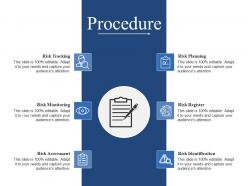
Procedure presentation slides with all 5 slides:
Create an ethereal atmosphere with our Procedure Presentation Slides. Give folks a heavenly experience.
FAQs for
Okay so three main things you gotta nail: prep work, solid structure, and keeping people engaged. Research your audience first - sounds boring but it's honestly game-changing. Then do the whole intro/body/conclusion thing with that "tell them what you'll tell them" format (I know it's old school but it works). Plan some interactive stuff so people don't zone out. Practice those transitions between sections - that's where everyone trips up. Oh and definitely leave time for Q&A at the end. Start by figuring out your main points first, then build everything around those. Having backup slides ready is clutch too.
Okay so basically you gotta match your audience. Execs want the big picture stuff - ROI, business impact, that kind of thing. Technical people? They want all the details and how-to's. Mixed groups are honestly the worst because you're trying to please everyone at once. I usually start broad then get specific if they seem into it. Oh and switch up your examples too - like don't use engineering stories when you're talking to the marketing team, you know? The trick is watching faces during your presentation. If people look confused or bored, you'll need to shift gears pretty quick.
Honestly, good visual design can make or break your presentation. Keep slides clean with lots of white space and readable fonts. High-quality images that actually support your points - not random stock photos of people pointing at laptops (seriously, why do those exist?). Simple color schemes work way better than rainbow explosions. Don't go crazy with animations either. Make sure everything lines up properly since crooked text drives people nuts. The visuals should guide where your audience looks. Oh, and start planning this stuff early! You'll thank yourself later instead of scrambling with design at midnight.
Hey! So for your presentation - stick to one main point per slide, seriously. Don't overthink it. Simple language beats fancy corporate BS every time (people zone out otherwise). Bullet points work way better than big text blocks. Practice your transitions beforehand so you're not awkwardly clicking around. Time yourself too - you'll catch where you drag on. Start strong by telling them exactly what they'll get out of this, then wrap up by hitting those key points again. Oh, and try asking "so what?" about each slide - if you can't answer it clearly, cut that slide. Works every time.
Honestly, the biggest game-changer is just making it interactive - throw in questions, maybe a quick poll if you can. People zone out when you're just talking AT them, you know? Stories beat boring facts every single time. I learned this the hard way lol. Move around instead of standing there like a statue, make eye contact, use your hands. Oh and don't rush through everything! Pausing actually works. The whole thing is really about reading the room though - if people look confused or bored, switch it up. Their body language will tell you everything.
Don't panic when someone jumps in with questions - just roll with it gracefully. Quick relevant question? Answer it fast or jot it down and say "good one, I'll hit that in a few slides." Off-topic stuff is trickier. Politely redirect like "interesting point, but let's stick with [current topic] for now." Honestly, I've watched so many presentations crash and burn because the speaker lost control of the room. You've got to stay respectful but firm. And yeah, don't forget to actually circle back to those promised answers later!
Oh man, the tech thing is HUGE - I've watched so many people crash and burn just trying to get their screen to work. Super awkward. Don't read straight off your slides either, like we can all see what's written there. Practice saying it out loud at least once or you'll hit those weird "ummm... next slide" pauses. Actually look at people instead of your notes the whole time. Also? Don't go way over without asking if people have questions. I swear half the presentation disasters I've seen could've been avoided with just one practice run.
Hey! So for stories, hit three spots: opening hook, middle examples, and wrap-up. Lead with something relatable that sets up your main point - emotions first, logic second. Sprinkle in quick customer stories or case studies when explaining tricky stuff. Seriously, even the driest spreadsheet data becomes interesting with the right anecdote. Close with a story showing the outcome you want them to picture. Keep each story under 90 seconds and tied to your message. Oh, and practice those transitions - nothing kills momentum like awkward pauses between your story and the actual content.
Honestly, PowerPoint and Google Slides are your basic go-tos for most presentations. Prezi's cool if you want something flashy. For remote stuff, Zoom works but I'm obsessed with Loom for practicing - seriously catches all your weird speech habits. Mentimeter's clutch for live polls, and Canva makes even terrible designers look decent (speaking from experience lol). Oh, and Slido's good for Q&A sessions. But here's the thing - don't get tool-crazy. Pick one main platform and actually get good at it instead of half-learning a bunch of different ones.
Don't just dump everything and ask for questions at the end - weave feedback breaks right into your talk. Hit them with a quick "make sense so far?" early on. Then pause mid-section for actual discussion. Honestly, most people rush through their slides way too fast anyway. After big points, give people space to react instead of barreling ahead. Oh and skip the generic "any questions?" - ask specific stuff like "what worries you about this timeline?" You'll get way better responses when you actually create openings for people to jump in.
Okay so definitely practice your presentation beforehand - trust me on this one. You'll spot weird timing issues and awkward transitions that would totally throw you off during the real thing. My slides literally crashed during a big pitch last year and I was NOT prepared lol. But honestly, the bigger benefit is just feeling more confident up there. When you know your material inside and out, you can actually focus on your audience instead of scrambling to remember what slide comes next. I'd say run through it twice minimum - once by yourself, then maybe grab a coworker to listen if you can.
Honestly, send out quick surveys after but ask specific stuff - was it clear, engaging, actionable? Skip the generic "how was it" questions. Watch people's behavior too. Did they stick around for Q&A or bail immediately? That tells you way more than polite feedback sometimes. If you can record yourself, do it - you'll catch where you rushed through parts or lost energy. Oh and this might sound obvious, but set your success metrics beforehand so you're not just measuring against whether people seemed to like you. Track if they actually followed up later too.
Honestly, the best thing you can do is get people actually involved instead of just talking at them. Ask direct questions, do quick polls, or break them into pairs for mini discussions. I love that think-pair-share thing - less awkward than putting someone on the spot right away. Mentimeter's pretty solid for live polling, but even sticky notes work great. Just don't try to improvise these moments! Plan where you'll add interaction beforehand. Oh, and start small - maybe just one or two interactive bits per presentation until you get the hang of it.
Oh man, this is so true - I bombed a presentation in Japan once because I went straight into my pitch without any context building. Turns out different cultures have totally different expectations. Some want you to cut to the chase immediately, others think that's rude and want relationship-building first. Eye contact is weird too... what feels confident here can seem aggressive elsewhere. Even little things like how much background info to include varies a ton. I always try to do some quick research on cultural norms beforehand now, saves you from looking like an idiot.
Honestly, interactive stuff works great - throw in some live polls or quick Q&As to wake people up. Stories are your best friend though. Real case studies, personal examples, whatever connects to your point. I've watched people absolutely crush it with random props or demos that nobody expected. Way better than endless slides, you know? Oh, and starting with a weird question or something that sounds totally wrong? Gets them hooked right away. Just don't go overboard with gimmicky stuff that feels forced. Pick maybe two things that actually fit your style and practice the hell out of them first.
-
Topic best represented with attractive design.
-
Easily Editable.