


Production Company Quality Inspection Flow Chart




Try Before you Buy Download Free Sample Product
 Impress Your
 Audience
 100%
100% Editable
 Save Hours
 of Time


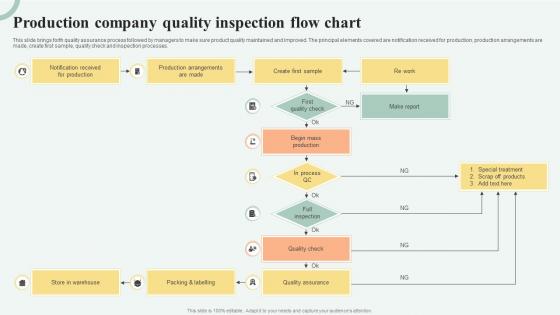
This slide brings forth quality assurance process followed by managers to make sure product quality maintained and improved. The principal elements covered are notification received for production, production arrangements are made, create first sample, quality check and inspection processes.
People who downloaded this PowerPoint presentation also viewed the following :
Production Company Quality Inspection Flow Chart with all 6 slides:
Use our Production Company Quality Inspection Flow Chart to effectively help you save your valuable time. They are readymade to fit into any presentation structure.





FAQs for Production Company Quality
So you'll need inspection standards, clear pass/fail points, and what to do when stuff goes wrong. Documentation too, obviously. Map out who's responsible for each step - that's where things usually fall apart. I'd start by sketching your current process first, then spot the gaps. Too many people forget the failure path though, which is honestly the most important part! Include immediate fixes like quarantine AND the longer-term root cause stuff. Keep it visual so anyone can jump in without reading a novel. Short version: don't overthink it, just make sure every scenario has a next step.
So basically, a quality inspection flow chart just tells everyone exactly what to check and when during production. No more guessing games. Workers follow the visual steps, catch problems early before they get expensive to fix. Think of it like having clear directions instead of wandering around lost - honestly saves so much headache. You'll cut down on rework and waste because people actually know what they're supposed to be doing. Production keeps moving instead of grinding to a halt over quality issues. I'd start by looking at where you're already doing inspections, then figure out what gaps you need to fill in.
Start with ovals for your beginning/end points, then use rectangles for inspection steps. Diamonds work for pass/fail decisions - super straightforward. Parallelograms are perfect for inputs and outputs like docs or test data. Arrows obviously show which direction everything flows. I'd stick with circles or triangles for inspection points, though honestly some teams go wild with custom symbols (probably overkill at first). Colors help a ton - green for pass routes, red for reject paths. Keep your text short and punchy inside each shape. Master these basics first, then you can get fancy later once everyone's comfortable with the flow.
Start by mapping out your whole process - trust me, it makes spotting problem areas so much easier. Target steps where things usually go wrong or would be expensive to fix downstream. High variability processes are red flags, plus anywhere you're bringing in new materials or equipment. Handoffs between teams always seem to cause drama too. Bottlenecks are obvious trouble spots. Think about what actually matters to your customers most - sometimes we obsess over stuff they don't even notice. Keep it to 3-5 critical points max, then back it up with your defect history.
So basically, a quality inspection flowchart is like your safety net for staying compliant with industry standards. You map out all the checkpoints and procedures your team needs to follow. When auditors show up (and they always do), you can just point to your chart and show them you've got a solid system in place. Honestly, it saves so much headache. The flowchart also helps you catch gaps in your process before they bite you later. Start by sketching out what you're already doing, then compare it against what regulations actually require. You'll probably find a few missing pieces - most people do.
Honestly, hands-on practice is everything here. Get people walking through real scenarios with the flowchart - don't just hand it over and hope for the best. Have trainers show the tricky decision points and what happens when you hit those weird defects that don't fit anywhere obvious. Role-playing helps too, though it feels awkward at first. Let them mess up in practice before they're dealing with actual products. Repetition is key. I'd also throw in quarterly refreshers because people forget stuff faster than you'd think. The safe practice environment really makes the difference.
Honestly, the two big killers are overcomplicating things and not talking to your team first. Skip the vague stuff like "check quality" - what exactly are you checking? Be super specific about your criteria. Map out the failure scenarios too (because yeah, stuff breaks). Don't duplicate processes that already exist - I've seen people waste weeks on that. Test it with real people before you launch anything. Keep it simple enough that someone can actually follow it without calling you every five minutes. Short sentences work better than long rambling ones, trust me on this.
Honestly, every 6 months minimum, but quarterly is way better if you can manage it. Whenever you switch up processes or launch new products - boom, update it right then. Same goes if customers start complaining about quality stuff. Don't wait around for your next scheduled review if something's obviously not working! I learned this the hard way at my last job lol. The whole point is making sure it matches what's actually happening, not some idealized version in your head. Set a phone reminder now because you'll totally forget otherwise. These things have a way of getting pushed to the back burner.
Honestly, tech can make your quality inspections way less painful. Start with IoT sensors and barcode scanners - they'll cut out all those data entry mistakes that drive everyone crazy. Mobile apps are a game changer too since your team can update stuff in real-time instead of hunting down clipboards (seriously, who thought paper was a good idea?). The really cool part is AI can actually spot problems before they blow up by finding patterns you'd never notice. Cloud dashboards show you exactly where things are getting stuck. I'd definitely tackle your biggest time-wasters first though.
So basically you map out your whole process first, then mark where stuff keeps breaking down. It's honestly like having x-ray vision for your workflow - suddenly all those recurring problem spots jump out at you. Way easier than staring at boring spreadsheets all day. The visual thing really works because patterns become super obvious. I'd update it regularly too, otherwise you won't know if your fixes actually helped or just moved problems around. Oh, and don't forget to track new issues that pop up. Bottlenecks become really clear this way.
Track your defect rates and cycle times first - those are the big ones. First-pass yield matters too. Cost per inspection is actually huge because you don't want to spend more checking stuff than the defects would've cost you, which happens more than you'd think. Inspector consistency and rework percentages show where things break down. Customer complaints tell you if you're catching what actually matters to people. Oh, and set up some kind of weekly dashboard so you can spot weird patterns early. Way easier than trying to fix bigger messes later.
Set up a feedback loop that tracks complaints, returns, and surveys - then dig into patterns your inspections are missing. Those customer gripes? Pure gold for spotting blind spots. Every month or quarter, update your inspection checklist based on what keeps coming up. I'd create triggers too - like three complaints about the same defect means it automatically becomes a new checkpoint. Simple tracking system closes the loop. Honestly, customers will tell you exactly what's wrong if you're listening. Just don't overthink the setup.
Honestly, manufacturing and healthcare are where these really shine - especially when you're dealing with safety stuff or regulations. Pharma, car parts, medical devices, that kind of thing. Software teams use them too now, which I didn't expect. The expensive-defect industries see huge wins. Aerospace catches my attention because one mistake there is... yeah, costly. Electronics and chemical processing too. I'd say start with whatever scares you most - your riskiest processes. They basically fund themselves by spotting problems early instead of after everything's already gone wrong.
Honestly, I'd go with Lucidchart first - super easy to use and they have decent templates already built in. Microsoft Visio is the standard if you're already using Office stuff, but it's kinda pricey. Draw.io works well too and it's free, which is nice. There are fancier options like MasterControl if you need serious quality management features, but that's probably way more than you need right now. Most people I know just stick with the simple web-based ones anyway. Start with Lucidchart's free version and see how it goes.
Dude, the visual stuff is honestly what makes or breaks these charts. Standard symbols are your friend - rectangles for processes, diamonds for decisions, circles for start/stop. I'd go with consistent colors too, maybe different ones for each inspection stage. Nothing worse than a flowchart that looks like someone threw shapes at a wall! Keep your text big enough to actually read and make those arrows super obvious. Oh, and definitely test it with whoever's gonna use it first - I learned that one the hard way. You want people following the process easily, not squinting at some confusing mess.
-
The service is fast, and I could access any presentation after buying the subscription. I don’t think I’ll ever have to worry about a presentation in my life.
-
“Love it! I was able to grab an exciting proposal because of SlideTeam.”