

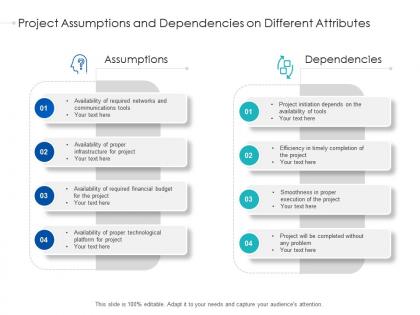
Project assumptions and dependencies on different attributes




Try Before you Buy Download Free Sample Product
 Impress Your
 Audience
 100%
100% Editable
 Save Hours
 of Time


Our Project Assumptions And Dependencies On Different Attributes are topically designed to provide an attractive backdrop to any subject. Use them to look like a presentation pro.
People who downloaded this PowerPoint presentation also viewed the following :
Project assumptions and dependencies on different attributes with all 2 slides:
Use our Project Assumptions And Dependencies On Different Attributes to effectively help you save your valuable time. They are readymade to fit into any presentation structure.

FAQs for Project assumptions and dependencies
So there's five main phases: initiation, planning, execution, monitoring, and closure. Most projects crash when people skip steps - trust me on this one. First you figure out what you're building and why it matters. Planning comes next where you map out timeline, resources, all that stuff. Then execution happens - managing your team while keeping an eye on progress. Closure wraps it up and captures what went wrong (or right, hopefully). Here's the thing though - if you rush planning, execution becomes a nightmare. Seriously, spend the extra time upfront. Your future self will thank you.
Honestly, most project disasters I've seen happen because someone thought everyone was on the same page - spoiler alert, they weren't. You'll save yourself so much headache by setting up regular check-ins and being super clear about timelines from day one. Daily standups are clutch, plus weekly updates for stakeholders so they don't freak out. Shared dashboards help too, though don't go overboard or people tune out. Figure out who needs what info and when, then just stick to that schedule. Trust me, a little structure upfront beats scrambling to explain why everything went sideways later.
So you're basically translating between two different languages - exec strategy-speak and actual doable work for your team. Take those big business goals and break them into specific deliverables your people can tackle. Honestly, this part's kind of a pain because you're constantly in meetings making sure everything still connects to what the company actually wants. Document how your project ties to business priorities (trust me on this one) so nobody loses sight of why you're doing the work. Oh, and you'll be checking alignment like... constantly. Short answer: you're the bridge between "we need growth" and "build this feature by Friday."
Honestly, don't wait until stuff hits the fan - bake risk planning into your project from the start. During initial scoping, brainstorm what could tank your timeline, budget, or team dynamics. Rank each risk by how likely it is and how badly it'd hurt. I keep a basic risk tracker and make someone own each major risk. Here's the thing though - most people do this once and forget about it. Bad move. Bring up risks in every team meeting, even briefly. Oh, and definitely pad your timeline and budget based on your worst-case scenarios. Trust me, something will go wrong.
Honestly, time-blocking saved my sanity. Pick your biggest project and literally block out hours for it - no meetings, no Slack, nothing. Also that two-minute rule is gold: if it takes less than two minutes, just knock it out instead of writing it down (my to-do lists used to be insane). Work backwards from deadlines to set milestones, but add like 20% extra time because stuff always breaks. I do quick weekly check-ins with my team so we're not flying blind. Try the time-blocking thing tomorrow with whatever's most important. Guard that time like your life depends on it.
Honestly, start with dashboards that show budget variance, timeline stuff, and how you're using resources - but in real-time so you catch issues early. I've watched way too many PMs crash and burn because they had zero visibility until everything was already on fire. Pick maybe 3-5 metrics that actually matter for your project (don't go overboard with data). Historical trends help predict risks too. The trick is figuring out what your stakeholders care about most. You can always add more KPIs later, but drowning in analytics from day one? That's a recipe for analysis paralysis.
Dude, scope creep will destroy you - I've seen it happen so many times. Document everything upfront and make clients go through a formal process for changes. Timelines? Always pad them because Murphy's Law is real. Something always breaks at the worst moment. Set up regular check-ins and shared dashboards so nobody's flying blind. Poor communication kills more projects than money problems, which honestly surprised me when I first started. Jump on issues while they're still small - way easier than playing firefighter later.
Look at how much your requirements will probably shift around. Waterfall's perfect when you know exactly what you're building and it won't change much - super straightforward. Agile's better for projects where things evolve or you need constant customer input. Most software stuff leans Agile these days, honestly makes sense. Team size matters too - small teams pick up Agile quick, but big companies sometimes need Waterfall's rigid structure (even though it can be a pain). Just ask yourself: "How much will this thing change while we're building it?" That'll point you in the right direction.
Honestly, just pick Asana, Trello, or Monday.com for project stuff and stick with it - doesn't really matter which one. Slack's great for team chat so you're not drowning in email threads all day. If you need time tracking, Toggl works well. Oh and obviously Google Workspace or Office 365 for sharing files and docs. Here's the thing though - don't go crazy adding a million tools right away. Your team will hate you for it. Start with maybe 2-3 basics, let everyone get used to them first, then add more later if you actually need them. Most teams overdo it with the tools honestly.
Dude, stakeholder analysis is a game changer. Map out everyone who's got skin in the game or could mess with your project. I've literally watched projects implode because someone ignored a key player who then felt totally sidelined - not pretty. Figure out what each person wants and expects upfront. Some will have way more influence than others, so prioritize accordingly. Better communication flows from this, and you'll dodge those awful curveballs that tank your timeline. Oh, and start simple - just list everyone involved first, then sort by who actually matters most.
Honestly, it's all about overcommunicating - way more than feels normal at first. Get really specific about when people should respond and when they're actually available, because that confusion kills productivity fast. Tools like Asana help everyone see what's happening, and daily video calls are non-negotiable (seriously, turn those cameras on). You'll also want regular one-on-ones to catch problems before they explode. Oh, and create some random chat time too - remote teams lose all that random hallway conversation stuff. It feels weird being so structured about communication, but it works.
Honestly, just make it part of the routine instead of this big separate thing. Schedule retrospectives after sprints - they're actually useful if you follow through on stuff. When someone admits they messed up or spots a better way to do things, make a big deal about it in a good way. Your team needs to feel safe suggesting changes without seeming like they're complaining about everything. I always track the small improvements because people need to see it's actually working. Oh, and definitely talk about your own screwups and what you learned - sets the tone for everyone else.
Track delivery stuff like schedule and budget obviously, but don't forget the quality side - defect rates, customer satisfaction scores. Those matter way more than people think. Team velocity helps you catch bottlenecks before they become disasters. Schedule performance is probably your most obvious one. I'd say pick maybe 4-5 metrics max that your stakeholders actually care about and check them weekly. Any more than that and you're just creating busywork for yourself. Budget variance and scope creep round out the basics, but honestly the customer satisfaction piece is what makes or breaks projects.
Dude, get your change control process locked down ASAP. Document everything - scope, timeline, budget impacts before you approve anything. Trust me, I got burned last year when a "tiny tweak" completely wrecked my schedule. Don't just tell the person who asked - loop in ALL stakeholders right away. Keep a running log too so you can spot patterns in what's causing the creep. Honestly, saying no is your best friend when changes don't match your main goals. Oh, and set up regular team meetings to review what's pending. Saves so much headache later.
AI tools are everywhere now for scheduling and risk stuff - definitely worth playing around with those. Remote work's sticking around, so hybrid team management is huge. Everyone's talking about agile-at-scale too, which... honestly makes sense if your company's growing. What's really interesting is how we're finally moving past just "did you hit the deadline?" Success is more about actual outcomes now. Plus sustainability metrics and team wellbeing are becoming real requirements, not just nice-to-haves. If you're looking to level up, scaled agile certifications are pretty hot right now. Worth checking out!
-
Design layout is very impressive.
-
Excellent work done on template design and graphics.
-
Wonderful templates design to use in business meetings.
-
Awesome use of colors and designs in product templates.