


Project Assessment Powerpoint Presentation Slides





Try Before you Buy Download Free Sample Product
 Impress Your
 Audience
 100%
100% Editable
 Save Hours
 of Time


Showcase project outcomes and objectives with the help of our content ready Project Assessment PowerPoint Presentation Slides. The project summary report PowerPoint complete deck contains thirty-nine editable PPT slides, that help you to present the current performance status of your project. Demonstrate project areas, pain points and work status using the visually appealing task management PPT slideshow. Utilize the project performance review presentation slides to discuss the steps of project methodology such as schedule assessment, budget analysis, and risk analysis. Take advantage of the project management PowerPoint templates to identify the gap between planned vs. actual performance to meet the business goals. Take the assistance of ready-to-use project analysis PowerPoint presentation to create a project status report with activity, description, start and end dates. You can also provide the details about milestone status using the visually appealing project evaluation PPT graphics. Thus download the topic-specific project review presentation templates to grab the attention of your viewers. Avoid insignificant debates with our Project Assessment Powerpoint Presentation Slides. Identify any baseless arguments.
People who downloaded this PowerPoint presentation also viewed the following :
Content of this Powerpoint Presentation
Slide 1: This slide introduces Project Assessment. State your company name and begin.
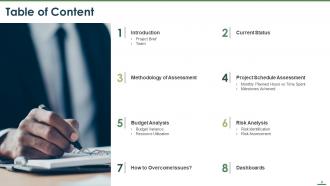
Slide 2: This slide displays the Table of Content of the presentation.
Slide 3: This slide showcases Table of Content of the presentation.
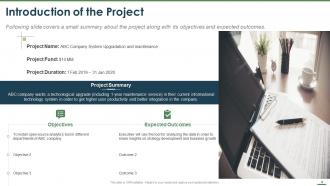
Slide 4: This slide displays the Introduction of the Project.
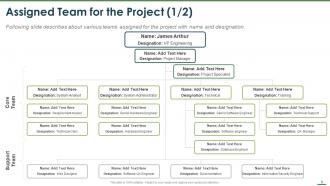
Slide 5: This slide displays Assigned Team for the Project with names and designation.
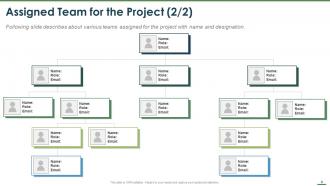
Slide 6: This slide displays Assigned Team for the Project with names and designations.
Slide 7: This slide displays Table of Content with Current Status.
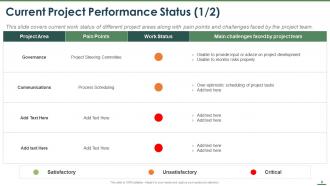
Slide 8: This slide depicts Current Project Performance Status. This slide covers current work status of different project areas along with pain points and challenges faced by the project team.
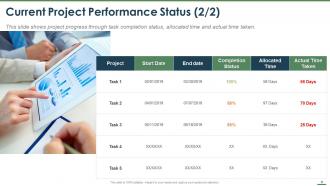
Slide 9: This slide describes Current Project Performance Status. This slide shows project progress through task completion status, allocated time and actual time taken.
Slide 10: This slide displays Table of Content with Methodology of Assessment.
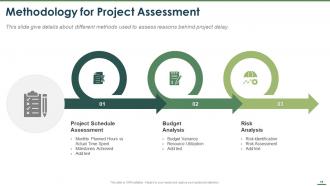
Slide 11: This slide describes Methodology for Project Assessment with- Monthly Planned Hours vs Actual Time Spent, Milestones Achieved, Project Schedule Assessment, Budget Variance, Resource Utilization, Budget Analysis, Risk Identification, Risk Assessment, etc.
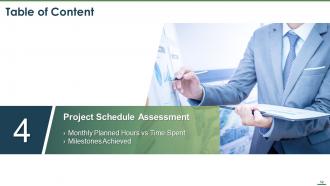
Slide 12: This slide displays the Table of Content with- Project Schedule Assessment, Monthly Planned Hours vs Time Spent Milestones Achieved.
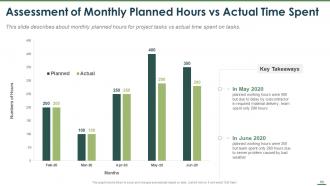
Slide 13: This slide depicts Assessment of Monthly Planned Hours vs Actual Time Spent.
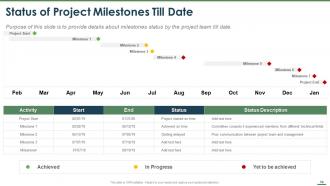
Slide 14: This slide showcases Status of Project Milestones Till Date. Purpose of this slide is to provide details about milestones status by the project team till date.
Slide 15: This slide displays the Table of Content with- Budget Analysis, Budget Variance, Resource Utilization.
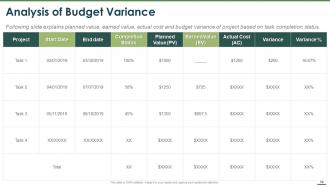
Slide 16: This slide showcases Analysis of Budget Variance explaining planned value, earned value, actual cost and budget variance of project based on task completion status.
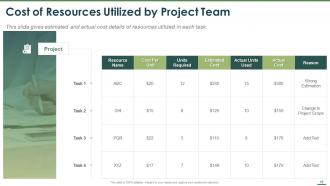
Slide 17: This slide depicts Cost of Resources Utilized by Project Team.
Slide 18: This slide displays the Table of Content with- Risk Analysis, Risk Identification, Risk Assessment.
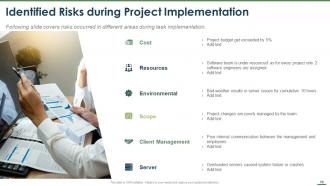
Slide 19: This slide describes Identified Risks during Project Implementation.
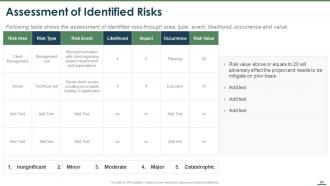
Slide 20: This slide describes Assessment of Identified Risks. The table in the slide shows the assessment of identified risks through area, type, event, likelihood, occurrence and value.
Slide 21: This slide displays Table of Content with How to Overcome Issues?
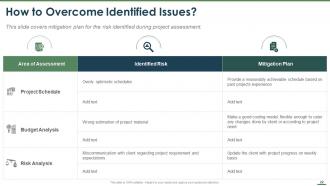
Slide 22: This slide showcases How to Overcome Identified Issues? This slide covers mitigation plan for the risk identified during project assessment.
Slide 23: This slide displays the Table of Content with Dashboards.
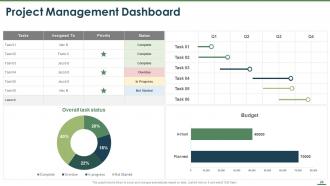
Slide 24: This slide showcases Project Management Dashboard.
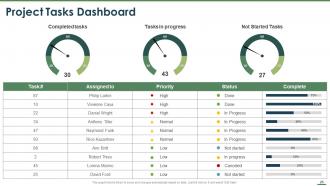
Slide 25: This slide depicts Project Tasks Dashboard containing- Completed tasks, Not Started Tasks, Tasks in progress.
Slide 26: This is Project Assessment Icons Slide.
Slide 27: This slide is titled as Additional Slides for moving forward.
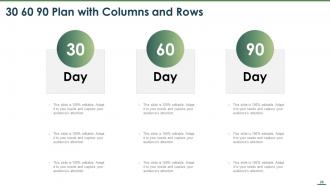
Slide 28: This slide showcases 30 60 90 Plan with Columns and Rows.
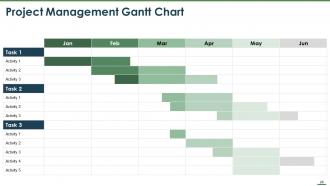
Slide 29: This slide displays the Project Management Gantt Chart.
Slide 30: This is Our Mission slide with Vision, Mission and Goal.
Slide 31: This is Our Team slide with names and designation.
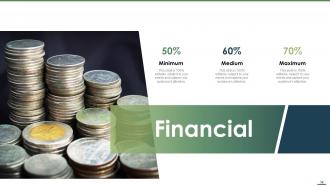
Slide 32: This is Financial slide. Showcase your finance related stuff here.
Slide 33: This is About Us slide to showcase company specifications.
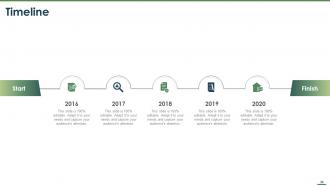
Slide 34: This is five years Timeline slide.
Slide 35: This is Quotes slide to convey message, beliefs etc.
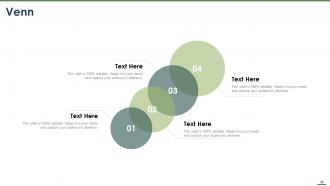
Slide 36: This is Venn with related imagery to showcase information.
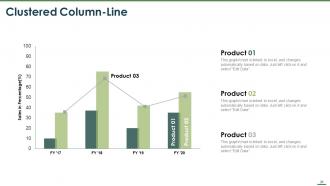
Slide 37: This slide displays Clustered Column-Line with different product comparison.
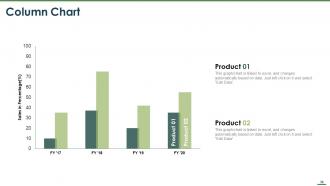
Slide 38: This slide displays Column Chart with comparison of different products.
Slide 39: This is Thank You slide with Email address, Contact number and Address.
Project Assessment Powerpoint Presentation Slides with all 39 slides:
Use our Project Assessment Powerpoint Presentation Slides to effectively help you save your valuable time. They are readymade to fit into any presentation structure.









FAQs for Project Assessment
Check if it hit the original goals and stayed on budget/timeline - that's the obvious stuff. But honestly? I've watched so many projects that looked great on paper but sat there collecting digital dust because nobody actually wanted to use them. User adoption is everything. Also look at deliverable quality - does the thing actually work like it's supposed to? Oh, and how'd the team dynamic hold up? You'll want that intel for next time. Pro tip: make yourself a little scorecard before you even start the next one. Way easier than trying to figure out what "success" means when you're already knee-deep in it.
Honestly, mix it up with surveys and one-on-one chats. Rating scales work great for the basics - communication, deadlines, deliverables. But those open-ended questions? That's where people actually tell you what's going wrong (or right). I always do follow-up conversations with the big stakeholders since they'll say stuff verbally they'd never write down. Oh, and don't wait until the project's over to ask - check in early and often so you can fix things while there's still time. Trust me, course-correcting mid-project beats dealing with angry stakeholders at the end.
Honestly, I'd go with a risk matrix first - it's dead simple and stakeholders actually get it. You plot probability against impact and boom, clear picture of what's urgent. SWOT analysis works too if you want something more comprehensive (strengths, weaknesses, opportunities, threats). Monte Carlo simulations are fancy but totally overkill unless you're dealing with something massive and complex. Decision trees can be useful depending on your project type. The matrix thing though? Best starting point because it gives you that visual punch of what needs fixing right now.
Okay so basically you can't assess everything the same way - a project that just started needs totally different evaluation than one that's been going for two years. Early on you're looking at whether it's even doable and what could go wrong. Later you're tracking actual performance and checking if deliverables are good quality. Makes sense, right? You'll want to assess more often when big milestones are coming up. I learned this the hard way on a project last year - was using the same metrics throughout and it was useless. Match your assessment style to where the project actually is in its timeline.
Okay so your initial project scope is basically your measuring stick for everything. That's what you'll compare against to see if you hit your targets, stayed on schedule, or went over budget. Trust me, I learned this the hard way on a project last year - without clear scope documentation, you're just shooting in the dark when trying to figure out if things went well or totally off the rails. Make sure you nail down that scope and write it out before you even think about assessment. Otherwise you'll be arguing with people later about what was actually supposed to happen.
So I'd start with the hard numbers - budget variance, timeline stuff, deliverable completion rates. That gives you the facts. But honestly? Numbers are kinda boring without context. Schedule some quick 30-minute chats with your main stakeholders and team members to get the real story. What you want is using those metrics to spot patterns, then digging into why those patterns exist through actual conversations. Client feedback sessions work great for this too. I usually pull up my key metrics dashboard first, then talk to people to understand what's actually going on behind the data.
Oh man, scope creep will kill you every time - that's the big one. Also watch out for crazy unrealistic timelines and forgetting to actually define what "success" looks like before you even start. Don't evaluate projects like they exist in some bubble either, because they don't. Dependencies with other stuff will bite you. Politics are inevitable but try not to let them mess with your head too much. Here's what drives me nuts though - teams get so obsessed with checking deliverable boxes that they forget to ask if they're actually solving the original business problem. Set your criteria early, loop stakeholders in from day one, and always ask "so what?" Trust me on this.
Honestly, just dig into what screwed up your past projects and use that intel for better estimates. Stakeholder communication usually falls apart, or you'll underestimate technical stuff - happens every time. When I'm sizing up new projects, I add extra padding wherever things historically went sideways. Maybe keep some kind of notes about patterns you're seeing? Short ones work fine. That way you won't repeat the same disasters and you'll catch warning signs faster. It's like having cheat codes for project planning, but you know, actually useful.
So for project stuff, Microsoft Project or Asana are solid for tracking everything - honestly can't imagine doing big projects without them now. Tableau's great for dashboards if you need to impress the higher-ups. SurveyMonkey works well for getting feedback from stakeholders too. Oh and don't overlook Excel - I know it's basic but sometimes it just works better than the fancy options. Actually had a coworker who swore by it for everything lol. My take? Stick with 2-3 tools that play nice together instead of bouncing between a million different apps.
So I usually do surveys or quick retrospectives at major project points to get their input. Ask specific stuff - what worked, what sucked, what they'd do differently. Anonymous feedback is honestly where you'll get the real tea, especially about team drama or broken processes. Skip the vague "how'd it go?" questions though, they're useless. Then just document their thoughts next to your own data and observations. You end up with way better recommendations that the team actually validates instead of just your perspective. Makes the whole assessment feel more legit.
Start with your big wins upfront - don't make people dig through boring methodology stuff. Different audiences want different things, so execs need ROI numbers while your team leads care more about day-to-day operations. Honestly, visual dashboards are a lifesaver because nobody actually reads those giant reports we used to make. Focus on what people can actually DO with your findings instead of just dumping data on them. Always have your backup numbers ready for when someone inevitably asks "but what about this scenario?" Oh, and include clear next steps with who's doing what by when.
So if you're doing agile, just stick to lightweight stuff each sprint - retrospectives, burn-down charts, getting feedback from stakeholders regularly. Waterfall's totally different though. You need those formal gate reviews at every milestone to check if deliverables actually match requirements. Honestly, agile's way better because you can pivot when things go sideways (trust me on this one). With waterfall you're basically just confirming each phase is done right before moving on. Match your assessment style to whatever method you're using - agile cares about working software and team collaboration, waterfall's all about docs and hitting those predetermined specs.
Okay so biggest thing is using the same standards for everyone - don't accidentally move the goalposts between people. Be transparent about how you're making decisions too. Cultural stuff can bite you (trust me, learned that one the hard way on this global project). Document everything because you'll thank yourself later. Watch out for bias creeping in, and honestly? If you're second-guessing a call, just run it by someone you trust. Oh and think about confidentiality when you're sharing feedback - you don't want to accidentally mess with someone's career trajectory over something minor.
Honestly, I'd say hit the major milestones - after each big phase wraps up, plus maybe monthly check-ins if it's a longer project. So like initiation, when planning's done, halfway through execution, and right before you close things out. But don't go crazy with it - I've seen teams that assess everything to death and it just becomes this thing everyone rolls their eyes at. The trick is catching problems early without making your team want to hide when they see another assessment email. Oh, and actually DO something with the results you get. Otherwise you're just making work for yourself that doesn't help anyone.
Get your data from multiple sources to double-check everything - that's called triangulation. Mix numbers with actual feedback from people. Don't just survey the same folks who always respond either. Keep your collection methods consistent across the whole project. Learned that lesson when I tried comparing totally different data sets - what a mess! Document when you collected stuff and add context notes. Set up checkpoints where you can reality-check your findings before making any major moves. Trust me on this one.
-
Easily Editable.