


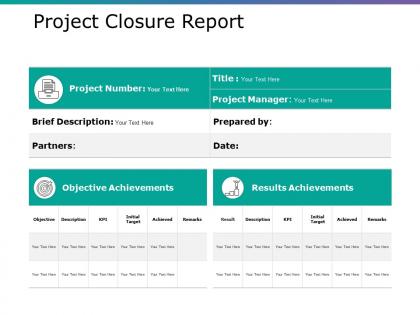
Project closure report powerpoint slide templates download




Try Before you Buy Download Free Sample Product
 Impress Your
 Audience
 100%
100% Editable
 Save Hours
 of Time


Build a harmonious group with our Project Closure Report Powerpoint Slide Templates Download. Direct their focus to concerted effort.
People who downloaded this PowerPoint presentation also viewed the following :
Project closure report powerpoint slide templates download with all 5 slides:
Discuss it inside out with our Project Closure Report Powerpoint Slide Templates Download. Dwell on every angle in depth.

FAQs for Project closure report powerpoint
Start with your project summary and how objectives lined up with what you actually delivered. Budget stuff is crucial - where you went over or under and why. Timeline analysis too, obviously. Stakeholder feedback is honestly the most valuable part for next time. Document team performance, risk outcomes, and resource usage. If you had vendors, rate how they did. Always throw in a "what we'd change" section because let's be real, something could've gone better. Get sign-offs from your key people and note any loose ends for handoff. Oh, and grab a template to start with - saves tons of time.
Honestly, templates are lifesavers because they make you actually think about what happened. You get prompts like "what would you do differently?" and "what worked well?" - the kind of stuff you'd totally forget otherwise when you're just happy it's over! Without structure, you'd probably just scribble "done" and call it a day. The whole point is capturing wins AND failures while they're fresh. Don't fill it out alone though - use it to get your team talking. Way better insights that way, plus people remember things differently.
Honestly, templates are a game changer. You'll save so much time not reinventing the wheel every single project. Everything stays consistent too, which makes comparing results way less of a headache. Your stakeholders will love knowing what to expect - no curveballs. The best part? You won't forget to document the important stuff like lessons learned when you're scrambling to close things out. I learned that one the hard way lol. Just make one solid master template and tweak it for different project types as needed.
Honestly, templates are a lifesaver for this stuff. Stakeholders know exactly what to expect - budget, deliverables, lessons learned, all that jazz. They get used to your format pretty quickly, so they can jump straight to whatever section they need. No more digging through random docs wondering if they missed something important. Clean structure just makes people feel better about signing off, you know? It's basically like having a checklist that covers your ass. Way better than scrambling to remember what Bob from finance always asks about (spoiler: it's always the budget breakdown).
Honestly, get yourself a good project closure template - it'll save your sanity when you're scrambling to close everything out. The pre-built sections handle all the annoying stuff like budget vs actual costs and outstanding invoices. What I love about them is they actually prompt you for the important details you'd totally forget otherwise - cost overruns, where you saved money, lessons learned. Makes explaining budget variances to your boss way less painful. Oh, and they remind you about pending payments and contract stuff that could come back to haunt you later. Just customize it with your financial categories from the start.
Honestly, project closure reports are like your safety net for not screwing up the same way twice. You document what went right, what was a disaster, and all the messy stuff in between. Future you will be so grateful when you're planning something similar and can actually remember why that vendor was terrible or why the timeline got wrecked. Templates make it less painful - they standardize how you track budget issues, risks, team drama, whatever. Yeah, writing them feels like homework, but trust me, you'll dig through these reports constantly when you're trying to avoid past mistakes. Start collecting them now.
You know those project closure reports? They're actually pretty solid for keeping people honest. Instead of just saying "we're done," everyone has to write down what they actually delivered compared to the original plan. Plus any lessons learned and leftover stuff. Each team member gets their own section to fill out - forces them to really think about their work. Honestly, it's like showing your work in math but way more practical. Future teams can look back and see who handled what and how things went. Definitely worth setting up if you're dealing with accountability issues.
Definitely throw in some Gantt charts or timeline stuff to show how things actually went vs. your original plan. Budget charts work great too - makes it super obvious where you nailed it or totally blew past your numbers. Before/after visuals are honestly my favorite if you can swing them. Risk heat maps are clutch for showing which problems actually hit and how bad they were. Oh, and if you had a team involved, maybe add some stakeholder or performance tracking charts? Just keep everything clean and focused on the real story - what you planned versus what actually went down.
Honestly, digital templates are so much better than paper ones. You can add hyperlinks, dropdown menus, real-time editing - all that good stuff. They automatically calculate your metrics too, which saves tons of time. No more chasing people around for signatures either (thank god). Version control is clutch for tracking changes. Plus searching through old project data is actually possible now instead of digging through filing cabinets. I'd start simple though - maybe just convert your current template first, then add the fancy features later once you're used to it. Way less headache overall.
Oh man, the worst thing you can do is make those templates super vague - like "what went well" tells you nothing useful. Be specific about what you actually want people to talk about. Don't make it this giant 10-page beast either. Nobody reads that stuff, trust me. Keep sections focused and short. And whatever you do, don't let it become a blame session where everyone's pointing fingers at who screwed up. That kills morale fast. Actually celebrate the good stuff too! Teams need that recognition. Simple beats complicated every time.
Yeah so basically you keep the main structure but swap out the details for whatever industry you're in. Construction projects need all the safety stuff, permits, warranties - that whole mess. Tech focuses on code docs and user adoption instead. Healthcare and pharma? Those are compliance nightmares, so tons of regulatory paperwork. Financial services want risk assessments and sign-offs from regulators. The core parts don't change much - you'll still have outcomes, lessons learned, financials. Just ditch the generic fluff and add checkpoints that actually matter to your people. Start basic then customize from there.
So closure reports are just the final piece that fits into whatever method you're using - Agile, Waterfall, PRINCE2, whatever. Each one wants different stuff. Waterfall loves those comprehensive lessons learned docs, but Agile cares more about retrospective insights and improvements (though honestly the lines blur when you're actually doing the work). The trick is making your template match your methodology's language so it doesn't feel like random busywork. I've seen teams completely skip this step and regret it later. Just adapt it to support how your team actually works.
Most PM tools like Asana or Jira have template features built right in. Check your platform's template library first - might save you time. These usually auto-fill project data so you're not typing everything manually. Monday's pretty good for this too, though I find their interface a bit clunky sometimes. If your software doesn't have native templates, you can link to Google Docs or SharePoint instead. Works just as well. Start with whatever's already there and customize it. You'll probably find something that's like 80% of what you need anyway.
Get feedback from everyone who mattered - team, sponsors, stakeholders. Mix it up with one-on-ones (people are way more honest), anonymous surveys for the stuff they won't say to your face, and group retrospectives. Those group sessions are actually pretty great because people build off each other's ideas. Ask specific questions about what worked and what bombed. Oh, and don't just collect it and forget about it - pull out the main themes and stick them in your closure report. Future PMs will thank you for the real lessons learned instead of generic fluff.
Honestly, project closure reports are like goldmines for future risk stuff. They document what actually blew up on your project, not just the theoretical risks you worried about. Which mitigation strategies worked? Which ones were complete garbage? You'll totally forget this stuff without writing it down. These reports help you spot patterns - like when similar warning signs pop up on new projects. Your team builds up this whole knowledge base over time. I always flip through old closure reports before starting something new. Sometimes you catch risks you wouldn't have thought of otherwise.
-
Great product with effective design. Helped a lot in our corporate presentations. Easy to edit and stunning visuals.
-
Easy to edit slides with easy to understand instructions.