

Project Communication System Data Flow Diagram




Try Before you Buy Download Free Sample Product
 Impress Your
 Audience
 100%
100% Editable
 Save Hours
 of Time


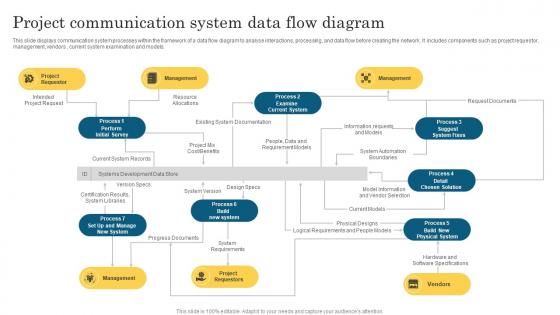
This slide displays communication system processes within the framework of a data flow diagram to analyse interactions, processing, and data flow before creating the network. It includes components such as project requestor, management, vendors, current system examination and models.
People who downloaded this PowerPoint presentation also viewed the following :
Project Communication System Data Flow Diagram with all 6 slides:
Use our Project Communication System Data Flow Diagram to effectively help you save your valuable time. They are readymade to fit into any presentation structure.





FAQs for Project Communication System
Honestly, think of it as your project's nerve center - it keeps everyone from being totally clueless about what's going on. You'll want to map out who needs which updates and when, then stick to actually sending them (I know, easier said than done). Status reports, meeting notifications, decision requests - all that stuff flows through here instead of you playing that awful telephone game with important info. The whole point is stopping stakeholders from ambushing you with "wait, what's the timeline again?" Set it up early though. Trust me, future you will be way less stressed when people actually know what's happening without you having to repeat yourself constantly.
Honestly, these tools are game-changers for remote teams. You'll get messaging, file sharing, and project dashboards all bundled together - way better than drowning in email threads. Everyone can see who's doing what and share updates instantly. Plus everything stays organized by topic or deadline, which is clutch. The best part? No more endless status meetings because people actually know what's happening. Oh, and here's the thing - pick ONE tool and make sure your whole team commits to using it. That consistency part is where most teams totally fail, but it makes all the difference.
You'll want to map out your stakeholders first - figure out who needs what info and when. Communication channels come next (email, Slack, whatever works). Set up regular check-ins like weekly updates or milestone reviews. Honestly, the key thing is making sure someone actually owns each communication piece. Otherwise stuff just disappears into the void, which is super frustrating. Oh, and create a simple matrix showing who gets which updates and how often. Sounds boring but it's a lifesaver - trust me on this one. Skip the stakeholder mapping step and you're basically asking for chaos later.
Honestly, I just watch how much people are scrambling around confused. Track response times to messages and see if the same questions keep popping up - that's a dead giveaway something's not clicking. Meeting outcomes are huge too. Are decisions actually happening or is everyone just talking in circles? I also peek at missed deadlines caused by unclear directions (happens way more than you'd think). Quick team surveys help - ask if people feel in the loop. The vibe during standups tells you everything though. Pick maybe 2-3 things that bug you most and check weekly.
Oh man, the usual suspects are info silos, confusing messages, and just drowning people in updates. I'd set up different channels - Slack for quick stuff, email for the important decisions. Timing's huge too! Don't be that person sending novel-length emails (been there). Break things down instead and always tell people what you actually need from them. Regular check-ins with stakeholders help tons. Honestly? I'm team over-communicate early rather than finding out later everyone's confused. A basic communication plan at the start will save you so much drama down the road.
Honestly, this stuff makes or breaks projects. When people email about urgent issues or try having complex tech discussions over Slack, everything falls apart. You need to match the channel to what you're actually talking about - Slack works great for quick updates, but save the heavy conversations for video calls. I learned this the hard way on a project last year. Project management tools are obviously better for tracking progress than random message threads. Pick one main channel for each type of thing and actually stick with it. Otherwise your team won't know where to look for anything.
Honestly, daily standups are a game-changer - most teams swear by them. Pick one main channel where everyone actually checks for updates (not like, five different places). Project boards are clutch because you can see everything at once without hunting through messages. Don't let decisions live in people's heads - write that stuff down somewhere everyone can find it. Share blockers early before they blow up into real problems. Oh, and celebrate the wins too. Just start simple with what feels right for your team and tweak it as you go.
Dude, try switching to something like Slack or Teams instead of drowning in those endless email threads. Set up different channels for each project so everything's not all jumbled together. File sharing becomes super easy too - no more "did you get my attachment" nonsense. The trick is getting everyone to actually use it consistently, which honestly takes some nagging at first. Once people see how much cleaner everything is though, they usually come around. Oh, and turn on those automatic notifications so stuff doesn't get forgotten. Just pick one tool and commit to it.
Honestly just tell them ASAP - waiting never helps. Give them the basics: what changed, why, and how it hits their stuff. I used to overthink these messages so much lol, but people really just want straight facts. Stick to whatever you normally use - email, Slack, whatever they actually check. Then hit up anyone who's getting screwed over by the change for a quick one-on-one. Trust me, being upfront beats having angry stakeholders later. Nobody wants project surprises dropping on them out of nowhere.
Oh man, cultural stuff can totally derail project communication if you're not paying attention. Some people are super direct with feedback, others hint around it - and honestly, the indirect approach drives me nuts sometimes but that's just how it works. You've got hierarchy expectations that vary wildly, plus different meeting styles. What seems polite to you might feel rude to someone else. Then there's conflict handling - some cultures dive right into disagreements while others avoid them completely. Time zones suck enough without this added layer! My advice? Ask your international teammates straight up what they prefer and set communication rules early.
Honestly, just work it into what you're already doing. Throw feedback time into your regular meetings, maybe set up a Slack channel where people can drop thoughts whenever. Quick surveys after big milestones work too - I've seen that be pretty effective. The trick is making it dead simple for people to speak up when something's on their mind, not just when you formally ask. Oh, and this part's crucial - you gotta actually show them what you did with their input. People will totally ghost you if they think you're just collecting feedback to check a box.
Think of documentation as your project's brain - it remembers stuff when you can't. Keep everything in one place because hunting through scattered files is the worst. Update it regularly or it becomes useless. Don't go overboard with details, but don't leave people guessing either. Someone needs to own the important docs - otherwise they'll get stale fast. I learned this the hard way on a project where our onboarding guide was like six months outdated. New people were so confused. It'll save you major headaches later when everyone's freaking out and can't remember why decisions were made.
Honestly, you've gotta figure out what each group actually wants to hear. Executives? High-level stuff with numbers and business impact - skip the technical weeds entirely. Your dev team's the opposite though, they'll want all the nitty-gritty details. I bombed this once by sending way too much technical stuff to leadership and got some very confused replies lol. Stakeholders need regular updates but make them bite-sized. Also figure out how they prefer getting info - some people live in Slack, others are email-only. Just ask them straight up how they want updates delivered.
Pick one communication channel - email or Slack usually - and stick with it religiously. One person should handle all updates to avoid the chaos of mixed messages. Trust me, I've watched teams implode when everyone's hearing different versions of the same story. Send quick updates every few hours, even if it's just "still working on it." Silence breeds panic and wild rumors. Oh, and be honest about what you actually know versus what you're still figuring out. Set up clear escalation paths so the big decisions don't get stuck with someone who can't make the call.
Honestly, just pick one spot for everything and stick with it - Slack, Teams, whatever works for your team. Stop letting important stuff get lost in email threads (seriously, why do we still do this to ourselves?). Create different channels or folders so people aren't hunting around. Then you've gotta be religious about posting updates there consistently. Weekly summaries work great. The hard part isn't setting it up though - it's actually getting everyone to check the damn thing regularly instead of reverting to their old habits.
-
“I really like the convenient operation and professionalism I saw on the SlideTeam website. I want to express my regards and appreciation to the team.”
-
They saved me a lot of time because they had exactly what I was looking for. Couldn’t be happier!