


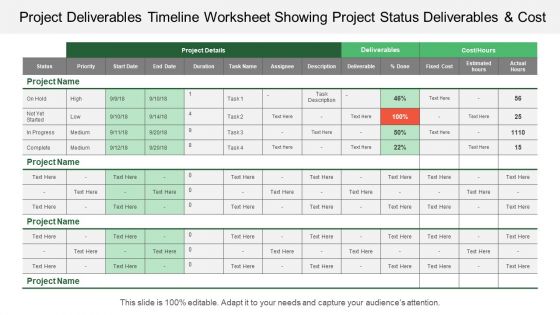
Project deliverables timeline worksheet showing project status deliverables and cost





Try Before you Buy Download Free Sample Product
 Impress Your
 Audience
 100%
100% Editable
 Save Hours
 of Time


Get folks to increase the degree of alertness with our Project Deliverables Timeline Worksheet Showing Project Status Deliverables And Cost. Elaborate on your apprehensions.
People who downloaded this PowerPoint presentation also viewed the following :
Project deliverables timeline worksheet showing project status deliverables and cost with all 5 slides:
Give them your blessings with our Project Deliverables Timeline Worksheet Showing Project Status Deliverables And Cost. They feel fortunate you are their guru.
FAQs for Project deliverables timeline worksheet showing project status
So you'll want to map out your main project phases and milestones first. Then break those down into specific tasks with start/end dates - plus who's handling what. Dependencies between tasks are crucial too (like when one thing can't start until another wraps up). I always add estimated vs actual hours because honestly, we're all terrible at time estimates initially. A simple status column helps track what's not started, in progress, or done. Oh, and if there's budget involved, throw those numbers in there too. The whole point is having one place where you can see everything without having to bug people constantly for updates.
So timeline worksheets are basically your project's best friend - they show you everything laid out visually so you can catch problems early. Map out your big milestones first, then add the smaller stuff underneath. You'll actually see which tasks are make-or-break versus the ones that can wait. Resources become way easier to manage when you can see the whole picture. Everyone stays in sync about what depends on what. I know it sounds nerdy, but there's honestly something really satisfying about crossing things off as you go!
Honestly? Just start with Excel or Google Sheets if you're already comfortable with them - they work great for basic Gantt charts. Asana's really nice for the visual drag-and-drop stuff, and Monday.com is similar. Trello's good too but feels more like sticky notes than actual timelines. PowerPoint sounds weird but I've actually seen some pretty slick timeline presentations made there (though you can't really manage projects with it). Oh, and Smartsheet's like Excel but with better project tools built in. My advice? Don't overthink it. Start with whatever you know best and switch later if you need more features.
Dude, trust me on this - visual stuff is a game changer for timeline presentations. Color-coding and progress bars let people spot problems instantly instead of squinting at boring spreadsheet rows. Red/yellow/green indicators work great, plus little icons for different task types. I swear, half the room used to zone out during my old text-heavy reviews. Now stakeholders actually get what's happening without drowning in details. Dependencies become obvious. Critical deadlines jump out. Honestly, it's kind of embarrassing how much better my meetings got just from adding some visual markers.
So a Gantt chart is like a visual timeline with bars and lines showing how tasks connect and overlap. Timeline worksheets? More like a basic list or table with dates and milestones - way simpler. Gantt charts are perfect when you need to see how one delayed task screws up everything else. But they're honestly overkill for straightforward projects. Timeline worksheets are cleaner and way easier for people to scan quickly - I've seen executives' eyes glaze over at complex Gantt charts. Got lots of interdependent moving parts? Go with Gantt. Pretty straightforward project? Just stick with the worksheet.
Honestly, I always start by breaking down each task and getting a rough estimate based on similar stuff I've done before. Your team members are gonna be your best resource here - they know way better than anyone how long their work actually takes. Build in some padding because trust me, something will definitely go wrong. Dependencies are huge too, so map those out and think about where you might hit bottlenecks. I learned the hard way to add like 20-30% buffer time to whatever my initial gut says. Once you've got it all laid out, run it by stakeholders to make sure you're not completely off base with their expectations.
Ugh, the time thing gets everyone - we're all terrible at estimating how long stuff actually takes. Build in buffer time or you'll hate yourself later. Also don't get crazy detailed with your timeline right away. I've literally watched people spend hours color-coding spreadsheets instead of just... doing the actual project? Start big picture first. Dependencies will absolutely wreck you if you're not careful - like when you realize you can't do step 2 until step 1 is totally finished. Oh, and don't forget about holidays and vacation days. Those sneak up fast.
Honestly, project timeline worksheets are game-changers because everyone can actually see who's doing what and when. No more of those super awkward "wait, wasn't that your job?" conversations. Dependencies between tasks become obvious, so you'll catch bottlenecks before they blow up your whole schedule. When deadlines inevitably shift (and trust me, they always do), you can instantly see how it affects everything else. I'd say bring it to your next team meeting - you'll be shocked how much clearer everyone's priorities suddenly become. It's basically like having a roadmap that keeps everyone from wandering off into chaos.
Honestly, your project timeline is like having a heads-up for all the stuff that could go wrong. Map out your tasks and you'll catch bottlenecks and resource clashes before they bite you. Dependencies are huge - you can see exactly where one delay will mess up everything else downstream. Build in some buffer time because we're all way too optimistic about deadlines (guilty as charged). Check your timeline weekly and flag anything that feels off. Way better to pivot early than deal with a dumpster fire later. Trust me on this one.
I update mine every week usually, but tbh whenever something big happens is really when you need to jump on it. Resource changes, delays, scope creep - that stuff can't wait. Weekly works for most projects though. Fast-moving ones? Maybe check every few days. The whole point is catching problems before they mess everything up, not scrambling after. Oh and definitely set a calendar reminder or you'll totally forget like I always used to. Trust me on that one.
Build in 15-20% buffer time from day one - trust me on this. Track everything with version control and use separate columns to flag new stuff vs. original work (total lifesaver for avoiding confusion). When changes hit, look at how they'll mess with other tasks first. Always show stakeholders the trade-offs when scope creeps up. Your timeline isn't set in stone - update it constantly and document every decision so you can point back to it later. Oh, and conditional formatting is your friend for highlighting impact. Basically treat it like a living doc that evolves.
Honestly, start with your critical path - the stuff that'll actually derail your deadline if it's late. Map out which tasks depend on others first. I'm weirdly obsessed with color-coding everything (probably overkill but whatever), though you should use whatever system clicks for you. Focus on high-impact work that unblocks other things. When you're sequencing, think effort vs. impact. Always pad extra time around your riskiest tasks - trust me on this one. Your timeline needs to balance business priorities with logical flow. Don't try juggling everything at once; tackle one major deliverable at a time instead.
Dude, color coding your timeline is such a game changer. I usually do different colors for team members or project phases - whatever works for you. Sounds basic but trust me, you'll spot problems way faster than scrolling through boring black text. Bottlenecks jump out at you immediately. Same with overlapping deadlines or when two people are supposed to be doing stuff at the same time. Don't go crazy with it though - stick to maybe 3 or 4 colors max. I made that mistake once and my spreadsheet looked like a unicorn exploded.
Just grab a basic template and swap out the generic stuff for what your industry actually does. Construction projects need phases like permits and framing, while software teams care more about sprints and deployment. The key is using terminology your team recognizes - don't leave "review phase" when marketing reviews are totally different from manufacturing ones. Duration estimates matter too since timelines vary wildly between fields. Honestly, most templates are pretty flexible once you dig in. Replace those placeholder tasks with real workflow steps, adjust the timeframes to match reality, and you're set.
Ditch those dense spreadsheets - nobody can read them anyway. Go with visual stuff like Gantt charts or simple roadmaps that actually show what matters. Skip the tech jargon and talk about outcomes they actually care about. I made this mistake once and literally watched a room of execs zone out during my presentation lol. Color-coding helps tons - organize by priority or team. Always pad your timeline because things will go wrong. Here's the key though: don't just email updates. Set up regular face-to-face check-ins to walk through everything together. You'll catch problems way earlier.
-
Great quality product.
-
Informative presentations that are easily editable.