

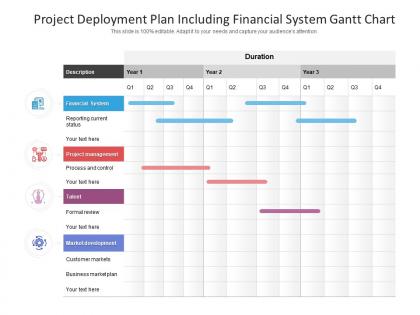
Project deployment plan including financial system gantt chart




Try Before you Buy Download Free Sample Product
 Impress Your
 Audience
 100%
100% Editable
 Save Hours
 of Time


Don't let half truths cause any damage. Our Project Deployment Plan Including Financial System Gantt Chart give access to the full gen.
People who downloaded this PowerPoint presentation also viewed the following :
Project deployment plan including financial system gantt chart with all 2 slides:
Doubts won't hamper you with our Project Deployment Plan Including Financial System Gantt Chart. Acquire the clarity to forge ahead.

FAQs for Project deployment plan including financial
Okay so you need a solid timeline with actual milestones first. Then map out who's doing what - can't stress this enough, vague responsibility assignments kill projects. Build in rollback procedures because things will probably go wrong at some point. Testing phases are obvious but people skip them anyway. Oh and communication - how will everyone stay updated? Infrastructure prep is huge too, I've watched deployments crash because nobody verified the servers were actually ready. User training docs, monitoring after launch. Honestly the specifics matter way more than people think. Get those nailed down and you'll dodge most disasters.
Don't treat risk management like some separate thing you tack on later - weave it into every step of your deployment. During planning, hunt down potential problems: system crashes, resource shortages, integration nightmares. Build your mitigation strategies right into the timeline. Honestly, I've watched so many deployments blow up because teams just crossed their fingers and hoped for the best. Assign someone to own each risk. Set up checkpoints to catch issues early. Have your rollback plan ready to go. The trick is making this stuff routine, not something you scramble for when everything's already on fire.
Dude, communication really is everything with deployments. Map out who needs to know what before you even nail down the tech stuff. Keep everyone in the loop about timelines and what you need from them - otherwise you'll have people freaking out at the worst possible moments. Trust me on this one. Users won't be ready for changes, execs will be breathing down your neck wondering what went wrong. Even when nothing's happening, send updates anyway. I learned this the hard way once when a "simple" rollout turned into chaos because half the stakeholders had no clue what was coming.
Honestly, deployment milestones are a lifesaver because they give you actual checkpoints instead of just winging it. Your team can see if they're hitting deadlines, and you'll catch problems before they spiral. Way better than those awkward "we're still working on it" conversations with stakeholders - trust me on that one. When stuff goes sideways (and it will), you can point to specific milestones and explain exactly what's delayed. Makes resource juggling easier too. I'd start with maybe 3-5 big milestones for your next deployment and just track how you're doing against them.
Map out your critical path stuff first - that's where you put your best people. Don't try to be fair with assignments, honestly that's where most projects crash and burn. Get your skilled folks working early when you're still nailing down requirements. I always build in like 15-20% buffer time for each big phase because something always goes sideways. Oh, and identify backup people for key roles ahead of time. Once things get rolling, track how busy everyone is weekly so you can catch problems before they wreck your timeline. It's really about matching the right people to actual demands, not just adding more bodies.
Dude, don't wait until after you've deployed to think about what could go wrong. Figure out your main risks first - servers crashing, needing to rollback, APIs going down, whatever. Build actual plans for each scenario with clear owners. The weird thing is, Murphy's Law always kicks in with stuff you never saw coming. But having decent processes still helps when chaos hits. Your team needs to know these plans exist (shocking how often people forget this). Practice during smaller releases. Oh and keep everything in a runbook that's actually findable at 2am.
Track both technical stuff and business impact. Uptime, response times, error rates - the usual suspects that show if things are actually working. Then look at user adoption, feature usage, customer satisfaction. Maybe conversion rates if that's relevant to what you shipped. Honestly depends what you deployed, but don't go crazy with metrics - I'd say pick like 4-6 max or you'll drown in data. Set up some dashboards for the real-time stuff and maybe schedule weekly check-ins to spot trends. Oh and support ticket volume is super telling too.
Dude, feedback loops are a lifesaver - they catch problems before everything explodes. Real-time insights from users and monitoring let you pivot fast instead of discovering disasters later. It's like having an actual conversation with your deployment rather than blindly pushing code. You'll want multiple touchpoints: user feedback, performance data, team check-ins. Honestly, I learned this the hard way after a deploy went completely sideways last year. Don't overcomplicate it though. Start with just one or two mechanisms and expand from there. Trust me, you'll be so glad you did this when things inevitably get weird.
Dude, automation is your best friend here. Start with CI/CD stuff like Jenkins or GitHub Actions - they'll handle all the boring deployment steps automatically. Terraform's great for infrastructure setup, and Kubernetes if you're dealing with containers (though that one's kind of a beast to learn). For tracking everything, Jira or Azure DevOps work well. The setup is honestly pretty annoying at first, but once it's running? You'll save hours every week. I'd pick whatever manual task is driving you most crazy and automate that first. Don't try to do everything at once or you'll hate yourself.
Honestly, you'll want to cover three big things: tech support, training users, and keeping an eye on the system. First thing - figure out your incident response. Like, who's getting called when everything crashes at 2am? People will have tons of questions once they actually start using it, so plan for that ongoing support. Regular health checks are crucial too. Oh, and document everything during deployment - trust me, you'll hate yourself later if you don't. I'd do a review meeting maybe 2-3 weeks after launch to see what support issues keep popping up.
Map your docs to each deployment phase first - trust me, it saves you from total chaos down the road. Your tech specs and user guides need to actually match what you're shipping, not whatever was written months ago. I'd set up regular check-ins between your doc team and whoever's running deployments. Version control everything with the same release numbers too. Honestly, documentation should be baked into your whole pipeline, not something you scramble to update after. Oh, and make a quick checklist to verify everything lines up before each release goes out.
Oh man, don't rush the testing phase - I see people do this constantly and it always bites them. Also, back everything up first (obviously, but you'd be surprised). Never deploy during busy hours unless you enjoy chaos. Your rollback plan? Actually test it instead of just having some document nobody's looked at. Communication is huge too - keep everyone in the loop or they'll freak out when stuff goes sideways. Monitor everything like a hawk for the first few hours since that's when weird issues pop up. Double-check your environment beforehand and honestly, just have your team ready to jump in for at least 24 hours after.
So phased deployment is when you roll stuff out in chunks - like maybe 10% of users first, then bump it up to 25%, you know? Full-scale just dumps it on everyone at once. Honestly, phased is way smarter for anything complicated because if something breaks, at least you're not screwing over your entire user base lol. Sure, full-scale is quicker, but it's also terrifying. You can catch problems early with phased rollouts and actually fix them before they become disasters. I'd definitely go phased if it's anything important.
Honestly, communication is everything here. Figure out who's getting affected first and loop them in early - people hate workflow surprises. Set up a Slack channel or whatever for updates so nobody feels left out. Training matters way more than you'd think... I've seen rollouts crash because users had no clue what they were doing. Oh, and definitely have a backup plan ready because stuff breaks. Sometimes spectacularly. Keep everyone in the loop throughout and you'll be fine. The whole thing really comes down to not blindsiding people.
Definitely dig through your old retrospectives before starting this deployment. Seriously, the patterns you'll find are so useful - like if you always blow database migration timelines or forget DNS takes forever to propagate. Teams I've worked with have saved massive amounts of time just by reviewing their "what went wrong" notes first. Don't skip the good stuff either though. Maybe your staging setup was perfect last time, or you had a communication plan that actually kept everyone from freaking out. Build a checklist from all this and stick to it. Otherwise you're just gonna repeat the same mistakes again.
No Reviews