

Project Documentation Powerpoint Presentation Slides PM CD




Try Before you Buy Download Free Sample Product
 Impress Your
 Audience
 100%
100% Editable
 Save Hours
 of Time


Check out our professionally designed Project Documentation PowerPoint Presentation. This all encompassing Project Documentation PowerPoint PPT template is your ultimate resource for effective project management. This professionally designed presentation provides essential tools to streamline your project workflow. Emphasizing critical elements such as the Project Charter aids in clearly defining the project scope and objectives. The template also encompasses Project Reports, ensuring precise progress tracking and analysis. Additionally, the Project Documentation Management PPT templates include a section for the Project Budget Plan Report, offering a strategic financial perspective facilitating efficient cost management. Featuring visually appealing graphics and customizable slides, this PPT empowers you to communicate project details effectively, making it an indispensable asset for project managers and teams. Download this100percentage editable and customizable PowerPoint, compatible with Google Slides, to streamline your presentation process.
People who downloaded this PowerPoint presentation also viewed the following :
Content of this Powerpoint Presentation
Slide 1: This slide introduces Project Documentation. State your company name and begin.
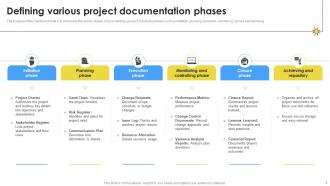
Slide 2: This slide showcases the various stages of documenting a project. It includes phases such as initiation, planning, execution, monitoring, closure and achieving.
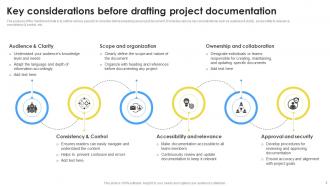
Slide 3: This slide outlines various aspects to consider before preparing any project document. It includes various key considerations such as audience & clarity etc.
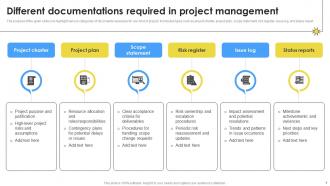
Slide 4: This slide highlights various categories of documents necessary for any kind of project. It includes types such as project charter, project plan, scope statement etc.
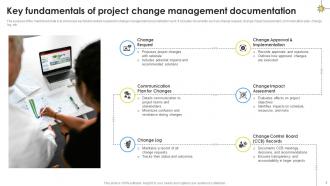
Slide 5: This slide showcases key fundamentals required in change management documentation work. It includes documents such as change request, change impact assessment etc.
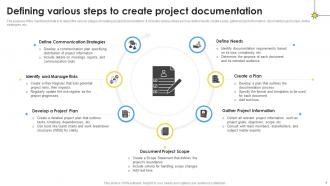
Slide 6: This slide depicts the various stages of creating project documentation. It includes various steps such as define needs, create a plan, gather project information etc.
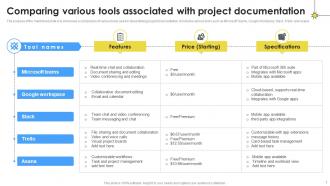
Slide 7: This slide showcase a comparison of various tools used in streamlining project documentation. It includes various tools such as Microsoft Teams, Google Workplace, Slack etc.
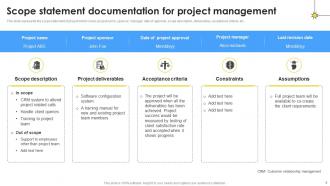
Slide 8: This slide represents the scope statement of project which covers project name, sponsor, manager, date of approval, scope description, deliverables etc.
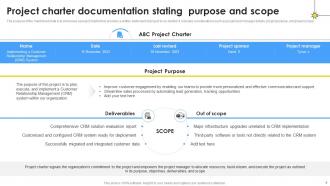
Slide 9: This slide showcase a project charter that provides a written statement of project to be started. It includes considerations such as project and manager details etc.
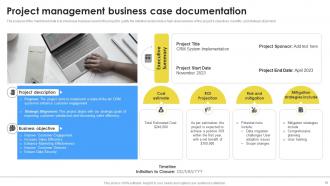
Slide 10: This slide displays business case for the project to justify the initiation and provide a high-level overview of the project's objectives, benefits, and strategic alignment.
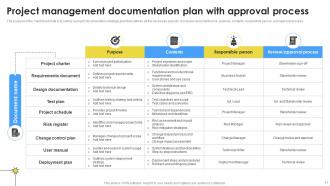
Slide 11: This slide outline a project documentation strategic plan that outlines all the necessary aspects. It includes document name, purpose, contents, responsible person etc.
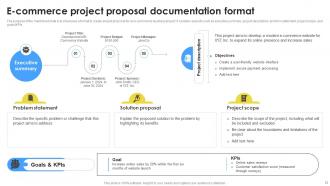
Slide 12: This slide showcase a format to create project proposal for an e-commerce business project. It contains aspects such as executive summary, project description etc.
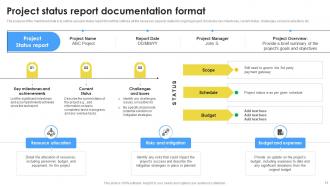
Slide 13: This slide outline a project status report format that outlines all the necessary aspects related to ongoing project. It includes key milestones, current status etc.
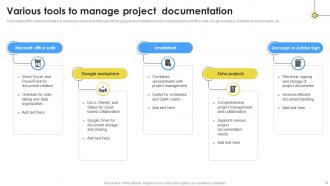
Slide 14: This slide showcase various tools that supports the project documentation process. It includes Microsoft office suite, Google Workplace, Smartsheet, Zoho projects, etc.
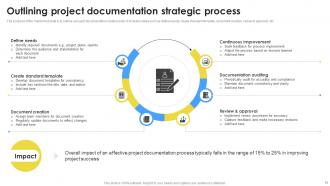
Slide 15: This slide outlines a project documentation creation plan. It includes steps such as define needs, create standard template, document creation etc.
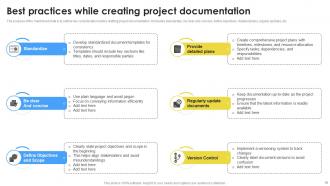
Slide 16: This slide displays key consideration before drafting project documentation. It includes standardize, be clear and concise, define objectives, detailed plans etc.
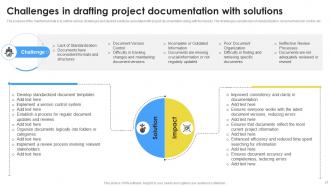
Slide 17: This slide outlines various challenges and desired solutions associated with project documentation along with its impacts.
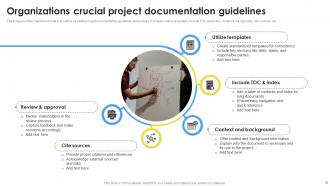
Slide 18: This slide displays essential project documentation guidelines and policies. It includes utilize templates, include TOC and index, context & background etc.
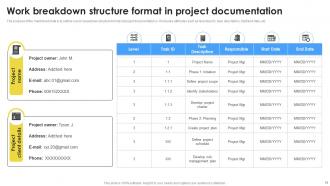
Slide 19: This slide outline a qork breakdown structure format of project documentation s. It includes attributes such as level task ID, task description, start/end date, etc.
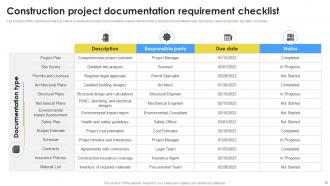
Slide 20: This slide displays a construction project documentation requirement checklist. It includes documentation type, description, responsible party, due date, and status.
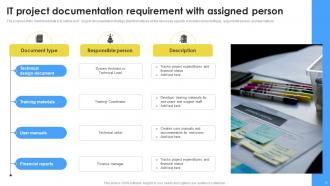
Slide 21: This slide outline an IT project documentation strategic plan that outlines all the necessary aspects. It includes document type, responsible person etc.
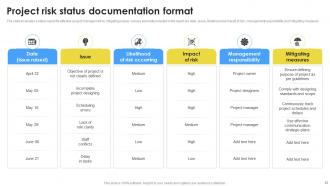
Slide 22: This slide inculcates a status report for effective project management by mitigating issues. Various elements included in the report are date, issue etc.
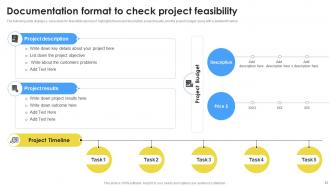
Slide 23: This slide displays a case study for feasibility report as it highlights the project description, project results, and the project budget.
Slide 24: This slide shows all the icons included in the presentation.
Slide 25: This slide is titled as Additional Slides for moving forward.
Slide 26: This slide shows Post It Notes for reminders and deadlines. Post your important notes here.
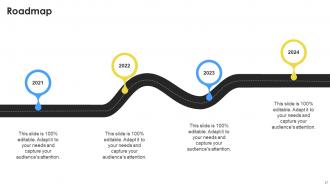
Slide 27: This slide presents Roadmap with additional textboxes. It can be used to present different series of events.
Slide 28: This is Our Target slide. State your targets here.
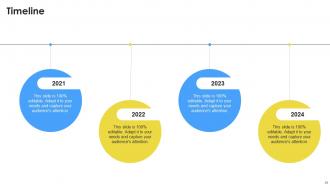
Slide 29: This is a Timeline slide. Show data related to time intervals here.
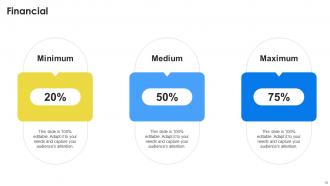
Slide 30: This is a financial slide. Show your finance related stuff here.
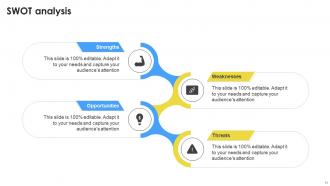
Slide 31: This slide shows SWOT analysis describing- Strength, Weakness, Opportunity, and Threat.
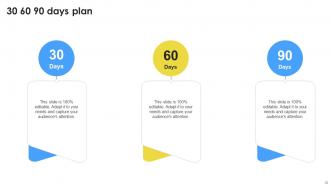
Slide 32: This slide provides 30 60 90 Days Plan with text boxes.
Slide 33: This is an Idea Generation slide to state a new idea or highlight information, specifications etc.
Slide 34: This is a Thank You slide with address, contact numbers and email address.
Project Documentation Powerpoint Presentation Slides PM CD with all 42 slides:
Use our Project Documentation Powerpoint Presentation Slides PM CD to effectively help you save your valuable time. They are readymade to fit into any presentation structure.










FAQs for Project Documentation Powerpoint Presentation
Okay so first things first - get your project overview down with the actual "why" behind everything. Timeline with milestones is crucial, plus who's doing what (roles and responsibilities). Don't skip the risk management stuff either. Communication protocols will save your sanity later when people start panicking about random things. Budget breakdown, quality standards, change management process - all that needs to be in there too. Honestly the biggest mistake is creating this masterpiece document then never touching it again. Keep updating it throughout or it's basically useless.
Look, good documentation is basically your project's memory bank. When stakeholders have questions about timelines or decisions, they can just check the docs instead of bugging you constantly. Trust me, you'll thank yourself later when someone goes "wait, why did we do it this way?" months down the line. It builds credibility too - shows you're organized and transparent about what's happening. I'd start with the major decisions and work down from there. Honestly, it saves so much time compared to explaining the same stuff over and over in meetings.
Honestly, version control is a lifesaver for docs. It tracks every single change and shows you exactly who edited what and when. If someone accidentally nukes something important (and trust me, it happens), you can just roll back to an earlier version. Multiple people can work on the same document without creating a total mess. The branching feature is pretty sweet too - you can create separate versions for different releases or features. I'd say start using it even for basic stuff. You'll definitely thank yourself later when things inevitably go sideways.
You know how some people create docs that are all over the place? Templates fix that mess. Everyone follows the same format, so you're not hunting for basic info that should be there but isn't. Plus you'll actually remember to include the important stuff instead of forgetting half the requirements. Honestly, I've worked on projects where the documentation was such a disaster because people just made it up as they went along. Starting with a blank page every time is such a waste too. Just pick your most common doc types and create simple templates for those first.
Honestly, just nail three basics: structure, language, and knowing your audience. Clear headings and bullet points are your friend - people scan, they don't read every word. Skip the jargon completely. I learned this the hard way after writing docs that nobody understood. Short sentences work best, and throw in examples whenever you can. Here's the thing though - you'll never catch your own unclear spots. Get someone else to read it first. They'll spot confusing parts you're totally blind to. Oh, and define technical terms if you absolutely have to use them.
Agile basically throws the old "document everything upfront" approach out the window. You write just what's actually useful - user stories, acceptance criteria, retrospective notes. Skip those massive requirements docs that sit in folders gathering digital dust (seriously, who has time?). The manifesto puts it perfectly: working software beats comprehensive documentation. Keep things collaborative - shared wikis work way better than static files. Before writing anything, ask yourself who actually needs this info and when they'll use it. Way more efficient than the traditional approach.
Honestly, just pick what your team will actually use. Notion's pretty sweet for wikis and databases if you want everything in one place. Confluence is solid too. GitBook makes technical docs look really clean. But like, Google Docs works fine for smaller stuff - I've seen teams overthink this way too much. Already using Slack or Teams? Their doc features might be enough. My friend's startup just uses shared Google folders and they're doing great. Start with something simple and switch later if you need to. The fanciest tool means nothing if people won't open it.
Dude, project docs are a game changer - they stop all that "wait, I thought YOU were doing this" chaos. Honestly, I've seen teams fall apart without them. Write down who's responsible for what and when stuff's due. Your future self will thank you when Sarah goes on maternity leave and you're scrambling to figure out what she was working on. Meeting notes with action items work great. Don't overthink it. You'll waste way less time hunting through old messages, and new people can actually understand what's happening instead of being totally lost.
Honestly, just bake it right into your process instead of leaving it till the end. I made that mistake once - had to document like 6 months of changes right before a big release and it was brutal. What works for me now is making docs part of "done" - nothing ships without updated documentation. Set calendar reminders for doc reviews, maybe assign different people to own different sections. The trick is using tools that already fit your workflow so it doesn't feel like this annoying extra step you'll keep putting off. Short bursts work better than marathon sessions too.
Honestly, regulatory stuff is such a headache but you gotta figure out early which rules apply to your project. Healthcare and finance? You're stuck with tons of formal docs and approval chains. Building something internal? Way more chill. The annoying part is your documentation becomes like legal proof you didn't screw up the process - no shortcuts with sticky notes, unfortunately. I learned this the hard way on my last project. Just build those doc requirements into your timeline from the start or you'll be scrambling later.
Honestly, documentation is your best friend for catching risks early. Write down your assumptions and decisions as you go - even the tiny ones that seem obvious right now. Trust me, they won't be obvious in six months. I've watched projects completely fall apart because no one bothered documenting the "simple" stuff. This becomes your risk register foundation later. When things inevitably go wrong (and they will), you'll actually understand what happened and can fix it way faster. Also helps with those painful lessons-learned meetings afterward.
Honestly, visuals are a game changer for docs. Nobody wants to read through massive text blocks - I know I don't. Screenshots and diagrams actually help people remember stuff better too. A quick flowchart can explain what would take you forever to write out. Different people learn differently, so you're covering more bases. Oh, and it makes everything look way more professional without doing much extra work. I'd just start simple - throw some screenshots into your process docs or sketch out a basic workflow diagram. You'll see the difference right away.
Honestly, the worst thing you can do is go overboard with detail right away - you'll hate yourself later trying to keep it all updated. Write like you're explaining to some new person who'll join your team eventually and knows literally nothing. Oh, and document the "why" behind your decisions! I cannot stress this enough because you will 100% forget your own logic later. Put everything somewhere people can actually search for it instead of buried in email threads. Just start with the basics and add more when people start asking the same questions over and over.
Honestly, it's all about knowing your audience. Executives just want the big picture - outcomes, timelines, maybe budget stuff. Skip the technical details completely or they'll zone out. Developers are the opposite though - give them code examples, implementation specifics, the whole nine yards. Stakeholders are trickier since they're somewhere in between. I once made the mistake of sending this super dense technical doc to our VP and... yeah, that didn't go well. Now I always ask myself: what's this person actually gonna do with this info? That usually tells me how deep to go.
Honestly, you need a review process or your docs will be a total mess. Catches all the gaps and outdated stuff before people start complaining they can't find anything. Trust me - there's nothing worse than onboarding someone new and watching them struggle through confusing documentation. Short review cycles work best, maybe monthly? Assign different people to own specific sections so nobody's like "oh I thought Sarah was handling that." Your future self will thank you when the project changes and your docs actually stay current instead of becoming some weird time capsule.
-
Great work on designing the presentation. I just loved it!
-
Really like the color and design of the presentation.