

Project launch meeting powerpoint presentation slides






Try Before you Buy Download Free Sample Product
 Impress Your
 Audience
 100%
100% Editable
 Save Hours
 of Time


The kick-off meeting is the key to successful project completion, select out content ready Project Launch Meeting PowerPoint Presentation Slides to explain project objectives and milestones. Explain the project, its background, business needs and why it is important for stakeholders and company using this initial project agenda presentation deck. The project management kick-off meeting PowerPoint complete deck comprises of easy-to-understand templates such as project description and scope, core team, project management team, responsibility assignment matrix, RACI- rapid, project management cycle, work breakdown structure, project cost estimate, project management Gantt chart, communication plan, work priority allocation, tracking plan etc. Have a meeting that is well organized informative and motivating using project kick-off meeting agenda PPT slides. Furthermore, you can demonstrate your ability to lead and direct the project with the help of easy to understand meeting for starting new project presentation design. Download visually appealing kick-off meeting in project management PowerPoint templates to communicate important information to stakeholders. Handle the case efficiently with our Project Launch Meeting Powerpoint Presentation Slides. Don't allow energies to get dissipated.
People who downloaded this PowerPoint presentation also viewed the following :
Content of this Powerpoint Presentation
Slide 1: This slide introduces Project Launch Meeting. State Your Company Name and begin.
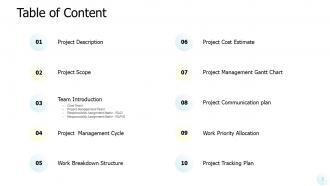
Slide 2: This slide shows Table of Content of the presentation.
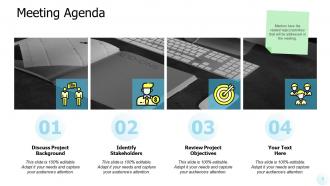
Slide 3: This slide presents Meeting Agenda as- Discuss Project Background, Identify Stakeholders, Review Project Objectives.
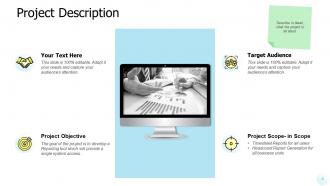
Slide 4: This slide represents Project Description including- Project Objective, Target Audience, Project Scope.
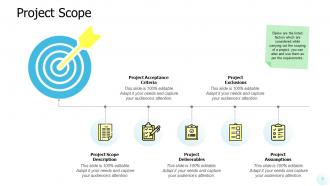
Slide 5: This slide displays Project Scope describing- Project Acceptance Criteria, Project Scope Description, Project Exclusions, Project Assumptions, Project Deliverables.
Slide 6: This is Core Team slide with names and designation.
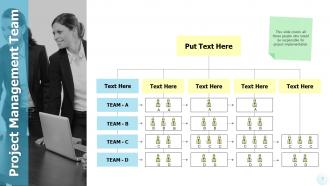
Slide 7: This slide showcases Project Management Team covering all those people who would be responsible for project implementation.
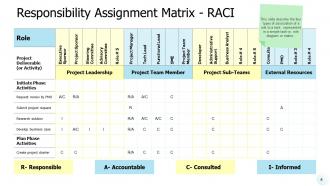
Slide 8: This slide shows Responsibility Assignment Matrix - RACI describing the four types of association for a role to a task.
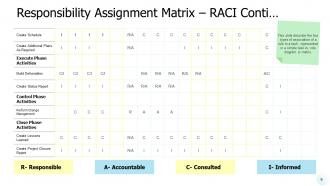
Slide 9: This is another slide continuing Responsibility Assignment Matrix – RACI.
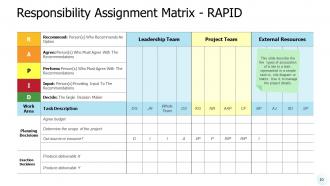
Slide 10: This slide presents Responsibility Assignment Matrix - RAPID describing the five types of association for a role to a task.
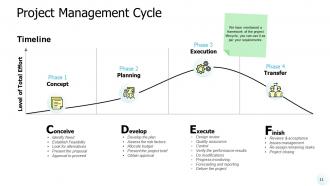
Slide 11: This slide displays Project Management Cycle describing- Conceive, Develop, Execute, Finish.
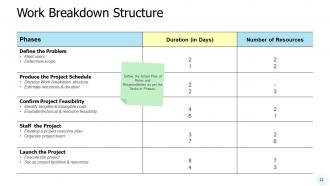
Slide 12: This slide represents Work Breakdown Structure defining the Action Plan of Roles and Responsibilities as per the Tasks or Phases.
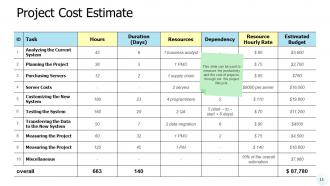
Slide 13: This slide showcases Project Cost Estimate to measure the productivity and the cost of projects, through out the project lifecycle.
Slide 14: This slide shows Project Management Gantt Chart covering the entire work plan of the project split across different months.
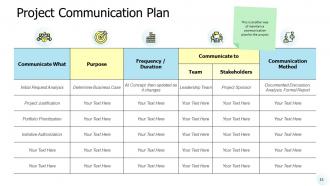
Slide 15: This slide presents Project Communication Plan in tabular form. You can change the data as per needs.
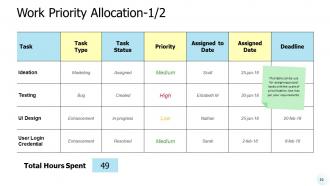
Slide 16: This slide displays Work Priority Allocation in tabular form for assigning project tasks with the scale of prioritization.
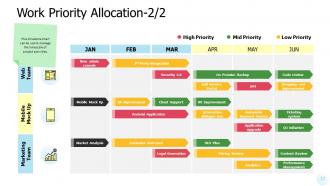
Slide 17: This is another slide for Work Priority Allocation with a milestone chart to manage the timescale of project activities.
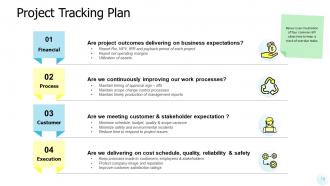
Slide 18: This slide represents Project Tracking Plan with four common KPI objectives to keep a track of overdue tasks.
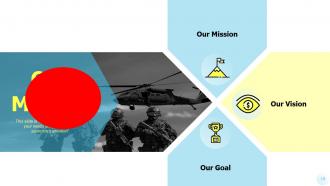
Slide 19: This is Our Mission slide with related imagery and text.
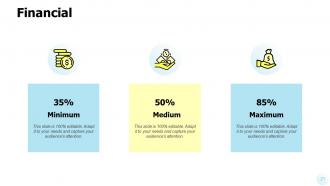
Slide 20: This is a Financial slide. Show your finance related stuff here.
Slide 21: This is a Comparison slide to state comparison between commodities, entities etc.
Slide 22: This is About us slide to show company specifications etc.
Slide 23: This is a Puzzle slide with additional text boxes.
Slide 24: This is a Venn slide with text boxes to show information.
Slide 25: This is a Bulb or Idea slide to state a new idea or highlight information, specifications etc.
Slide 26: This slide displays Magnifying Glass with text boxes.
Slide 27: This is a Thank You slide with address, contact numbers and email address.
Project launch meeting powerpoint presentation slides with all 29 slides:
Encourage discussions in an amicable environment with our Project Launch Meeting Powerpoint Presentation Slides. Be an advocate of civilized debate.



FAQs for Project launch meeting
Okay so three main things to lock down: what success actually looks like (deliverables, metrics, all that), who's responsible for what, and your timeline with key milestones. Budget constraints too - can't forget those. I've literally watched projects crash because people left thinking totally different things about scope. It's wild how often that happens. Get everyone on the same page about potential roadblocks upfront. The whole point is nobody leaves confused about what they're supposed to do or when it's due. Oh, and definitely send a recap email after to make sure you all heard the same thing in there.
Write up a scope doc with all the details - deliverables, deadlines, what's in and what's out. Then actually walk through it in your kickoff meeting instead of just emailing it beforehand (because nobody reads those anyway, let's be real). Go section by section and let people ask questions or complain right then. Be specific too - none of that "user-friendly" nonsense that means nothing. Get each stakeholder to actually say yes before moving on. Oh, and send follow-up notes afterward summarizing what everyone agreed to. Trust me on this one.
Honestly, start with a decent meeting agenda template - saves you from those super awkward silences where nobody knows what we're even discussing. Project charter templates are clutch for getting scope and stakeholders sorted early on. Oh, and RACI matrices might sound boring but they're lifesavers when Karen from accounting claims she wasn't supposed to handle that task. For brainstorming, Miro's pretty solid (though I personally like Mural better). Don't overthink it though - just make a basic action tracker with names and deadlines. These few things will make your meetings actually productive instead of painful.
Don't just have people show up as warm bodies - give them actual jobs. Someone takes notes, another tracks action items, rotate who presents different parts. Send a quick survey beforehand asking what they're most worried about with the project. Because honestly? Hour-long monologues are brutal and nobody pays attention anyway. Break into smaller groups to tackle specific problems, then report back. The quiet people who actually know their stuff? Ask them directly about areas where they're the experts. Oh, and make everyone commit to owning one concrete next step before you wrap up.
Your project charter is basically the referee for that launch meeting - super helpful when people start arguing about what you're supposed to be doing. Send it out ahead of time so everyone's on the same page. Bookmark the important parts because you'll definitely need to pull it up when Jim from accounting decides the project should include his random idea about... whatever Jim thinks about. It shows who gets to make the final calls too. That alone saves you from so much drama. Honestly, I've seen meetings go completely sideways without one. Just have it ready to reference when things get messy.
Break your project down into bite-sized pieces first - way easier to estimate that way. I always look back at similar stuff I've done before to get a ballpark. Buffer time is crucial because something always goes sideways (learned that the hard way). Get crystal clear on scope before you even think about timelines, otherwise you're just setting yourself up. Push back if people are being crazy unrealistic about deadlines - they usually don't know what goes into the work. Whatever timeline feels right? Add 25-30% more. Sounds excessive but trust me on this one.
Here's what I've learned the hard way: nail down who's doing what from day one, or you'll be scrambling later. People zone out after 90 minutes, so don't pack everything into one marathon session. Actually get people agreeing with you instead of just nodding politely while you talk at them. Figure out how everyone's gonna communicate before things get messy. Document your decisions somewhere people can actually find them - not Steve's random notebook that disappears for weeks. Focus on getting aligned and figuring out next steps rather than getting lost in technical weeds. Oh, and book that follow-up meeting before people scatter.
Dude, you HAVE to sort this out in that first meeting - I can't stress this enough. When roles are fuzzy, projects go to hell fast. Someone thinks Sarah's handling the social media, Sarah thinks it's Mike, and suddenly nobody posted anything for two weeks. Been there, it sucks. Get super specific about who does what and when. Don't just say "Tom's on design" - spell out exactly what Tom's designing and by what date. Also figure out who gets final say on decisions, because that'll save you so many headaches later. Maybe throw together a quick RACI chart if your team's into that sort of thing.
Honestly, visual aids are a game-changer because they stop people from zoning out during your presentation. Charts make complex data way easier to follow. Screenshots help abstract ideas actually make sense to your audience. I mean, nobody wants to stare at someone talking for 20 minutes without any visuals, right? Mix up your formats too - graphs work great for analytical people, images hit the creative types, bullet points help the note-takers. Oh, and don't just read your slides out loud. That's annoying. Your visuals should back up what you're saying, not repeat it.
Okay so first thing - figure out your success metrics before you start anything. Timeline, budget, quality standards for whatever you're delivering. Don't forget stakeholder happiness and business stuff like adoption rates or revenue goals. Track both the early wins (milestone completions) and final results. This is honestly where most projects fall apart because nobody agreed on what "success" meant from the start. Put everything in your project charter so there's zero confusion later. Trust me, future you will thank present you for being this specific upfront.
Figure out who needs what info first - your core team probably wants daily check-ins while stakeholders can handle weekly updates. Pick your channels early (email, Slack, whatever) because honestly this gets chaotic if you wing it. Someone needs to own each type of communication or stuff will slip through. Decide on meeting schedules and report formats now, not later when you're scrambling. Create a simple matrix everyone can reference - nothing fancy. Oh and build in ways to get feedback so you can tweak things as you go.
Honestly, ground rules are everything - make sure everyone knows they'll get heard and no idea's off limits. Round-robin stuff works well to stop the loud people from taking over (we've all been in those meetings lol). Try breakout groups too. Visual tools like whiteboards get people actually engaged instead of just sitting there. You'll want to find common ground between teams, which can be tricky. The key thing though? Give everyone specific action items before you wrap up. People need to feel like they own part of the outcome or they'll just check out.
Honestly, get those risks on the table right from day one - don't wait until everything's already falling apart. I always start meetings by literally asking "what's gonna bite us in the ass here?" sounds dramatic but it works. Write down the scary stuff and give people homework to figure out solutions. That risk/impact matrix thing is pretty clutch for sorting out what actually matters vs what's just anxiety talking. Oh and definitely have someone keeping tabs on this stuff throughout, because otherwise you'll just forget about it until it's too late. Better to be paranoid early than scrambling later.
Before everyone bolts from that meeting, lock down three things: who's doing what by when, when you're meeting next, and how updates get shared. Don't let anyone sneak out without clear ownership! Someone needs to document everything too - probably the PM but double-check. Honestly, the 24-hour rule for sending notes is clutch here. Skip this stuff and you'll waste half your week playing detective, asking "so... what exactly did we decide again?" Been there, done that. Way too many times.
First thing - figure out who's gonna be in that room. Executives want the big picture stuff with clear ROI numbers. Technical people? They'll dig into every implementation detail you've got. Finance teams are obsessed with spreadsheets and timelines (seriously, they get excited about budget breakdowns). Marketing folks love the visual story - show them user impact scenarios. My advice: build your presentation in chunks so you can pivot mid-meeting. Start with what each group cares about most, but keep those detailed backup slides handy. You never know when someone's gonna ask a curveball question.
No Reviews