


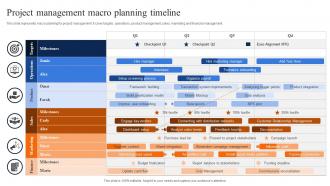
Project Management Macro Planning Timeline





Try Before you Buy Download Free Sample Product
 Impress Your
 Audience
 100%
100% Editable
 Save Hours
 of Time


This slide represents macro planning for project management. It cover targets, operations, product management, sales, marketing and financial management.
People who downloaded this PowerPoint presentation also viewed the following :
Project Management Macro Planning Timeline with all 6 slides:
Use our Project Management Macro Planning Timeline to effectively help you save your valuable time. They are readymade to fit into any presentation structure.





FAQs for Project Management
Honestly, start by mapping out your big deliverables first, then work backwards - trust me on this one. Way less painful than building from scratch. You'll need project milestones, task dependencies (these will screw you over if you forget them), realistic deadlines, and who's doing what. Don't forget buffer time because something always goes sideways. Mark those critical review points where stakeholders need to weigh in. Oh, and use a tool that actually lets you shift dates around easily when things change. Because they will change - probably like three times minimum.
Honestly, project timelines are lifesavers because they stop that chaos where nobody knows what's happening. Everyone can actually see who's doing what and when stuff is due. No more of those super awkward moments where you're like "wait, wasn't that your thing?" Dependencies become way clearer too - you'll spot bottlenecks before they bite you. And when things go sideways (which, let's be real, always happens), the whole team can see how it affects everything else. I learned this the hard way on a project last year. Just make sure everyone can access it and keep updating the damn thing regularly.
Honestly? Asana and Monday.com are solid picks if you want something your team won't hate learning. Great for visual stuff too. Microsoft Project is like the fancy Swiss Army knife - powerful but maybe too much unless you're doing complex builds or whatever. Trello's decent for basic milestone stuff, nothing fancy. Smartsheet's actually pretty cool because it feels like Excel but does real project management. I'd just pick whatever feels closest to how you're already working. Last thing you need is everyone complaining about another new tool to figure out.
Break your project into smaller tasks first - way easier to estimate pieces than the whole mess. I usually tack on 20-30% extra time because something always goes sideways. Check with people who've done this before if you can. Also, look at your team's real availability, not just what looks good on paper. Dependencies between tasks will bite you if you ignore them. Oh, and don't forget holidays and review cycles - those eat up time fast. Honestly? Being realistic beats telling people what they want to hear every single time.
Oh man, stakeholder feedback can totally derail your timeline if you're not careful. Mid-project changes? That's scope creep city right there. You'll be juggling delays and moving resources around like crazy. But honestly, their input usually saves you from way bigger headaches later - learned that one the hard way. Build feedback periods into your original schedule from the start. Set boundaries about when changes are actually doable. Document everything when they request stuff and make them sign off before you dive in. Otherwise you're just asking for trouble down the line.
Gantt charts are seriously your best bet here. You can see everything - task dependencies, how long stuff takes, what overlaps. I always color-code different teams or workstreams so it's not confusing. Make sure your timeline bars show clear start/end dates, and throw some diamonds or flags on major milestones. Don't go overboard with colors though or it'll look like a rainbow threw up on your screen. Asana and Monday work great, but honestly even Excel does the job. List out your tasks first, then figure out realistic timeframes and what depends on what.
Dude, the worst thing people do is totally lowball how long stuff takes. Seriously, always tack on like 20% extra time because something WILL go wrong. Don't make your team super dependent on each other either - if Sarah calls in sick, the whole project shouldn't crash and burn. Getting everyone to actually agree on deadlines upfront saves so much drama later. Oh and holidays exist! People take vacation! I swear everyone forgets this. Weekly check-ins are clutch for catching problems before they snowball into disasters.
Look, you can only go as fast as your team allows - if you need five devs but only have three, something's gotta give. Either deadlines slip or you cut features. No way around it. Most PMs do this totally backwards though. They dream up these timelines first, then scramble to find people to hit them. Start with who you actually have locked down, then figure out realistic dates from there. I learned this the hard way on like three projects. Your stakeholders would rather hear "we need 8 weeks" upfront than watch you miss every milestone you promised.
Spot your risks early and pad your timeline - seriously saves my butt every time. Map out backup plans for the big scary stuff and check on them during team check-ins. Critical path analysis is actually useful here (rare for project management tools lol) - shows you which delays matter vs. the ones that don't. Don't wait to tell stakeholders about timeline issues. Nobody likes surprises, especially the bad kind. For your next project, write down 3-5 things that'll probably go wrong and how you'd handle each.
Honestly, the trick is mixing short sprints with your big deadline dates. Break things into 2-4 week chunks but keep those milestone dates your boss cares about. Don't plan everything upfront - that's where most people mess up. Set up regular check-ins so you can actually pivot when stuff changes (and it always does). I'd start by figuring out what parts could work in cycles, then just fit those into whatever timeline structure you're already stuck with. Works way better than trying to go full Agile when everyone's expecting traditional project updates.
So basically a Gantt chart is like a visual timeline for your project - shows all your tasks mapped out against deadlines. You can see who's doing what and when, plus how different pieces connect to each other. Super helpful for catching bottlenecks early before they screw up your whole timeline. My boss swears by them (maybe a little too much honestly). They're also great for updating stakeholders without having to explain every tiny detail. Dependencies are probably the most useful part - you'll instantly see how one delayed task affects everything downstream. Just start with something basic and build from there.
Honestly, I'd say weekly at minimum - that's what works for me anyway. Daily check-ins make sense if you're in crunch mode or juggling a bunch of moving pieces. Longer projects? Every two weeks is probably fine. The trick is actually sticking to whatever schedule you pick, not just scrambling to update things when stuff hits the fan. I throw 30 minutes on my calendar every Friday to see how reality matches up with what we originally planned. Timeline creep is sneaky as hell and will absolutely bite you if you're not paying attention. Set a reminder and don't skip it.
Get a proper change control process going - write down every scope change, check how it'll mess with your timeline, and make sure stakeholders actually sign off. Honestly, buffer time is going to save your butt more than you realize. Time-boxing works great for containing scope creep. I'd use something like MoSCoW to prioritize what changes actually matter. Always be upfront about trade-offs though - more scope means longer timeline or cutting other stuff. Regular check-ins help catch scope drift before it totally wrecks your schedule. The transparency thing is huge.
Dependencies run your whole project timeline - when Task A blocks Task B, you're stuck waiting. Miss that first deadline? Everything after it gets delayed too, which sucks. I learned this the hard way on my last project actually. Critical path mapping shows you which delays will actually mess up your end date versus the ones that won't. Put your energy on those make-or-break dependencies first. Buffer time helps where you can swing it. Short version: some delays matter way more than others, so figure out which ones early.
Honestly, just rip the band-aid off and tell people as soon as you know there's gonna be a delay. Don't do what I did and try to "fix" it yourself first - that backfired spectacularly. People hate surprises way more than bad news delivered upfront. Explain what actually went wrong, not just the new dates. Give them options if you can swing it. I'd send a clear email with the updated timeline, then personally follow up with anyone who's gonna be pissed about it. Most folks will respect you more for being straight with them instead of making excuses or waiting until the last second.
-
I really liked their customized design services. I got my desired template made by their expert team. Thank You!
-
I want to express my gratitude to SlideTeam’s presentation design services team for helping me create the best presentation of my life!