

Project Manpower Planning Powerpoint Ppt Template Bundles




Try Before you Buy Download Free Sample Product
 Impress Your
 Audience
 100%
100% Editable
 Save Hours
 of Time


Our Project Manpower Planning Powerpoint Ppt Template Bundles are topically designed to provide an attractive backdrop to any subject. Use them to look like a presentation pro.
People who downloaded this PowerPoint presentation also viewed the following :
Project Manpower Planning Powerpoint Ppt Template Bundles with all 26 slides:
Use our Project Manpower Planning Powerpoint Ppt Template Bundles to effectively help you save your valuable time. They are readymade to fit into any presentation structure.

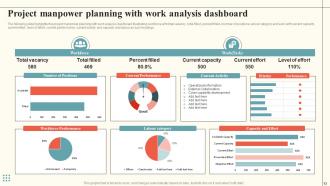
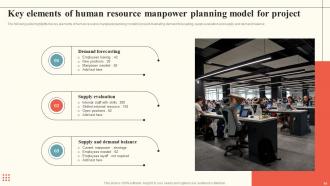
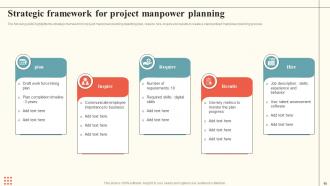
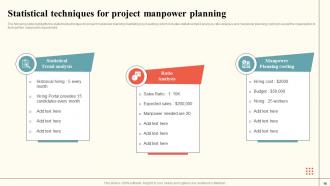





FAQs for Project Manpower Planning Powerpoint
Okay so for your manpower plan, start by mapping out what skills you actually need for each phase. Figure out how many people and exactly when - timing's crucial here. Source your talent next (internal moves, new hires, contractors). Then work out who's doing what and when, watching for conflicts with other projects. I always pad in extra time because something will definitely go wrong lol. Set up an escalation plan too for when things get messy. Honestly, just sketch it on a timeline first - you can worry about fancy software later. Oh, and don't overthink the initial draft!
Break each phase into specific tasks first. Then estimate hours based on what you've done before - honestly, save every detail from past projects because you'll thank yourself later. Work backwards from your deliverables to figure out who needs to do what. I always add 15-20% extra time for sick days and when clients inevitably change their minds. Don't just guess with round numbers either. Get granular with your estimates and make a skills matrix so you actually know who can handle each piece of work.
Start with resource leveling - basically smoothing out those insane staffing spikes by moving non-critical stuff around. Cross-train your people so they can jump between roles when things get crazy. I keep a small pool of contractors on standby (trust me, you'll need them). Gradually ramp people up and down instead of those jarring all-hands-on-deck moments. Oh, and map your skill needs early so you can shuffle folks between project phases. The weekly resource check-ins are way more useful than monthly ones - things change too fast otherwise. Stay flexible, honestly that's like 80% of it.
Yeah, culture totally affects how you staff up. Collaborative teams need different ratios than top-down places. Some teams click right away, others take forever to get going - honestly depends on personalities more than anything. You've got to think about how people actually communicate and make decisions too. Cross-functional stuff is hit or miss depending on your crew. Before you lock in headcount, maybe ask your current teams what they prefer workload-wise? I learned this the hard way on a project last year. Trust me, it beats dealing with disaster later.
Honestly, the biggest game-changer is ditching the guesswork and actually tracking stuff. Project management tools show you how long tasks really take vs what you thought they'd take - and wow, the difference can be eye-opening. Analytics help you spot productivity patterns too. There's some decent AI tools now that predict resource needs based on your past projects and complexity levels. But really, it all comes down to using real data instead of just winging it. Once you start tracking your current projects closely, you'll get way better at planning future ones. Makes such a difference.
So first thing - list out what skills each task actually needs, not just the obvious stuff. I make this matrix thing (sounds super nerdy but trust me) where I match required skills against what my team can do. Really helps when your boss starts grilling you later. Don't just think technical either - domain knowledge matters, plus who can actually communicate without making everyone's eyes glaze over. Once you see the gaps, it's way easier to figure out if you need training, new hires, or just shuffling people around. Takes some upfront work but saves your butt down the road.
Oh man, time estimates are always way off - that's the big one. People forget Sarah from accounting takes forever to review stuff, or that half the team's going on vacation next month. Don't assume everyone works at the same speed either, that'll bite you. New people need time to get up to speed too, which nobody ever plans for. Honestly? I just figure out what each person can actually handle (not what they say they can), then add extra time for all the random crap that comes up. Works way better than being overly optimistic about deadlines.
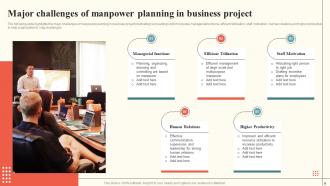
Honestly, scope changes mess with your team size more than most people realize. Bigger scope? You're gonna need more bodies or push out deadlines. But here's the weird part - cutting scope is actually harder because you can't just boot people halfway through without screwing up the whole team vibe. I always build in some buffer when I'm planning upfront, saves me so much headache later. Oh, and get a proper change control process going - don't just eyeball the resource changes when scope shifts happen. Trust me, you'll thank yourself when you're not frantically trying to figure out staffing at the last minute.
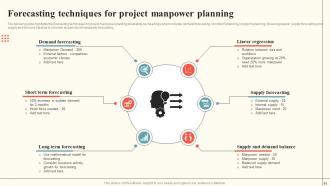
Honestly, I'd start with your historical data - look at what similar projects actually consumed resource-wise. That's your baseline right there. Then try breaking down your remaining work packages and estimate hours/skills needed for each piece. Your senior folks' gut instincts are worth their weight in gold here, so definitely tap into that. Oh, and don't forget the annoying stuff like vacation schedules or seasonal dips that'll mess with your availability. Trend analysis helps too - just plot current staffing against milestones. Start simple with whatever feels most natural, then you can get fancier later.
Dude, talk to your stakeholders before you finalize anything - trust me on this. They'll catch skill gaps and budget issues you totally missed. Plus they know weird requirements that aren't in the docs, like "oh yeah, we need someone bilingual for client calls." I learned this the hard way once. They'll also tell you which roles are actually urgent vs nice-to-have. And honestly? The political stuff matters too - who works well together, which departments share resources. Sometimes stakeholders drop random curveballs that completely change your hiring priorities. Just get their input early instead of scrambling later.
Honestly, just build in way more buffer than you think you need - like 10-15% extra resources minimum. Something always breaks at the worst possible time. Cross-train people so they can cover for each other when stuff hits the fan. Rolling forecasts work way better than those rigid annual plans nobody follows anyway. Check in weekly to see if your resource needs changed. Keep some contractors or part-time people on speed dial for emergencies. Oh, and treat your plan like it's alive - update it constantly instead of letting it collect dust in some folder.
Check your productivity first - are people hitting deadlines and finishing their deliverables? Resource utilization is huge too. If everyone's working 60-hour weeks, you've screwed up somewhere. Budget variance between what you planned vs actual costs will show staffing issues fast. Quality metrics matter - high defect rates usually mean you're spread too thin. Honestly, scope creep is probably the biggest red flag that you don't have enough people. I'd look at this stuff monthly instead of waiting till the end when it's too late to fix anything.
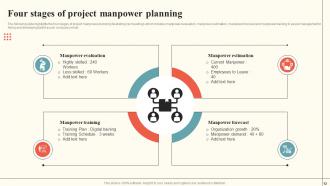
Look, the trick is baking training right into your workforce planning from the start. Map out your upcoming projects, then figure out what skills you'll actually need. Sometimes upskilling your current people beats hiring new ones - and it's usually way cheaper too. I learned this the hard way at my last job. Audit what skills your team has now versus what's coming down the pipeline. Build learning paths that match your project timeline so people are ready when you need them. Don't treat training like some side thing you'll get to later. Make it part of how you plan resources.
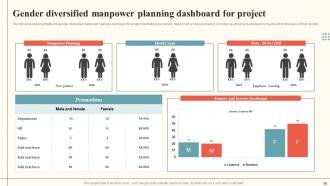
So diversity in team planning? Game changer honestly. Different backgrounds bring fresh perspectives and catch problems you'd totally miss otherwise. Better problem-solving, more creative solutions - the whole thing just clicks better. Your stakeholders get represented properly too, which matters way more than people think. Oh and diverse teams are just more fun to work with, not gonna lie. Here's what actually works: look at who you've got now, then actively hunt for different voices when you're staffing up. It's not just the right thing to do - your projects will literally perform better. Trust me on this one.
Oh man, external stuff totally messes with your staffing plans. Market changes hit hard - sudden demand spikes mean you're scrambling to hire fast, or budget cuts leave you doing way more with fewer people. Economic shifts and competitor moves? They'll force you to shuffle teams mid-project. Regulatory changes too, honestly. I watched one team get completely reorganized after a single market announcement - it was chaos. Best bet is planning for flexibility upfront and having backup resources ready. You'll thank yourself later when things inevitably go sideways.
-
The pricing page of this website is very sorted. I felt no pain while buying the PPTs.
-
Easy to use and customize templates. Helped me give a last minute presentation.