

Plano de Marcos do Projeto Slides de Apresentação em PowerPoint




Try Before you Buy Download Free Sample Product
 Impress Your
 Audience
 100%
100% Editable
 Save Hours
 of Time


Alcance seus objetivos de negócios usando estes Slides de Apresentação do Plano de Marcos do Projeto PowerPoint. Aproveite esses visuais de PowerPoint de gerenciamento de projetos para mostrar seus marcos mensais juntamente com suas fases. Represente as estratégias para definir marcos, como identificação de marcos, comunicação de informações de conquista, entre outros, com esses modelos de planejamento de projetos em PPT. Determine os cronogramas do projeto por meio da combinação de marcos com técnicas de programação como PERT e CPM. Utilize este deck de apresentação de conquistas de projeto para revelar as cinco etapas do gerenciamento de projetos, como iniciação de projeto, planejamento de projeto, execução de projeto, etc. Além disso, você pode apresentar a importância de aprender com a experiência. Sempre garanta que seu projeto esteja no cronograma com esses layouts de PPT de gerenciamento de projetos. Além disso, você também pode retratar a importância da avaliação de projetos na avaliação da eficácia de um projeto. Baixe esses infográficos de PowerPoint de gerenciamento de projetos para demonstrar conquistas de negócios.
People who downloaded this PowerPoint presentation also viewed the following :
Conteúdo desta apresentação em PowerPoint
Slide 1: Este modelo apresenta o Plano de Marcos do Projeto. Adicione o Nome da sua Empresa para começar.
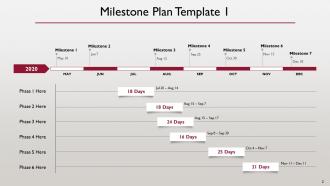
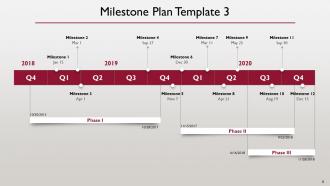
Slide 2: Este slide contém o Modelo de Plano de Marcos.
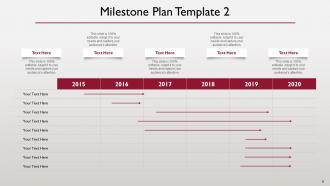
Slide 3: Este slide também contém o Modelo de Plano de Marcos.
Slide 4: Este slide também contém o Modelo de Plano de Marcos.
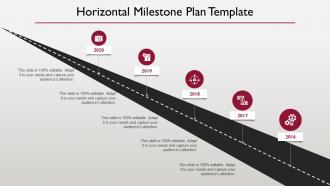
Slide 5: Este slide contém o Modelo de Plano de Marcos Horizontal.
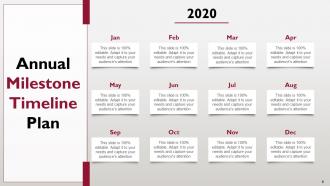
Slide 6: Este slide mostra o Plano de Cronograma de Marcos Anuais.
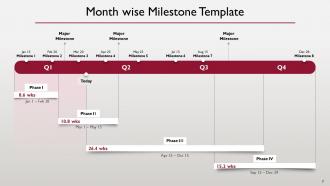
Slide 7: Este slide contém o Modelo de Marcos Mensais.
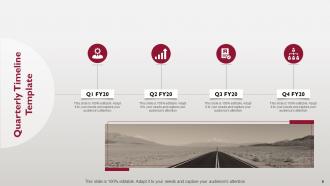
Slide 8: Este slide contém o Modelo de Cronograma Trimestral.
Slide 9: Este Modelo contém o Slide de Ícones do Plano de Marcos do Projeto.
Slide 10: Este slide é intitulado como Slides Adicionais para avançar.
Slide 11: Este slide contém um gráfico de barras editável mostrando a participação de mercado dos produtos para vários anos fiscais.
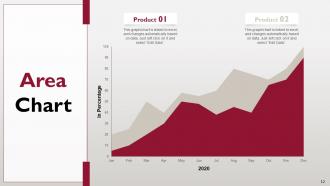
Slide 12: Este slide contém um gráfico de área editável mostrando a participação de mercado dos produtos para vários anos fiscais.
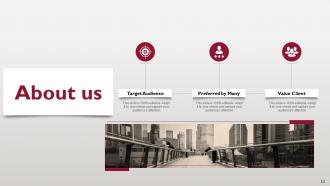
Slide 13: Este slide mostra Sobre nós.
Slide 14: Este slide revela os nomes e cargos dos membros da Nossa Equipe.
Slide 15: Este slide revela Nossos Principais Objetivos - Conscientização, Qualidade, Sucesso.
Slide 16: Este slide revela a Linha do Tempo.
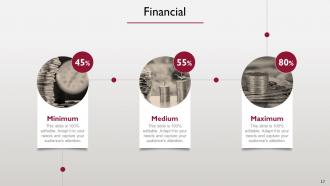
Slide 17: Este slide revela as informações financeiras.
Slide 18: Este é um slide de Obrigado, consistindo de Endereço, Números de Contato e Endereço de E-mail.
Slide 1: Plano de Marcos do Projeto Slide 2: Introdução Slide 3: Objetivos do Projeto Slide 4: Escopo do Projeto Slide 5: Cronograma do Projeto Slide 6: Marcos do Projeto Slide 7: Marco 1: Definição do Escopo Slide 8: Marco 2: Planejamento da Execução Slide 9: Marco 3: Início da Implementação Slide 10: Marco 4: Revisão de Meio de Projeto Slide 11: Marco 5: Conclusão da Implementação Slide 12: Marco 6: Testes e Validação Slide 13: Marco 7: Entrega do Projeto Slide 14: Recursos Necessários Slide 15: Riscos e Mitigação Slide 16: Comunicação e Gerenciamento de Partes Interessadas Slide 17: Próximos Passos Slide 18: Perguntas e Respostas
Mantenha a calma com nosso Plano de Marcos do Projeto Apresentação de Slides do PowerPoint. Seja tranquilo e calmo em qualquer crise.



FAQs for Project Milestones Plan
You need three things for a solid milestone: what you're delivering, when it's due, and how you'll know it's actually finished. Don't do that vague "make progress" nonsense - nobody knows what that means. Be specific like "user login works and is live." Set a real deadline. Then figure out your completion criteria - tests pass, client signs off, whatever works. Honestly, I've seen too many projects fall apart because milestones were just wishful thinking. Make them concrete enough that there's zero confusion about whether you hit the target or not.
Milestones are basically your project's checkpoints - they show if you're on track or totally screwing up. Make them super specific though, not just "design done" or whatever. Like "user testing finished with 85% happy users" or "API actually works without breaking." I've watched so many teams just tick boxes without really looking at what went wrong. The GPS thing is kinda cheesy but honestly it's true - you need those waypoints to know if you're heading into disaster. Review them with your whole team too. Don't just pretend everything's fine and keep going.
Honestly? Just chop your project into bite-sized pieces you can actually measure. Work backwards from your big deliverables to figure out timing. I learned the hard way to always pad your timeline because Murphy's law is real - something will definitely break or take longer than expected. Get your team involved when you're setting dates too, since they know better than anyone how long stuff actually takes. Each milestone should have super clear "done" criteria so there's zero confusion. Oh, and if things start going off track, speak up immediately. Way better than surprising everyone at the last minute.
Honestly, it comes down to timing and how much you can change course. Traditional milestones are these fixed checkpoints you set at the beginning - kinda like mapping out a road trip in advance. Agile ones shift around based on sprint completions or when you actually ship features. With traditional PM, you're stuck with whatever gates you planned months ago (even when they make zero sense anymore). Agile milestones evolve with your project. Traditional celebrates stuff like "requirements approved" while Agile focuses on real working features users can touch. My take? Go traditional if stakeholders need predictable dates. Pick Agile if you'll be pivoting based on user feedback.
Dude, milestones are seriously your best friend for keeping stakeholders happy. Set ones that actually mean something to THEM, not just your internal team stuff. When you hit those checkpoints, you've got real talking points for meetings instead of just winging it. Plus they help you catch problems early - way better than scrambling later when everything's on fire. I always tie mine back to business impact because that's what executives care about anyway. Trust me, those status meetings become so much less painful when you can point to concrete wins. Short ones work great too, don't overthink it.
Look at what your team actually delivered before versus what they said they could do. That's your real starting point. Add maybe 10-15% on top to push them a bit - not enough to crush morale though. I made that mistake once and it was brutal, everyone just gave up. Break the big stuff into smaller chunks so you can catch problems early. Here's the thing that actually works: get your team involved in setting the deadlines. They'll be honest about timing instead of just telling you what sounds good. Short wins keep momentum going better than one massive goal anyway.
Honestly? Asana and Monday.com are my top picks - super visual and won't make your team want to cry. Microsoft Project's decent if you're already living in the Office world. Google Sheets can be surprisingly powerful for smaller stuff (I know, I know, sounds basic but it works). Trello's card system is perfect if your brain works visually. JIRA's good too but only if you're already stuck with it. The real trick is finding something everyone will actually open more than once. Oh, and definitely test the free versions first - no point paying for something that'll collect digital dust.
Okay so first thing - get those milestones into whatever project tool you're using with actual dates and what "done" looks like. Then don't just fire off one email about it (trust me, people forget instantly). I always make a shared tracker that's super simple. Kick things off with a meeting, then do regular check-ins. When someone hits a milestone or we're behind? Post it in the team chat immediately. Honestly, celebrating the wins keeps everyone motivated way more than you'd think. Set yourself weekly reminders to check status - otherwise stuff just disappears into the void.
Ugh, missing milestones sucks but happens to everyone. First thing - figure out what actually went wrong and how behind you really are. You've got options: throw more people/resources at it, negotiate new deadlines with whoever's in charge, or just cut some of the less important stuff. Running things in parallel instead of one-by-one can help too, though that gets chaotic fast. Honestly, the worst thing you can do is stay quiet hoping you'll magically catch up. Tell your stakeholders what's up and show them your plan to fix it. Do a team postmortem afterward so this doesn't happen again.
When scope changes mess things up, you've got a few moves. Push milestone dates around based on what's been added or cut. Break big milestones into smaller pieces - trust me, complex projects always need this anyway. Sometimes you'll have to completely redefine what "finished" actually means for each milestone. New work streams pop up? Add new milestones for those too. Just document everything right away and get everyone to agree before you move ahead. Otherwise your team will be lost and stakeholders will wonder why nothing's happening when they expected it.
Don't make your milestones super vague like "good progress on design" - that tells you nothing. Go for concrete stuff like "design mockups completed." I've watched teams crash and burn because they crammed too many milestones into short sprints. Then everyone's just chasing deadlines instead of actually getting work done. Build in some buffer time too because reviews always take longer than you think. Each milestone needs a clear owner and you gotta track them consistently. Oh, and make sure the completion criteria are actually measurable - saves so much headache later.
So here's what I'd do - map each milestone straight to your company's actual goals. Like if they want 20% more revenue, every milestone should push toward that. I've watched so many projects just float around doing their own thing (total waste). Work backwards from the big deadlines - product launches, end of quarters, whatever matters to your business. Your stakeholders need to see how each milestone actually moves things forward, not just checks boxes. Otherwise you're just playing project manager while the real business happens around you. Make those connections crystal clear from day one.
Oh man, this is such a real thing. Different cultures treat deadlines totally differently - some see them as suggestions, others as gospel. Planning styles clash too. You'll have teams wanting every detail mapped out while others just wing it as they go. Communication gets tricky since direct feedback hits different across cultures. What really helped me was getting everyone on a call super early to hash out what milestones actually mean to each team. Honestly felt awkward at first but saved me so much headache later. Build in extra time for getting aligned too.
Honestly, I'd go with milestones every 2-4 weeks - works way better than you'd think. Made the mistake once of doing weekly ones and it was ridiculous overkill. Everyone was burned out from constant reviews instead of actually getting stuff done. Start with your big deliverables and decision points first. Then throw in some progress check-ins between those. The spacing should feel natural when you map it out on a timeline. Quick test: if your team's rolling their eyes at another milestone meeting, you've probably overdone it. Better to have fewer meaningful ones than a million tiny checkpoints that don't matter.
Honestly, simple stuff works best for celebrating milestones. Team lunches are solid, or just grab some donuts for the office - people love free food, trust me. I'm obsessed with those fun Slack announcements with emojis when we hit something big. Gift cards are nice too, doesn't have to be fancy. Oh, and shoutouts during meetings make people feel seen. The timing matters though - don't wait weeks to celebrate or it'll feel weird. Just pick whatever fits your budget and team culture, then actually stick with it. Consistency beats fancy every time.
No Reviews