

Project planning proposal powerpoint presentation slides





Try Before you Buy Download Free Sample Product
 Impress Your
 Audience
 100%
100% Editable
 Save Hours
 of Time


For organizations, executing a new project has never been so easy. A lot of things and strategies are included while beginning a project. The market has been really competitive and cut-throat over the years. So, entrepreneurs leave no ounce in managing and monitoring their project from start to finish. Regardless of what size of a project is, it is handled by a bunch of professionals. Each member is responsible for designing a full-fledged project and undoubtedly, it takes a lot of planning. To give projects a more finishing look, businesses fall short of materials or some advanced equipment. This is why they take the help of service providers. But, choosing one of many is quite a daunting task. Also, it is difficult for providers too to connect with their clients. Despite all the problems, there is one go-to solution that resolves the queries of both the parties and that is the readymade proposals. Presenting our creatively designed Project Planning Proposal PowerPoint Presentation Slides that perfectly suits your requirements. Take advantage of this project strategy proposal PPT template to exhibit your extraordinary services to the clients. By utilizing our project management and planning proposal PowerPoint slide to create an engaging cover letter for the landing page of your proposal. With the aid of this visually-appealing project planning proposal PPT layout, you can talk about your company and its background to build clients’ trust. In this, you can explain how your additional services will increase the clients’ leads. Incorporate our project planning proposal PowerPoint template to showcase the estimated budget that your client needs to make while accepting your services. By employing this project management proposal PPT theme, you can mention the expertise and practical knowledge of your professionals that make clients’ projects even more effective. Download our pre-designed project planning proposal PowerPoint presentation template and win over your clients quickly.
People who downloaded this PowerPoint presentation also viewed the following :
Content of this Powerpoint Presentation
Slide 1: This slide introduces Project Planning Proposal. State Client details, User details and begin.
Slide 2: This slide displays Cover letter for Project Planning Proposal.
Slide 3: This slide displays Table of Content.
Slide 4: Proposal Context for Project Planning Proposal. We propose a 5 phase process to implement the Plan.
Slide 5: This slide showcases Action Plan for Project Planning Proposal. We Propose a Four Phase solution to ensure that your YouTube Channel gets the audience it deserves
Slide 6: This slide showcases Gap Analysis for Project Planning Proposal
Slide 7: This slide depicts Project Timeline for Project Planning Proposal. Mentioned below is the timeframe for the 4 stage Project timeline , the four stage process will take around 9 weeks which are divided into various phases
Slide 8: This slide represents Budget Allocation for Project Planning Proposal.
Slide 9: This slide depicts Investment details for Project Planning Proposal
Slide 10: This is About Us slide to showcase Company specifications.
Slide 11: This is Our Team slide with Names and Designations.
Slide 12: This is Our Team slide with Names and Designations.
Slide 13: This slide shows Client Testimonials for Project Planning Proposal
Slide 14: This slide represents Next Step. Once you are satisfied with our proposal you can send a signed copy to us either by mail or by post.
Slide 15: This slide shows Terms and Conditions for Project Planning Proposal.
Slide 16: This is Contact Us slide with Address, Email address and Contact number.
Slide 17: This is Icons Slide for Project Planning Proposal.
Slide 18: This slide is titled as Additional Slides for moving forward.
Slide 19: This slide displays Our Vision, Mission & Goal for Project Planning Proposal
Slide 20: This slide displays Gantt Chart for Project Planning Proposal.
Slide 21: This is 30 60 90 Days Plan slide.
Slide 22: This slide showcases Timeline for Project Planning Proposal.
Slide 23: This slide showcases Roadmap process for Project Planning Proposal.
Project planning proposal powerpoint presentation slides with all 23 slides:
Give your audience a fulfilling experience. They will find our Project Planning Proposal Powerpoint Presentation Slides elevating.
-
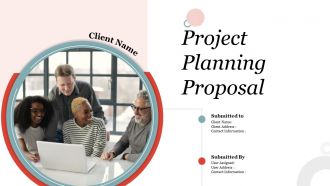
Project Planning Proposal
-
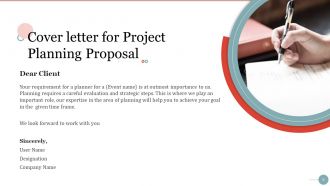
Cover letter for Project Planning Proposal
-
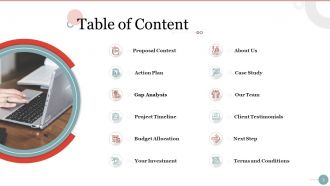
Table of Content
-
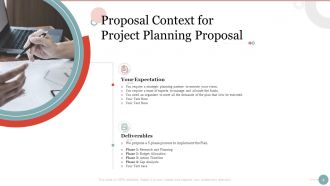
Proposal Context for Project Planning Proposal
-
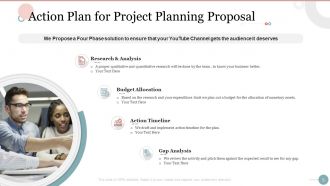
Action Plan for Project Planning Proposal
-
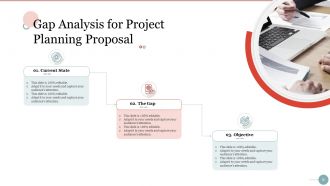
Gap Analysis for Project Planning Proposal
-
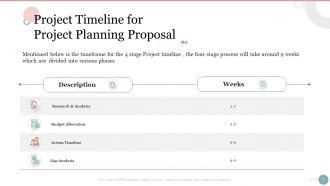
Project Timeline for Project Planning Proposal
-
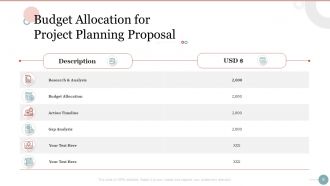
Budget Allocation for Project Planning Proposal
-
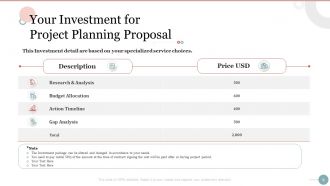
Your Investment for Project Planning Proposal
-
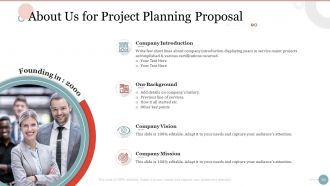
About Us for Project Planning Proposal
-
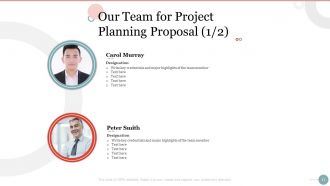
Our Team for Project Planning Proposal 1 2
-
Our Team for Project Planning Proposal 2 2
-
Client Testimonials for Project Planning Proposal
-
Next Step for Project Planning Proposal
-
Terms and Conditions for Project Planning Proposal
-
Contact Us for Project Planning Proposal
-
Icons Slide for Project Planning Proposal
-
Additional Slides
-
Our Vision Mission Goal for Project Planning Proposal
-
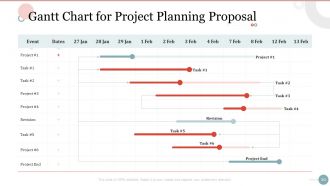
Gantt Chart for Project Planning Proposal
-
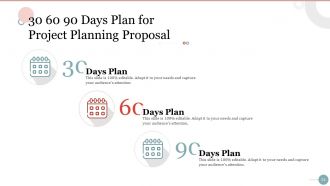
30 60 90 Days Plan for Project Planning Proposal
-
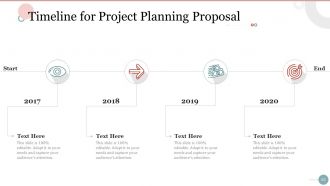
Timeline for Project Planning Proposal
-
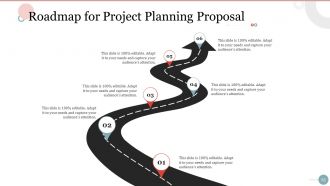
Roadmap for Project Planning Proposal
FAQs for Project planning proposal
First things first - figure out your scope, timeline, and budget. Those three will make or break you. Map out clear deliverables and milestones so everyone's on the same page about what success looks like. Oh, and definitely plan for communication upfront (seriously, I've watched projects crash just because people weren't talking). Risk management matters too. Get your team roles sorted out early - who's doing what and when. Basically you need to answer all the basics: who, what, when, and how much money. Start simple with a template and add complexity as you go.
First thing - write down every single detail of what you're delivering and what you're NOT. Get everyone to actually sign off on it (trust me on this one). Because guaranteed, someone will come asking for "just one small addition" later. When they do, pull out that original doc and show them how their "quick change" affects the timeline and budget. You'll want a proper change request system too - no casual hallway asks allowed. Oh, and document everything! People have terrible memories about what they agreed to. It's honestly wild how fast they forget.
Honestly, the trick is breaking everything down into tiny pieces first - that alone will save you so much headache later. I always do three-point estimation: best case, worst case, and realistic timeline, then average them out. Look at old projects too, they're goldmines for figuring out how long stuff actually takes vs. what you think it'll take. Expert opinions are clutch for technical stuff you've never touched. Bottom-up works way better than guessing the whole thing at once. Oh, and don't forget smaller tasks are just easier to estimate accurately than big vague deliverables.
Dude, stakeholder analysis will save your ass on projects. Map out everyone who could mess with your project or get affected by it. Figure out who's got real power and what they actually want. I've watched perfectly good projects crash because someone forgot about a key player who got pissy about being ignored. Keep the important ones happy with regular updates - doesn't have to be fancy, just consistent. Also prioritize by who has influence vs who just cares a lot (sometimes they're different people). Trust me, spending time upfront on this beats scrambling later when someone's throwing roadblocks at you.
Think of risk assessment as your project's crystal ball - helps you catch problems before they blow up your timeline. Get your team together and brainstorm everything that could go sideways (trust me, something always does). Then rate each risk: how likely is it and how badly would it mess things up? I usually just make a simple grid with probability on one side, impact on the other. Focus on the scary high-risk stuff first. Your teammates will spot things you totally missed, so don't skip that step. Write it all down and check back regularly - projects change, risks change too.
Figure out your critical path first - what tasks absolutely can't be late without screwing your deadline. After that, I'd use something like MoSCoW to sort everything (Must have, Should have, Could have, Won't have). Super helpful for staying focused. The impact vs effort matrix is honestly a game changer for finding quick wins. You'll want to think about task dependencies and who's actually available to do the work. Oh, and definitely review priorities every week in standups - I learned this the hard way because stuff changes constantly and you don't want to be caught off guard.
Honestly, start with something simple - even a basic spreadsheet tracking who's doing what and when. You'll spot the chaos immediately. If you want to get fancier later, tools like Microsoft Project or Asana are solid for seeing everyone's workload at once. Resource leveling is pretty clutch - it'll automatically shuffle schedules when someone's drowning in work. I'm a big fan of just ranking projects by actual business value, then putting your strongest people on the most important stuff. Sounds obvious but tons of companies mess this up. Map out the current situation first though - the bottlenecks will jump out at you.
Your project planning totally depends on which methodology you pick. Waterfall makes you document everything upfront - like, EVERYTHING - before you touch any code. Agile's the opposite though. You plan just enough to start, then keep adjusting as you go. I've literally watched teams spend months planning in Waterfall and still miss the mark. With Agile, planning never really stops - it's more like this ongoing thing. Way less stressful honestly. Just match your approach to how much uncertainty you're dealing with.
Ugh, the worst thing you can do is underestimate how long stuff takes. Always add buffer time - like, way more than you think you need. Also get your key stakeholders involved right from the start, not halfway through when they suddenly have "feedback." Document everything because people will definitely forget what they agreed to. Scope creep will absolutely destroy your project if you're not crystal clear about boundaries upfront. Oh and actually make a risk register instead of crossing your fingers and hoping for the best. Kick things off with a proper meeting where everyone's aligned on goals and timelines.
Honestly, templates are game-changers for project planning. You get all the basic structure already built out - timelines, task lists, resource stuff - so you don't have to start with a blank page every single time. Just drop in your project details and adjust whatever doesn't fit. Your whole team stays on the same page too, which is huge when you've got people at different experience levels. I swear they've saved me hours of work. Oh, and pro tip - grab a simple template for your next project, then modify it as you go. You'll figure out what actually works for how your team operates.
Honestly, the biggest thing is just getting your communication game sorted from the start. Pick whatever channels work for your team and actually stick with them - I'm talking regular check-ins, some kind of project tool where people can see what's happening, maybe even templates for updates so nothing falls through the cracks. Document everything as you go because I swear, half the drama comes from people thinking they agreed on something totally different. Also? Better to annoy people with too many updates than leave them guessing. Oh and definitely touch base each week to make sure everyone's still on the same page about how you're communicating.
Honestly, just pick something like Asana or Monday and throw your current project in there. You'll immediately see the difference instead of drowning in spreadsheets like we all used to. The whole team can actually see what's happening and spot problems before they blow up. Set up those automated reminders so you're not constantly nagging people about deadlines - that alone is worth it. Real-time progress tracking means no more guessing games. Plus file sharing becomes stupid easy. I'd start simple though, don't go crazy with features right away.
Oh man, you definitely need project planning! It's like giving everyone a map so nobody's wandering around lost. Clear roles mean people aren't accidentally doing the same work (been there, it sucks). Deadlines keep things moving, and honestly? When people see how their piece fits the whole puzzle, they actually care more. The biggest win though - realistic timelines so your team isn't dying from stress every week. Just do a quick 30-minute planning session before you start. Trust me, it'll save you from so much chaos later.
Okay so the key thing is being crazy specific about what "done" actually means for each deliverable. Like, what format? Quality level? Who's doing it and when? I learned this the hard way when someone delivered a "website mockup" that was literally stick figures while I was expecting something polished. Document all this stuff somewhere everyone can see it - your project charter or whatever. Walk through everything during kickoff so people can ask questions. Honestly, those 30 minutes of clarification upfront will save you from wanting to pull your hair out later when everything's wrong.
First thing - nail down the basics like scope, timeline, and what success looks like. Introduce everyone and their roles because (trust me on this) role confusion kills projects faster than anything. Go over how you'll communicate and meeting cadence. I always try to flag potential problems early since it's so much easier than dealing with crisis mode later. Oh, and definitely send out those action items within a day or two while people actually remember what happened. Documentation sounds boring but you'll thank yourself later when someone asks "wait, what did we decide about X?"
No Reviews