

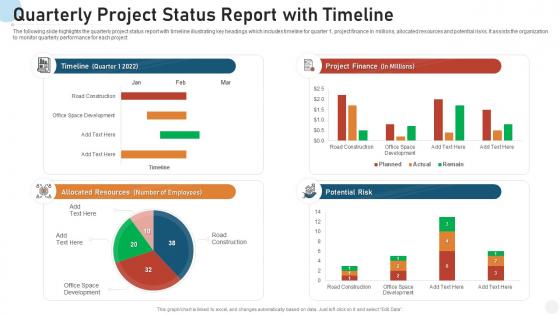
Quarterly project status report with timeline




Try Before you Buy Download Free Sample Product
 Impress Your
 Audience
 100%
100% Editable
 Save Hours
 of Time


Our Quarterly Project Status Report With Timeline are topically designed to provide an attractive backdrop to any subject. Use them to look like a presentation pro.
People who downloaded this PowerPoint presentation also viewed the following :
Quarterly project status report with timeline with all 7 slides:
Use our Quarterly Project Status Report With Timeline to effectively help you save your valuable time. They are readymade to fit into any presentation structure.





FAQs for Quarterly project status
So for your quarterly report, hit these main things: how projects are tracking against milestones, budget stuff (actual vs what you planned), any big risks and what you're doing about them, plus team/resource updates. Oh and definitely include what's coming next quarter. I always add a "quick wins" section because honestly, execs eat that stuff up. Don't try to hide problems or delays - they'll figure it out anyway and you'll look worse. Better to be straight about issues so they can actually help. Keep it short though, like 2-3 pages tops. Nobody wants to read a novel.
Dude, charts and graphs are game-changers for getting stakeholders to actually pay attention. Nobody wants to dig through paragraphs looking for budget issues or timeline problems. Visuals let them spot trends instantly. I've literally watched executives zone out during text-heavy presentations, but show them a simple progress bar? Suddenly they're asking questions. Plus you can tell the real story - like how that September mess screwed up everything else downstream. Honestly just pick one or two key metrics to visualize first. Don't go crazy right away.
Honestly, stick to the big three: milestone completion, budget variance, and timeline stuff. Those are your bread and butter. Team velocity is clutch if you're doing agile - stakeholders eat up those green/red status visuals too. Don't sleep on the softer metrics though, like team morale or client happiness scores. Sometimes those tell you more than the numbers do. Oh, and keep it to maybe 4-6 metrics total? Nobody's reading a 20-page data dump, trust me. Been there.
Honestly, tackle the review within that first week - don't put it off. I always do a quick halfway check between quarters too. The early review catches any major issues before they snowball, you know? Yeah I get it, these documents are boring as hell to read through, but it's worth doing properly. Halfway through gives you a sense if things are going sideways and you need to reset expectations. Oh and definitely set those calendar reminders. Most people who actually stay on top of stuff follow something like this. Otherwise you'll be scrambling at the end wondering what happened.
Honestly, the two biggest mistakes I see are being way too vague OR dumping every tiny detail on people. Nobody wants "everything's good!" but they also don't need a dissertation about Bob's computer issues. Focus on what's actually coming up next and any roadblocks where stakeholders need to step in. Oh, and seriously - don't wait until the night before to chase down updates from your team. I learned this the hard way! Start collecting info like a week early so you can follow up on missing pieces. Half the battle is just having complete information to work with.
Just be super direct about what could go wrong - don't hide it in fancy language or dump it at the bottom. Start with your worst fears and spell out exactly how it'll mess with your timeline or budget. I've watched so many projects blow up because people sugarcoated the risks upfront. Give real numbers too, like "if the vendor screws up, we're looking at a 3-week delay" instead of some vague "potential concerns." Oh, and always include what you're gonna do about each problem. Shows you're not just complaining but actually handling it.
Honestly, stakeholder feedback is like having a cheat sheet for your next quarterly report. People will straight up tell you what metrics they actually care about and which sections made their eyes glaze over. I've watched reports go from total snoozefests to something people genuinely reference in meetings - just from listening to what folks wanted to see. Don't wait around hoping for feedback though. Send a quick survey after each report asking what worked and what bombed. Trust me, you'll get way better insights than you expect.
Dude, you gotta match your reports to who's reading them. Executives want the big picture stuff - budget, risks, key metrics. Skip the technical details or they'll zone out. Your project team though? They need all the messy specifics about what's blocking them and what comes next. Other departments just want to know how it affects their stuff. Honestly, I'm lazy about this - I write one big report then cherry-pick sections for different people. Works pretty well and saves me from writing three separate things. Just figure out who you're sending to and what they actually give a damn about first.
Honestly, just stick with whatever project management thing your team's already using - Asana, Monday, Jira all have solid reporting stuff. Excel still works great too if you organize it right (I know, I know, but it really does). Tableau and Power BI are awesome for those fancy executive dashboards, though sometimes they're overkill. Google Sheets is clutch for real-time collab. Main thing is finding something that pulls data automatically instead of making you type everything manually. You'll save yourself hours. Start basic, then upgrade later if you're drowning in data entry.
Make a milestones section with checkmarks or progress bars - anything that shows what's done vs. what's coming up. I'd list each one with target dates, actual completion dates, and current status. Honestly, stakeholders eat up those little context notes about blockers or wins, so toss those in too. A simple table works great, or just use bullet points. People want to scan, not read paragraphs. The whole point is making your progress super obvious at first glance. Oh, and don't bury the lead - put completed stuff at the top so they see wins immediately.
So you'll want everyone using the same template format - like milestones, budget, risks, that stuff. The tricky part is making sure "at risk" means the same thing to everyone (I swear, some people think everything's fine until the building's literally on fire). Set up quarterly reviews where you actually check if people are sticking to the format. Oh, and give them a simple checklist to follow. Nothing fancy. Just consistent sections so when you're looking at 10 different project reports, you're not decoding what each PM means by their color coding.
Past project reports are like your project diary - they show what actually worked vs. what you *thought* would work. Hunt for patterns in delays and budget disasters across quarters. Which estimates were completely wrong? (We've all been there, trust me.) Notice team members who always deliver or consistently struggle. Those risk strategies that saved you before? Write them down and use them again. Oh, and compare your original assumptions with how things actually went - it'll help calibrate your gut instincts. Honestly, just start a basic spreadsheet tracking this stuff now.
Okay so definitely lead with an executive summary - your 3 biggest wins plus any major roadblocks. Bullet points and visuals are your friend here because honestly, dense paragraphs will kill you. I bombed my first presentation doing exactly that! Structure goes: key wins, how you did against targets, what's blocking you, next quarter's game plan. Two pages tops - these people are swamped. Oh and throw in one specific story about your wins. Makes it way more memorable than just rattling off numbers.
Oh totally, your industry makes a huge difference in how you write these things. Tech companies obsess over sprint updates and user engagement numbers. Healthcare? They want compliance stuff everywhere - kinda makes sense though. Manufacturing tracks every single cost down to like the last bolt (those people are intense). Financial services need all the risk assessments upfront since regulators breathe down their necks. You'll still hit the same basic stuff - status updates, what's going wrong, what's next. But honestly, just swap out the metrics and jargon for whatever your industry cares about most.
Check out quarterly reports from Microsoft, Spotify, or Atlassian - they're amazing at mixing data with actual storytelling. These companies show real progress on goals and don't sugarcoat the messy parts. Spotify's my favorite honestly - they call challenges "learning opportunities" without being cringe about it. Your report needs three things: what you got done, what got in your way, and what's next. Don't just throw numbers at people. Tell the story behind them. Most of these companies have templates in their investor sections if you want to steal their format.
-
Easily Understandable slides.
-
Much better than the original! Thanks for the quick turnaround.
-
Visually stunning presentation, love the content.
-
Content of slide is easy to understand and edit.
-
Great product with effective design. Helped a lot in our corporate presentations. Easy to edit and stunning visuals.