

RAD Model Powerpoint Presentation Slides




Try Before you Buy Download Free Sample Product
 Impress Your
 Audience
 100%
100% Editable
 Save Hours
 of Time


RAD model is an adaptive software development technique in which a software model is immediately modified based on user feedback. Grab our professionally designed RAD Model template that gives a brief idea about current problems faced by the company. In this PowerPoint Presentation, we have covered the need for the RAD model by showcasing details of its business benefits and market size. It also talks about the right time for implementing the RAD model in the company. In addition, this RAD Methodology PPT contains the RAD model, usage process, life-cycle, and the architecture of RAD methodology. Also, the presentation includes standard phases of the RAD model, such as requirement planning, user design and prototypes, rapid construction, and cutover. Moreover, it contains different RAD tools, platforms, and how to implement RAD in the company. Furthermore, this template compares the RAD model with other models such as Agile, Waterfall, and traditional SDLC. In addition, it also caters to use cases of RAD and a budget to implement RAD in the organization. Lastly, this RAD Methodology deck comprises impacts of RAD implementation on business, a timeline, etc. Get access now.
People who downloaded this PowerPoint presentation also viewed the following :
Content of this Powerpoint Presentation
Slide 1: This slide displays title i.e. 'RAD Model' and your Company Name.
Slide 2: This slide presents agenda.
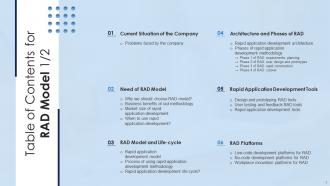
Slide 3: This slide exhibits table of contents.
Slide 4: This slide also shows table of contents.
Slide 5: This slide depicts title for one topic that is to be covered next in the template.
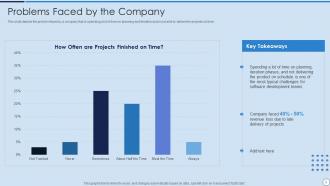
Slide 6: This slide depicts the problem faced by a company that is spending a lot of time on planning and iteration and is not able to deliver the projects on time.
Slide 7: This slide depicts title for four topics that are to be covered next in the template.
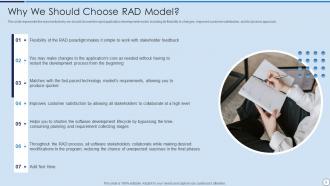
Slide 8: This slide represents the reasons that why we should choose the rapid application development model, including its flexibility to changes, etc.
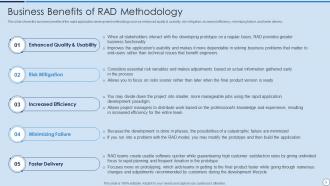
Slide 9: This slide shows the business benefits of the rapid application development methodology such as enhanced quality & usability, etc.
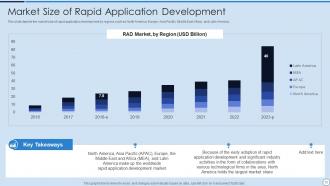
Slide 10: This slide depicts the market size of rapid application development by regions such as North America, Europe, Asia Pacific, etc.
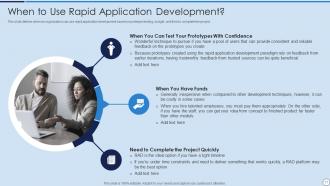
Slide 11: This slide defines when an organization can use rapid application development based on prototype testing, budget, and time to complete the project.
Slide 12: This slide depicts title for three topics that are to be covered next in the template.
Slide 13: This slide depicts the rapid application development model in detail consisting of business modeling, data modeling, process modeling, etc.
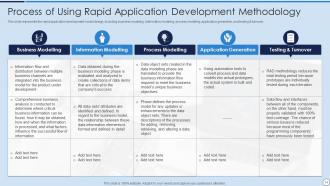
Slide 14: This slide represents the rapid application development model design, including business modeling, information modeling, process modeling, etc.
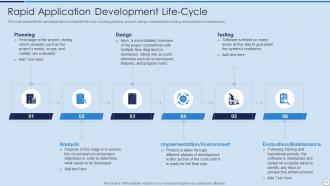
Slide 15: This slide represents the rapid application development life-cycle, including planning, analysis, design, implementation, testing, etc.
Slide 16: This slide depicts title for seven topics that are to be covered next in the template.
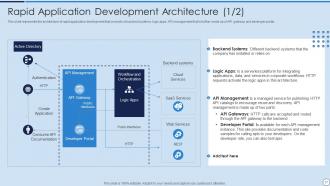
Slide 17: This slide represents the architecture of rapid application development that consists of backend systems, logic apps, etc.
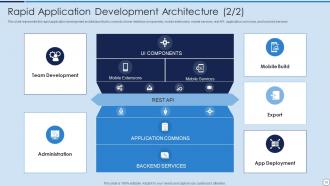
Slide 18: This slide represents the rapid application development architecture that is consists of user interface components, mobile extensions, etc.
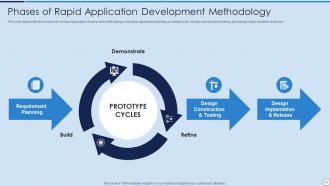
Slide 19: This slide represents the four phases of rapid application development methodology, including requirement planning, prototype cycle, etc.
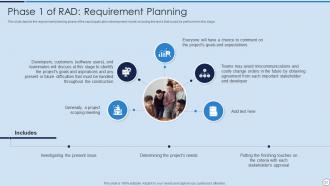
Slide 20: This slide depicts the requirement planning phase of the rapid application development model, including the tasks that would be performed in this stage.
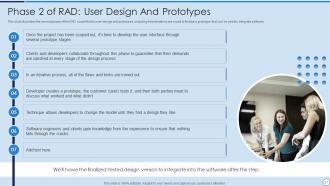
Slide 21: This slide illustrates the second phase of the RAD model that is user-design and prototypes.
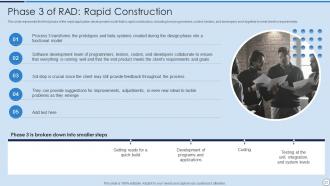
Slide 22: This slide represents the third phase of the rapid application development model that is rapid construction, including how programmers, coders, etc.
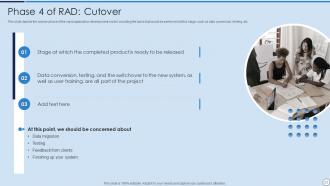
Slide 23: This slide depicts the cutover phase of the rapid application development model, including the tasks that would be performed at this stage.
Slide 24: This slide depicts title for three topics that are to be covered next in the template.
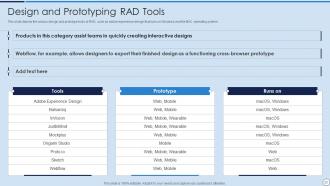
Slide 25: This slide depicts the various design and prototype tools of RAD, such as adobe experience design that runs on Windows and the MAC operating system.
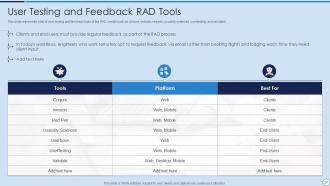
Slide 26: This slide represents a list of user testing and feedback tools of the RAD model such as conjure, invision, red pen, usability sciences, etc.
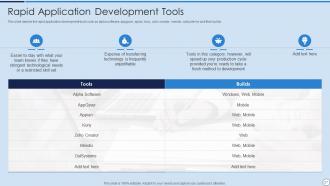
Slide 27: This slide depicts the rapid application development tools such as alpha software, appgyver, apian, kony, zoho creator, mendix, etc.
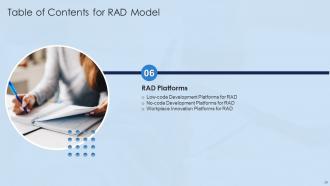
Slide 28: This slide depicts title for three topics that are to be covered next in the template.
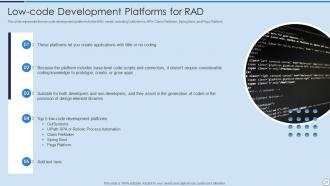
Slide 29: This slide represents the low-code development platforms for the RAD model, including OutSystems, RPA, Claris FileMaker, Spring Boot, and Pega Platform.
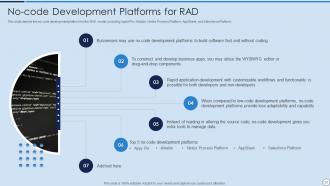
Slide 30: This slide depicts the no-code development platform for the RAD model, including Apple Pie, Airtable, Nintex Process Platform, etc.
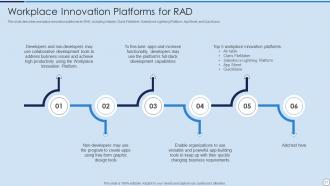
Slide 31: This slide describes workplace innovation platforms for RAD, including Airtable, Claris FileMaker, Salesforce Lightning Platform, AppSheet, etc.
Slide 32: This slide depicts title for four topics that are to be covered next in the template.
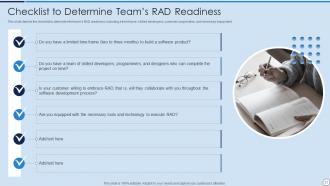
Slide 33: This slide depicts the checklist to determine the team’s RAD readiness, including a time frame, skilled developers, customer cooperation, etc.
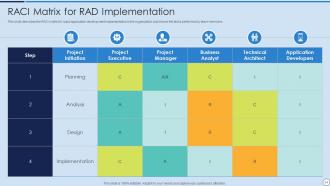
Slide 34: This slide describes the RACI matrix for rapid application development implementation in the organization and shows the tasks performed by team members.
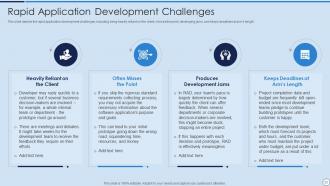
Slide 35: This slide depicts the rapid application development challenges, including being heavily reliant on the client, misses the point, developing jams, etc.
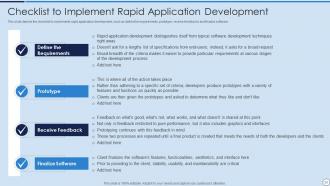
Slide 36: This slide depicts the checklist to implements rapid application development.
Slide 37: This slide depicts title for five topics that are to be covered next in the template.
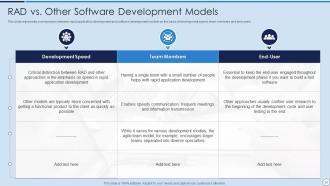
Slide 38: This slide represents a comparison between rapid application development and software development models on the basis of development speed, etc.
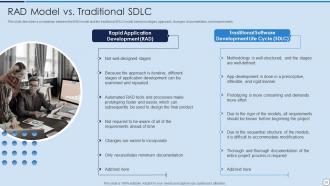
Slide 39: This slide describes a comparison between the RAD model and the traditional SDLC model based on stages, approach, changes, documentation, and requirements.
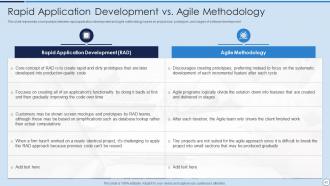
Slide 40: This slide represents a comparison between rapid application development and agile methodology based on project size, prototypes, etc.
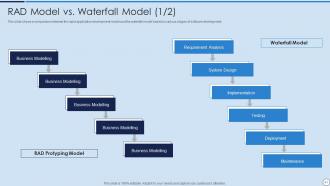
Slide 41: This slide shows a comparison between the rapid application development model and the waterfall model based on various stages of software development.
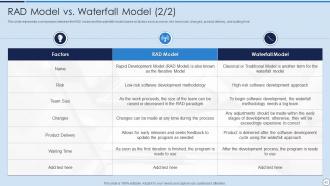
Slide 42: This slide represents a comparison between the RAD model and the waterfall model based on factors such as name, risk, team size, changes, etc.
Slide 43: This slide depicts title for three topics that are to be covered next in the template.
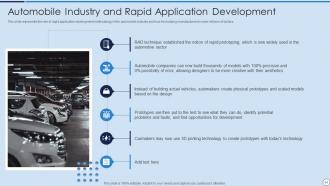
Slide 44: This slide represents the role of rapid application development methodology in the automobile industry.
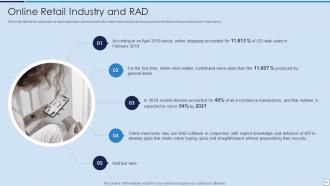
Slide 45: This slide depicts the application of rapid application development in the online retail industry and how customer feedback enhances the buyer’s experience.
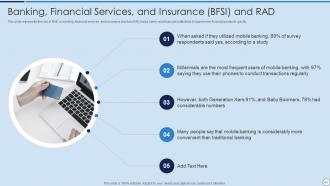
Slide 46: This slide represents the role of RAD in banking, financial services, and insurance and how RAD helps banks and financial institutions.
Slide 47: This slide depicts title for one topic that is to be covered next in the template.
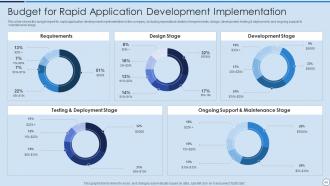
Slide 48: This slide shows the budget report for rapid application development implementation in the company, including expenditure details of requirements, etc.
Slide 49: This slide depicts title for one topic that is to be covered next in the template.
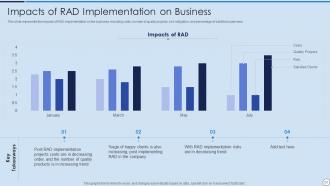
Slide 50: This slide represents the impacts of RAD implementation on the business, including costs, number of quality projects, risk mitigation, etc.
Slide 51: This slide depicts title for one topic that is to be covered next in the template.
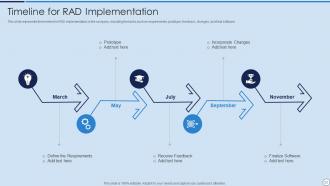
Slide 52: This slide represents the timeline for RAD implementation in the company, including the tasks such as requirements, prototype, feedback, etc.
Slide 53: This slide depicts title for one topic that is to be covered next in the template.
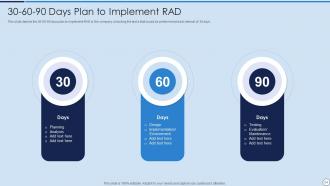
Slide 54: This slide depicts the 30-60-90 days plan to implement RAD in the company, including the tasks that would be performed at each interval of 30 days.
Slide 55: This slide presents title for additional slides.
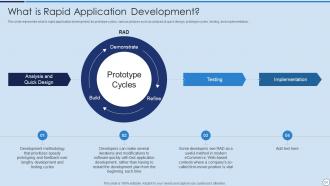
Slide 56: This slide represents what is rapid application development, its prototype cycles, various phases such as analysis & quick design, etc.
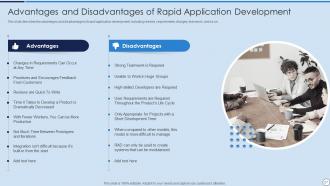
Slide 57: This slide describes the advantages and disadvantages of rapid application development, including reviews, requirements changes, teamwork, and so on.
Slide 58: This is the icons slide.
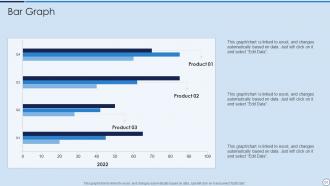
Slide 59: This slide exhibits quarterly bar graph for different products. The charts are linked to Excel.
Slide 60: This slide shows roadmap.
Slide 61: This slide displays Venn.
Slide 62: This slide depicts posts for past experiences of clients.
Slide 63: This slide exhibits yearly timeline.
Slide 64: This is thank you slide & contains contact details of company like office address, phone no., etc.
RAD Model Powerpoint Presentation Slides with all 69 slides:
Use our RAD Model Powerpoint Presentation Slides to effectively help you save your valuable time. They are readymade to fit into any presentation structure.







FAQs for RAD Model
So RAD has four main things: getting users involved constantly, building prototypes over and over, working in short time blocks, and reusing stuff you already have. Honestly, the prototype approach is a lifesaver - you'll catch what users actually want before you waste months building the wrong thing. Speed matters more than having perfect docs here. Short sprints, constant tweaking based on feedback. Oh and make sure your stakeholders aren't flaky - they need to actually show up for reviews or the whole thing falls apart.
So basically, RAD is all about building quick prototypes and testing them constantly instead of getting stuck in that whole waterfall thing where you can't move forward until each phase is "perfect." You're always tweaking and improving based on what users actually want. Way more flexible if requirements change - which they always do, let's be honest. Traditional methods make you finish everything in order, which takes forever. Plus you might build something nobody even wants! If your project needs user input or things might shift around, RAD will probably save you a lot of stress.
Honestly, RAD's main win is just pure speed - you're talking 2-4 months vs years for delivery. Constant user feedback through prototyping means you actually build what people want (shocking concept, right?). Short iterations keep your team super flexible when requirements inevitably change. Plus you catch issues early, which saves your butt on project risk. I've seen it work really well for tight deadlines or when requirements are all over the place. Oh, and your users feel way more involved in the process, which they love.
So RAD has four main phases. **Business Modeling** is where you map out what info actually drives your processes. **Data Modeling** figures out what data you need and how it moves around. Then **Process Modeling** - that's designing how data transforms to make business stuff happen. **Application Generation** is the cool part where you build software with automated tools (honestly, this is why RAD is so fast). Here's the thing though - these aren't strict steps. You can jump back and tweak things as you go. The whole point is prototyping with users constantly, so you're not building something they'll hate.
RAD's great when you need software fast and requirements keep changing. Works well for internal tools or prototypes where you can actually talk to users regularly. Small skilled teams handle the constant iterations best. Don't use it for anything mission-critical though - banking apps need way more testing than RAD allows. Your users need to be super involved throughout, which honestly can be exhausting for everyone. Perfect for business apps where stakeholders are around. Just make sure your project can roll with constant changes. If you've got accessible users and a tight deadline, RAD might be your answer.
Prototypes are basically how RAD works - you build quick working models that people can actually touch and use. Way better than the old school approach where you wait months to see if anything makes sense. You'll go through tons of versions, each one getting better based on what users tell you. Keep them simple enough that you can change direction fast, but functional enough that feedback actually means something. Honestly, it's so much less stressful because you're not gambling on some huge final reveal. The whole point is catching problems early when they're still cheap to fix.
So in RAD, user feedback is literally your steering wheel - it shapes everything you build each iteration. Prototype fast, show users, then immediately work their input into the next version. Short feedback loops are the whole point, so you're always course-correcting based on what users actually want (not what you think they want, which is usually wrong lol). Get feedback from real end-users though, not just stakeholders. Document everything so your team can prioritize changes properly. Once you get into the rhythm it's honestly pretty addictive!
Honestly, RAD can be pretty tricky. Your team needs to be experienced - junior devs usually crash and burn with the pace. Scope creep is brutal too since you're always tweaking things and clients go "oh can we add this?" every five minutes. You need users who'll actually stick around and give feedback, which is harder than it sounds when people have real jobs. The thing that bit me before? Don't try RAD on huge projects - it gets messy fast. Keep it small and make sure everyone knows they're signing up for serious time investment upfront.
RAD actually rocks at handling scope changes - way better than waterfall methods. You're building prototypes in these short 2-4 week sprints, so when requirements shift (and they always do), it's not a disaster. The constant user testing catches problems early instead of at the end when fixing stuff costs a fortune. Honestly, those prototype demos are gold - treat them like checkpoints where you can spot scope creep before it spirals. The whole iterative thing means you're always adjusting based on real feedback rather than guessing what users want.
So most teams I've worked with go for visual stuff like PowerBuilder or OutSystems - PowerApps too if you're in the Microsoft world. MySQL or Oracle handle your data side of things. Git's pretty much standard for keeping track of changes. But honestly? Just use whatever your team already knows. Learning new tools while trying to move fast is a nightmare. Oh and you definitely need something like Jira or Trello to track all those iterations - trust me on that one. The whole point is picking tools that don't slow you down with crazy setup requirements.
Yeah totally! RAD and Agile work surprisingly well together actually. The rapid prototyping stuff from RAD fits right into sprint cycles, and both love getting user feedback constantly. Sprint reviews become natural spots for showing off those quick prototypes. One thing though - RAD can get a bit messy with the "build it fast" mentality, while Agile wants sustainable code. But honestly? That tension isn't necessarily bad. I'd start by throwing RAD prototyping into your sprint planning sessions. Use whatever feedback you get to shape the next sprint. Works pretty well from what I've seen.
Honestly, team collaboration can totally make or break RAD projects. You need people talking constantly and making quick decisions together - otherwise you'll hit those annoying bottlenecks that kill your momentum. RAD is all about those fast iterations and feedback loops, so if anyone's working in a silo, you're screwed. Don't sleep on the user involvement part either. They're basically teammates throughout the whole thing. Daily standups are your friend, and pick some good collaborative tools that everyone actually uses. Oh, and make sure people (users included) feel comfortable calling out issues right away when something seems weird.
So with RAD, you're basically building prototypes constantly and getting user feedback super early. This catches problems when they're still cheap to fix instead of discovering them months later when you've already spent a fortune. Each cycle lets you test if your ideas actually work - if not, you pivot fast. Way better than waterfall where you're basically gambling the whole project on getting requirements perfect upfront (spoiler: you won't). Get your first prototype in front of real users within a few weeks. That's honestly where you'll catch the scariest risks before they blow up your timeline.
Microsoft crushed it with early Visual Basic using RAD - tons of rapid prototyping that completely changed desktop development. American Airlines did something similar with their reservation system, pushing updates way faster than usual. None of these were flawless right away, but honestly that's kind of the point with RAD. DuPont built their chemical tracking stuff this way too, getting user feedback every couple weeks instead of those painfully long release cycles. If you're thinking about RAD, just look at how all these companies focused on quick feedback loops rather than planning everything to death upfront.
Track your time-to-market and user satisfaction scores first - those tell the real story. Development speed vs traditional methods matters too. Count how many iterations you need (more than 4-5 means your requirements gathering sucks, tbh). Don't forget defect rates after launch since RAD sometimes cuts corners on testing. Stakeholder feedback during prototyping cycles is huge. Oh, and start measuring from day one - you can't just slap metrics on later and expect meaningful data. The iteration count one really separates good RAD teams from the messy ones.
-
SlideTeam, Please don’t stop sharing discount coupons! I love your occasional discounts and tend to buy your products around that corner.
-
Helpful product design for delivering presentation.