

Raid Log For Project Issues And Risk Management




Try Before you Buy Download Free Sample Product
 Impress Your
 Audience
 100%
100% Editable
 Save Hours
 of Time


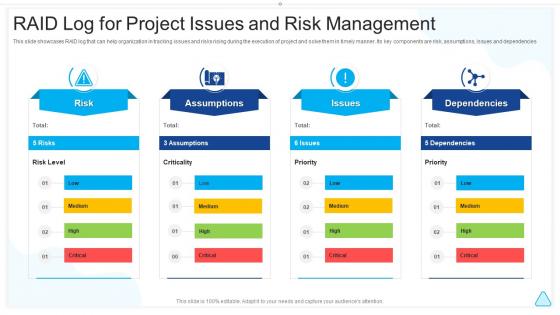
This slide showcases RAID log that can help organization in tracking issues and risks rising during the execution of project and solve them in timely manner. Its key components are risk, assumptions, issues and dependencies
People who downloaded this PowerPoint presentation also viewed the following :
Raid Log For Project Issues And Risk Management with all 6 slides:
Use our Raid Log For Project Issues And Risk Management to effectively help you save your valuable time. They are readymade to fit into any presentation structure.





FAQs for Raid Log For Project Issues
So a RAID log tracks four things in one doc: Risks, Actions, Issues, and Decisions. Pretty straightforward stuff. Instead of hunting through different dashboards like you do with Jira or Monday, everything's right there - usually just a spreadsheet honestly. What I love about it is how simple it stays. You can update it during meetings and boom, everyone sees what's current. Way less overwhelming than those project tools that have like 50 features you'll never touch. Just grab a basic template and tweak it as you figure out what works. Much easier than it sounds.
Basically, a raid log keeps all your project stuff - risks, issues, dependencies, assumptions - in one spot instead of buried in random emails. Your team can actually see what's blocking things and who's supposed to fix it. Way better than those meetings where everyone's like "wait, what was the deal with that vendor thing again?" You just throw it in a shared doc and update it weekly. Honestly, it's saved me so many headaches because you're forced to write down decisions before they come back to haunt you later. Game changer for keeping everyone on the same page.
So you'll want five main things in your raid log: Risks (stuff that might blow up), Actions (who's doing what), Issues (problems happening right now), Decisions (what you've all agreed on), and Dependencies (things you're stuck waiting for). Make sure each thing has an owner, status, and due date. Otherwise it turns into this sad graveyard nobody ever checks. Oh, and throw in unique IDs so you can actually reference them in meetings without everyone going "wait, which one?" Keep it stupid simple and review weekly with your team.
Honestly? At least weekly, but twice a week is better if your project's moving fast. Daily updates work great for critical stuff - maybe during your morning standup. The trick is keeping everything fresh and visible. Once entries get stale (like sitting there for weeks), people just ignore the whole log. I've watched so many turn into complete dead zones lol. Really though, consistency matters way more than being perfect about it. Pick whatever schedule actually works for your team and don't overthink it.
Honestly, the worst thing you can do is create this beautiful spreadsheet and then... just never look at it again. I've seen teams do this so many times - they dump every tiny issue in there, then wonder why nobody takes it seriously. What works better: pick one person to own each risk, actually talk through the list in your weekly meetings (don't just skim it), and ruthlessly delete stuff that's been sitting there forever. Focus on the risks that'll actually mess up your project timeline, not whether the coffee machine's broken.
You'll get the most out of your raid log when you're actually running the project - that's when stuff hits the fan and issues come out of nowhere. Planning phase is great too since you can spot problems before they bite you. Though honestly, most people forget about it during closing, which is a mistake because that's where you document what went wrong for next time. The trick is updating it regularly, not just creating it once and forgetting about it. I'd say start now and just review it every week during your team check-ins. Way better than scrambling when things go sideways.
Honestly, visual templates are a game changer for raid logs. Color code your risk levels - red for high, yellow for medium, that sort of thing. Use the same icons for each type so people instantly know what they're looking at. Plain text spreadsheets are brutal and nobody reads them anyway. Keep your layout consistent so stakeholders don't have to hunt around for updates. I always start simple - just priority levels and status indicators work fine. Once your team sees how much cleaner it looks, they'll actually engage with it instead of ignoring those weekly emails.
So RAID log risks are basically future problems that could mess up your project. I rank mine by impact vs probability - like how bad would this screw us over and how likely is it? High impact + high probability stuff gets tackled first, obviously. Color-coding helps me stay organized (probably overkill but whatever). You'll want to review these regularly since projects change constantly. Oh, and honestly? Don't overwhelm yourself - just focus on your top 3-5 risks and have backup plans ready. That's been my approach anyway.
Yeah, most raid logs nowadays play nice with Jira, Asana, Monday - all the usual suspects. Your risks and issues sync up automatically through APIs or those built-in connectors. The two-way updates are pretty sweet honestly - change something in Jira and it updates your raid log too. You can spin up tickets straight from raid items and track everything in one place. I'd definitely poke around your PM tool's marketplace first though, since most already have raid integrations sitting there waiting. Way easier than building something custom from scratch.
So basically, you've gotta prove the raid log actually does something. When people see their concerns turn into real action, they'll keep feeding you info. I'd build updates right into your regular meetings - makes it automatic. Honestly? Sometimes you just need to directly ask the quiet people what they're worried about. But don't let it turn into finger-pointing because that'll shut everyone down real quick. Try rotating who runs the updates so people feel like they own it. The whole point is showing you're preventing disasters, not just writing them down after everything goes sideways.
Honestly, a raid log is a lifesaver for keeping track of all your project's messy bits - risks, issues, dependencies, assumptions. Everything's in one spot instead of scattered across random emails and sticky notes (which I'm definitely guilty of). You can actually see what's blocking you and prioritize the scary stuff before it blows up your timeline. I'd say update it weekly, maybe during team meetings? That way you're not blindsided by problems you could've seen coming. It's like having a heads-up on all the ways your project might go sideways.
Honestly, I'd start with resolution time - are you actually closing stuff out quickly or letting things drag? Then check how many risks turn into real problems versus the random issues that blindside you (which are the worst, obviously). Track your action item completion rate too. If people aren't hitting deadlines, that's a red flag. Also watch escalation frequency - constantly pushing things upstairs means your process is broken somewhere. I usually measure this stuff monthly, then tweak the whole system based on what's actually happening. The numbers don't lie.
Check out old project logs from similar stuff - you'll spot the same disasters happening over and over. Vendor delays, resource fights, that kind of mess. Honestly, people are terrible at estimating how long fixes actually take vs what they think upfront. Grab 3-5 finished projects and dig through their pain points. Build your risk plans around what keeps screwing teams over. Why reinvent the wheel when you can just steal their hard-won lessons? Focus on the recurring themes - those are your real blind spots waiting to happen.
Oh man, there's actually some cool examples! NASA's Apollo program basically used early RAID logs to track every single anomaly - they were obsessive about it. Spotify talks about how their impediment tracking helped them scale so fast by keeping all the cross-team mess visible. The UK's Government Digital Service even made theirs public during big project overhauls, which is kinda bold honestly. Look, most teams just... don't do this step consistently. Try logging your risks and issues for one sprint though - you'll probably be surprised how much clearer everything becomes.
Honestly, check if your company has internal training first - saved me a bunch of time when I found out we had stuff I didn't know about. PMI has solid RAID management courses if you want something official. Coursera's project management modules are pretty decent too, though some can be kinda dry. Reddit's PM forums are actually amazing for seeing how people handle weird situations in real life. Oh, and PMI's templates were clutch when I started out. My advice? Grab a basic template and just try it on something small first. You'll figure out what works way faster than overthinking it.
-
Innovative and attractive designs.
-
Wonderful templates design to use in business meetings.