


Raid Storage IT Powerpoint Presentation Slides




Try Before you Buy Download Free Sample Product
 Impress Your
 Audience
 100%
100% Editable
 Save Hours
 of Time


Check out this professionally designed Raid Storage IT template for reducing the risk of losing data. The purpose of this is to discuss several storage methods for data backup and understand the requirement of their implementation. Redundant Array of Independent Disks RAID is a method of capturing the same information on multiple hard drives or solid-state drives SSD to protect information against disk failure. This PowerPoint presentation is of significant assistance to learn and present details about the RAID storage methods for data backup. This RAID storage PowerPoint presentation covers the overview of spinning disks and solid-state drives, various RAID types, and nested RAID levels. In addition, RAID PPT shows the nonstandard levels of RAID storage, advantages of the RAID storage mechanism, its downsides, and different implementation levels. Moreover, this RAID storage mechanism presentation represents a comparison chart to choose the best RAID level for your organization, the difference between RAID and UNRAID, and different RAID levels. Further, the RAID storage deck comprises the collaboration of RAID with cloud storage, the difference between hardware and software RAID, and its works. Lastly, the RAID storage template provides a checklist to implement RAID storage in the organization, a 30 60-90-day plan, and a roadmap. Download our 100 percent editable and customizable template, which is also compatible with Google Slides. Get access to our Raid Storage IT template and ensure successful implementation and safety of data. Download it now.
People who downloaded this PowerPoint presentation also viewed the following :
Content of this Powerpoint Presentation
Slide 1: The slide displays the title i.e. Raid Storage (IT) and your company name.
Slide 2: The slide explains the agenda for Raid Storage (IT).
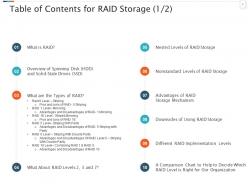
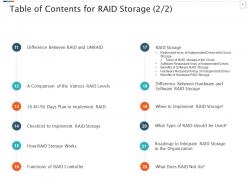
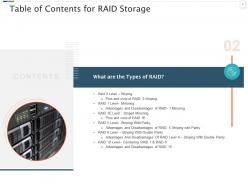
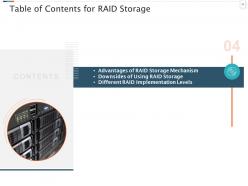
Slide 3: The slide showcases the table of contents for Raid Storage.
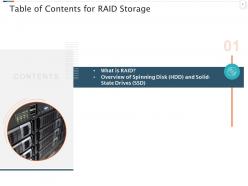
Slide 4: The slide showcases the table of contents for Raid Storage. This slide is adaptable according to needs.
Slide 5: This slide presents the title for overview on Raid.
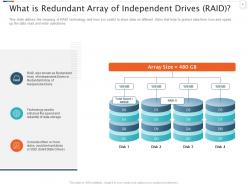
Slide 6: This slide defines the meaning of RAID technology and how it is useful to store data on different disks that help to protect data from loss and speed up the data read and write operations.
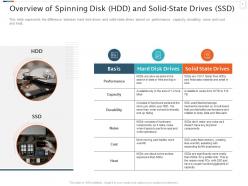
Slide 7: This slide represents the difference between hard disk drives and solid-state drives based on performance, capacity, durability, noise and cost and heat.
Slide 8: This slide exhibits the title for types of Raid.
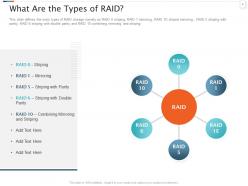
Slide 9: This slide defines the main types of RAID storage namely as RAID 0 striping, RAID 1 mirroring, RAID 1E striped mirroring , RAID 5 striping with parity, RAID 6 striping with double parity and RAID 10 combining mirroring and striping.
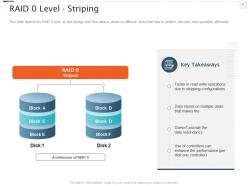
Slide 10: This slide depicts the RAID 0 level of raid storage and how data is stored on different disks that help to perform the read write operation efficiently.
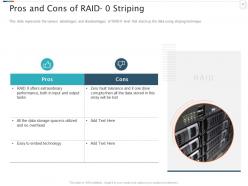
Slide 11: This slide represents the various advantages and disadvantages of RAID-0 level that stack up the data using striping technique.
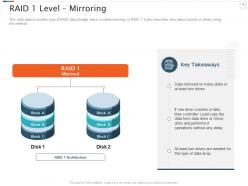
Slide 12: This slide depicts another type of RAID data storage which is called mirroring or RAID 1. It also describes how data is stored on drives using this method.
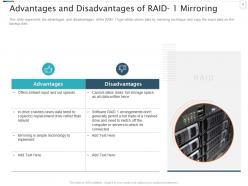
Slide 13: This slide showcases the advantages and disadvantages of the RAID 1 type which stores data by mirroring technique and copy the exact data on the backup disk.
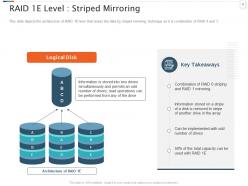
Slide 14: This slide explains the architecture of RAID 1E level that stores the data by striped mirroring technique as it is combination of RAID 0 and 1.
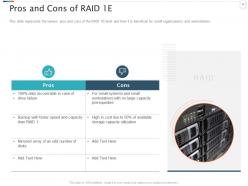
Slide 15: This slide represents the various pros and cons of the RAID 1E level and how it is beneficial for small organizations and workstations.
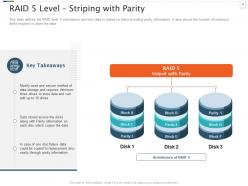
Slide 16: This slide defines the RAID level 5 mechanism and how data is stored on disks including parity information. It also shows the number of minimum disks required to store the data.
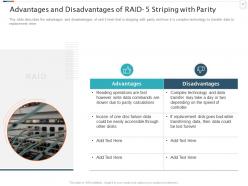
Slide 17: This slide describes the advantages and disadvantages of raid 5 level that is stripping with parity and how it is complex technology to transfer data to replacement drive.
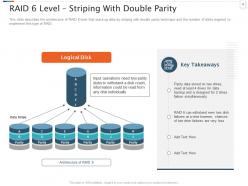
Slide 18: This slide presents the architecture of RAID 6 level that stack up data by striping with double parity technique and the number of disks required to implement this type of RAID.
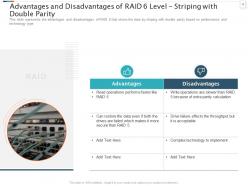
Slide 19: This slide represents the advantages and disadvantages of RAID 6 that stores the data by striping with double parity based on performance and technology type.
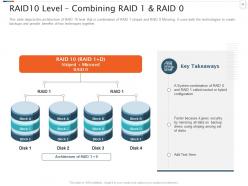
Slide 20: This slide depicts the architecture of RAID 10 level that is combination of RAID 1 striped and RAID 0 Mirroring. It uses both the technologies together.
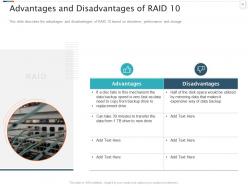
Slide 21: This slide describes the advantages and disadvantages of RAID 10 based on downtime, performance and storage.
Slide 22: This slide displays the title for Raid Storage levels.
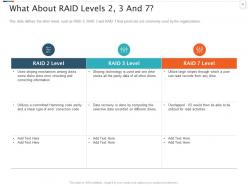
Slide 23: This slide defines the other levels such as RAID 2, RAID 3 and RAID 7 that exists but not commonly used by the organizations.
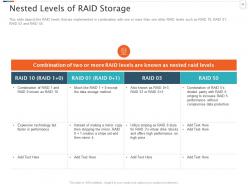
Slide 24: This slide depicts the RAID levels that are implemented in combination with one or more than one other RAID levels such as RAID 10, RAID 01, RAID 03 and RAID 50.
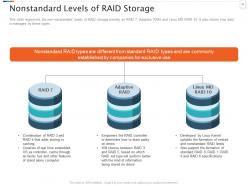
Slide 25: This slide represents the non-nonstandard levels of RAID storage namely as RAID 7, Adaptive RAID and Linux MD RAID 10. Also shows how data is managed by these types.
Slide 26: This slide exhibits the title for advantages & downsides of raid storage.
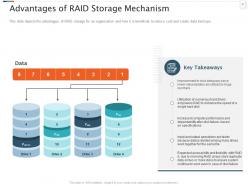
Slide 27: This slide depicts the advantages of RAID storage for an organization and how it is beneficial to reduce cost and create data backups.
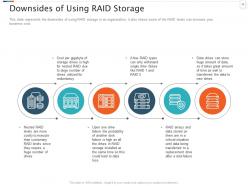
Slide 28: This slide represents the downsides of using RAID storage in an organization, it also shows some of the RAID levels can increase your business cost.
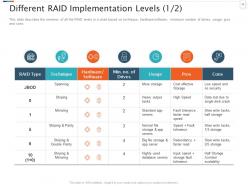
Slide 29: This slide describes the overview of all the RAID levels in a chart based on technique, hardware/software, minimum number of drives, usage, pros and cons.
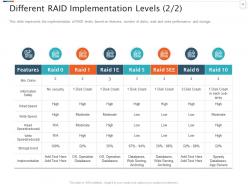
Slide 30: This slide showcases the implementation of RAID levels based on features, number of disks, read and write performance and storage .
Slide 31: This slide presents the title for comparison charts in deciding which Raid level to choose.
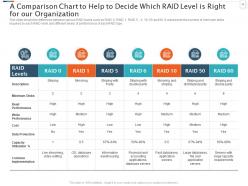
Slide 32: This slide shows the difference between various RAID levels such as RAID 0, RAID 1, RAID 5 , 6, 10, 50 and 60. It represents the number of minimum disks and different levels of performance of each RAID type.
Slide 33: This slide displays the title for difference between Raid and Unraid.
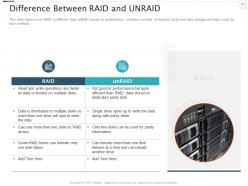
Slide 34: This slide depicts how RAID is different than unRAID based on performance, minimum number of required disks and data storage technique used by each method.
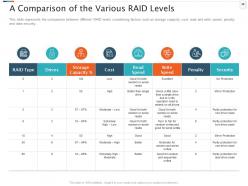
Slide 35: This slide represents the comparison between different RAID levels considering factors such as storage capacity, cost, read and write speed, penalty and data security.
Slide 36: This slide presents the title for 30-60-90 days plan in raid storage.
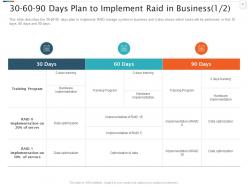
Slide 37: This slide describes the 30-60-90 days plan to implement RAID storage system in business and it also shows which tasks will be performed in first 30, 60 and 90 days.
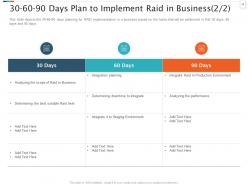
Slide 38: This slide depicts the 30-60-90 days planning for RAID implementation in a business based on the tasks that will be performed in first 30 days, 60 days and 90 days.
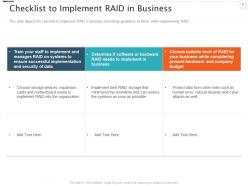
Slide 39: This slide showcases the checklist to implement RAID in business describing guidelines to follow while implementing RAID.
Slide 40: This slide exhibits the title for how raid storage works.
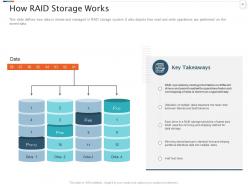
Slide 41: This slide defines how data is stored and managed in RAID storage system. It also depicts how read and write operations are performed on the stored data.
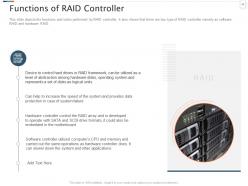
Slide 42: This slide explains functions & tasks performed by RAID controller. It also shows that there are two type of RAID controller namely as software RAID and hardware RAID.
Slide 43: This slide displays the title for benefits of hardware & software raid storage.
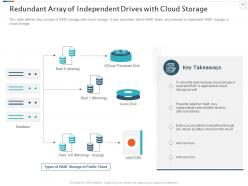
Slide 44: This slide defines the concept of RAID storage with cloud storage. It also describes which RAID levels are included to implement RAID storage in cloud storage.
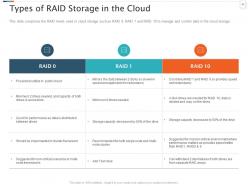
Slide 45: This slide comprises the RAID levels used in cloud storage such as RAID 0, RAID 1 and RAID 10 to manage and control data in the cloud storage.
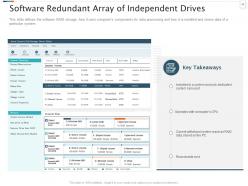
Slide 46: This slide defines the software RAID storage, how it uses computer’s components for data processing and how it is installed and stores data of a particular system.
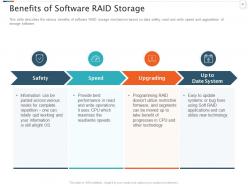
Slide 47: This slide describes the various benefits of software RAID storage mechanism based on data safety, read and write speed and upgradation of storage software.
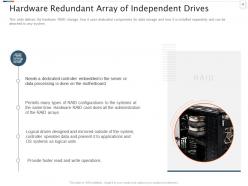
Slide 48: This slide defines the hardware RAID storage, how it uses dedicated components for data storage and how it is installed separately and can be attached to any system.
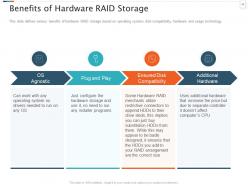
Slide 49: This slide explains various benefits of hardware RAID storage based on operating system, disk compatibility, hardware and usage technology.
Slide 50: This slide presents the title for difference between hardware and software raid storage.
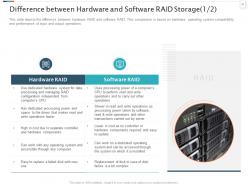
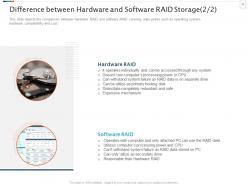
Slide 51: This slide depicts the difference between hardware RAID and software RAID. This comparison is based on hardware, operating system compatibility and performance of input and output operations.
Slide 52: This slide demonstrates the comparison between hardware RAID and software RAID covering main points such as operating system, hardware compatibility and cost.
Slide 53: This slide exhibits the title for implementation of raid storage.
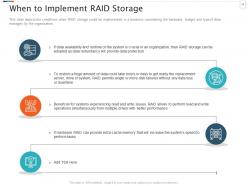
Slide 54: This slide depicts the conditions when RAID storage could be implemented in a business considering the hardware, budget and type of data manages by the organization.
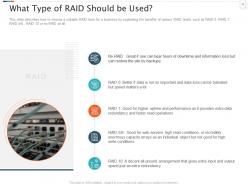
Slide 55: This slide describes how to choose a suitable RAID level for a business by explaining the benefits of various RAID levels such as RAID 0, RAID 1, RAID 5/6 , RAID 10 or no RAID at all.
Slide 56: This slide displays the title for roadmap to integrate raid storage.
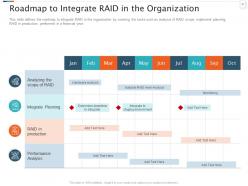
Slide 57: This slide defines the roadmap to integrate RAID in the organization by covering the tasks such as analysis of RAID scope, implement planning, RAID in production, performed in a financial year.
Slide 58: This slide presents the title for what does raid not do.
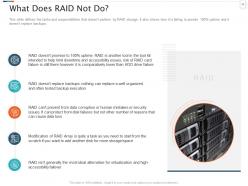
Slide 59: This slide explains tasks & responsibilities that doesn’t perform by RAID storage. It also shows how it is failing to provide 100% uptime & doesn’t replace backups.
Slide 60: This slide gives the title for extra slides.
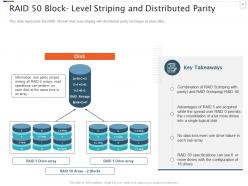
Slide 61: This slide represents the RAID 50 level that uses striping with distributed parity technique to store data.
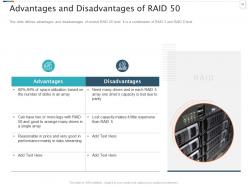
Slide 62: This slide defines advantages and disadvantages of nested RAID 50 level. It is a combination of RAID 5 and RAID 0 level.
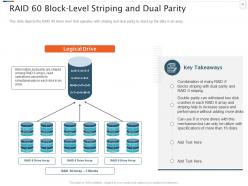
Slide 63: This slide depicts the RAID 60 block level that operates with striping and dual parity to stack up the data in an array.
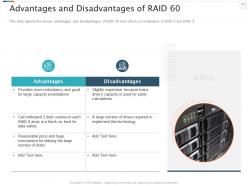
Slide 64: This slide showcases the various advantages and disadvantages of RAID 60 level which is combination of RAID 6 and RAID 0.
Slide 65: This is the icons slide for raid storage (IT).
Slide 66: This slide presents the title for additional slides.
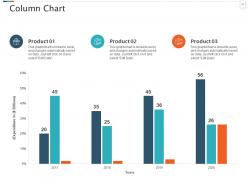
Slide 67: This slide demonstrates the yearly expenditure column charts for different products. The charts are linked to Excel.
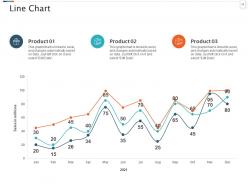
Slide 68: This slide exhibits the monthly sales line charts for different products. The graphs are linked to Excel.
Slide 69: The slide explains the vision, mission and goals of the company.
Slide 70: This slide showcases the timeline of the company's success and achievements.
Slide 71: This slide displays the posts for past feedbacks and experiences of the clients.
Slide 72: This slide provides glimpse on 30-60-90 days plan of the project.
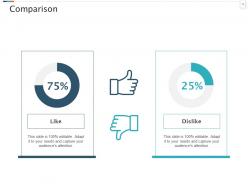
Slide 73: This slide demonstrates the comparison based on factors of the project.
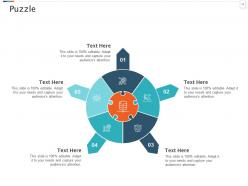
Slide 74: This slide explains the puzzle related to the company.
Slide 75: This slide presents the variant targets of the company.
Slide 76: This is the thank you slide and contains contact details of the company including phone number, email address, office address, etc.
Raid Storage IT Powerpoint Presentation Slides with all 76 slides:
Use our Raid Storage IT Powerpoint Presentation Slides to effectively help you save your valuable time. They are readymade to fit into any presentation structure.


FAQs for Raid Storage IT
So RAID basically spreads your data across multiple drives - if one craps out, you don't lose everything. That's pretty clutch for keeping things running. Performance gets better too since drives work together for faster speeds. RAID 1 mirrors everything for max protection, RAID 0 is all speed but zero safety (scary stuff). Most people go with RAID 5 or 10 - good mix of both. Oh, and don't think this replaces backups! Still need those separate copies somewhere else.
So RAID 0 strips data across drives, which makes everything way faster but zero backup - lose one drive and you're screwed. RAID 1 mirrors everything to two drives, so you've got full backup but writes don't get any faster since it's writing to both. Honestly depends what you need more. Speed matters most and you backup religiously? Go RAID 0. Can't afford downtime? RAID 1's the safer bet. I learned this the hard way with my old setup lol.
Dude, go with RAID 10 if you can swing it - mirrors pairs of drives then stripes across them. You'll get great speed plus solid redundancy. RAID 6 works too since it survives two drive failures, but writes are sluggish. Honestly? RAID 5 is kinda sketchy now with these huge drives - rebuilds take forever and you're gambling the whole time. Oh, and obviously keep doing backups no matter what RAID you pick. I learned that one the hard way lol.
Honestly, it comes down to what you can't live without - uptime, speed, or storage space. RAID 1 is bulletproof but you lose half your capacity, which kinda sucks. RAID 5 hits a sweet spot with decent protection and better space usage. Don't even think about RAID 0 unless you're editing 4K video or something and have backups running constantly. What's your main use case - tons of reading files or writing? That matters more than people think. Figure out how many hours of downtime would actually kill your workflow, then just pick whatever setup matches that reality.
RAID levels totally determine how screwed you are when drives fail. RAID 0? You're toast if anything breaks - no redundancy whatsoever. RAID 1 mirrors everything, so losing one drive isn't the end of the world. Now RAID 5 lets you rebuild from parity if one drive dies, but two simultaneous failures? That's where things get really expensive fast. Honestly, I've seen too many people not even know what RAID they're running until it's too late. Whatever setup you've got, just keep backing up anyway - RAID isn't a backup strategy.
So RAID spreads your data across multiple drives, which means when one dies (and trust me, they always do), your system doesn't crash. You get time to replace the busted drive while everything keeps running. Pretty clutch for businesses where downtime = lost money. It's like having a spare tire - buys you breathing room to fix the real problem. Just don't think it replaces actual backups though. I learned that one the hard way years ago. You'll still need your regular backup routine running too.
RAID and backups aren't the same thing - you need both, trust me. Hardware fails? RAID's got you covered. But what about when you accidentally delete something important or ransomware hits? That's where backups save your ass. I've literally seen someone kill a whole server with spilled coffee (don't ask). RAID keeps you running when drives die, but it won't protect against corruption or human stupidity. Set up proper backups too - the 3-2-1 rule works well if you can swing it.
SSDs blow HDDs out of the water for RAID performance, especially with random I/O stuff. RAID 0 and 10 really shine here - SSDs can pump out thousands of operations per second while HDDs max out around 200. Pretty crazy difference. HDDs aren't completely useless though, they're decent for sequential work like backups or streaming media. Obviously SSDs cost way more per TB, so it's speed vs budget. If you're running databases or VMs on your array, just bite the bullet and go SSD. Trust me, you'll notice the difference immediately.
Dude, the biggest mistake people make is thinking RAID = backup. It's not! RAID only saves you from drive failures - if ransomware hits or you accidentally delete something, you're toast. Also, don't assume RAID 5 is bulletproof. With huge drives nowadays, rebuilds take ages and another drive might die while you're waiting. Higher numbers don't automatically mean better performance either, which trips people up. Oh, and always keep separate backups. I learned that one the hard way. Pick your RAID based on what you actually need, not marketing BS.
Yeah, RAID scaling is pretty straightforward actually. Most modern controllers let you hot-swap drives, so no downtime when you're expanding - total game changer for production stuff. Adding drives to existing arrays works great, or just spin up new ones as you need more space. Higher-capacity drives are another option during your next refresh cycle. Oh, and migrating to RAID 6 or 10 gives you way better performance if that's what you're after. Just double-check your controller supports whatever expansion you're planning first - learned that one the hard way once. Compatibility headaches aren't worth it.
For RAID monitoring, I'd start with whatever built-in stuff you already have - Intel RST, LSI MegaRAID Storage Manager, or if it's a Dell/HP server, their management tools work pretty well. Linux users swear by smartctl and mdadm from command line. Honestly though, third-party monitoring saves your butt. PRTG and Nagios are solid choices, or you could write simple scripts if you're into that. The key is setting up email alerts for degraded arrays - trust me, you don't want to discover a failed drive when it's too late. I learned that one the hard way a few years back.
RAID's getting swallowed up by software-defined storage these days. Most stuff runs in the cloud now, so you're seeing software RAID that spans VMs and different locations instead of those old hardware controllers. Cloud providers basically handle redundancy for you - which honestly saves so much headache compared to babysitting arrays. Though if you're doing hybrid setups, you gotta think about how your local RAID plays with cloud backups. Main thing is avoiding gaps in data protection between your on-site storage and whatever's in the cloud. Way less painful than it used to be.
RAID's way simpler to manage and you'll get solid local performance. Problem is when that one server craps out - you're kinda screwed. Distributed storage handles failure better since it spreads everything across multiple machines. You can grow horizontally too, which is nice. Downside? It's more complex and sometimes slower because data might be sitting on some node across the room (or building). Honestly, if you're just getting started, RAID's probably your friend. But planning for real growth or zero downtime? Yeah, distributed's worth the headache.
Dude, RAID choice seriously matters when you're hammering the system. RAID 0 is crazy fast since it spreads everything across drives - but if one craps out, you're screwed. RAID 1 rocks for reads since it pulls from multiple mirrors, though writes get slower. Here's the thing though - RAID 5/6 can really choke during heavy writes because of all that parity math happening. Honestly, I'd test your actual workload first instead of relying on benchmarks. Those synthetic tests sometimes lie when you're really pushing things hard.
Dude, you gotta check on your RAID setup regularly - the management software will scream at you when drives start dying. Don't be like me and ignore those warnings for weeks because I was lazy. Swap out dead drives right away or you're basically playing Russian roulette with your data. Run those scrub checks too, they catch weird errors before everything goes to hell. And seriously, test your backups! RAID isn't magic protection. Oh, and keep spare drives around that match your current ones - trust me on this. Set up email alerts so you actually know when stuff breaks instead of finding out the hard way.
-
Designs have enough space to add content.