

Raid storage it a comparison chart to help to decide which raid level is right for our organization




Try Before you Buy Download Free Sample Product
 Impress Your
 Audience
 100%
100% Editable
 Save Hours
 of Time


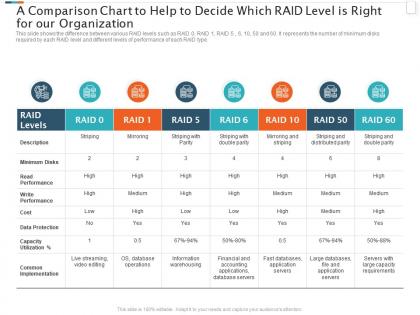
This slide shows the difference between various RAID levels such as RAID 0, RAID 1, RAID 5 , 6, 10, 50 and 60. It represents the number of minimum disks required by each RAID level and different levels of performance of each RAID type.
People who downloaded this PowerPoint presentation also viewed the following :
Raid storage it a comparison chart to help to decide which raid level is right for our organization with all 2 slides:
Use our Raid Storage It A Comparison Chart To Help To Decide Which Raid Level Is Right For Our Organization to effectively help you save your valuable time. They are readymade to fit into any presentation structure.
FAQs for Raid storage it a comparison chart to help to decide which raid level is right
So RAID 0 is all about speed but if one drive dies, you're screwed - everything's gone. RAID 1 just mirrors everything, so super safe but you only get half your storage space. Most people end up going with RAID 5 since it hits that middle ground - decent speed plus protection through parity, though rebuilds are painfully slow. RAID 10 is honestly the best of both worlds with great performance AND safety, but you'll need four drives minimum and it gets pricey fast. Really depends what matters more to you - speed, protection, or keeping costs down. I'd probably go RAID 5 for most setups.
Okay so RAID level basically decides if you can bounce back from drive failures or not. RAID 0? You're screwed if anything dies - zero redundancy means bye bye data. RAID 1 and 10 mirror everything so they'll survive one drive going bad. RAID 5 and 6 use parity magic to handle one or two failures respectively. Just don't get lazy though - swap out dead drives fast because your array's sitting there naked until it rebuilds. Honestly RAID 5 rebuild times can be brutal on bigger arrays. Go with RAID 1, 5, 6, or 10 if you actually care about your data.
Honestly, go with RAID 5 for your setup. You'll need at least 3 drives, and it uses one drive's space for parity data - so like 4x1TB drives gets you 3TB to actually use. Performance is solid, storage efficiency is pretty good, and you can lose one drive without everything going to hell. The rebuild times with bigger drives can be kinda stressful though, not gonna lie. But it's way better than RAID 1 where you're basically throwing away half your storage. Still backs up your stuff separately no matter what - RAID isn't a backup solution.
So RAID 6 lets you lose two drives at once without everything going to hell, while RAID 5 only handles one failure. Pretty big deal when you've got larger arrays since rebuild times are getting insane nowadays. You'll give up more storage space though - two drives worth of capacity instead of just one. Write speeds also take more of a beating because it has to crunch two parity calculations every time. Honestly, if you're running something critical or have 6+ drives, I'd go RAID 6. That extra protection is worth the headache.
RAID 0 is amazing for video editing or gaming since you're basically doubling your read/write speeds by striping data across drives. The performance boost is actually insane for large file transfers. Here's where it gets sketchy though - one drive dies and you lose literally everything. Zero redundancy. I learned this the hard way years ago, honestly. Don't put your OS or anything important on RAID 0 unless your backup game is bulletproof. It's really only worth it when you need raw speed and can handle losing the data. Perfect for temp work files, but that's about it.
RAID 50 is pretty solid - basically takes RAID 5's parity protection and stripes it across multiple arrays like RAID 0. Write performance is way better than regular RAID 5 since you're hitting more drives at once. You can lose multiple drives too, just not from the same RAID 5 group. Downside is you need at least 6 drives minimum and storage efficiency takes a hit. I've seen it work really well for busy database servers though. If you're dealing with lots of transactions, definitely worth considering over plain RAID 5.
RAID 10 is your best bet for video editing and database stuff. You get the speed boost from striping plus mirroring for backup protection. Sure, RAID 0 is faster but one dead drive = goodbye everything. RAID 5 has okay redundancy but writes get bogged down with all those parity calculations - honestly pretty annoying when you're pushing deadlines. Yeah, RAID 10 needs at least four drives so it's pricier. But when your livelihood depends on this stuff not crashing, the extra cost makes sense. Performance stays solid and you can actually sleep at night.
Honestly, you really need RAID 6 for cloud stuff - drive failures happen way more than people think. RAID 5 only survives one disk dying, which feels sketchy when you're running massive arrays. With RAID 6, you can lose two drives and still be fine. RAID 10 works too but costs more since you're basically doubling everything. The math gets scary fast - bigger arrays mean higher chances of multiple failures hitting close together. I learned this the hard way on a project last year. Start with RAID 6 and see how your failure rates look.
Yeah totally, mixing RAID setups is super normal. I do RAID 1 for OS stuff and RAID 5 for big storage all the time. Each array runs separately so if one craps out, the others keep going. Your RAID controller needs to handle multiple arrays obviously - most decent ones can though. Honestly the biggest pain is making sure you don't build something so weird that the next person maintaining it wants to murder you. Just match your RAID type to what you actually need. Like don't waste money on RAID 10 for storing backup logs or whatever.
Set up monitoring that checks drive health and temps daily - most RAID controllers already have tools for this built in. The worst part is when arrays fail silently and you're totally clueless until disaster strikes. Check logs regularly for weird error rates or slow rebuilds. Run scrubbing checks to catch corruption early, and honestly just keep spare drives around because swapping them quickly makes such a difference. Oh, and test your backups regularly - I learned this the hard way but RAID isn't actually backing anything up, it's just keeping things running.
Honestly, software RAID is way cheaper - you're just using what you already have instead of buying those expensive controllers. Modern CPUs are crazy powerful now, so the performance gap isn't as huge as it used to be. The flexibility is what sold me on it though. You can swap drives around, mix different types, whatever. Hardware RAID locks you into their ecosystem which is annoying. I'd definitely try software first unless you're running something that really needs every last bit of performance or you want to save some CPU cycles.
SSDs are a game changer for RAID setups, no question. RAID 0 sees the biggest jump since SSDs can actually handle those speeds - regular drives usually choke first. With RAID 1 and 10, you'll get way faster reads but writes stay about the same. Now RAID 5/6 is where things get cool because SSDs crush those parity calculations that slow down spinning drives. Yeah they're expensive but honestly, if you're already doing RAID you probably need the performance anyway. Just depends what you're running - gaming vs like a media server or whatever.
Honestly, RAID 10 is your best bet if you can afford the extra drives - rebuilds are way faster. RAID 5/6 will take forever on big volumes, like we're talking days. And here's the scary part: the longer that rebuild takes, the higher your chances of losing another drive during the process. Been there, not fun. For really critical stuff with massive datasets, I'd go RAID 10 or at least RAID 6 for the extra safety net. The whole thing comes down to how much downtime you can stomach versus how much you want to spend on drives.
Dude, RAID isn't backup - biggest misconception ever. Yeah RAID 1 or 6 can save you from a dead drive, but what about ransomware? Or when you accidentally delete everything at 2am? Been there. Your RAID setup does matter for backup timing though. Running RAID 0? You're living dangerously so backup daily. Got RAID 6? You can probably stretch it a bit more. But honestly, everyone needs offsite backups no matter what. I've watched people cry over "redundant" systems that weren't actually backed up.
RAID levels basically let you bake redundancy right into your disaster recovery plan. For stuff that absolutely can't go down, go with RAID 1 - instant failover when drives die. RAID 5 or 6 work great if you're watching costs but still want protection. Trust me, you don't realize how much you need this until you're dealing with a dead drive at 2am! Match your RAID choice to how much downtime you can actually handle. Mission-critical systems? RAID 1 or 10. Everything else can probably survive RAID 5. Just figure out what actually needs protection first.
-
Qualitative and comprehensive slides.
-
Best way of representation of the topic.