


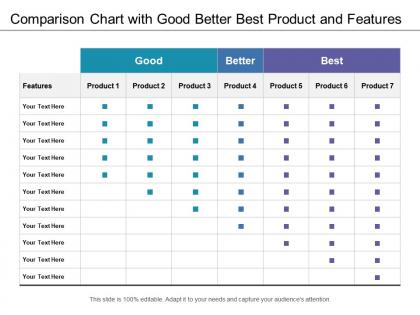
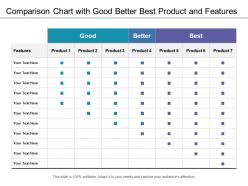
Comparison chart with good better best product and features




Try Before you Buy Download Free Sample Product
 Impress Your
 Audience
 100%
100% Editable
 Save Hours
 of Time


Head off distractions with our Comparison Chart With Good Better Best Product And Features. Avoid factors that dilute the focus.
People who downloaded this PowerPoint presentation also viewed the following :
Comparison chart with good better best product and features with all 5 slides:
Get a boost with our Comparison Chart With Good Better Best Product And Features. They will give your ideas the impact they deserve.
FAQs for Comparison chart with good better best
So basically you want headers for each product you're comparing, then consistent categories like features, price, pros/cons - the usual stuff. I literally always screw up the formatting first time around but oh well. Just make sure you're using the same comparison points for everything so it's not totally random. Throw in some visual stuff too - stars, checkmarks, whatever makes it easier to scan quickly. Start with maybe 3-4 categories and add more if you need them. Also honestly? Color coding helps way more than you'd think.
Okay so first thing - stick to the same colors for each category throughout the whole chart. Makes a huge difference! Then give everything room to breathe with white space. Bold your headers and keep columns aligned. Maybe add some light shading to break things up visually. Honestly, most comparison charts I see are total disasters because they're way too cluttered. Keep fonts big enough to actually read and don't go crazy with icons - just use them for the really important stuff. The whole point is someone should get the gist in like 10 seconds max. Oh, try squinting at it - if you can still see the main info, you're golden.
Use comparison charts when you've got different categories to stack up against each other - like sales by region or survey results across age groups. Bar charts are clutch for this stuff because the differences jump out immediately. They're also great for ranking things or showing your best and worst performers. Honestly, I probably use bar charts way more than I should, but they just work. Keep your categories meaningful though, and don't go overboard with too many or it'll look chaotic. Time periods work well too if you're tracking changes over months or years.
Honestly, the chart you pick makes a huge difference. Bar charts are perfect for comparing amounts - they just make sense to look at. For trends over time, go with line charts. You'll spot patterns way easier. Radar charts are kinda divisive though (I personally think they look cool but some people hate them) - they're good when you need to compare several things across multiple categories. Just match your chart to what you're actually comparing, you know? Think about what story you want to tell first, then pick whatever makes it clearest.
Biggest mistake? Comparing totally different things - like putting a Tesla against a bicycle just because they're both "transportation." Pick 3-5 criteria that actually matter to whoever's deciding. Don't go overboard with features either, people just get overwhelmed and give up. Keep your info fresh too, nobody wants last year's prices. Oh and try not to let your personal preferences mess with the scoring - I'm guilty of this one lol. Focus on what'll genuinely help someone choose instead of creating some monster chart they'll scroll past.
Ugh, color choice is SO important for charts. I learned this the hard way when I used red for sales growth once - everyone thought we were tanking! Your brain automatically reads red as "bad" and green as "good," even when the data says otherwise. Blues work great because they feel neutral and trustworthy. Honestly, I've watched entire presentations get derailed because someone picked confusing colors. Always run your chart by someone else first. They'll catch stuff you miss since you're too close to the data.
Honestly, I'd go with a chart when you're trying to make a point about which option is better. Tables are fine if people need to dig into specific numbers, but charts? They make the differences obvious right away. Like, executives love that stuff - they want to see the winner without squinting at a bunch of rows. Charts work way better when you've got an audience that'll zone out looking at tons of data. I mean, sometimes raw numbers matter more, but usually you want that quick visual punch that shows the story.
Honestly, icons are game-changers for comparison charts. Your brain processes visuals way faster than text, so instead of reading "unlimited data" fifty times, you just spot the infinity symbol. Makes everything so much easier to scan. I always tell people to stick with super obvious icons though - don't get creative with some weird abstract thing nobody understands. Replace your most repetitive phrases first, like support features or pricing tiers. Oh, and they break up those massive text blocks that make people's eyes glaze over. You'll definitely see more people actually engaging with your charts.
Honestly, mobile presentations are tricky - you gotta flip everything vertical instead of horizontal. Those wide comparison charts? Total nightmare on phones. Stack your data points and cut down on columns, or people will be zooming in constantly. I made this mistake once and watched everyone squint at their screens... so awkward. Break complex stuff into separate slides if needed. Bigger fonts are your friend here, plus way more white space than feels normal. Oh, and test it on your own phone first - if you can't read it easily, neither can they.
Dude, you absolutely need to cite your sources on comparison charts. People won't just take your word for it - they'll want to verify the data themselves, especially if it's something important. Citations also cover your ass legally and show you actually did the research instead of making stuff up. I learned this the hard way when my boss questioned every single number on a chart I made without sources. Super awkward. Just throw the citations at the bottom or use footnotes. Make sure they're current and from reliable places though.
Dude, interactive charts are game-changers because people actually *do* stuff instead of zoning out. You can build suspense by revealing data piece by piece, or have them guess outcomes before showing results. Way more engaging than static charts that just sit there looking boring. Start simple though - even basic hover effects or animated bars make people perk up. I've seen presenters let audiences vote on predictions first, then reveal the real data. Gets competitive real fast lol. The whole point is turning your audience into participants rather than letting them mentally check out. Try one small interactive element next time and you'll see what I mean.
Honestly, for comparison charts just grab Excel or Google Sheets if it's internal stuff. Figma's way better if customers will see it though - way more control over how things look. I always go for tools with conditional formatting and sortable columns, makes highlighting the key differences so much easier. Don't get stuck overthinking the tool choice like some people do (I've watched coworkers spend days on this). Clean spreadsheet beats a messy fancy design every time. Just pick whatever exports nicely to your final format and you're good.
Dude, make your labels crystal clear and stick with the same terms throughout. Category names should be specific enough that anyone gets it immediately. Don't forget units like $ or % for data points! I swear, half the charts I see have text so tiny you need a magnifying glass. Use bigger fonts and contrasting colors so people can actually read the thing. A quick subtitle explaining what you're comparing helps tons. Oh, and callouts work great for anything needing extra context. Your chart should make sense even when you're not around to explain it.
Dude, get other people to look at your comparison chart before you finalize it. They'll catch stuff you totally missed - like confusing labels or important data you forgot to include. Colors that made perfect sense to you? They'll tell you it's a mess. Fresh eyes also spot when you've accidentally made one option look way better (we're all biased without realizing it). I usually show mine to 2-3 people early on. Don't just ask "what do you think?" though - that's useless. Ask specific stuff like "what's confusing here?" or "does this flow make sense?" Way better feedback that way.
Oh man, software companies are obsessed with these things! They're always showing feature comparisons in their sales pitches. SaaS companies do it for pricing tiers. Healthcare uses them for treatment outcomes and costs - honestly makes sense since there's so much data to compare. Financial services? Same deal with investment performance and insurance plans. Consulting firms might be the worst offenders though - they turn literally everything into a comparison matrix. It's kinda their thing. If you're in any of these fields, getting good at clean comparison charts will make your presentations way better.
-
I discovered this website through a google search, the services matched my needs perfectly and the pricing was very reasonable. I was thrilled with the product and the customer service. I will definitely use their slides again for my presentations and recommend them to other colleagues.
-
Unique design & color.