

Ransomware Attacks In Cyber Security Training Ppt




Try Before you Buy Download Free Sample Product
 Impress Your
 Audience
 100%
100% Editable
 Save Hours
 of Time


This set of PPT slides in detail covers the working and prevention strategies to avoid ransomware attacks in cyber security.
People who downloaded this PowerPoint presentation also viewed the following :
Content of this Powerpoint Presentation
Slide 2
This slide gives an introduction to ransomware attacks. Ransomware is a type of malware created to deny a user or organization access to files on their computer.
Slide 3
This slide discusses how ransomware attacks work. The first step in a ransomware attack is to infect the target system, followed by data encryption, and lastly the ransom demand.
Slide 4
This slide gives information about infection and distribution vectors in ransomware attacks. Ransomware can gain access to an organization’s systems by phishing emails or specific infection vectors that use services such as Remote Desktop Protocol.
Slide 5
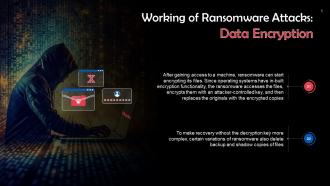
This slide talks about data encryption in ransomware attacks. After gaining access to a machine, ransomware can start encrypting its files. Since operating systems have in-built encryption functionality, the ransomware accesses the files, encrypts them with an attacker-controlled key, and then replaces the originals with the encrypted copies.
Slide 6
This slide gives information about ransom demand in ransomware attacks. After all the files have been encrypted, the ransomware makes a ransom demand. This is usually done by changing the display background to a ransom note or adding text files (with the ransom note) to each encrypted directory.
Slide 7
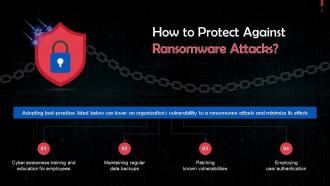
This slide highlights best practices for protection against ransomware attacks. These are: Regular cyber awareness training, maintaining regular data backups, etc.
Slide 8
This slide talks about reducing the attack surface to protect against ransomware attacks. To reduce the attack surface, address the following: Phishing messages, mobile malware, unpatched vulnerabilities, and, remote access solutions.
Slide 9
This slide discusses how deploying anti-ransomware solutions can help in mitigating ransomware attacks.
Slide 10
This slide illustrates steps that active ransomware infection. Most ransomware attacks are detected only after data encryption is done ; however, some steps must be taken immediately.
Instructor’s Notes:
- Quarantine the system: Some ransomware strains attempt to spread to other computers and associated drives. You can control its spread by blocking access to other potential recipients
- Leave the PC on: A computer may become unstable if files are encrypted, and you can lose volatile memory when a computer is turned off can happen. Keep the computer running to increase the likelihood of recovery
- Create a backup: For some ransomware versions, decrypting files is possible without paying the ransom. Create a backup of any encrypted files on a removable drive in case a solution is available in the future. Files are damaged during an unsuccessful decryption attempt
- Check for decryptors: Check with the No More Ransom Project to check if a free decryptor is available. If so, run it on a copy of the encrypted data to see if it can restore the files
- Ask for help: Computers sometimes keep backup copies of files stored on them. A digital forensics expert may be able to recover these copies if the malware has not deleted them
- Wipe and restore: Restore the system from a clean backup or operating system installation. This ensures that the malware is completely deleted from the device
Slide 11
This slide depicts key statistics on ransomware attacks.
Ransomware Attacks In Cyber Security Training Ppt with all 30 slides:
Use our Ransomware Attacks In Cyber Security Training Ppt to effectively help you save your valuable time. They are readymade to fit into any presentation structure.















FAQs for Ransomware Attacks In Cyber
Ugh, ransomware gets in through so many ways it's annoying. Phishing emails are still the biggest culprit - people keep clicking on sketchy attachments even though we all know better by now. Weak passwords on remote desktop stuff became a huge problem after everyone went remote. Sometimes you don't even do anything wrong and just visiting a compromised website can infect you. Unpatched software is like leaving your door unlocked. The really sneaky attackers will hit you with multiple methods at once. Honestly, just keeping your software updated and teaching people to spot suspicious emails stops most of this crap.
Honestly, three things will save you: patch everything, train your people constantly, and get bulletproof offline backups. Most attacks come through email - those phishing attempts are getting scary good these days. Run endpoint detection tools and segment your network so malware can't just waltz through everything. Oh, and do tabletop drills because people freeze up when shit hits the fan. Start by testing if you can actually restore from your backups quickly. Network segmentation is clutch too. Practice makes perfect when everyone's panicking.
Dude, train your people - that's literally your best bet against ransomware. Most of these attacks happen because someone clicks on sketchy links or downloads random attachments. Teaching your team to spot phishing emails and social engineering tricks is huge. I swear, companies get destroyed because someone in accounting opens a fake "urgent invoice" without thinking twice. Run those fake phishing tests on your employees too. They're kind of annoying but they work. Regular training shows people what red flags look like - you know, sudden requests for passwords or weird file downloads they weren't expecting.
Okay so first thing - map out who's doing what when everything goes to hell. Like, who's isolating infected systems? Who's calling the FBI? Get your backup restoration process nailed down too. Communication is huge - you need protocols for telling everyone what's happening without causing total chaos. Oh and the legal stuff is messy now since these jerks usually steal data before encrypting it. Set clear rules about paying (spoiler: don't). Practice this thing regularly because when you're staring at encrypted servers at 3am, that's not the time to figure it out.
Honestly, small businesses get destroyed by ransomware way more than big corps. Yeah, you hear about the enterprise attacks on the news, but small companies usually just... die. They don't have IT teams or proper backups, so when everything gets encrypted, that's it. Game over. Meanwhile big companies have whole incident response teams and can restore from backups without paying a dime. The really messed up part? Hackers specifically go after small businesses because they know they're easy targets. Your best bet is having solid backups and training people not to click sketchy links - most of this stuff still starts with human error anyway.
Don't pay the ransom dude - you could literally get in legal trouble for it. If the hackers are on sanctions lists or from certain countries, Treasury will come after YOU with fines. I know that sounds insane when you're already dealing with getting hacked, but they're serious about enforcement. There's also zero guarantee they'll actually give your data back anyway. Call the FBI first and definitely talk to a lawyer before doing anything. Trust me, getting slapped with federal violations on top of everything else is the last thing you need right now.
Your files will start getting these random extensions you've never seen before. Can't open anything familiar anymore either. Desktop gets flooded with ransom notes - honestly the worst feeling ever. Everything slows to a crawl because encryption just destroys your system resources. You'll probably notice weird processes running too, stuff that definitely shouldn't be there. Oh, and random network activity spikes are another dead giveaway. If you see any of this happening, pull that ethernet cable immediately! Don't restart either - sometimes that just helps it spread faster through your system.
So there's basically a whole spectrum of this stuff. Simple ones just encrypt your files and ask for money. Then you've got the real nasty variants that wipe everything permanently - those are terrifying. Some spread through entire networks like wildfire (remember WannaCry?), others stick to one computer. The newer ones are doing this double extortion thing where they steal your data AND encrypt it, threatening to leak everything publicly. Honestly feels like we're losing this battle sometimes. What really sucks is they usually go after your backups first now, so you need multiple recovery options stored separately.
Honestly, the 3-2-1 rule saved my butt - keep 3 copies of everything important, use 2 different storage types, and put 1 copy somewhere else entirely. Don't connect your backups to the main network or ransomware will toast those too. Found this out when a buddy's "backup" was just another drive that got encrypted along with everything else. Test your restores monthly because finding out your backups are trash during an actual crisis? Yeah, that's pure hell. Also grab immutable backups if you can - they can't be touched for however long you set. Daily automated backups are clutch.
Okay so first thing - pull those infected machines off your network immediately. Don't let this crap spread everywhere. Get your IT security people involved right now and document what you're seeing. When did it start, which systems got hit, all that stuff. I'd contact law enforcement and your cyber insurance (if you have it) before even thinking about paying these assholes. Oh, and obviously don't pay the ransom if you can avoid it - most companies that pay just get hit again later anyway. Once you've got it contained, start recovery with clean backups.
Dude, ransomware is getting insane lately. Hackers are using AI now to automate everything and spot weak points super fast. Since everyone moved to the cloud, that's their new favorite target - and honestly they're annoyingly good at it. They're also doing this double extortion thing where they steal AND encrypt your stuff, so backups don't even save you anymore since they'll just leak everything anyway. Machine learning helps them customize attacks for your specific setup too, which is terrifying. You should probably update your response plan and maybe get some AI security tools to fight back.
Dude, the worst myth is thinking ransomware only goes after huge companies. Small businesses get hit constantly because their security sucks. Also, don't believe paying actually gets your files back - these are literal criminals we're talking about. Antivirus isn't enough anymore since this stuff changes so fast. Honestly, the "it'll never happen to me" attitude kills me because that's when people get screwed. Just back up your stuff regularly and teach everyone to watch for sketchy emails. Oh, and keep your software updated - boring but it works.
Hackers love going after healthcare, schools, and city governments the most. Those places are sitting ducks honestly - they've got tons of sensitive info but their security is usually trash. Plus they panic when systems go down and just pay the ransom. Manufacturing and banks get hit a lot too since downtime literally bleeds money. Basically criminals target anyone who can't afford to be offline. Oh, and financial companies are weirdly vulnerable despite having more resources. If you work somewhere like this, your backup game better be rock solid and actually test your emergency plans.
NIST and ISO 27001 are your best bet for ransomware defense - they're like having a checklist that actually makes sense. NIST is free which is nice, and it breaks everything down into five areas: identify, protect, detect, respond, recover. Most companies totally bomb the recovery part though, their backup game is weak. I'd start with a quick assessment against NIST to spot your worst gaps first. Don't try to fix everything at once, just hit the scary stuff. Oh and ISO 27001 works too if you're into that, but honestly NIST's more straightforward.
Oh man, that sucks. First thing - call the FBI's Internet Crime Complaint Center (IC3), they'll walk you through reporting it and might even have decryption tools. CISA has some really helpful recovery guides too. If you've got cyber insurance, use it - they usually have vendors lined up for this exact situation and honestly it's one of those times the premiums actually feel worth it. Your local FBI office probably has a cybercrime unit that works with businesses. Document everything you can right now, but don't pay those jerks until you've tried these other routes first.
-
Helpful product design for delivering presentation.
-
Great designs, really helpful.