

Requirements Management Powerpoint Presentation Slides





Try Before you Buy Download Free Sample Product
 Impress Your
 Audience
 100%
100% Editable
 Save Hours
 of Time


Requirement management is the process of recording, reviewing, tracking, prioritizing and deciding on specific project requirements. This PowerPoint presentation is useful for a project manager to make a requirement management plan which covers a description of how they will analyse the document and manage the requirements of the projects. Also, monitoring changes in requirements and communicating them to appropriate stakeholders. This presentation also covers the problem areas faced by the company due to lack of tools and documentation process of the product requirement and depicts the current situation of the company covering low revenues and high operating costs for the current financial year. This presentation also covers the problems associated with the requirement management process along with its solutions and it can be said as gap analysis and fit in the gap process. It also includes the Project management methodology composed of a group of Project Management Plans PMPs, processes, procedures, and tools used to effectively and efficiently manage project activities. In this PowerPoint presentation, we have also covered the requirement management plan communicating with the other primary interrelated software development methodologies workflow to achieve the goals. It also covers the requirement analysis workflow with the other software development workflows. Here we have also covered the product features which company will be adding in a new product such as customized workflow, customizable fields, watch unread bugs, etc. in addition to that it also covers the user stories which will help software developers to identify product specifications or agile team clearly, so the development team recognizes the desired result of the new functionality. In the objective of the requirement document, we are focusing on the vision, goals, initiatives, and personas of the requirements. Also, it covers the product release plan for the project including iteration, development, public holiday weeks, and testing days. This presentation also covers the product release weekly progress timeline including release version, feature, bug fixing report, released or scheduled status and product roadmap including kick off meeting, executive review, beta release, and final release dates and details. It also covers the project development timeline for 5 months including releases, milestones, product integrations, UXandUI designs and meetings schedules. In this PPT presentation, we are covering product requirements for each feature in detail including feature name, description, purpose and user problems, user value, assumptions and acceptance criteria. Also, the key performance indicators for analyzing the product features based on the baseline target and time frame for the project. This PowerPoint presentation also covers the potential requirement for the product in the market document, its specifications, Product Requirement Priority with user persona. In these PPT templates, we are focusing on Design Verification and product Validation Process. These ppt presentation templates also cover the impact of implementing requirement management in the organization, the budget allocated to project, roles and responsibilities of the key individuals, a communication plan for stakeholders and product requirement Key performance indicators to track the project ad well as product progress.
People who downloaded this PowerPoint presentation also viewed the following :
Content of this Powerpoint Presentation
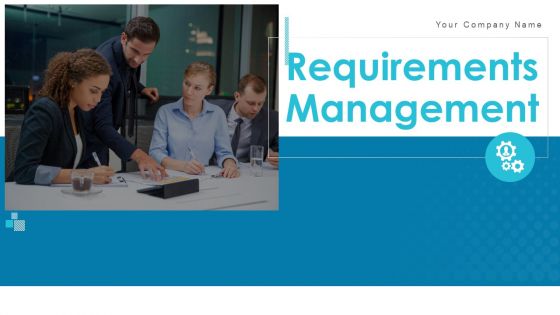
Slide 1: This slide introduces Requirements Management. State your Company name.
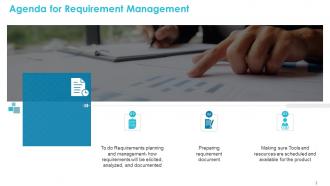
Slide 2: This slide displays Agenda for Requirement Management
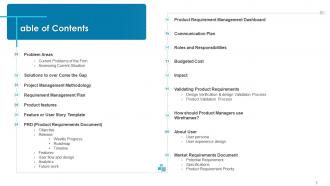
Slide 3: This slide displays table of Contents
Slide 4: This slide shows Table of Contents
Slide 5: This slide covers the problem areas faced by the company due to lack of tools and documentation process of the product requirement.
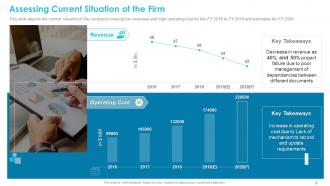
Slide 6: This slide depicts the current situation of the company covering low revenues and high operating cost for the FY 2016 to FY 2019 and estimates for FY 2020.
Slide 7: This slide displays Table of Contents
Slide 8: This slide covers the problems associated with requirement management process along with its solutions and it can be used as gap analysis and fit in the gap.
Slide 9: This slide covers the Project management methodology composed of a group of Project Management Plans (PMPs), processes, procedures, and tools used to effectively and efficiently manage project activities.
Slide 10: This slide covers the requirement management plan communicating with the other primary interrelated software development methodologies' workflow to achieve the goals. Also covers the requirement analysis workflow with the other software development workflows.
Slide 11: This slide displays Table of Contents
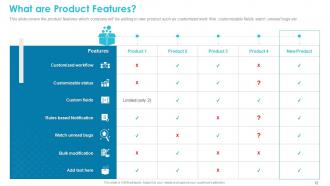
Slide 12: This slide covers the product features which company will be adding in new product such as customized work flow, customizable fields, watch unread bugs etc.
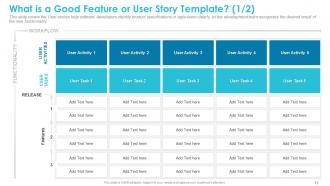
Slide 13: This slide covers the User stories help software developers identify product specifications or agile team clearly, so the development team recognizes the desired result of the new functionality.
Slide 14: This slide covers a user story is an agile development term that describes a product feature from the perspective of the end-user.
Slide 15: This slide displays Table of Contents
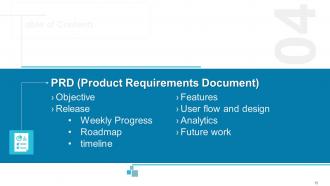
Slide 16: This slide covers the vision, goals, initiatives and personas of the requirement document.
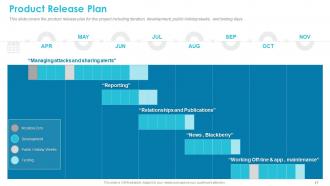
Slide 17: This slide covers the product release plan for the project including iteration, development, public holiday weeks, and testing days.
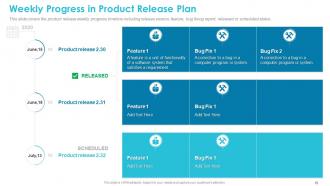
Slide 18: This slide covers the product release weekly progress timeline including release version, feature, bug fixing report, released or scheduled status.
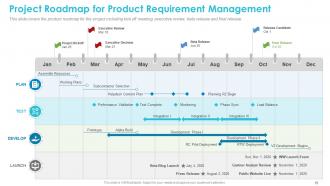
Slide 19: This slide covers the product roadmap for the project including kick off meeting, executive review, beta release and final release.
Slide 20: This slide covers the project development timeline for 5 months including releases, milestones, product integrations, UX&UI designs and meetings.
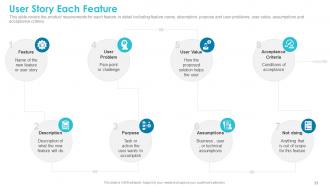
Slide 21: This slide covers the product requirements for each feature in detail including feature name, description, purpose and user problems, user value, assumptions and acceptance criteria.
Slide 22: This slide covers the key performance indicators for analyzing the product features based on baseline target and time frame.
Slide 23: This slide covers the product feature analysis including HEART framework, goals, signals and metrics.
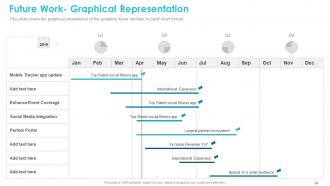
Slide 24: This slide covers the graphical presentation of the quarterly future updates in Gantt chart format.
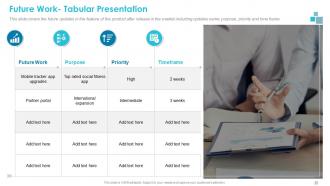
Slide 25: This slide covers the future updates in the feature of the product after release in the market including updates name, purpose, priority and time frame.
Slide 26: This slide displays Table of Contents
Slide 27: This slide covers the potential requirement for product in market document such as colour- coding, sample design, reports along with its description, persona, type and source.
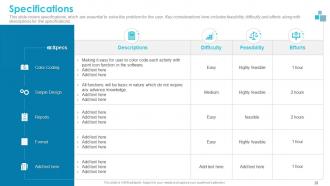
Slide 28: This slide covers specifications, which are essential to solve the problem for the user. Key considerations here includes feasibility, difficulty and efforts along with descriptions for the specifications.
Slide 29: This slide covers the product features prioritization tool which depicts the low value features, features to cut, development priorities and low hanging features.
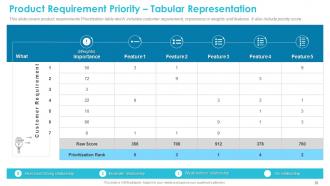
Slide 30: This slide covers product requirements Prioritization table which includes customer requirement, importance or weights and features. It also include priority score.
Slide 31: This slide Table of Contents
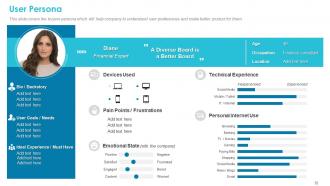
Slide 32: This slide covers the buyers persona which will help company to understand user preferences and make better product for them.
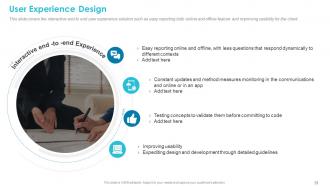
Slide 33: This slide covers the interactive end to end user experience solution such as easy reporting both online and offline feature and improving usability for the client.
Slide 34: This slide shows Table of Contents.
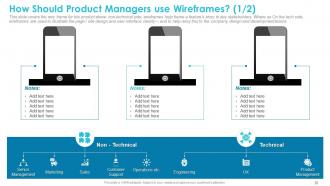
Slide 35: This slide covers the wire frame for the product where non-technical side, wireframes help frame a feature's story to key stakeholders. Where as On the tech side, wireframes are used to illustrate the page / site design and user interface clearly— and to help relay this to the company, design and development teams.
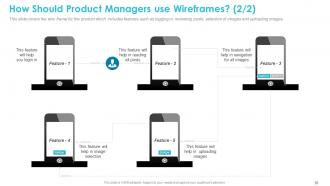
Slide 36: This slide covers the wire frame for the product which includes features such as logging in, reviewing posts, selection of images and uploading images.
Slide 37: This slide displays Table of Contents
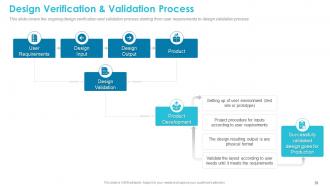
Slide 38: This slide covers the ongoing design verification and validation process starting from user requirements to design validation process.
Slide 39: This slide covers the product validation process starting from verification process and ending upon capturing the work products from product validation.
Slide 40: This slide shows Table of Contents
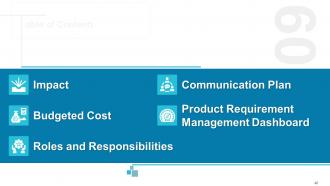
Slide 41: This slide covers the impact of implementing requirement management in the organization.
Slide 42: This slide covers the product development cost based on allocation bases, allocation rate, total units produced, total direct material cost and direct labor hours etc.
Slide 43: This slide covers the budgeted cost for product development including material used, labor hours, over head costs and total costs.
Slide 44: This slide covers the roles and responsibilities of the stakeholder’s such as understanding requirement of the clients and understanding the requirement of the project regarding product design etc.
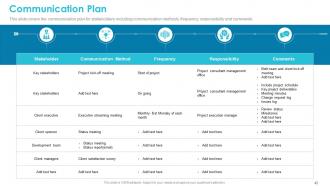
Slide 45: This slide covers the communication plan for stakeholders including communication methods, frequency, responsibility and comments.
Slide 46: This slide covers the product requirement Key performance indicators such as product overview, requirement graphs, late finishing tasks, text execution status and release test summary.
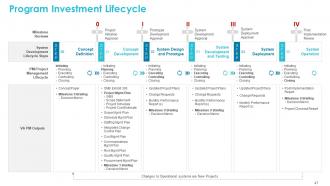
Slide 47: This slide showcases Program Investment Lifecycle.
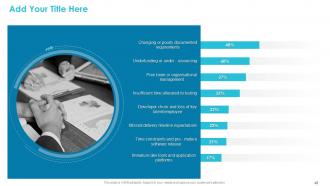
Slide 48: This slide is for adding title. Add Your Title Here
Slide 49: This slide reminds of Coffee Break
Slide 50: This is Requirements Management Icons Slide.
Slide 51: This slide is titled as Additional Slides for moving further.
Slide 52: This slide displays Agenda.
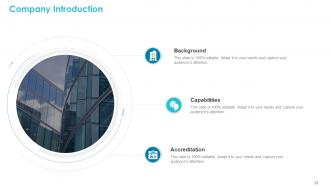
Slide 53: This slide displays Company Introduction.
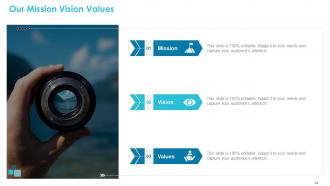
Slide 54: This slide depicts Our Mission,Vision and Values
Slide 55: This slide shows Our Goals.
Slide 56: This is Bar Chart Template
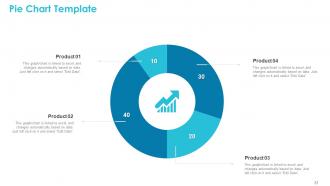
Slide 57: This is Pie Chart Template for comparison of products.
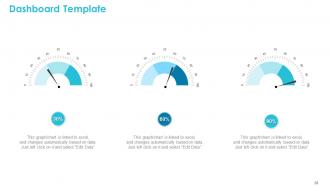
Slide 58: This is Dashboard Template.
Slide 59: This is Roadmap Template.
Slide 60: This is Thank You slide with Contact details.
Requirements Management Powerpoint Presentation Slides with all 60 slides:
Use our Requirements Management Powerpoint Presentation Slides to effectively help you save your valuable time. They are readymade to fit into any presentation structure.


























FAQs for Requirements Management
So basically you start by talking to everyone to figure out what they actually want. Then analyze all that info and write it down clearly - this part's crucial because nobody remembers what they said three months ago. Get everyone to approve it (good luck with that). After launch, you're constantly managing changes and scope creep. People always want "just one more thing." Track everything so you can prove what the original requirements were. Oh, and test that your final product actually does what you documented it should do. Seriously though - get your documentation process solid from day one. Future you will thank present you.
Look, you've gotta get your stakeholders to rank stuff by business impact first - that's your north star. Then reality check it against what's actually buildable and how complex things are. Some features literally can't happen without others being done first. MoSCoW method works pretty well for this, or just do a simple scoring system. Honestly, getting everyone aligned early saves so much headache later. Build your backlog and don't be afraid to shuffle priorities around - you'll learn what users really want as you go, and spoiler alert: it's usually not what they said initially.
Jira and Azure DevOps are pretty much everywhere - most companies default to those. IBM DOORS too if you're in a more enterprise-y place. Confluence works great for documenting stuff, though honestly? I've seen teams crush it with just really well-organized Excel sheets (shh, don't tell the software salespeople). ReqSuite and Visure are solid if you need something more specialized. But here's the thing - pick whatever your team will actually stick with. The fanciest tool is useless if half your people ignore it. Start with something that plays nice with your current dev setup and you'll thank yourself later.
Honestly, treat them like actual partners instead of just people you're interviewing for info. Explain upfront why you need their input and how it'll change the final product. Don't do those one-time meetings - schedule regular check-ins because people's minds change and they remember stuff differently later. Collaborative workshops work great since they can watch requirements get built in real-time. Always send follow-ups so nobody gets confused about what was decided. Oh, and create some shared space where they can drop random thoughts between your official meetings. Multiple touchpoints beat cramming everything into the beginning - learned that one the hard way.
Ugh, scope creep will kill you - stakeholders always want "just one more thing." Requirements change constantly too, which is maddening. Get everything in writing upfront, seriously. Regular check-ins help catch problems early, and honestly? Push back on those "tiny" requests because they're never actually tiny. Communication falls apart fast when people assume everyone's aligned. Document like your life depends on it and use traceability matrices to track all the chaos. Oh, and start schmoozing stakeholders now - those relationships are gold when things get messy later.
Start by linking each requirement to where it came from, then follow it through design docs, tests, and code. A spreadsheet works fine if you actually keep it updated - which nobody wants to do but trust me, you'll thank yourself later. The real trick is going both ways: requirement to final feature AND backwards from what you shipped to the original ask. Yeah, it's tedious updating everything when stuff changes, but skipping those trace reviews will bite you. Most gaps turn into major headaches if you don't catch them early.
Look, change management keeps your project from turning into a total mess when requirements shift around. And trust me, they will shift - stakeholders always want something different halfway through. You need some kind of formal process to evaluate requests before approving them. Otherwise your team gets jerked around constantly and scope creep kills your timeline. I'd set up a change control board right away so there's actually a process for modifications. That way you can figure out what changes will do to your budget and resources before committing. Honestly saves so much headache later.
Okay so agile totally flips requirements on their head. Instead of writing this massive document upfront, you're constantly talking to stakeholders and tweaking user stories as you go. Way more talking, way less paperwork - which honestly took me forever to get used to. You build stuff in short sprints and get real feedback every couple weeks. Breaking things into tiny user stories is key. Oh and those regular check-ins with stakeholders? Non-negotiable. Sure beats the old days of crossing your fingers after handing off a 50-page requirements doc.
Functional requirements are basically what your system does - users log in, reports get generated, that kind of stuff. Non-functional is more about how well it performs those tasks. Like speed, security, whether people can actually use it without wanting to throw their computer out the window. Car analogy works pretty well here - functional is "it drives you places," non-functional is "it won't break down and actually gets decent gas mileage." Here's the thing though: I've watched way too many projects crash and burn because teams got obsessed with cool features but completely ignored performance. You can build something that technically works but is totally unusable if it takes forever to load. Grab both types of requirements early or you'll regret it later.
Honestly, visuals are a game-changer for requirements docs. People's eyes just glaze over when they hit walls of text - I've seen it happen in so many meetings. Diagrams and mockups turn those abstract ideas into something everyone can actually picture. Process flows work great for business logic, wireframes for user stuff, and system diagrams when you're getting technical. The trick is matching the right visual to what you're explaining. I always try to throw at least one diagram or mockup into each major section now. Makes stakeholder reviews way less painful too.
Get your stakeholders in the room from day one instead of collecting feedback after the fact - trust me, it'll save you so much headache. Write everything as user stories with clear acceptance criteria, and don't forget the "why" behind each one. Reading requirements out loud with your team is weirdly effective at catching stuff you'd totally miss otherwise. Short sentences work. Keep a shared glossary so everyone's speaking the same language. My go-to test? Ask yourself if someone new could pick this up in six months and actually get it. Skip the jargon, stick to active voice, and you'll be golden.
Honestly, good requirements management is what saves your project from turning into a budget nightmare. Document everything upfront and get people to actually sign off on it - trust me on this. Poor requirements tracking leads to scope creep, which is basically project death by a thousand cuts. I've watched teams get blindsided by "oh, we forgot to mention we need this too" requests that blow budgets wide open. Some projects I've seen grew by 40% just from this mess. Short version: nail down your requirements early, use a formal change process, and you'll dodge those expensive surprises later.
So I'd track a few things to see if your requirements process isn't total chaos. Requirements volatility is big - basically how much stuff keeps changing after you think you're done. Traceability coverage matters too (can you actually follow a requirement from start to testing?). Defect rates tied to requirements problems will show you where things break down. Approval cycle time is another one - honestly, requirements sitting around forever drives everyone nuts. Stakeholder satisfaction with the whole process gives you the human side of it. Oh, and compare what you actually delivered versus what you planned originally. Start with volatility and traceability though - they'll tell you pretty quickly if your process works or if it's just paperwork for paperwork's sake.
Honestly? Get everyone in a room - even if it's just a Zoom call. Make those conflicts super visible so nobody can ignore them anymore. Have each group explain WHY they need what they're asking for, not just the "what." You'd be surprised how often their actual business goals overlap or some stuff turns out way less critical than it seemed. I've watched people go from practically yelling at each other to brainstorming together once they got each other's pain points. Write down whatever you all agree on and get everyone to actually sign off. Oh, and start booking those meetings like... yesterday.
Get your stakeholders reviewing stuff from day one - requirements docs, prototypes, the whole thing. Each requirement should trace back to actual business needs and forward to test cases. Most teams completely blow this off and kick themselves later (learned that the hard way). Peer reviews and prototype sessions are clutch here. Build a traceability matrix so every requirement links to specific tests. Honestly, just bake this into your process now instead of scrambling to add it later when scope creep starts hitting.
-
Very unique, user-friendly presentation interface.