


Retail Store Performance Evaluation Powerpoint Presentation Slides




Try Before you Buy Download Free Sample Product
 Impress Your
 Audience
 100%
100% Editable
 Save Hours
 of Time


Retail Store Performance Evaluation is the process of analyzing the current level of the stores performance using multiple KPIs. The store manager can use this module to identify the areas with poor performance and formulate strategies to achieve operational efficiency. The PowerPoint deck includes a holistic view of retail store operational areas such as inventory management, store administration, customer service, and employee management, sales. It visually presents the inventory inspection findings of safety stock, holding costs, and stock status and lists strategies to overcome identified challenges by deploying inventory management software, using catalog sheets for perishable food items, etc. This presentation also contains approaches to improve store management functions efficiency by deploying cash management software, using cleaning checklists, installing cameras, and applying merchandise tags to prevent shoplifting. The PowerPoint module showcases the inspection discoveries of customer service in terms of high wait time at checkout counters, nonfriendly return policy, disengaging store atmosphere, etc. Additionally, the PPT deck includes workforce challenges the store faces, such as high turnover rates, low employee engagement, etc., and solutions to overcome the same by giving competitive salaries, ensuring work-life balance, etc. Talk about the major sales and marketing challenges, limited social media presence, etc., with techniques for improvement. Lastly, it also contains expected benefits to drive from retail store operational excellence and dashboards top track retail store sales, inventory, etc. Download this editable template now.
People who downloaded this PowerPoint presentation also viewed the following :
Content of this Powerpoint Presentation
Slide 1: This slide introduces Retail Store Performance Evaluation. State your company name and begin.
Slide 2: This slide states agenda of the presentation.
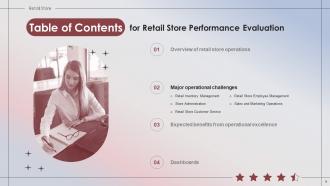
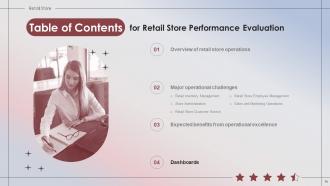
Slide 3: This slide shows Table of Content for the presentation.
Slide 4: This slide depicts title for three topics that are to be covered next in the template.
Slide 5: This slide provides information regarding retail company in terms of headquarters, revenues, total number of employees, number of stores across USA.
Slide 6: This slide provides an overview of multiple retail store operational areas such as store administration, inventory management, customer service, etc.
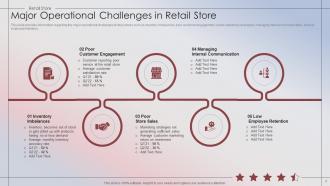
Slide 7: This slide provides information regarding the major operational challenges of retail stores such as inventory imbalances, poor customer engagement, etc.
Slide 8: This slide depicts title for the topic that are to be covered next in the template.
Slide 9: This slide depicts title for Retail store inventory management.
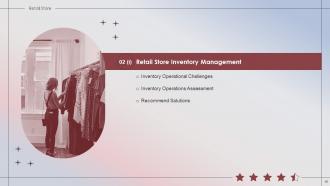
Slide 10: This slide reflects the retail store inventory operational challenges such as real time tracking, overstocking, spoiled products, expediting, etc.
Slide 11: This slide depicts title for Inventory Operations Assessment.
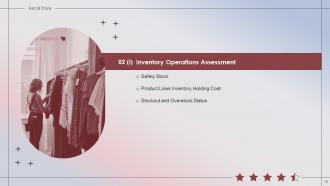
Slide 12: This slide shows the current performance of inventory operations providing information regarding customer and predicted demand, excess and deficit values, etc.
Slide 13: This slide indicates the inventory holding cost of multiple product lines providing details regarding revenue, cost of goods sold, gross profit, etc.
Slide 14: This slide illustrates the current assessment of the stockout and overstock status of multiple products.
Slide 15: This slide depicts title for Recommend Solutions for Retail Store Inventory Operational Challenges.
Slide 16: This slide tabulates the solutions to mitigate operational challenges of retail store inventory such as deploying a centralized tracking system, etc.
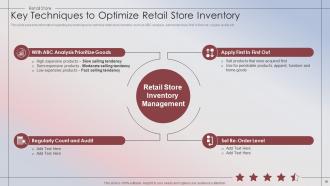
Slide 17: This slide presents information regarding key techniques to optimize retail store inventory such as ABC analysis, set reorder level, first in first out, etc.
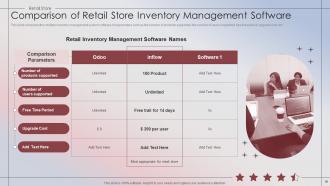
Slide 18: This slide compares the multiple inventory management system software on parameters such as the number of products supported, etc.
Slide 19: This slide indicates the inventory catalog sheet for perishable food items providing information regarding normal and vacuum shelf life, storage details, etc.
Slide 20: This slide depicts title for Retail Store Administration.
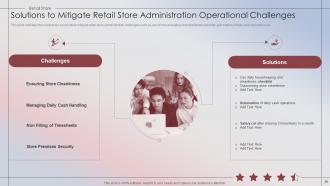
Slide 21: This slide represents the major challenges associated with successful retail store administrations such as staff time keeping, managing store cleanliness, etc.
Slide 22: This slide depicts title for Store Administration Assessment.
Slide 23: This slide illustrates the graph to showcase visitors responses towards the cleanliness of multiple store areas such as floor, display counters, try rooms etc.
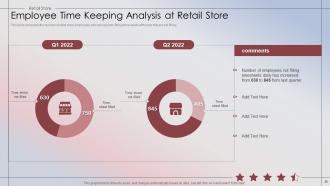
Slide 24: This slide compares the number of retail store employees who are regularly filling timesheets with ones that are not filling.
Slide 25: This slide indicates the assessment findings of retail store administration’s cash handling operations providing information regarding Note Counterfeiting, etc.
Slide 26: This slide provides information regarding the percentage of theft incidents that occurred at the retail store in a given quarter such as shoplifting, etc.
Slide 27: This slide depicts title for Recommend Solutions for Retail Store Administration Operational Challenges.
Slide 28: This slide indicates the solutions to successfully mitigate retail store administration challenges such as use of housekeeping and cleanliness checklist, etc.
Slide 29: This slide depicts the checklist for cleaning of multiple areas of the retail store such as entrance, stairways, shelves, restrooms, etc.
Slide 30: This slide compares the multiple cash management software for the retail store on features such as dimensions, currencies supported, etc.
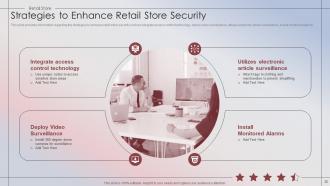
Slide 31: This slide provides information regarding the strategies to enhance retail store security such as integrate access control technology, etc.
Slide 32: This slide depicts title for Retail Store Operations Customer Service.
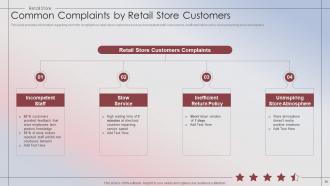
Slide 33: This slide provides information regarding common complaints by retail store customers such as incompetent staff, slow service, etc.
Slide 34: This slide depicts title for Store Customer Service Assessment.
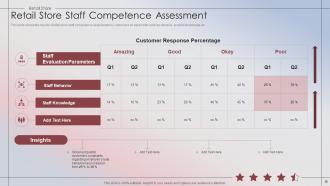
Slide 35: This slide shows the results of retail store staff competence assessment by customers on parameter such as behavior, product knowledge etc.
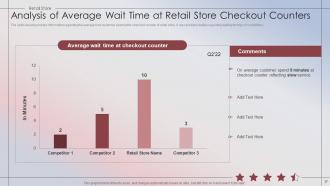
Slide 36: The slide visually provides information regarding the average time customer spent at the checkout counter of retail store.
Slide 37: This slide illustrates the customer response towards the current return policy of retail store.
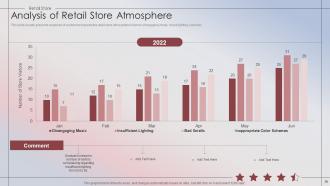
Slide 38: This slide visually presents response of customers towards the retail store atmosphere in terms of engaging music, mood lighting, scent etc.
Slide 39: This slide depicts title for Recommend Solutions for Improving Customer Service at Retail Store.
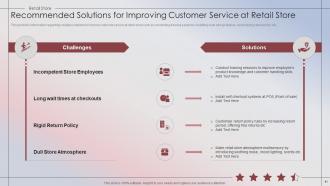
Slide 40: This provides information regarding multiple solutions to improve customer service at retail store such as conducting training sessions, etc.
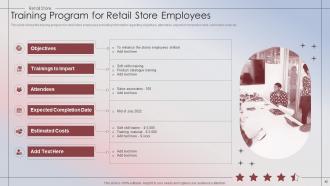
Slide 41: This slide shows the training program for retail store employees providing information regarding objectives, attendees, expected completion date, etc.
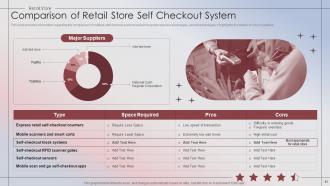
Slide 42: This slide provides information regarding the comparison of multiple self checkout systems based on space required, advantages, and disadvantages.
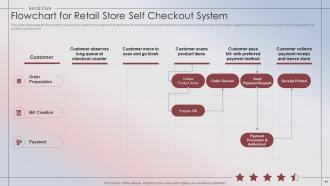
Slide 43: This slide represents the flowchart for scan and go system to be deployed at retail store to provide self checkout feature to customers.
Slide 44: This slide depicts the multiple initiatives to be undertaken for the improvement of retail store’s current return and refund policy.
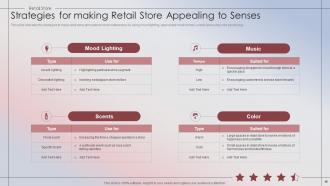
Slide 45: This slide indicates the strategies to make retail store atmosphere more multisensory by using mood lighting, appropriate music tempo, etc.
Slide 46: This slide depicts title for Retail Store Employee Management.
Slide 47: This slide provides information regarding the employee management challenges in retail store such as high turnover rates, low employee engagement, etc.
Slide 48: This slide depicts title for Store Workforce Assessment.
Slide 49: This slide visually presents the information regarding the employee turnover rate and engagement score at retail store.
Slide 50: This slide provides information regarding the employees theft reported at retail store based upon types, gender and average value of products stolen.
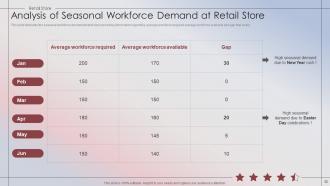
Slide 51: This slide tabulates the seasonal workforce demand at retail store providing information regarding average workforce required average workforce.
Slide 52: This slide depicts title for Recommend Solutions to overcome Employee Management Challenges at Retail Store.
Slide 53: This slide illustrates the recommended solutions to overcome employee management challenges in retail store such as offer competitive salaries, etc.
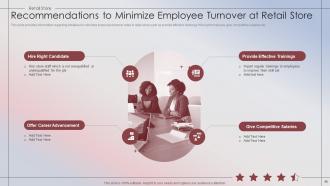
Slide 54: This slide provides information regarding initiatives to minimize employee turnover rates in retail store such as provide effective trainings, etc.
Slide 55: This slide provides details regarding initiatives to boost employee engagement at retail store such as recognize efforts, inculcate transparency, etc.
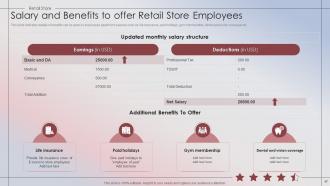
Slide 56: This slide indicates details of benefits can be given to employees apart form salaries such as life insurance, paid holidays, gym membership, etc.
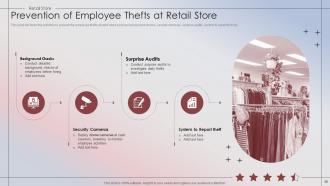
Slide 57: This slide list down the activities to prevent the employee thefts at retail store such as background checks, security cameras, surprise audits, etc.
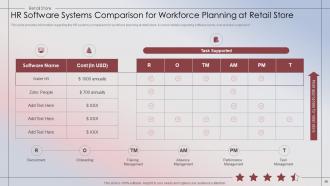
Slide 58: This slide provides information regarding the HR systems comparison for workforce planning at retail store.
Slide 59: This slide depicts title for Retail Store Operations Sales And Marketing.
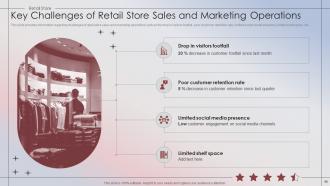
Slide 60: This slide provides information regarding challenges of retail store sales and marketing operations such as the drop in visitors footfall, etc.
Slide 61: This slide depicts title for Sales and Marketing Operations Assessment.
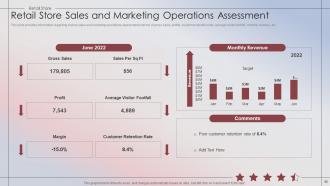
Slide 62: This slide provides information regarding instore sales and marketing operations assessment in terms of gross sales, profits, customer retention rate, etc.
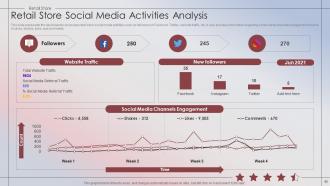
Slide 63: This slide represents the dashboard to showcase retail store social media activities such as followers on Facebook, Twitter, website traffic, etc.
Slide 64: This slide depicts title for Improvement Initiatives for Retail Store Sales & Marketing Operations.
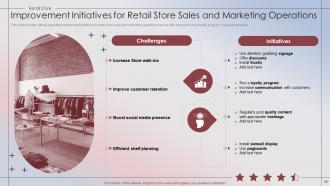
Slide 65: This slide provides details regarding improvement initiatives for retail store sales and marketing operations such as offer discounts, run a loyalty program.
Slide 66: This slide provides information regarding the strategies to increase retail store walk-ins such as conduct in store events, enticing signage, etc.
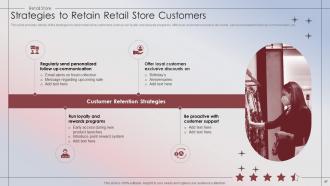
Slide 67: This slide provides details of the strategies to retain retail store customers such as run loyalty and rewards programs, etc.
Slide 68: This slide provides information regarding strategies to boost retail store social media presence such as post high quality content, use social media calendar, etc.
Slide 69: This slide presents the multiple types of social media influencers that retail store can hire such as micro, macro and, celebrities.
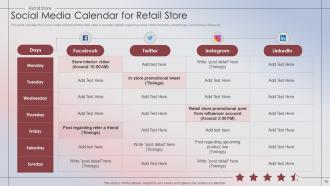
Slide 70: This slide indicates the social media calendar for the retail store. It provides details regarding social media channels, content type, and timings of the post.
Slide 71: This slide indicates the techniques to maximize shelf space at retail stores such as install slatwall, use pegboards, install grills for small products, etc.
Slide 72: This slide depicts title for Expected Benefits from Operational Excellence.
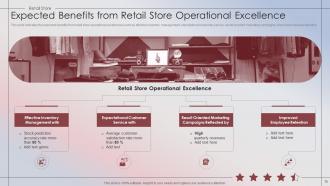
Slide 73: This slide indicates the expected benefits from retail store operational excellences such as effective inventory management, expectational customer service, etc.
Slide 74: This slide depicts title for Dashboards.
Slide 75: This slide depicts the retail store inventory dashboard providing information regarding expired items, low stock items, returned goods.
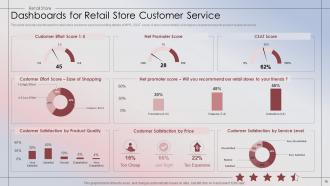
Slide 76: This slide includes dashboards for retail store customer service providing details of NPS, CSAT score.
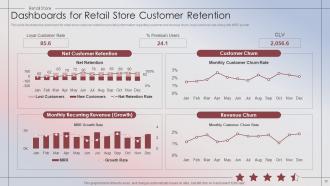
Slide 77: This slide illustrates the dashboard for retail store customer retention providing information regarding customer and revenue churn, loyal customer rate.
Slide 78: This slide represents the dashboard to showcase retail stores employee engagement score teamwise, hierarchy levels wise.
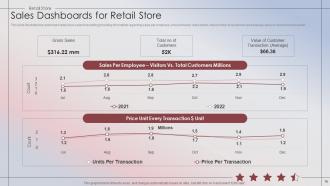
Slide 79: This slide illustrates the dashboard retail store sales forecasting providing information regarding sales per employee, price unit every transaction, etc.
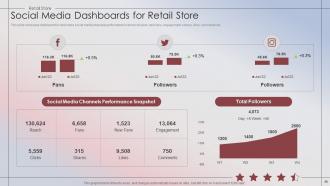
Slide 80: This slide showcase dashboard for retail store social media channels performance in terms of reach, new fans, engagement, shares, likes, comments etc.
Slide 81: This slide contains all the icons used in this presentation.
Slide 82: This slide is titled as Additional Slides for moving forward.
Slide 83: This is About Us slide to show company specifications etc.
Slide 84: This is a Timeline slide. Show data related to time intervals here.
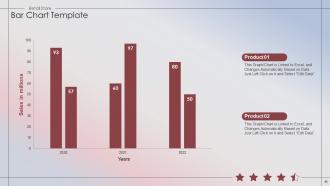
Slide 85: This slide presents Bar chart with two products comparison.
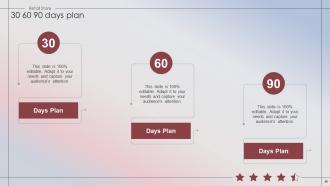
Slide 86: This slide provides 30 60 90 Days Plan with text boxes.
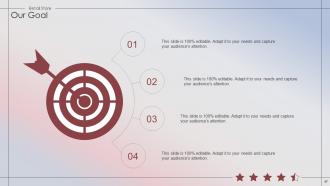
Slide 87: This is Our Goal slide. State your firm's goals here.
Slide 88: This slide contains Puzzle with related icons and text.
Slide 89: This slide shows Post It Notes. Post your important notes here.
Slide 90: This is a Thank You slide with address, contact numbers and email address.
Retail Store Performance Evaluation Powerpoint Presentation Slides with all 95 slides:
Use our Retail Store Performance Evaluation Powerpoint Presentation Slides to effectively help you save your valuable time. They are readymade to fit into any presentation structure.








































FAQs for Retail Store Performance Evaluation
Sales per square foot, conversion rate, and average transaction value are your big three. Customer traffic and inventory turnover matter too - nothing bugs me more than dead stock eating up cash flow. If you've got loyalty programs going, definitely watch customer acquisition cost and lifetime value. Labor costs as a percentage of sales will help with scheduling (learned that one the hard way). Monthly tracking works best, then compare year-over-year to catch patterns. Honestly, nail these seven metrics and you'll quickly see what's broken vs. what's actually making you money.
Hey! So door counters are your cheapest starting point - they'll show peak hours and help with staffing decisions. Heat mapping shows where people actually hang out (usually not where you'd expect lol). WiFi tracking exists too but feels kinda stalkerish to me. The real gold is in patterns: short visits usually mean your layout's confusing or staff aren't connecting with customers. Long dwell times reveal what's actually working versus what you think should work. You'll start seeing conversion rates and seasonal trends that'll help with inventory planning. Honestly, just start basic and build from there.
Dude, engaged employees make such a difference in retail. Your sales go up because they actually care about upselling and helping customers instead of just standing there looking miserable. Customers pick up on that vibe immediately - I swear they can smell disengagement from a mile away. Plus engaged people don't quit as much, which saves you a fortune on constantly hiring and training new folks. They'll also throw out good ideas for improving things rather than just collecting their paycheck. Honestly, start doing quick check-ins with your team and watch how it connects to your numbers.
Okay so basically when you turn inventory faster, you're making more money because stuff isn't just sitting there eating up space and costing you storage fees. Dead stock is literally dead money - learned that the hard way at my old job. Better demand forecasting helps a ton so you don't overorder products nobody wants. Also try dynamic pricing to move old inventory quickly, and maybe shuffle your store layout to put slow sellers where people actually walk by. Getting smaller, more frequent deliveries from suppliers works too. Oh and definitely track turnover monthly by category - you'll spot exactly which products are killing your numbers.
Track your displays with sales lift analysis - compare numbers before and after you switch things up in different zones. Heat mapping shows where customers actually stop (surprisingly addictive to watch tbh). A/B test your setups to see what converts better. Conversion rates by placement matter too, plus dwell time if you've got that tech. Start with baseline metrics first, then measure after each change. That way you can prove the ROI when your boss inevitably questions the budget.
Honestly, don't treat customer feedback like some side thing - make it a huge chunk of your evaluation process. Maybe 30-40% of the total score? Set up post-purchase surveys and keep tabs on online reviews. Track satisfaction scores and how fast complaints get handled. I mean, happy customers are literally what pays the bills, right? Give each team member monthly feedback reports with actual customer quotes during reviews. Makes it way more real when Sarah can see that Mrs. Johnson specifically mentioned her helpfulness. Yeah, it's more work upfront, but the data you'll get is gold.
Start with Square or Shopify since their POS systems have solid built-in analytics. Google Analytics is a no-brainer for online stuff. RetailNext is pretty good for foot traffic and heat mapping if you need that level of detail. Integration is huge though - I've seen people waste hours every week pulling data from different platforms. Super annoying. For inventory, check out TradeGecko or Cin7 since they connect sales performance to your stock levels automatically. My advice? Get your POS analytics dialed in first, then add other tools when you figure out what's missing.
Dude, store layout is seriously everything for sales. First thing - put your money-makers at eye level, that's prime real estate. Make people walk past impulse buys to get to essentials like milk or whatever. I always notice how grocery stores do this perfectly. Wide aisles make people browse more, but squeeze them a bit near checkout and they'll feel rushed to buy. Your entrance sets the whole vibe, so nail that first impression. Even those long checkout lines aren't accidents - gives shoppers time to grab gum or magazines. Walk through your space like you're shopping and you'll spot tons of opportunities.
Start by breaking down your sales data - time periods, product categories, customer segments. That's where the patterns hide. Excel pivot tables are honestly your best friend for this, even though setting them up is annoying at first. Compare month-over-month and year-over-year numbers. Find your top performers and biggest disasters, then ask why. Seasonal stuff? Inventory problems? Customers acting weird? I swear, once you map out these trends, you can actually create plans that target each opportunity instead of just throwing stuff at the wall.
Dude, seasonal swings are crazy - like 30-50% depending what you sell. Holiday rushes, back-to-school madness, summer dead zones. You need at least 2-3 years of data to really see the patterns. Most people totally blow this and get caught off guard every year. Start your holiday buying in July, not October when everyone's scrambling. Use slow periods for training your team or fixing stuff around the store. Track weekly numbers, not just monthly - you'll catch trends way earlier. Oh, and adjust your staff schedules ahead of time, not after you're already swamped.
Honestly, having a solid online game makes a huge difference for your physical store. People browse your website and Instagram before they ever step foot inside - it's like digital window shopping, you know? Reviews are everything too. Bad ones will kill your foot traffic fast. I'd definitely set up "buy online, pick up in store" if you haven't already. Shows your inventory online too so people know what you've got. Just make sure your actual store vibe matches what they see online, otherwise you'll disappoint them when they show up.
Pick 3-5 main competitors and go mystery shop them regularly - check out their pricing, how they set up displays, the whole customer experience. Google Alerts for their brand mentions is clutch, plus follow their socials to catch new stuff early. Track their promo patterns and product mix too. Oh and definitely scope out their websites since everything's online now anyway. I swear the detective work actually gets addictive once you start. Make a simple monthly scorecard comparing prices, service, store setup - makes it way easier to spot trends and where they're slipping up.
Look, this is gonna sound obvious but you gotta align your training with whatever you're actually grading people on. Customer service scores matter? Then teach greeting skills, complaint handling, upselling - the real stuff. I swear, half the companies I've worked with train people on random topics that never show up in reviews. What a joke. Map your learning goals directly to performance metrics. Short sentences work here. Then actually track if people get better at those specific things post-training. Otherwise you're just burning money on feel-good workshops that don't move the needle on what you're measuring.
Dude, pricing is make-or-break for your business. Get it right and you'll maximize profits while keeping customers happy. Mess it up? You'll either scare people away or basically give money away for free. I've watched so many businesses tank because of bad pricing decisions, it's wild. Your prices also tell people what kind of brand you are - high prices scream premium quality, low prices pull in deal-seekers. Start by checking what competitors charge, then test small changes to see how customers react. Don't overthink it initially.
Track cohort retention rates - that's your bread and butter metric here. Compare how long loyalty members stick around vs regular customers over like 12-24 months. Monitor repeat purchases, order values, and lifetime value too. The annoying part? You've gotta isolate the program's actual impact from other stuff like seasonal changes or whatever marketing campaigns you're running. Survey people who churned to see if missing loyalty perks pushed them away. Monthly dashboards help you catch problems early. Oh, and make sure you're comparing similar time periods or the data gets weird.
-
I have just started downloading templates for my presentations and I must say this is a great design. It helped accelerate my presentation design process and made it more visually appealing.
-
The pricing page of this website is very sorted. I felt no pain while buying the PPTs.