

Risk Management Heatmap Low Medium High 3 X 3 Powerpoint Slide Deck




Try Before you Buy Download Free Sample Product
 Impress Your
 Audience
 100%
100% Editable
 Save Hours
 of Time


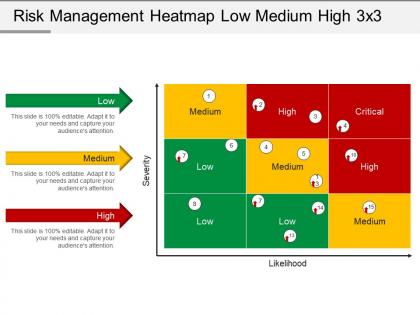
Visualize risk and set priorities with our intelligently designed risk management heat map low medium high 3 X 3 PowerPoint slide deck presentation design template. You can use this powerful risk heat map PowerPoint template to measure and track the risk velocity associated with the operational process. The simple act of placing risks in special relationship with each other allows a quick overview of important elements of risk profile. Most importantly, this risk assessment PowerPoint template allows you to communicate operational risk to others which is highly important in information security, IT, and information management related projects. You can also use this powerful PPT template to display cyber security risk heat maps and understanding risk heat maps with other industries as well. Design template perfectly describes the risk magnitude as low, medium, high or critical, thus it becomes helpful in understanding risk velocity and taking timely action. So, without any further ado simply download this powerful PPT design by clicking on the download button to get applauded. Convert the intolerant with our Risk Management Heatmap Low Medium High 3 X 3 Powerpoint Slide Deck. Encourage them to embrace humanity.
People who downloaded this PowerPoint presentation also viewed the following :
Risk Management Heatmap Low Medium High 3 X 3 Powerpoint Slide Deck with all 5 slides:
Every message your company sends represents your company. Send the right message with our Risk Management Heatmap Low Medium High 3 X 3 Powerpoint Slide Deck.
FAQs for Risk Management Heatmap Low Medium High 3 X 3
So basically you've got two main axes - how likely something is to happen, and how much it'll mess you up if it does. Plot your risks as colored dots (green = chill, yellow = watch it, red = panic mode). I always throw in who owns each risk and where you're at with fixing them. Categories help too if you want to filter by department or whatever. Honestly, the whole point is making it dead obvious to your boss where the scary stuff lives. Keep it visual but don't go overboard - executives just want to see those red zones screaming for attention.
Honestly, just throw your risks on a heatmap - likelihood vs impact. Red zone stuff (high chance, big damage) needs fixing NOW. Green can wait. Most teams I've seen just chase whatever's making the most noise, which is dumb. Hit the top-right corner first, then move down to yellow zones. But here's the thing - you gotta update this regularly because risks change all the time. I'd tackle your worst 3-5 red risks this quarter, then take another look. Sounds simple but it actually works if you stick with it.
Honestly, just stick with red-yellow-green - everyone knows what that means without thinking about it. Red = bad, yellow = eh, green = good. Some people throw in orange between yellow and red, which actually works pretty well when you've got a bunch of medium-ish risks floating around. I mean, you *could* get creative with other colors, but why make it harder than it needs to be? The main thing is keeping your color intensity consistent across the whole heatmap. Don't overthink the colors - spend that time getting your risk ratings accurate instead.
Honestly? At least every quarter, but it really depends on your industry. Fast-moving sectors or companies going through big changes should probably do it monthly. I've watched teams get super lazy and only update theirs once a year - terrible idea. Your heatmap becomes totally pointless if you're looking at stale risks or missing new ones entirely. Monthly feels like overkill sometimes, but quarterly is the sweet spot for most places. Just set a recurring reminder and actually follow through. When your boss asks about current exposure, you'll want data that's actually current, not from six months ago.
Honestly, Excel's probably your best bet to start. Everyone knows it and you can set up conditional formatting to auto-color code based on risk scores - works like a charm. If you need something fancier later, ServiceNow and MetricStream are solid but they'll cost you. Tableau makes pretty dashboards that'll impress the executives, though sometimes I think people get too caught up in making things look fancy. Power BI's another good option. Hell, even Google Sheets works for basic stuff. I'd say build it in Excel first, see how it goes, then move up if you need more features.
Get your stakeholders involved right from the start when you're identifying risks - they know their departments way better than you do. Then bring them back for the assessment part too. They'll give you realistic probability and impact scores since they deal with this stuff every day. I've found workshops work great, or just send out surveys if people are swamped. Honestly, trying to build these heatmaps solo is pretty pointless. Their input makes the whole thing actually useful instead of just some theoretical exercise that sits in a drawer somewhere.
Don't rely on gut feelings - you need actual criteria for rating probability and impact or your heatmap becomes useless. Also, some people go crazy with colors and categories. I've seen ones that look like a kid went wild with crayons, honestly. Keep it simple with a basic 3x3 matrix to start. You'll miss strategic and reputation risks if you only think about day-to-day operational stuff. Update it regularly too - risks change constantly and treating this like a one-time thing is pointless. When possible, back up your ratings with real data instead of just guessing.
Honestly, heatmaps are game-changers for risk talks. Everyone's staring at the same visual, so you can instantly see where Bob thinks something's no big deal but Sarah's freaking out about it. Way better than those endless email chains where nothing gets decided. In meetings, you'll spend time on stuff that actually matters instead of arguing about tiny risks for twenty minutes. The colors just make sense - even my old boss could figure it out, and he still prints emails. One weird thing though, people get oddly attached to their color choices. But yeah, definitely start your next risk review with the heatmap up on screen.
Honestly, heatmaps are just so much easier on the brain. Instead of scrolling through endless spreadsheets (ugh), you get this instant visual hit - red means "panic mode," green means "chill." Traditional risk stuff is basically glorified lists that make everyone's eyes glaze over. With heatmaps though, you're plotting probability vs impact using colors, so when you walk into that meeting, you can literally point at the red squares and go "fix these first." Way better than trying to explain some wonky numerical score to your boss. Plus executives love anything they can understand in like 3 seconds, which this totally delivers.
Oh man, visualization is like 99% of what makes heatmaps actually useful. Think about it - without the colors and layout, you're basically staring at a massive spreadsheet trying to find patterns. Your brain can instantly spot the red danger zones, but good luck doing that with raw numbers in Excel (been there, it's awful). The visual stuff transforms all that overwhelming data into something you can actually make decisions with. Just make sure the colors make sense - red for bad, green for good, you know? And definitely test it with real people first because what looks obvious to you might be confusing to everyone else.
Honestly, just slap dollar amounts on everything you can - potential losses, downtime costs, how many customers you'd lose. Some stuff like reputation damage is impossible to put a number on (which is so frustrating), but you can still rate those on a 1-10 scale or whatever works. The main thing is staying consistent so you're comparing apples to apples. I'd start with your top 5 scariest risks first. You don't need to be perfect - even rough estimates will show you what actually matters versus what just feels scary.
Healthcare's big on these for tracking patient safety stuff and med errors. Banks use them constantly - regulators eat that visual risk stuff up, so they're probably mapping credit risks and compliance violations 24/7. Manufacturing tracks supply chain issues, quality problems, the usual operational headaches. Oh, and energy/construction companies swear by them for safety management. Honestly, if you're dealing with complicated risks that you need to assess quickly, they're pretty solid. Any industry where you've got multiple risk layers happening at once could probably benefit from one.
So basically, risk heatmaps let you figure out which risks actually mess with your main business goals. Instead of panicking about every little thing, you focus resources on what could really hurt you. Like if growing revenue is your top priority, you'd zero in on risks that could kill sales or block expansion. The visual part is clutch - makes it way easier to show leadership what needs attention first. I mean, nobody has unlimited time or budget, right? Use it when you're planning your annual risk stuff and deciding where to spend money. Way more effective than that whole "treat everything as equally important" approach that never actually works.
Honestly, the worst part is trying to cram messy, subjective stuff into clean numbers. Like how do you score "reputation damage" - is that a 3 or a 4? Everyone's gonna see it differently based on their own experience. Your finance guy will rate budget risks way higher than your marketing person would. Short sentences turn into inconsistent heatmaps pretty fast. You end up losing all the important details when everything becomes just red/yellow/green boxes. Oh, and people get weirdly attached to their ratings sometimes. I'd say just be upfront about how imperfect this whole process is, and maybe add some actual descriptions next to the scores so you don't lose all that context.
Honestly, heatmaps are lifesavers when everything's going sideways. You get this instant visual of your biggest threats instead of drowning in boring spreadsheets. Quick decisions become way easier - you'll know which fires need water first versus what can simmer on the back burner. Leadership gets it immediately too, no long explanations needed. I swear it's like having GPS for your disasters. Keep updating it though, especially when things are unpredictable. Use it in your daily check-ins to figure out priorities. Way better than playing guessing games with resources.
-
Graphics are very appealing to eyes.
-
Great product with highly impressive and engaging designs.