


Safety KPI Dashboard Powerpoint Ppt Template Bundles




Try Before you Buy Download Free Sample Product
 Impress Your
 Audience
 100%
100% Editable
 Save Hours
 of Time


Our Safety KPI Dashboard Powerpoint Ppt Template Bundles are topically designed to provide an attractive backdrop to any subject. Use them to look like a presentation pro.
People who downloaded this PowerPoint presentation also viewed the following :
Safety KPI Dashboard Powerpoint Ppt Template Bundles with all 21 slides:
Use our Safety KPI Dashboard Powerpoint Ppt Template Bundles to effectively help you save your valuable time. They are readymade to fit into any presentation structure.







FAQs for Safety KPI Dashboard Powerpoint
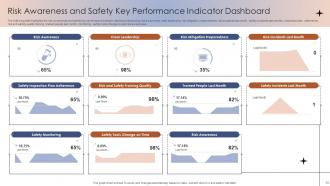
Mix leading and lagging indicators on your dashboard. Leading stuff like safety training completion and near-miss reports helps catch problems early. Lagging tracks what already went wrong - injury rates, lost time incidents, workers comp claims. Definitely segment by department or location so you can spot where the real trouble spots are. Trend analysis over time is clutch too, honestly way more useful than most people realize. Short sentences work great for high-level stuff, but make sure you can drill down into specifics when something's actually blowing up and needs your attention right away.
Honestly, charts and graphs are total lifesavers compared to staring at boring spreadsheets all day. Heat maps will blow your mind - they instantly show you which areas of your facility are trouble spots. I always tell people to start simple with bar charts for incident counts, then maybe add line graphs to track trends over time. The patterns become so obvious it's ridiculous. Plus your boss will actually pay attention when you can show them something visual instead of rambling through numbers. Oh, and if you're seeing spikes in certain departments or shifts, those jump right out at you. Makes the whole safety meeting thing way less painful.
Hey! So for safety KPI dashboards, I'd probably go with Power BI first - it plays nice with most safety systems and updates in real-time without being a pain. Tableau's solid too but honestly gets expensive quick (trust me on that one). If you're just tracking basic stuff like incident rates, Excel might actually work fine with some pivot tables. Oh, and pro tip - whatever you pick, make sure your team will actually use it regularly. Maybe start with whatever software you already have licenses for? No point buying new tools if nobody's gonna update the damn thing.
Don't cram everything onto one screen - seriously, less is more here. Users get overwhelmed and then ignore the actually important stuff. Mix leading indicators with lagging ones too, otherwise you're just staring at problems after they've already happened. Those red/yellow/green status lights everywhere? Yeah, they become meaningless real quick. Keep your timeframes consistent across metrics (sounds boring but trust me). Oh, and turn off that crazy auto-refresh - nobody needs updates every few seconds. Start with maybe 5-7 key things, test it with real people, then tweak based on what they actually look at daily.
Weekly updates are your bare minimum, but honestly daily is way better if you can pull it off. Fresh data means you'll catch problems before they blow up into something worse. I've watched too many dashboards just sit there gathering dust for weeks - total waste. Incident stuff? That needs updating the second something happens. Monthly is way too slow for safety metrics. You need that real-time view to actually make decent decisions. Set up automated feeds or just make someone own the weekly refresh. Trust me, stale data kills the whole point.
For your safety dashboard, start with these four basics: incident rate (total incidents per hours worked), severity rate (lost workdays per incident), near-miss frequency, and days since last recordable injury. Honestly, incident rate tells you the most - it shows patterns over time. Don't forget leading indicators too, like safety training completion and hazard reports submitted. Those actually help prevent issues before they blow up. Update everything weekly so you catch trends fast. Oh, and start simple - you can always layer on more specific stuff once you see what your team actually pays attention to.
First figure out what actually matters to your company - reducing specific incidents, better compliance, or tracking near-misses. Then build your dashboard around those priorities instead of random metrics. If ergonomic injuries are your thing, focus on lifting incidents and training completion rates rather than broad injury data. You can slice it by department or time periods too, which is pretty handy. I'd check your goals every quarter since stuff changes. Oh, and don't overcomplicate it - start with maybe 3-5 key metrics and add more later if you need them.
Dude, you definitely want real-time data for your safety dashboard. Otherwise you're finding out about problems way too late - like weeks after something sketchy happened. Live updates let you catch patterns as they develop, not after someone remembers to pull reports. Near-misses spike? You'll know today, not next month. Equipment acting weird? Same deal. Honestly, I'd be paranoid without instant alerts set up for the big stuff. It's like monitoring your workplace's vital signs instead of waiting for the annual check-up when everything's already gone sideways.
Start with automated surveys - weekly pulse checks or quick incident feedback forms that dump straight into your dashboard. Anonymous reporting systems work too. The tricky part? Converting that messy qualitative stuff into actual numbers you can track. Sentiment scores, feedback volume trends, that kind of thing. Honestly, I'd just pick one source to begin with (maybe I'm being lazy but whatever), then add more later. Oh and make sure people can actually see their input changing things on the dashboard. They'll bail on giving feedback super fast if it feels pointless.
Honestly, charts and graphs are your best friend here - they tell the whole story without making people squint at spreadsheets. I always focus on trends instead of dumping raw numbers on everyone. Context is huge too, like saying "best Q3 we've had in three years" or comparing against industry benchmarks. Consistent colors help people spot problems fast. Start with the narrative though - what's working, what's broken, what you're actually gonna do about it. Oh, and always end with concrete next steps and deadlines. Nobody wants to leave a meeting wondering what happens next.
Honestly, without benchmarking you're just looking at random numbers that don't mean much. You need to compare your incident rates and training completion against what other companies in your industry are doing - that's how you figure out if you're actually doing well or if things are worse than you thought. It's basically your safety report card. I've seen too many dashboards that look impressive until you realize the "good" numbers are still way behind industry average. Plus it makes asking for budget way easier when you can show leadership exactly where you stand. Just make sure you're using current industry data, not something from like 2019.
Okay so three main things you gotta nail down. Get some automated validation running first - catches the weird stuff before it even shows up on your dashboard. Monthly audits are clutch too, just compare your dashboard against the actual source docs (though honestly if you're swamped with incidents maybe do it more often). Training is huge - your data entry folks need to categorize everything the same way or you'll get garbage results. Oh and pick one specific person to own this whole process. Like, actually sign off on it each month. Nobody wants to be "that guy" but someone has to care about the data quality or it all falls apart pretty quick.
Check your dashboard for incident spikes - like if one area keeps having slip-and-fall accidents, that's where you focus floor safety training. PPE violations and near-miss patterns work the same way. The data basically tells you what to train on instead of doing those boring company-wide sessions nobody pays attention to. Monthly reports are your friend here. Look for seasonal stuff or which departments have specific problems, then build targeted training around their actual issues. Way more effective than generic approaches, plus people actually listen when it's relevant to their daily work.
Oh man, compliance stuff is such a headache but you gotta get it right. GDPR will bite you if you're showing personal info, so anonymize everything. OSHA has their own reporting rules in the US too. Different regions = different safety regs, which honestly makes my brain hurt sometimes. Your dashboard needs to hide individual details but still show useful trends. Plus some industries have extra standards on top of everything else. Definitely run it by legal before launch - especially if outside people will see it. Trust me, it's way better to catch issues early than deal with angry regulators later.
So basically, your safety dashboard shows you what's actually happening instead of just guessing. You'll catch problems early and see if the stuff you're trying is working or just wasting time. Honestly, the best part is when you share the numbers with everyone - people get way more invested when they can see the data themselves. Track trends, set goals that aren't totally unrealistic, and don't be afraid to change direction if something's clearly not moving the needle. Oh, and definitely celebrate the wins when your numbers improve. People need to see progress.
-
They guys always go the extra mile to meet the expectations of their customers. Almost a year has been associated with them.
-
You guys are life-saver when it comes to presentations. Honestly I cannot do much without your services. Thank you!!!