


Health And Safety Dashboard Powerpoint Ppt Template Bundles




Try Before you Buy Download Free Sample Product
 Impress Your
 Audience
 100%
100% Editable
 Save Hours
 of Time


Our Health And Safety Dashboard Powerpoint Ppt Template Bundles are topically designed to provide an attractive backdrop to any subject. Use them to look like a presentation pro.
People who downloaded this PowerPoint presentation also viewed the following :
Health And Safety Dashboard Powerpoint Ppt Template Bundles with all 17 slides:
Use our Health And Safety Dashboard Powerpoint Ppt Template Bundles to effectively help you save your valuable time. They are readymade to fit into any presentation structure.
-
Health and Safety Dashboard
-
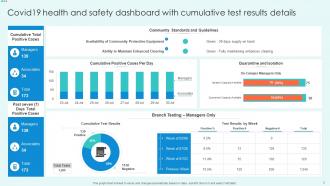
Covid19 health and safety dashboard with cumulative test results details
-
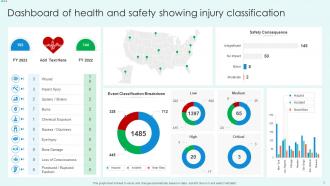
Dashboard of health and safety showing injury classification
-
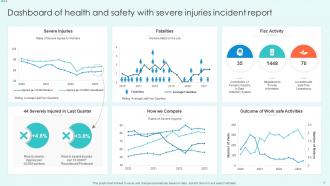
Dashboard of health and safety with severe injuries incident report
-
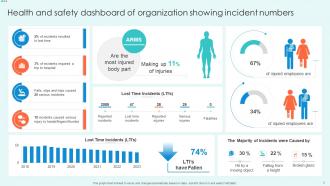
Health and safety dashboard of organization showing incident numbers
-
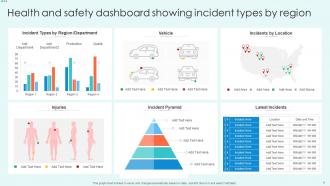
Health and safety dashboard showing incident types by region
-
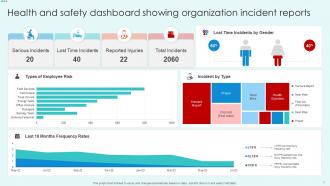
Health and safety dashboard showing organization incident reports
-
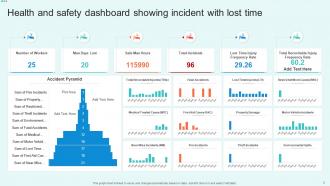
Health and safety dashboard showing incident with lost time
-
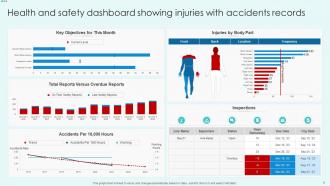
Health and safety dashboard showing injuries with accidents records
-
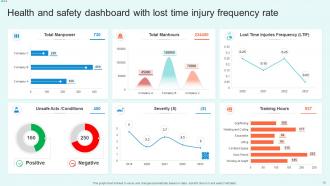
Health and safety dashboard with lost time injury frequency rate
-
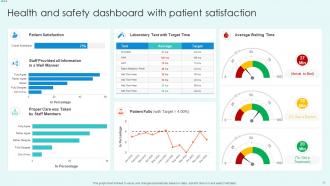
Health and safety dashboard with patient satisfaction
-
Health and Safety Dashboard
-

-

-

-

-

FAQs for Health And Safety Dashboard Powerpoint
Track your incident rates and lost time injuries first - that's the bread and butter stuff. Near-miss reports are huge too, plus safety training completion rates. Honestly, I'd skip the "days since last incident" counter because it just makes people want to hide stuff. Focus on leading indicators like completed inspections and hazard reports submitted. Oh, and how fast you close corrective actions matters way more than people think. Employee engagement is clutch - track safety suggestion participation. Mix the stuff that already happened with metrics that predict future problems. Start with maybe 5-6 metrics and build from there.
Okay so basically you get this one dashboard that shows all your safety stuff in real time. No more panic when audits happen! It tracks incident rates, training completion, inspections - all that regulatory stuff automatically. Honestly saves my sanity during audit season because I'm not digging through random spreadsheets forever. The best part? It catches problems before they become actual violations and spits out reports regulators actually want. You can set alerts for expired certs and overdue training too. Way better than trying to remember everything manually - trust me on that one.
Honestly, data visualization is a game-changer for safety stuff. Instead of staring at boring spreadsheets forever, you get charts and heat maps that actually make sense. Incident spikes? You'll see them right away. Training completion tanking? Also obvious. I mean, who has time to dig through endless rows of numbers when something urgent is happening? The visual approach works for everyone too - doesn't matter if you're talking to someone on the floor or in the C-suite. Just keep your dashboards clean and put the most critical metrics front and center where people can't miss them.
Set up automated validation rules and real-time alerts - that's your first move. Connect sensors straight to the dashboard so you're not dealing with manual entry mistakes (honestly, that's where most problems start). I've watched teams stare at yesterday's data thinking it's live... not fun. Get clear on who owns which metrics too. Build in automatic checks for weird readings - temperature spikes, safety counts that look sketchy, whatever makes sense for your setup. Oh, and do quick daily reviews with your team. Catches stuff before it becomes a real headache.
Look for dashboards with those traffic light colors - red/yellow/green alerts that anyone can read at a glance. Drag-and-drop stuff is huge too, plus icons instead of weird tech terms. One-click reporting saves so much time. The mobile thing matters more than you'd think - people actually want to check safety stats on their phones now. Best ones honestly just feel like any other app you'd use. Oh, and make sure they include tutorials that don't suck. Skip the backend demo entirely and ask to see how regular employees would actually use it day-to-day.
So predictive analytics basically turns your safety dashboard into a fortune teller instead of just showing what already went wrong. You'll spot patterns in near-misses and figure out which shifts are accidents waiting to happen. Equipment failures? You can see those coming too. Honestly, the whole preventing-vs-documenting thing is such a game changer - way better than scrambling after incidents. Your historical data is where you want to start digging. I mean, you've probably got tons of it just sitting there. Short version: crystal ball beats rearview mirror every time.
Honestly, automate your data feeds if you can - manual updates are a joke because someone always forgets. Quarterly reviews of your KPIs are clutch since priorities shift. Talk to the actual workers on the floor, not just managers. They know where the real problems are. Your data sources need regular check-ups too - nothing's worse than presenting old incident numbers in a meeting. Set alerts for the critical stuff so you're not blindsided. Oh, and actually use the dashboard in safety meetings! Otherwise it just becomes another fancy screen nobody looks at.
Get your team involved early with surveys and focus groups during design. Ask them what safety metrics they actually care about daily - it's never what managers assume it is. Test your prototypes with real users first. Their workflow is messier than you think. Add a feedback widget right in the dashboard too so they can complain later (they will anyway). The whole point is building something for the people stuck using it every day, not just impressing whoever signed the check.
Honestly, data quality is gonna be your biggest headache. Half your data will be scattered across different systems and probably outdated or missing chunks. Getting people to ditch their beloved Excel sheets for your shiny new dashboard? Good luck with that one. Integration between multiple safety systems is a nightmare too - I swear they're designed to not talk to each other. Start small though. Pick one or two reliable data sources, get those working smoothly, then expand once people see the value. Trust me, they'll start asking for more metrics once they realize how much time it saves them.
Honestly, mobile compatibility is a game-changer for safety dashboards. Your field supervisors can check incident reports and compliance stuff right from their phones instead of being stuck at a desk all day. When something urgent happens on-site, they don't have to wait to get back to the office to update records. People actually report safety issues faster too – nobody wants to remember details later when they could just log it immediately. I've seen teams where incident reporting went way up just because it got easier. Test your dashboard on a few different phones first though, you'll probably find some formatting issues that need fixing.
So here's the thing - putting up a safety dashboard literally changes everything because suddenly safety isn't invisible anymore. Real-time incidents and metrics are right there where everyone sees them daily. People actually start conversations about it! Instead of hiding problems, teams begin reporting more because there's transparency now. Leadership can't just sweep issues under the rug when they're staring at the data. You'll notice teams getting way more proactive about spotting hazards and pitching solutions. Honestly, visibility is half the battle. Just make sure you pick metrics that actually matter to your people and that everyone can access the info easily.
Honestly, dashboards are way better than those boring PowerPoint trainings everyone hates. You're using real data from your actual workplace - incident trends, near-misses, compliance stuff - so people actually pay attention. No more tracking training completions in random spreadsheets either, which is such a relief. The visual format just clicks better with people. I'd start by figuring out your worst 3 safety issues first. Then build your training around whatever the dashboard shows for those problems. Makes everything feel more relevant instead of generic safety theater, you know?
Start with the stuff that actually matters - injury rates, near misses, safety violations. Those are your bread and butter. Lead indicators beat lagging ones every time, even though your boss probably loves those shiny injury statistics. Training completion rates and hazard reports? Way more useful for preventing accidents instead of just counting them afterward. Don't go crazy with the dashboard - stick to maybe 5-7 key metrics or people's eyes will glaze over. Oh, and definitely ask your floor supervisors what numbers would help them day-to-day. They know what's actually happening out there.
Oh man, there's actually a bunch of cool stuff out there! Toyota's got the classic setup - injury rates, near-misses, training completion. Hospitals track infection rates and patient falls. Construction companies monitor equipment inspections and safety violations (weather delays too, which makes sense). Oil & gas gets pretty intense with gas leak monitoring and emergency response tracking. Even retail chains watch slip-and-fall incidents. Healthcare ones are probably the most detailed since, you know, people's lives. Your industry association might have examples you can steal from - that's honestly where I'd start looking first.
Honestly, dashboards are game-changers for this stuff. Instead of digging through boring incident reports, you'll see patterns jump right out at you. Seasonal spikes become super obvious. Same with departments that keep having the same problems over and over. You can actually tell if your safety programs are doing anything - which is huge because most people just guess about that. The filtering options are pretty sweet too, you can slice by location or injury type. Oh and definitely set up monthly reviews so you're not always playing catch-up with problems.
-
You know what? I'm so glad I opted for this PPT design. It has been a total game-changer for me and my presentations. Thank you!
-
“Detailed and great to save your time.”