

Safety Performance Dashboard With Employee Stats




Try Before you Buy Download Free Sample Product
 Impress Your
 Audience
 100%
100% Editable
 Save Hours
 of Time


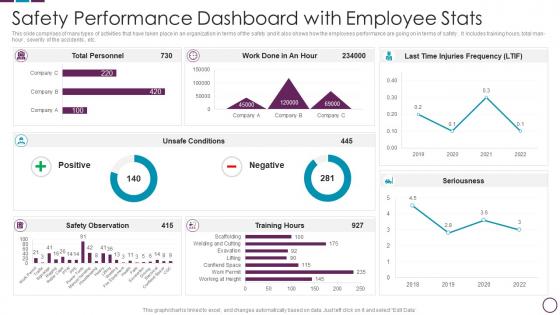
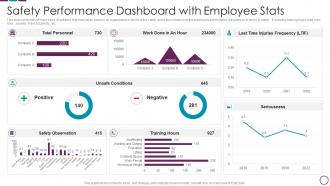
This slide comprises of many types of activities that have taken place in an organization in terms of the safety and it also shows how the employees performance are going on in terms of safety . It includes training hours, total man-hour , severity of the accidents , etc.
People who downloaded this PowerPoint presentation also viewed the following :
Safety Performance Dashboard With Employee Stats with all 7 slides:
Use our Safety Performance Dashboard With Employee Stats to effectively help you save your valuable time. They are readymade to fit into any presentation structure.





FAQs for Safety Performance Dashboard
Start with the basics: incident rates, near-misses, accident-free days, and training completion. But honestly? Leading indicators are where it's at - safety audits done, hazard reports coming in. Way better than just counting what already happened. Throw in injury severity rates and whatever compliance stuff your industry requires. I'd keep it to maybe 5-6 metrics at first - your team won't use it if you overwhelm them with data. You can always add more later once they're actually looking at the thing regularly.
Honestly, get a safety dashboard - it's a game changer. You'll have all your compliance stuff in one spot instead of digging through random spreadsheets when inspectors show up (ugh, the worst). It tracks incidents, training, inspections, all that automatically. Super easy to catch problems early before they turn into actual violations. Reports that used to take forever? Done instantly now. Oh and set up alerts for deadlines - I learned that one the hard way when we almost missed a certification renewal. Saves so much headache.
Red/yellow/green color coding works perfectly for incident severity - super intuitive. Use icons that actually make sense without having to think about them. Don't cram everything on one screen though, that's just asking for chaos. Group similar stuff together and give it breathing room with white space. Simple charts are your friend here, nothing fancy. The big thing is making critical alerts pop visually so they grab attention right away. I learned this the hard way when our old dashboard looked like a Christmas tree - nobody could find anything important when it mattered.
Daily updates are your sweet spot for most safety dashboards. Real-time is even better if you can swing it - safety stuff doesn't wait around for your weekly reports, you know? I'd honestly say weekly is way too slow since you need to catch problems before they blow up. High-risk operations? Push for hourly or real-time updates if possible. Just start with whatever your current systems can handle without breaking, then gradually move toward more frequent refreshes. The key is spotting trends fast so you can actually do something about them.
User feedback is honestly everything for your safety dashboard. Without it, you're just guessing what people need. I've watched so many teams build these gorgeous dashboards that collect dust because nobody bothered asking users what they actually wanted. Quick monthly check-ins work great - or even just grab coffee with your power users. They'll tell you which metrics are useless and what's missing. Plus you'll catch those annoying UX issues that make perfect sense to you but confuse everyone else. Oh, and prioritize the feedback from people who use it daily over the once-a-month crowd.
Dude, real-time data completely changes the game with safety dashboards. Instead of waiting around for those boring weekly reports, you'll get instant alerts the second something goes wrong. Spotting trends as they happen? Way better than playing catch-up later. You can actually jump on potential hazards before they blow up into real problems. Your team responds immediately, tweaks protocols on the spot - honestly makes such a difference when decisions actually matter. Oh, and figure out which metrics really need that instant monitoring first. Some stuff can totally wait for daily updates.
Honestly, the two big mistakes I see are cramming way too much info on one screen and making it impossible to figure out what's actually important. People's eyes just glaze over when they can't quickly spot the critical stuff. Stick to the KPIs that actually matter for safety decisions - not every single metric you can possibly track. Real-time data is huge, and color coding for alerts saves so much confusion. Oh, and definitely test with real users first! I've watched perfectly logical dashboards completely flop because nobody thought to ask the actual operators what they needed. Start simple, then build from there.
Honestly, dashboards work because people can actually see the safety numbers in real-time - incidents, near-misses, all that stuff. Makes it feel less abstract, you know? Your team gets more invested when they can track how they're doing and see their efforts paying off in the data. Plus transparency builds trust (which is huge). I'd definitely set up some friendly competition around the metrics - maybe team challenges or something. Oh, and don't forget to celebrate when groups hit their safety goals. People love recognition, and it keeps the momentum going. It's basically like having a scoreboard everyone can understand.
So basically, companies just focus on whatever could actually kill or hurt their workers. Manufacturing places track chemical exposure, hospitals watch patient falls, logistics monitors vehicle crashes - you know, the obvious stuff. The drag-and-drop thing is actually pretty neat though. Construction sites care way more about hard hats and near-misses than some office worried about bad chairs giving people back pain. Honestly, just figure out your top 3-5 "oh shit" scenarios first and build around those. Everything else is just noise.
Honestly, skip the PowerPoint death trap and just do hands-on training with real dashboard scenarios. Walk through what each metric actually means - like, what happens in the real world when you see these numbers, not just boring technical definitions. I've watched so many people drown in data because they miss the "so what" factor. Give them practice spotting both good trends and red flags so they catch problems early. Also... maybe this is obvious but create space where people can ask questions without feeling stupid about it. Nobody learns when they're scared to look dumb.
So these dashboards are actually pretty smart - they catch patterns we'd totally miss. Like your equipment starts vibrating weird before it craps out, or maybe certain shifts always seem to have more accidents. The system just connects all these dots across tons of data and goes "hey, this looks exactly like what happened before that big incident last month." You can set alerts when risk levels get sketchy, which beats scrambling after something goes wrong. I'd start with whatever your worst 3 incident types are and see what early warning signs pop up. Way better than playing catch-up all the time.
Honestly, I'd go with Power BI or Tableau for the visuals - both are solid for those real-time charts leadership actually wants to see. Power BI's probably cheaper if you're already using Microsoft stuff. Backend-wise, you'll need something pulling from your incident systems and compliance tracking. SQL Server works great, or hell, even Excel if you're just starting out. Main thing is getting automated data refresh set up. Trust me, you don't want to be updating spreadsheets manually every week - been there, it sucks.
Look for patterns in your dashboard - recurring incidents, high-risk spots, departments that keep screwing up safety metrics. That's where your real problems are hiding. Honestly, the data makes it pretty obvious once you know what you're looking for. Take those trends and use them to justify budget requests or push for process changes. Don't just dump statistics in meetings though - turn the numbers into actual action plans. I'd start by picking your worst three red flags from the dashboard. Build targeted training or improvement programs around those specific issues.
Look at your incident rates per thousand hours worked first - that's usually the most telling metric. Days between safety events and near-miss reporting frequency are solid benchmarks too. Don't forget training completion percentages, those matter more than people think. Pull your last 12 months of data to get realistic baselines, then compare against industry standards if you can find them. Set quarterly goals from there - maybe aim for 15% fewer workplace injuries year-over-year? I'd honestly start simple though. Once you've got those numbers locked down, they become your measuring stick for improvement.
Dude, layout is everything for safety dashboards. Put your most critical alerts right up top - if someone's panicking about an incident, they shouldn't have to hunt around for info. Group related stuff together in ways that actually make sense to the people using it. I've worked on dashboards that looked slick but were completely useless during emergencies. Your users will be stressed, so test with real people first. Map out what they need to do when shit hits the fan, then design around those workflows. Short bursts of info work better than cramming everything together.
-
Illustrative design with editable content. Exceptional value for money. Highly pleased with the product.
-
Thrilled to see several customizable templates catering various verticals and industries.