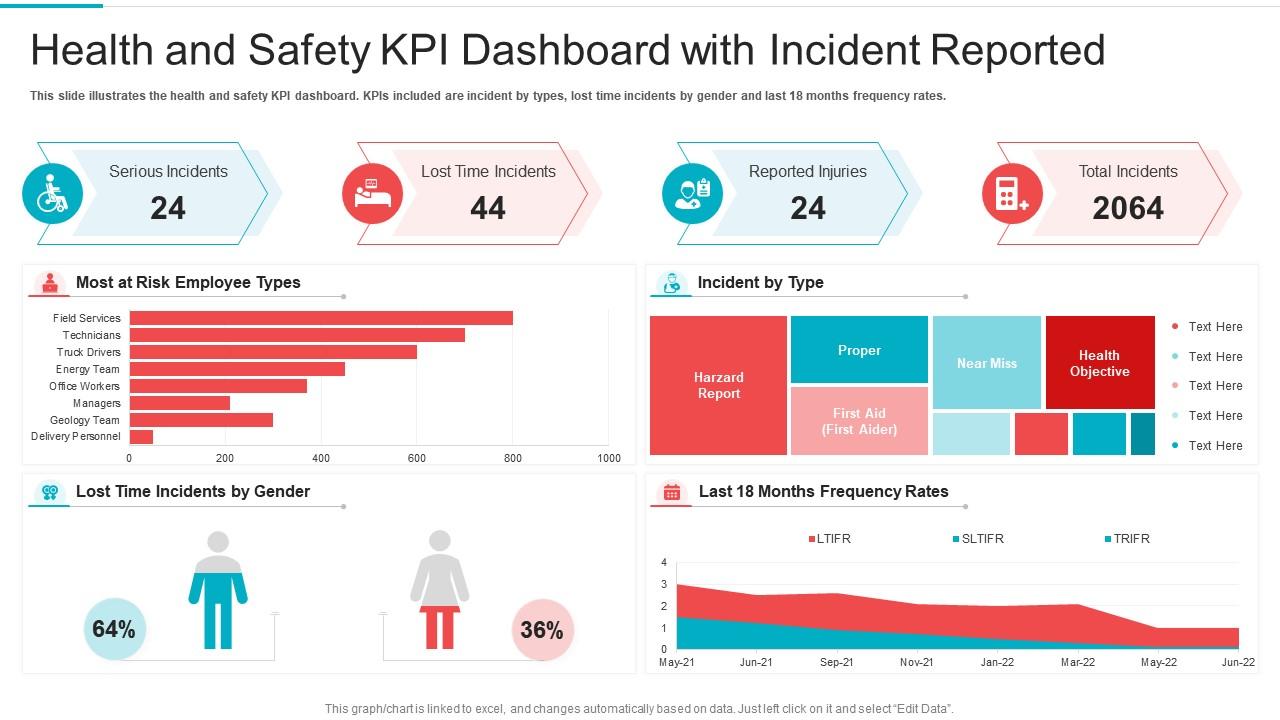
Health and safety kpi dashboard with incident reported

Rating:
100%
Health and safety kpi dashboard with incident reported
Slide 1 of 7
Favourites Favourites

Try Before you Buy Download Free Sample Product

Audience Impress Your
Audience
Editable 100%
Editable
Time Save Hours
of Time
The Biggest Sale is ending soon in
0
0
:
0
0
:
0
0
Rating:
100%
Introducing our Health And Safety KPI Dashboard With Incident Reported set of slides. The topics discussed in these slides are Risk, Team, Servives. This is an immediately available PowerPoint presentation that can be conveniently customized. Download it and convince your audience.

People who downloaded this PowerPoint presentation also viewed the following :

FAQs for Health and safety kpi dashboard

For your safety dashboard, mix reactive stuff (incident rates like TRIR, LTIR) with the proactive metrics that actually matter - near-miss reports, safety training completion, observation scores. Days since last incident is solid too. Honestly, behavioral metrics are where you'll catch problems early, way better than just tracking what already went wrong. Throw in compliance audit scores and meeting attendance if that's your thing. Don't go crazy with like 20 KPIs though - stick to 6-8 core ones or you'll drown in data. Corrective action closure rates are clutch for staying on top of follow-through.

Make simple dashboards with charts and color coding - green means good, red means pay attention. Heat maps are perfect for spotting incident patterns by department or time. Put real-time displays in break rooms or wherever people gather (seriously, nothing gets people talking like a big "Days Without Incident" counter). Trend lines beat static numbers every time - they actually show if you're improving. And honestly? Skip the boring compliance stuff. Your team will only look at data if it tells a story they can act on, not just numbers that make executives happy.

So data analytics transforms your safety numbers into something you can actually use. You'll start seeing patterns - like why third shift has more incidents or that one machine everyone complains about. Once you visualize the data properly, trends become super obvious. The real win though? Catching problems before they turn into accidents instead of scrambling after something bad happens. I'd focus your dashboard on metrics your team actually needs, not whatever makes the C-suite happy. Trust me, predictive stuff beats reactive every time.

Honestly, monthly is the bare minimum but weekly's way better if you can pull it off. Safety stuff doesn't wait around, you know? High-risk places should probably check leading indicators daily - like near-misses and observations. Actual incidents and lost time injuries don't need updates as often since they hopefully aren't changing much (knock on wood). Just don't get stuck manually updating spreadsheets every week - set up some automated feeds or you'll hate your life. I'd start monthly and bump it up once you see what patterns emerge from your data.

Honestly, less is more with dashboards - cramming everything onto one screen just creates chaos. Go with simple red/yellow/green indicators so people can spot problems fast. I've seen so many that look like slot machines with alerts going off everywhere, total nightmare. Regular data updates are key, obviously. But here's the thing - actually talk to whoever's using it daily, like your safety managers or floor supervisors. They'll call out what's confusing or what you're missing. Oh, and set up automated alerts for the critical stuff so nothing urgent gets lost in the noise.

Construction and manufacturing companies get the most bang for their buck with custom safety dashboards - honestly, anywhere with heavy machinery or hazardous stuff. Oil & gas and mining operations love them too since one accident can be absolutely devastating. Healthcare facilities are big users because they're juggling both patient and worker safety, which is a nightmare to track manually. Warehouses have been adopting them like crazy lately with all the forklifts and repetitive lifting injuries. The real game-changer is catching patterns before someone gets hurt, instead of just documenting what already happened. If your workplace has high injury rates, you'd probably see results pretty quickly.

First thing - figure out which regulations actually apply to you. OSHA, local codes, whatever your industry deals with. Then build your KPIs around those specific requirements, not just random safety stuff that's convenient to track. Mix lagging indicators (incident rates that auditors love) with leading ones like training completion rates. Those leading metrics are honestly way more useful for staying ahead of problems. Also check what reporting format regulators want - sounds boring but it'll save you so much stress later when audit time rolls around. Don't wing it on this part.

Honestly, I'd go with Power BI first - it plays nice with most HR systems and incident tracking stuff. Tableau's solid but kinda expensive and way more than you probably need. Google Data Studio is actually pretty decent for basic metrics like incident rates and training completions, plus it's free which is nice. My buddy at work swears by it for their safety dashboard. But here's the thing - just use whatever your IT team already has set up. Trust me on this one, getting new software approved is a total nightmare and takes forever.

Hook up feeds from your suggestion boxes, incident reports, and safety surveys straight to the dashboard. Focus on the numbers - how many suggestions you're getting, response times, implementation rates. That kind of stuff. Honestly, I've seen too many dashboards get messy when they try to display all the text feedback. Stick with what you can measure. Sentiment analysis from survey comments works well too. Here's the thing though - if employees don't see their feedback actually changing things, they'll just stop giving it. So make sure you're closing that loop and showing real results from their input.

Most companies make the mistake of only tracking injury rates after stuff happens. That's backwards - you need metrics that actually prevent incidents before they occur. Too many dashboards become a hot mess with way too many numbers nobody understands. Frontline workers get ignored in the process, which honestly makes the whole thing pointless. Without clear targets or follow-up actions, you're just collecting data for no reason. Stick to maybe 5-6 metrics that mix prevention stuff with outcome tracking. Make sure your team knows exactly what to do when things start looking sketchy.

Honestly, trend lines and heat maps are your best bet here - way better than staring at spreadsheets full of numbers. Color code everything: red for bad, green for good performance. Track your TRIR and DART rates monthly so you can actually see if you're improving or things are going downhill. Don't forget severity matters too - nobody cares about paper cuts the same way they do broken bones. Here's the thing though: throw in some leading indicators like training completion rates alongside your injury data. That way you're preventing stuff instead of just counting bodies after the fact. Near-miss tracking helps tons too.

Honestly, just hook up automated feeds from whatever safety systems you're already using - incident reports, sensors, those mobile apps people actually bother with. Manual data entry is a joke when stuff hits the fan. Nobody's updating spreadsheets during an emergency, trust me. Get your dashboard pulling from APIs every few minutes instead of those slow daily uploads. Push notifications for the serious alerts are clutch. Oh, and set up some validation rules so bad data gets caught right away. I'd start by figuring out what data sources you have now, then tackle the easiest automation wins first.

So here's the thing - these dashboards let you see what's actually happening in real time instead of waiting for monthly reports or whatever. You can catch problems early and figure out if your safety programs are doing anything useful. When the data's up on screens where everyone can see it, people definitely pay more attention (nobody wants to be the team dragging down the numbers). The trick is actually doing something with all that info instead of just staring at charts. Track your wins too - it keeps people motivated when they see improvements happening.

Look, you're basically gambling with people's safety without proper tracking. Can't spot dangerous trends early. Your safety programs might be total duds and you won't even know it. Audits become absolute hell when you're scrambling for data - been there, not fun. Management stays clueless about where to actually spend money on safety improvements. It's honestly way cheaper to track stuff upfront than deal with incidents later. Even a basic Excel sheet beats nothing. Trust me, the reactive approach will bite you hard eventually.

Honestly, visual storytelling is a game changer for safety dashboards. Instead of boring people with "15 incidents this month," you're creating flows that show trends and root causes over time. It's like turning spreadsheet hell into something your brain actually wants to process. Start with the big picture, then let people dig deeper when they need details - that whole "what happened, why, what we did" narrative. Charts should guide viewers through the story, not just dump data on them. Way more memorable than raw numbers, trust me.

Ratings and Reviews

100% of 100
Review Form
Write a review
Most Relevant Reviews
  1. 100%

    by Daron Guzman

    Colors used are bright and distinctive.
  2. 100%

    by Collin Gonzales

    Great designs, really helpful.

2 Item(s)

per page: